
PS4 Recover savefiles from internal hard drive

@Lorenzo Jabber On listbox, You can choose *.imgc (compressed) or *,img (not compressed). Compression of encrypted data is pointless because You will not gain almost anything and significantly making longer the process. ;) It have sense only in not encrypted sectors, and with in majority of not compressed data: on sector level but also on file abstraction level (i.e images like JPG, PNG, WEBP, all films, music like MP3, FLAC; are already compressed and another one will not shrink them much).

You did sector by sector copy - but compressed. Which means that, decompression will take similar amount of time like compression took. So in this case, better is just delete it and make another backup, this time not compressed (which in addition as a bonus: can be used by any software which offering writing image back to media (DMDE, HDDRCT, IsoBuster, dd, ddrescue etc.)).
 
Hi, I need help please.
The PS4 ask me updating, but it does not work with USB key.
So, I want to recover my save data of my PS4 games from the High Driver.
I recover the data from the software 4DDiG, but I dont understand the files and cant find the saves.
Is it possible de recover my saves games ? Thank you
 
Thank you for your answer.
Ok, my problem is :
When I start my PS4, the message is "connect a USB storage device that contains an update file for réinstallation for version 11.52 or later".
I made the good manipulation for the key USB or for the internet update, but nothing work.
The PS4 doesn't work, there is the same message.
I just want to recover my saves data of my games. And I thought to recover the saves data in the High Driver.
I don't want to reinitializate my PS4 because I will loose all my saves data of my games.
I hope my explications are better
 
@David06 You need to place on USB update package. If logic structure on HDD is intact, it is sufficient smaller one, for update (all data will remain). If no, then larger one, for reinstallation (which also will wipe out all data on disk).

If you don't have read EAP HDD Key already (for which console hacked in the past) and you will end with needs of use reinstall *.pup, then You cannot retrieve any data. Because you cannot currently hack fw newer than v11.00.
 
So i'm trying to make an image of the ps4 hdd using ddrescue like @Gurthang did but for some reason it will only rescue 1073mb then it says finished. i'm using a 2tb drive as output with no partitioning.

this is the code i used:

sudo ddrescue -O -f -vvvv /dev/sdd17 /dev/sdc ddrescue.map
 
Wrong syntax and I'm not sure what you want to achieve exactly. And why by ddrescue specifically (does your source HDD have bad sectors?).

Why have you chose partition 17 from disk sdd as source and disk sdc as output? Partition 17 is app_tmp.
 
How is the syntax wrong?

I'm trying to replicate what Gurthang did by making an image of the disk and messing with the partitions to hopefully be able to turn the ps4 on and recover the data from the console itself. He used ddrescue. And btw my ps4 hdd has 29 bad sectors according to linux.

/dev/sdd17 (ps4 hdd) and /dev/sdc (disk i want to write the image to) is what they are called in the disk utility in linux.

I want to make a full disk image.
 
sdd17 is not PS4 disk but one of its partition. sdd is disk.
Code:
lsblk -p -o MODEL,NAME,SIZE,LABEL,MOUNTPOINT

It have? What S.M.A.R.T saying (apt install smartmontools -y)?
Code:
sudo smartctl -x /dev/sdd
ddrescue is for physically damaged disks, if bad sectors exist but still fit in relocation pool, you can use normal dd:
Code:
sudo dd if=/dev/sdd of=/dev/sdc bs=128M status=progress
 
sudo dd if=/dev/sdd of=/dev/sdc bs=128M status=progress
I'm executing this command right now but in case the ps4 doesn't boot from the new disk, how can I do these other commands in dd?
#Mount image sudo losetup -Pf /mnt/z/ddrescue.img #Show mounted images, ex ddrescue.img = /dev/loop14 losetup #Confirm mounted partitions show up correctly sudo fdisk -l /dev/loop14 #Copy partition 27 to disk sudo ddrescue -vvvv -f /dev/loop14p27 /dev/sdb27

Edit: dd stopped after about 15 minutes and 19gb copied because of an i/o error on the ps4 hdd.
 
Last edited:
It will not boot from not assigned HDD. You must first format that HDD on PS4 because in the process, she will assign it.

Connection issue. If you would have bad sector, dd would stuck on it forever (that's why ddrescue fork was created).
 
That's why I was using ddrescue in the first place.

So like, format the new drive on ps4 then write the old disk image to it then try booting from the new drive?
 
Update: I reinstalled system software 7.02 through usb with the new disk and the console booted successfully.

Then, with ddrescue I copied all partitions from the old disk onto the new one except partition 19 because I think it was corrupted (ddrescue failed to copy some parts of it), then I tried booting the console again from the new disk.

PS4 checked storage status and at the end it said cannot start the ps4, asking to reinstall system software through usb. If I try rebuilding the database the same thing happens.

Did I do something wrong? Is it because maybe I completed the console setup the first time it booted so partition 19 wasn't clean anymore? Or the fact that I wrote the image on a 2tb disk first then copied all partitions from the 2tb disk to the 1tb disk I booted the console with? (Partition sizes were the same even on the 2tb disk).

I think I'll try reinstalling system software and copying all partitions again (except 19) or copying only partition 27. If nothing else works, I will have to decrypt the hdd which is going to take a lot longer than it already has even though there are guides for it.

Reminder: all I care about is screenshots and video clips so stuff that's on partition 27.
 
Last edited:
@Lorenzo Jabber If your goal is only to retrieve multimedia, then easiest for you is just format new HDD (install with initializing that fw version), then hack it and read EAP HDD key. Use below tutorial how to decrypt it and mount it (use read only mode, in current version in opposite to one used in tutorial, all modes are unified in one script):
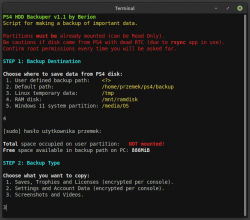
After that, use Backuper script:
ps4hdh_backuper.png

Everything was well tested by me, except case when GPT have sorted order partitions which only one user reported then disappear. :| Tests with @Colek revealed that some payloads dumps garbage EAP instead real one, so stick to Linux PSItarch or retrieve the key from SFLASH0 image.

- - -
If you still want to try current road, then:
When you formatted new drive (2TB) on console, you cannot restore whole image from old 1TB drive because it have zero sense (if PS4 rejected old, it will reject it also on new drive). Only try to transplant chosen partitions based on @Gurthang advice's. I don't have hacked PS4 so I know what you know in that matter.

Partition sizes were the same even on the 2tb disk
Yes, all are except user partition (no.27).
 
Last edited:
So far, most reliable EAP HDD Key retrieval method is from SFLASH0. Once you hack console, dump it, eg via FTP client (binary connection). On PC, extract key by mentioned toolkit. That's because some newer MOBO encrypting it in different way and not all payloads authors are aware of that, and in results you would get garbage instead key.

You can use disk image for data retrieving if you will attach it to loop device (only newest toolkit supporting it):
Code:
sudo losetup -f <direct path to full disk image file>
 

Similar threads

Back
Top