Playstation Home SDAT Dumper v1.00
Here is a small tool that will allow you to dump ALL Playstation Home SDATs and BARs, this includes the newer "SHARC" type SDATs. It dumps totally decrypted files, including all "protected" aka "secure" files such as LUA and LUAC. This is the first time this is possible. It opens up hundreds of GBs of content that can be made to work in offline mode.
NOTE: Due to the fact you need to sign into PSN to load the Decryption key, and that this is a custom "homebrew" application, there is a small BAN risk. So like any scene release use it at your own risk. I take no responsibility for anything that happens to your console. Personally I have used it while logged in to PSN for a week now during testing, no protection used and it was fine. Remember you only have to log in for a second. Then you can log out and keep dumping. OR use RPCS3 with a RPCSN account and no risk at all.
Please keep in mind, This is a heavily modified Home client EBOOT, its basically an app created out of another app. So due to that it can be a little clunky to use.
Considering all that, it has some good features:
- Dump normal old school BAR files
- Decrypt normal old school SDAT files
- Decrypt SHARC type SDAT files
- All Protected files like LUA and LUAC are decrypted on the fly.
- Change SHARC key from main menu.
- Option to copy the decrypted files to USB
Requirements:
- A PS3 on CFW or HEN, or RPCS3 emulator set up with PPU interpreter capabilities
- PSN account, SHARC decryption requires logging in to PSN briefly to load the key. You can log out after 2 seconds and it will still work afterwards.
- For normal non SHARC sdats you must NOT log in to PSN and you do NOT need a PSN account. Cancelling the sign in pop up stops the SHARC key from being loaded and allows those older files to decrypt.
- It is possible to use it without a USB keyboard, but its really recommended to have one.
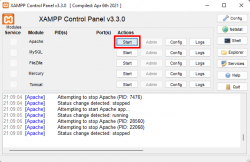
- Webman plugin is required on PS3, or a local webserver is required if on RPCS3. This is to serve the decryption key.
- This is really only for more advanced users who want to dump and map Playstation Home scenes, fix them, mod them etc.
- On RPCS3 do not use the debug console mode setting, and do not use the enable /host_root/ setting.
Usage:
At boot it will show you this menu:
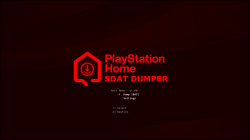
If you choose settings you can choose between changing SHARC key, or dumping to USB.
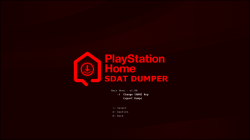
Changing SHARC key menu, some SHARC encrypted SDATs use Key 2, basically if it fails to mount then its probably Key 2, or its a normal non SHARc sdat and you need no key (No key = Cancel PSN log in pop up)
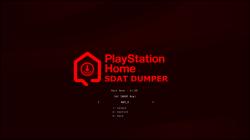
Dumping to USB, This feature is a bit slow, but it is very reliable, if you are having issues with small files on FTP, or dont want to install a file manager for any reason, you can use this feature to copy USRDIR/DUMP/ to dev_usb000.
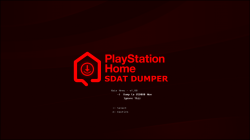
If you click dump SDATS on main menu, and are NOT logged into PSN, you should see this screen. Just cancel the log in pop up and wait a few seconds.
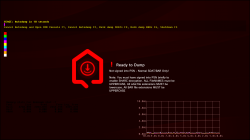
If you are logged into PSN and you click dump SDATS you should see this screen after a slightly longer delay:
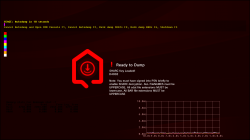
Notes:
1. To facilitate users with no USB keyboard, it will countdown from 10 and then Autodump USRDIR/SDAT/1.sdat up to 20.sdat if they exist. It will also check for USRDIR/BAR/1.BAR to 20.BAR and dump those too.
2. If you want, you can press F1 or F2 on a USB keyboard to cancel the Autodump feature, then use the command console to manually dump SDATs or BARs by typing commands like dumpbar filename.sdat DUMP/FOLDER/
F10 will bring up the console too
3. This way is probably the best, and that is to create custom lua scripts that can batch decrypt hundreds of SDATs at a time. There is an example script inside USRDIR/SCRIPTS/ that shows how to do that. These can be triggered with Keyboard keys F6 to F9.
4. If you find a SHARC type SDAT that will not decrypt on default settings (when logged in), try setting the the SHARC Key to Key_2 on main menu before logging in.
Quirks:
- Case is important for filenames and extensions, but the case you type is ignored.
- No matter what you type into console, it will always look for all file NAMES in UPPERCASE.
- No matter what you type into console it will always look for the file EXTENSION "sdat" in lowercase.
- No matter what you type into console it will always look for the file extension "BAR" in UPPERCASE.
- Due to the hacky way its made, error handling is not the best. Sometimes it might say "ready to dump" or" sharc key loaded" but really something is wrong. Just try restart it.
I had help from someone with this, massive thanks, without them it would not have been possible.
Thanks to everyone here at PSX-Place, Aldostools, Bucanero, Esc0rtd3w, Bguerville, STL and everyone else, and BIG shoutout to everyone in the Home Revival community who has been willing to share files and info, Lots of little things came together for the perfect storm to make this app possible. SpookySniper, Splicewave, VelocityGaming5, JustMaster, Jumpsuit, Rew, and all the rest who would rather not be mentioned. Thanks to everyone who leaked files over the years, without you it would not have been possible either.
Please remember, now that we can decrypt EVERYTHING, it is more important than ever that we save as much content as possible, if you ever fix/get any old PS3s, before formatting them, please check for NPIA00005, NPIA00010 or NPEA00013 folders, these can contain valuable CACHE data. Also if you know anyone with a PS3 they have not used for years. Please check them. ESPECIALLY TESTKIT/DEVKIT CONSOLES
More info to come soon about how to deal with the decrypted files after dumping...
Attachments
Last edited: