PS2-FPKG

PS4 [Release]PS2-FPKG v0.7-Beta - A complete rewrite of my PS2 to PS4 converter v0.7-Beta

Jabu

Developer
PS2-FPKG v0.7-Beta
A tool that converts PS2 games into PS4 fPKGs,
now completelly rewritten with more features and faster/better code!

ps2-fpkg_v0.7-Beta.png


So basically this app converts PS2 games into PS4 fPKGs using the well know PS2 Classics emulators.​

It's easy to use, just:

  1. Run ps2-fpkg.exe
  2. Select the ISO/BIN Image of the PS2 game in "Disc1"
  3. Customize some settings
  4. Click "Create fPKG" and choose a storage location
  5. Install the created fPKG on your PS4 and play
Note: For CD games (.bin) click YES when asked about adding LIMG sector. CD games won't work without it.
Another Note: The app will auto-select a config file that usually fixes some issues with the game, but only if it finds one in it's database.

Things that can be customized:
  • the game icon/splashscreen,​
  • you can create a multi-disc game (up to 5 isos)​
  • decide if you want to use the build-in game configs​
  • enable some game/performance fixes​
  • select your own txt/lua config,​
  • select the emulator to be used by the game(by default there are 2 known to be most compatible, you can add more)​
  • import a custom 8MB memory card with your saves(.ps2, .vm2, .bin [OPL VMC])​
  • change PS Vita remote play key bindings​
  • customize the lightbar colors​
  • use FastForward(works best on loading screens)​
  • change some display settings, like uprendering, display modes, shaders(only one for now) etc​
  • enable multitap support, change the default game volume and more​

  • So, what's new in this release?
    Well the whole code was redone from scratch, some things were moved around and some stuff was added
    But I think everything should work nicely now(at least compared to v0.6).

    Whole List of Changes in v0.7-Beta
    • Everything was rewritten from scratch with cleaner, faster and not so shitty code
    • Some tabs have new names now, some options were moved around, added a FirstRun dialog etc.
    • The pkg creation code won't error out anymore if the output path contains spaces(that one was an epic fail for a long time now in v0.6)
    • App now shows an error form with addional when pkg creation fails
    • widescreen patches are now added as trophy_data so they won't colide with other lua scripts anymore
    • misc features lua script like fast forward, custom lightbar color and some other were moved to feature_data
    • all game icons/splashs are now converted by the app natively, it won't error out anymore on systems that didn't like ImageMagic
    • It's now possible to enable/disable "Reset on Disc Change" when changing discs
    • It's now possible to disable MTVU, should help some games that don't play right with Multi-Threaded VU1 emulation(like Crash Nitro Kart, Gradius V, Timesplitters etc)
    • Added an option to disable Instant VIF1 Transfer, should fix games like MK Shaolin Monks, Soul Calibur 2 and some other.
    • The app now shows if it found txt/lua/ps3 config for the selected disc
    • It's now possible to select a scanline shader in the graphics options
    • You can now select if you want to have a MultiTap connected
    • It's now possible to lower the game volume in the settings
    • Added some debug/testing options and a build-in config viewer(run the app with the -test cmd argument)
    • A lot of other things that I don't remember anymore, because everything was rewritten

  • This program automatically adds txt (config-emu-ps4.txt) / ps3 (gameid_lopnor.cfgbin) / lua (gameid_config.lua) configs if they exist in the applications database.
    So you don't really need to add your own configs/scripts in most cases, the app does it for you ;p

    How to enable Widescreen Patches:
    Check the "Add Widescreen Patches" checkbox in the "Graphics" tab.
    It's not enabled by default because it doesn't always work properly and it may affect performance in some cases.
    If the app finds a widescreen patch for your game, it will be automatically used.

    How to add more emulators
    :
    Put the folder with emulator files into the "emus" folder and restart ps2-fpkg.
    New emulators should show up on the list, not all features may work on all emulators(mostly lua related stuff can break on emulators older than jak v2.)

    How to add more configs/patches to the inbuild database:
    You can even add more configs/patches by placing the txt/ps3/lua configs into their coresponding folders inside the "stuff\configs\" directory, custom widescreen patches in lua format can be added into "stuff\widescreen\".

    If you have trouble with the pkg creation process, you can try to run the app with admin rights, but it's not needed in most cases.
    And if the app doesn't even want to start make sure you have .NET Framework 4.0 installed(but it should already be on most system).


  • There are some things that I didn't or couldn't fix yet:
    • The included roque v1 emulator may not work with some lua related features, like custom game volume etc.
    • Few games do not follow SYSTEM.CNF's standard layout, for these games the app will fail to find the game ID (partially fixed, only CD games affected now)
    • If the program has any problems with creating fPKGs, you can try to run it as an administrator, it should help.
    • Memory cards greater than 8MB won't work. This is a emulator limitation, not the app itself.
    • crc.exe may be detected by some lame anti-viruses as malware, THIS IS A FALSE POSITIVE!
      I will fix it in the future by including the CRC detection code in the app itself.
    • Widescreen Patches won't work with CD(in .bin format) games, this will be fixed when I rework .bin support.


  • v0.7-Beta

    • Everything was rewritten from scratch with cleaner, faster and with less bad code
    • Some tabs have new names now, some options were moved around, added a FirstRun dialog etc.
    • The pkg creation code won't error out anymore if the output path contains spaces
    • App now shows an error form with addional when pkg creation fails
    • widescreen patches are now added as trophy_data so they won't colide with other lua scripts anymore
    • misc features lua script like fast forward, custom lightbar color and some other were moved to feature_data
    • all game icons/splashs are now converted by the app natively, it won't error out anymore on systems that didn't like ImageMagic
    • It's now possible to enable/disable "Reset on Disc Change" when changing discs
    • It's now possible to disable MTVU, should help some games that don't play right with Multi-Threaded VU1 emulation(like Crash Nitro Kart, Gradius V, Timesplitters etc)
    • Added an option to disable Instant VIF1 Transfer, should fix games like MK Shaolin Monks, Soul Calibur 2 and some other.
    • The app now shows if it found txt/lua/ps3 config for the selected disc
    • It's now possible to select a scanline shader in the graphics options
    • You can now select if you want to have a MultiTap connected
    • It's now possible to lower the game volume in the settings
    • Added some debug/testing options and a build-in config viewer(run the app with the -test argument)
    • A LOT of other things that I don't remember anymore, because I started working on the rewrite like 2 years ago

    v0.6


    • Command line window is now hidden, animated "Creating PKG" text on the status bar is now shown instead
    • The main window won't freeze anymore while creating a PKG (pkg creation process was moved to different thread)
    • PKG creation errors will now show up in a window
    • Added settings for uprender, upscale, and display mode in the new "Graphics Settings" tab"
    • Added a FastForward option, this allows you to set a custom combo to remove the framelimiter, and for example speed up loading screens or FMVs, or even gameplay sometimes.
    • FastForward option is available in 2 modes. Hold the combo to fastforward or press a combo to toggle it on/off.
    • Added a option to change the DS4 Lightbar color for normal gameplay and for fast forward mode.
    • Added game elf CRC reading to allow imported widescreen patches to be found by the app(via crc.exe)
    • Added auto widescreen patches (3700 patches fetched from pcsx2 repository)
    • "Try to fix graphics" is now enabled by default
    • Some GUI changes
    • More broken english

    v0.5

    • Added OPL's Virtual Memory Card (.bin) support
    • You can now select a Keymap layout for Vita Remoteplay
    • fixed some code, again

    v0.4

    • custom Memory Card support! You can now import your .vm2/.ps2 memory card's from a ps3 or pcsx2, it should work in all games.
    • gui now use tabs
    • jpg/bmp support added for custom icon/bg
    • removed "try to improve compatibility"
    • added "Try to improve Speed" should fix games like GOW 1 and 2, may break some others(this may not work on some emulators)
    • added "Try to fix Graphics" fixes AirBlade, Frogger: Ancient Shadow, God Hand, SpongeBob SquarePants: Battle for Bikini Bottom, and maybe others.
    • fixed some code

    v0.3

    • added compression support
    • added PS2 CD .bin support(app wil auto-add LIMG sector)
    • fixed DVD game ID searching code, it's fast now
    • limited "Try to improve compatibility" option to JAK v2 emu, Rogue emu not support that option

    v0.2
    • initial release

  • Files used:

    Programs used:

    Thanks Kozarovv for help and suggestions.
    @Zar for his ps3 configs database.
    Veritas83 (@VTSTech ) for PS2 GAMEID TITLE database.


Download:
PS2-FPK v0.7-Beta

Thanks Kozarovv for help and suggestions.
@Zar for his ps3 configs database.
Veritas83 (@VTSTech ) for PS2 GAMEID TITLE database.
And everybody else who helped ;p

 
Last edited by a moderator:
Hi, @Jabu
Congrats on public release of the new version. Great work!:applause:
And right to begging:) Can the game volume feature work for the increase or decrease only? Some emulated games have low volume especially for dialog even after maxing out setting in-game. Always wondered.
 
Hi Jabu, is it possible to run your application on Linux? I tried to open the 0.6v in Wine 8, but it kept crashing in Fedora.
Many thanks!

For context, I run Linux internally on my PS4... would love to be able to make PS4 pkgs in Linux and just install it manually into the PS4 hard-drive. No PC needed.
 
Hi, @Jabu
Congrats on public release of the new version. Great work!:applause:
And right to begging:) Can the game volume feature work for the increase or decrease only? Some emulated games have low volume especially for dialog even after maxing out setting in-game. Always wondered.

Well I've added the volume control because the games were always to loud, but, maybe it would be possible to boost the volume too?
I would need to check if this is possible, if yeas it could be added pretty easy.

Hi Jabu, is it possible to run your application on Linux? I tried to open the 0.6v in Wine 8, but it kept crashing in Fedora.
Many thanks!

For context, I run Linux internally on my PS4... would love to be able to make PS4 pkgs in Linux and just install it manually into the PS4 hard-drive. No PC needed.
Well v0.6 was pretty buggy, but I didn't test any version in wine, so I don't know if it'll work, but I can check if it works tommorow(on Manjaro). Maybe it'll be easy to fix idk ;p
I was thinking about making a crossplatform version in .net core or something, but that would require learning a new GUI framework(because .net on linux doesn't have something like winforms if I'm not mistaken).
 
Well I've added the volume control because the games were always to loud, but, maybe it would be possible to boost the volume too?
I would need to check if this is possible, if yeas it could be added pretty easy.


Well v0.6 was pretty buggy, but I didn't test any version in wine, so I don't know if it'll work, but I can check if it works tommorow(on Manjaro). Maybe it'll be easy to fix idk ;p
I was thinking about making a crossplatform version in .net core or something, but that would require learning a new GUI framework(because .net on linux doesn't have something like winforms if I'm not mistaken).

If you'd be willing to make this work on Linux or crossplatform; I will gladly give you a donation.
Sorry, I don't know if dotnet on Linux has something like winforms.
Many thanks.
 
Hey @Jabu Thank you very much for that, i was waiting for a long time to see some news about ps2 fpkg.
I have a question if you dont mind !
Is there a way to add .Pnach code or mode .dds to ps2 fpkg ?​
 
@Jabu Thank you for your contributions!

- Me being a long-time user, I believe that it would be best if there were a way to save my preferred settings after closing the executable. Try to fix graphics and other configs are not suitable for me as they tend to cause more trouble than they fix.

- Try to fix speed should include these commands and their values:
--vu1-di-bits=0
--ee-cycle-scalar=1.2
--vu1-mpg-cycles=200

- Try to fix graphics should include:
--vu-xgkick-delay=0
--vu-custom-min-max=0
--gs-kernel-cl-up="up2x2simple"

- The icon of the app should be automatically downloaded from cover databases such as this one:
https://github.com/xlenore/ps2-covers
 
Hey @Jabu Thank you very much for that, i was waiting for a long time to see some news about ps2 fpkg.
I have a question if you dont mind !
Is there a way to add .Pnach code or mode .dds to ps2 fpkg ?​
I'm working currently in my free time on gameshark cheat support in PSX-FPKG,
cheats could be also be added into PS2-FPKG(the widescreen patches are basically pnachs converted into lua scripts) but if I remeber correctly there were some issues with them, like not eveything not working or something. But maybe I don't remeber this right(because Widescreen patches were added a long time ago) xd
I will maybe look into this.

@Jabu Thank you for your contributions!

- Me being a long-time user, I believe that it would be best if there were a way to save my preferred settings after closing the executable. Try to fix graphics and other configs are not suitable for me as they tend to cause more trouble than they fix.

- Try to fix speed should include these commands and their values:
--vu1-di-bits=0
--ee-cycle-scalar=1.2
--vu1-mpg-cycles=200

- Try to fix graphics should include:
--vu-xgkick-delay=0
--vu-custom-min-max=0
--gs-kernel-cl-up="up2x2simple"

- The icon of the app should be automatically downloaded from cover databases such as this one:
https://github.com/xlenore/ps2-covers
Regarding covers, they're already added in PSX-FPKG(and they will be available in the next update) and I'm probably gonna add them into PS2-FPKG too.
Regarding the settings, your post gave me an idea, maybe I should add an option to edit the commands and values in the "Try to fix speed" option or something. They're would be saved and used for every pkg created with that option or something.

If you'd be willing to make this work on Linux or crossplatform; I will gladly give you a donation.
Sorry, I don't know if dotnet on Linux has something like winforms.
Many thanks.
Well I'll look into this, just bought an chromebook and it would be nice if it worked on them too xD
The main code can be easly ported to the newer .net version on linux, the only issue is the gui, but maybe I'll check out what's the easiest gui framework on linux and try to make something with it.

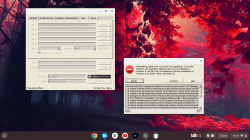
Edit: I've checked out if it runs in winehq on my chromebook and it throws an error and then hangs when preparing the pkg files. Too bad that I didn't implement any loggging so I don't really know now where it stops.
I still didn't try on manjaro on my main pc, maybe wine on chromeos has only this issue, idk.
I'll do some more test and I try to make it wine compatible when I have some time.
Screenshot 2023-10-25 16.52.36.png
 
Last edited:
@Jabu
Bit of a bug in PS2-FPKG v0.7 beta. If there is for some reason a nptitle.dat file present in the added by the user Emu\sce_sys folder and it has a different NP title listed in it compared to the game you trying to create pkg for, the program will throw this code during pkg creation and stop.

[Error] Format of the NP Title file is not valid. (nptitle.dat, NP Title ID mismatch)

This wasn't the case in PS2-FPKG v0.6. I just noticed it cause I had JakX v2 emu folder added along with all the files except iso itself.
 
@Jabu
Bit of a bug in PS2-FPKG v0.7 beta. If there is for some reason a nptitle.dat file present in the added by the user Emu\sce_sys folder and it has a different NP title listed in it compared to the game you trying to create pkg for, the program will throw this code during pkg creation and stop.

[Error] Format of the NP Title file is not valid. (nptitle.dat, NP Title ID mismatch)

This wasn't the case in PS2-FPKG v0.6. I just noticed it cause I had JakX v2 emu folder added along with all the files except iso itself.

Yeah I think that's because v0.6 didn't copy the sce_sys folder from the emulator,
v0.7 copies everything over, but it's an easy fix that I'll include in a new update.
For now you just need to delete the nptitle.dat file from the emulators sce_sys dir.
 
@Jabu
Another humble request in new version is it possible to maybe add in readme.txt file that all the files in emu folder will be used for the pkg or some kind of warning within the PS2-FPKG? Issue is as in my above post any unnecessary files (old configs etc) from custom emu folder are added. What files from emu folder are actually absolutely necessary for error-free pkg creation?
I can already see how unaware first-time users will be creating non-working pkgs because of wrong files being added.
Though I do like the fact that now in beta we can add custom features lua by sticking it into emu folder.
 
@Jabu
Another humble request in new version is it possible to maybe add in readme.txt file that all the files in emu folder will be used for the pkg or some kind of warning within the PS2-FPKG? Issue is as in my above post any unnecessary files (old configs etc) from custom emu folder are added. What files from emu folder are actually absolutely necessary for error-free pkg creation?
I can already see how unaware first-time users will be creating non-working pkgs because of wrong files being added.
Though I do like the fact that now in beta we can add custom features lua by sticking it into emu folder.

The main txt config is always overwritten with the default one included in ps2-fpkg, but yeah, all other files are copied over as is, I could ad a message in the app telling the users to delete any unnecessary files(if it detects any) in the emulators dir that they don't want to use.
Could be totally added in a new update.

Btw regarding updates, I've had some free time, so I've fixed the nptitle.dat problem and I've also added a cover downloader.
Still didn't have time to add other stuff, but I'll try to make it as fast as possible. No more updates 2 years apart xD
 
As a humble request... I would prefer a native port of PS2-FPKG converter to Linux rather than wine compatibility if possible.
Don't mean to make it harder for you, but I'll still donate for this cause.
 
I haven't been able to successfully play any game that I generate using this version - the PS4 tells gives me an error saying this application has stopped as soon as I open it. Using the exact same settings on the previous version (0.6) works though, and I can't explain why
 
I was using the previous version of this tool but it throws errors like now and then. This update has been awesome so far. Especially with adding icons and background images.

I am still not able to play multiplayer games with the MISC option as well as the - -mtap1=always command in the config.txt file for example- Urban Reign is the most played game among my friends. This is only working as a single player and not for 2 or more players.

Misc options 1-3 I have tried all but not working. Is there something I would have been doing wrong? Any idea guys?
Console - PS4 firmware 9.00 HEN

Update: Not writing "--mtap1=Always or --mtap2=Always" and Disabling "Multitap" option it makes the game 2 players but that's about it.
I need to play 4 players at a time with my friends, please.
 
Last edited:
I was using the previous version of this tool but it throws errors like now and then. This update has been awesome so far. Especially with adding icons and background images.

I am still not able to play multiplayer games with the MISC option as well as the - -mtap1=always command in the config.txt file for example- Urban Reign is the most played game among my friends. This is only working as a single player and not for 2 or more players.

Misc options 1-3 I have tried all but not working. Is there something I would have been doing wrong? Any idea guys?
Console - PS3 firmware 9.00 HEN

Update: Not writing "--mtap1=Always or --mtap2=Always" and Disabling "Multitap" option it makes the game 2 players but that's about it.
I need to play 4 players at a time with my friends, please.

Maybe trying to use the search field above can help next time?;) Config is here
 
Maybe trying to use the search field above can help next time?;) Config is here
Thanks for the reply mate,
I'm a newbie to this website forum thing. I am not aware of all the options I can use to refine my research on this website. Still, I never get disappointed with the community in regards to helping everyone. I have accomplished many things here because of the community members like you. Thanks a lot again. I will come back to you once I repack and try this game with new info.
 
Nice tool!! Almost every pkg I created with this tool is working properly. There is just 1 game I want to play but I am unable to build the pkg: NFS: Carbon. The Compatibility List says I need to use the Kinetica emulator, but I can't find it anywhere! According to the 'useful info' of this tool, we can add more emulator by just doing this:
  • Put the folder with emulator files into the "emus" folder and restart ps2-fpkg.
But what if I am unable to find the emu??

Please guys! could you tell me where to find that emu? Thanks in advance!!
 
Nice tool!! Almost every pkg I created with this tool is working properly. There is just 1 game I want to play but I am unable to build the pkg: NFS: Carbon. The Compatibility List says I need to use the Kinetica emulator, but I can't find it anywhere! According to the 'useful info' of this tool, we can add more emulator by just doing this:
  • Put the folder with emulator files into the "emus" folder and restart ps2-fpkg.
But what if I am unable to find the emu??

Please guys! could you tell me where to find that emu? Thanks in advance!!
you must buy a disc or rip it from hacked ps4 that has that ps2 game installed. any other way would be considered piracy and we can not discuss that here (site rules).
 
Back
Top