
You are using an out of date browser. It may not display this or other websites correctly.
You should upgrade or use an alternative browser.
You should upgrade or use an alternative browser.
PS3 (Research/Experimental) - NEC/TOKIN Capacitors Replacement - YLOD
- Thread starter Naked_Snake1995
- Start date


Revak3115
Member
It did this before the short circuit.After the shortcircuit is hard to know, maybe the RSX was damaged there
To me it feels like the either the CPU or GPU aren't getting enough power to supply for demands.
IIRC the CELL upscales PS2 games On BC systems correct?
now when I had all the caps bridged together it still did this, but that solder job was quite sloppy so maybe I just need to do it again?
(Rn only the Bottom side of the caps are bridged next to the main chips) maybe I need to bridge all the caps again?
I truly don't think it's a GPU/CPU failure since it only does this when it need to supply for demand in a Game
I just tested the system again
It loaded a ps2 game but froze immediately
Then it wouldn't get past the initial system Boot screen and froze. Now it doesn't display an image at all :/
Maybe I need to order a new set of caps?
Last edited:

Naked_Snake1995
Senior Member
No the CELL only Emulates the Emotion Engine MIPS CPU, but thats only for the CECHC/E Variants, in this case the RSX takes care of the Upconversion algorithm in the PlayStation2 System Software, on the CECHA/B, the CELL B/E stays mostly on idle, as non of the workload is needed to emulate nothing, since the PS2 Job is done by the dedicated PlayStation2 Hardware, this being the EE/GS and EDO RAM.It did this before the short circuit.
To me it feels like the either the CPU or GPU aren't getting enough power to supply for demands.
IIRC the CELL upscales PS2 games On BC systems correct?
now when I had all the caps bridged together it still did this, but that solder job was quite sloppy so maybe I just need to do it again?
(Rn only the Bottom side of the caps are bridged next to the main chips) maybe I need to bridge all the caps again?
I truly don't think it's a GPU/CPU failure since it only does this when it need to supply for demand in a Game
I just tested the system again
It loaded a ps2 game but froze immediately
Then it wouldn't get past the initial system Boot screen and froze. Now it doesn't display an image at all :/
Maybe I need to order a new set of caps?
Graphics Artifacts usually happens for two reasons, when the GPU is about to die, in this case the substrate/underfill, or if not enough voltage is supplied to the Chip, but in this case i suspect its a dead chip unfortunately, the short circuit isn't a problem, as i had once on mine it didn't damage any component in any shape or form, so shorts are out of the question.
This also could be a low supply to the RSX, usually the machine before it leads to YLOD, you would start to experience Choppy Framerates, and after that coupled with a pair of black screens, usually leading to YLOD, but now if you don't have a picture thats even more troublesome, as thats the GLOD, happens when the RSX Chip is dead.
In order to know if is the RSX for sure, get a heat gun and heat the chip for 150°Cs for 5 min flat, if it shows picture again, then the culprit is the RSX, if not then must be something on the Tantalums side.
Also one thing i didn't mentioned, usually artifacts also happens when there is any bad VRAMs caused by a short, but i see you get none of them wired checkerboard patters, no it must be the Chip for sure.
Sent from my G8141 using Tapatalk
Last edited:
Revak3115
Member
I'm going to use a very thick wire now( 14 Gauge) instead of what I was using beforeNo the CELL only Emulates the Emotion Engine MIPS CPU, but thats only for the CECHC/E Variants, in this case the RSX takes care of the Upconversion algorithm in the PlayStation2 System Software, on the CECHA/B, the CELL B/E stays mostly on idle, as non of the workload is needed to emulate nothing, since the PS2 Job is done by the dedicated PlayStation2 Hardware, this being the EE/GS and EDO RAM.
Graphics Artifacts usually happens for two reasons, when the GPU is about to die, in this case the substrate/underfill, or if not enough voltage is supplied to the Chip, but in this case i suspect its a dead chip unfortunately, the short circuit isn't a problem, as i had once on mine it didn't damage any component in any shape or form, so shorts are out of the question.
This also could be a low supply to the RSX, usually the machine before it leads to YLOD, you would start to experience Choppy Framerates, and after that coupled with a pair of black screens, usually leading to YLOD, but now if you don't have a picture thats even more troublesome, as thats the GLOD, happens when the RSX Chip is dead.
In order to know if is the RSX for sure, get a heat gun and heat the chip for 150°Cs for 5 min flat, if it shows picture again, then the culprit is the RSX, if not then must be something on the Tantalums side.
Also one thing i didn't mentioned, usually artifacts also happens when there is any bad VRAMs caused by a short, but i see you get none of them wired checkerboard patters, no it must be the Chip for sure.
Sent from my G8141 using Tapatalk
I don't think it's a failed GPU or anything since it worked completely fine just before I replaced the rest of the caps
Naked_Snake1995
Senior Member
Do that, your first mistake was to use a thin guage wire,but thats not problem to be worry with, but on another note, i still dont get it why bridging doesnt work, many people bridged each pair of Tantalum on each NEC Spot replaced,and they got it working, i am really entering into a mental shutdown here, are you sure you are bridging exactly like i have in the photo in the tutorial, Positive to Positive?I'm going to use a very thick wire now( 14 Gauge) instead of what I was using before
I don't think it's a failed GPU or anything since it worked completely fine just before I replaced the rest of the caps
Revak3115
Member
YesDo that, your first mistake was to use a thin guage wire,but thats not problem to be worry with, but on another note, i still dont get it why bridging doesnt work, many people bridged each pair of Tantalum on each NEC Spot replaced,and they got it working, i am really entering into a mental shutdown here, are you sure you are bridging exactly like i have in the photo in the tutorial, Positive to Positive?
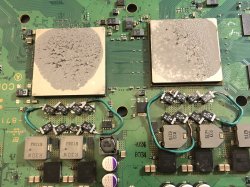
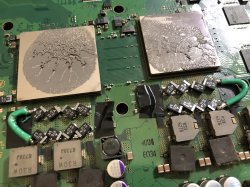
Here's my progress with thicker wire
thin wire is the old photo
Attachments
Naked_Snake1995
Senior Member
Nice, report as soon as you got any results, at least i could sleep with a free consciousnessYes
Here's my progress with thicker wire
thin wire is the old photo

Revak3115
Member
Alright guys huge news
bridged all caps top and bottom with high gage wire
Have the system without the bottom plate by the chips
System runs perfectly fine now
Going to cut the metal off the shield where the old NECs would be so no pressure and reassemble
PS3/ps2 games are working fine as I write this
MC:LA tested and works in game
I also noticed that the HDD is running a bit slower then usual so the Game textures are loading a bit slower but no biggie
EDIT: reassembled the system cut the Metal shield to fix the pressure on the caps and wires
I didn't bother doing it for the top side for now, I prob will later on since the system is very sluggish on the XMB and loading and is freezing/ giving artifacts again (more proof that it has something to do with pressure on the caps since it barley had any pressure before I reassembled and that worked fine) And I couldn't get a ps1 game to run since the system froze on the XMB after I mounted the iso
So I just used the disc and it worked fine thankfully.
I can almost say this is resolved but not quite yet.
So my assumption of all this is
*you need a very thick wire
*Have no pressure on the New Caps, idk why but it defiantly fixed the issues
This PS3 basically went through Hell and back xD
-
LAST UPDATE:
Cut the rest of the ps3 metal shell
And my theory was right, pressure (on my caps at least) caused the issues described earlier( mangled graphics/freezing/unstable) I still feel the system is the tiniest bit choppy but maybe that's just me expecting the worst.
I used a lot of electrical tape to make sure nothing touches and shorts anywhere
Putting her back together now
-
Since MC:LA works i noticed the game renders slower then i think it should, this may be nothing at all or it could be something semi-important. all i use this PS3 for is PS1/PS2(Mostly) MC:LA is the only game that i have played on the system, i don't plan on playing anything newer then MC:LA, since this is my (Preferred PS2 System alongside my A01/E01 Systems)
if i do play a more demanding game and it does anything bad or out of the ordinary i will post a update here, just don't expect one anytime soon.
So it looks like my System is working fine and i hope it does for awhile. XMB still kinda sluggish/PS3 game renders far objects slower then i would like.
oh well i just hope the Freezing/Artifacting is gone for good
Thanks Again Everyone Who Helped me out in this painful journey.
i hope my errors/fixes help someone else out who plans on replacing ALL NEC/TOKINs
-
Also would this mean that the "GPU Failure"/Artifacting is caused by the NEC/TOKINs? i got all the symptoms of a GPU failure with my system, to me it seems like the NEC/TOKINs cause alot of these issues with the ps3.
so maybe after all these years the dreaded GPU Failure is possibly just a product of failed/dead NECs?
this has me wondering.
@Naked_Snake1995 @sandungas
bridged all caps top and bottom with high gage wire
Have the system without the bottom plate by the chips
System runs perfectly fine now
Going to cut the metal off the shield where the old NECs would be so no pressure and reassemble
PS3/ps2 games are working fine as I write this
MC:LA tested and works in game
I also noticed that the HDD is running a bit slower then usual so the Game textures are loading a bit slower but no biggie
EDIT: reassembled the system cut the Metal shield to fix the pressure on the caps and wires
I didn't bother doing it for the top side for now, I prob will later on since the system is very sluggish on the XMB and loading and is freezing/ giving artifacts again (more proof that it has something to do with pressure on the caps since it barley had any pressure before I reassembled and that worked fine) And I couldn't get a ps1 game to run since the system froze on the XMB after I mounted the iso
So I just used the disc and it worked fine thankfully.
I can almost say this is resolved but not quite yet.
So my assumption of all this is
*you need a very thick wire
*Have no pressure on the New Caps, idk why but it defiantly fixed the issues
This PS3 basically went through Hell and back xD
-
LAST UPDATE:
Cut the rest of the ps3 metal shell
And my theory was right, pressure (on my caps at least) caused the issues described earlier( mangled graphics/freezing/unstable) I still feel the system is the tiniest bit choppy but maybe that's just me expecting the worst.
I used a lot of electrical tape to make sure nothing touches and shorts anywhere
Putting her back together now
-
Since MC:LA works i noticed the game renders slower then i think it should, this may be nothing at all or it could be something semi-important. all i use this PS3 for is PS1/PS2(Mostly) MC:LA is the only game that i have played on the system, i don't plan on playing anything newer then MC:LA, since this is my (Preferred PS2 System alongside my A01/E01 Systems)
if i do play a more demanding game and it does anything bad or out of the ordinary i will post a update here, just don't expect one anytime soon.
So it looks like my System is working fine and i hope it does for awhile. XMB still kinda sluggish/PS3 game renders far objects slower then i would like.
oh well i just hope the Freezing/Artifacting is gone for good
Thanks Again Everyone Who Helped me out in this painful journey.
i hope my errors/fixes help someone else out who plans on replacing ALL NEC/TOKINs
-
Also would this mean that the "GPU Failure"/Artifacting is caused by the NEC/TOKINs? i got all the symptoms of a GPU failure with my system, to me it seems like the NEC/TOKINs cause alot of these issues with the ps3.
so maybe after all these years the dreaded GPU Failure is possibly just a product of failed/dead NECs?
this has me wondering.
@Naked_Snake1995 @sandungas
Last edited:
Naked_Snake1995
Senior Member
Ladies and Gentlemen we have a hero, round of applauseAlright guys huge news
bridged all caps top and bottom with high gage wire
Have the system without the bottom plate by the chips
System runs perfectly fine now
Going to cut the metal off the shield where the old NECs would be so no pressure and reassemble
PS3/ps2 games are working fine as I write this
MC:LA tested and works in game
I also noticed that the HDD is running a bit slower then usual so the Game textures are loading a bit slower but no biggie
EDIT: reassembled the system cut the Metal shield to fix the pressure on the caps and wires
I didn't bother doing it for the top side for now, I prob will later on since the system is very sluggish on the XMB and loading and is freezing/ giving artifacts again (more proof that it has something to do with pressure on the caps since it barley had any pressure before I reassembled and that worked fine) And I couldn't get a ps1 game to run since the system froze on the XMB after I mounted the iso
So I just used the disc and it worked fine thankfully.
I can almost say this is resolved but not quite yet.
So my assumption of all this is
*you need a very thick wire
*Have no pressure on the New Caps, idk why but it defiantly fixed the issues
This PS3 basically went through Hell and back xD
-
LAST UPDATE:
Cut the rest of the ps3 metal shell
And my theory was right, pressure (on my caps at least) caused the issues described earlier( mangled graphics/freezing/unstable) I still feel the system is the tiniest bit choppy but maybe that's just me expecting the worst.
I used a lot of electrical tape to make sure nothing touches and shorts anywhere
Putting her back together now
-
Since MC:LA works i noticed the game renders slower then i think it should, this may be nothing at all or it could be something semi-important. all i use this PS3 for is PS1/PS2(Mostly) MC:LA is the only game that i have played on the system, i don't plan on playing anything newer then MC:LA, since this is my (Preferred PS2 System alongside my A01/E01 Systems)
if i do play a more demanding game and it does anything bad or out of the ordinary i will post a update here, just don't expect one anytime soon.
So it looks like my System is working fine and i hope it does for awhile. XMB still kinda sluggish/PS3 game renders far objects slower then i would like.
oh well i just hope the Freezing/Artifacting is gone for good
Thanks Again Everyone Who Helped me out in this painful journey.
i hope my errors/fixes help someone else out who plans on replacing ALL NEC/TOKINs
@Naked_Snake1995 @sandungas
PS: Don't forget to post pictures of your work.

Sent from my G8141 using Tapatalk
Revak3115
Member
i will post later tmr, i am done with this system for now, just enjoying my PS2 games in 1080p xDPS: Don't forget to post pictures of your work.
Seriously thank you for the whole post/help you have givin me.
Naked_Snake1995
Senior Member
No worries lad, makes life easier for me for future repairs and researches about this issue, for whom wants to replace all the capacitors.i will post later tmr, i am done with this system for now, just enjoying my PS2 games in 1080p xD
Seriously thank you for the whole post/help you have givin me.
Sent from my G8141 using Tapatalk

sandungas
Developer

Btw @Revak3115 the thickness of the ground wire you was using originally in your first tests was fine, and i still think is only needed 1 wire for CELL and 1 wire for RSX (so 2 wires in total for the whole motherboard)
Revak3115
Member
Maybe the old wire was fine but pressure on the caps themself was the problem too. I'm honesty afraid of testing any "demanding" games since MC:LA runs sluggish lol.
Btw @Revak3115 the thickness of the ground wire you was using originally in your first tests was fine, and i still think is only needed 1 wire for CELL and 1 wire for RSX (so 2 wires in total for the whole motherboard)
sandungas
Developer
Yep, i think it was the pressure... and i wonder if the short circuit happend because the tape you used was very soft (so it made like an small hole through the tape with a pike of the solder)Maybe the old wire was fine but pressure on the caps themself was the problem too. I'm honesty afraid of testing any "demanding" games since MC:LA runs sluggish lol.
Btw, for electronic jobs there is a tape that is perfect, probably a lot of you saw it before, because is used in laptops to isolate ram modules, the wifi/bt module, etc... everywhere

The original name is "kapton tape" (but is a copyrighted trademark, expensive stuff)
Is hard, it resists up to 350ºC (yeah you can solder in top of it)... is used in aerospatial industry to protect the satellites electronics from space radiation (lol, is true)
Is the kind of stuff that is better to buy a chinese clone instead of the original... because the clones are made of the same material and are cheap. The original material is "polymide tape" <--- try to search for this in ebay, aliexpress, etc...
https://en.wikipedia.org/wiki/Kapton
Revak3115
Member
Ah thanks for this, I'm using 2 layers of black electrical tape right now over every component.Yep, i think it was the pressure... and i wonder if the short circuit happend because the tape you used was very soft (so it made like an small hole through the tape with a pike of the solder)
Btw, for electronic jobs there is a tape that is perfect, probably a lot of you saw it before, because is used in laptops to isolate ram modules, the wifi/bt module, etc... everywhere
The original name is "kapton tape" (but is a copyrighted trademark, expensive stuff)
Is hard, it resists up to 350ºC (yeah you can solder in top of it)... is used in aerospatial industry to cover the satellites (lol, is true)
Is the kind of stuff that is better to buy a chinese clone instead of the original... because the clones are made of the same material and are cheap. The original material is "polymide tape" <--- try to search for this in ebay, aliexpress, etc...
https://en.wikipedia.org/wiki/Kapton
Im just confused why the system is sluggish in game still.
Have any ideas about that?
sandungas
Developer
Maybe is the hdd... by now i would not open the PS3, is better to consider that the tokin replacement job was well doneAh thanks for this, I'm using 2 layers of black electrical tape right now over every component.
Im just confused why the system is sluggish in game still.
Have any ideas about that?
I mean... keep the PS3 in quarentine for a couple of weeks, and in the next days make some stress tests playing a lot of games
For the hdd... there are many things you can try, but initially you should enter recovery menu and use the option "restore filesystem" and when is completed... enter again and use the other option "rebuild database"
But if you have other free hdd at home (to use it temporally in the PS3 for a few tests) is better to replace it
This is going to tell you for sure and in a easy way if the hdd have some problem
Revak3115
Member
That may be it since It was a "dying" HDD I took from a slim so I could get the 120GBsMaybe is the hdd... by now i would not open the PS3, is better to consider that the tokin replacement job was well done
I mean... keep the PS3 in quarentine for a couple of weeks, and in the next days make some stress tests playing a lot of games
For the hdd... there are many things you can try, but initially you should enter recovery menu and use the option "restore filesystem" and when is completed... enter again and use the other option "rebuild database"
But if you have other free hdd at home (to use it temporally in the PS3 for a few tests) is better to replace it
This is going to tell you for sure and in a easy way if the hdd have some problem
it's more concerning since the system started to do this after all the NEC replacements
but I did rebuild database and that seemed to fix it being slower at loading
like shadows and stuff render when you're next to them in game and it doesn't seem right at all
It very well could be the HDD since it's a iso
sandungas
Developer
Right now im not sure which PS3 model you have, and not sure if the game midnight club was emulated perfectly in the PS3That may be it since It was a "dying" HDD I took from a slim so I could get the 120GBs
it's more concerning since the system started to do this after all the NEC replacements
but I did rebuild database and that seemed to fix it being slower at loading
like shadows and stuff render when you're next to them in game and it doesn't seem right at all
It very well could be the HDD since it's a iso
I guess is better to make some test with a PS3 game in JB format (composed by looooot of small files and lot of folders)... this could be considered an stress test for the hdd
*Copy the game to internal hdd... dont load it from external usb hdd because what you are trying to check/stress is the internal hdd
Similar threads
-
 PS3 Interesting PS3 Errors (1802, 1701, 1601) and Capacitor Replacement
- Started by Cheshire UK
- Replies: 2
-
PS3 CECHA00 with several SYSCON errors (3004, 1001,1002, 2120,3011)
- Started by LSL
- Replies: 7
-
PS3 A0801002 after 4 nec/tokin replacement (maybe Felix or anyone help me)
- Started by Swhalegod
- Replies: 3
-
Hello newcomer to the ps3 modding scene, needing help with syscon diagnostic
- Started by ascendantprime
- Replies: 1