PS3 (Research/Experimental) - NEC/TOKIN Capacitors Replacement - YLOD

Did you replaced them all from the top? Thats odd,my EMI Sheild is still intact, there must be someway you solder the Tantalums,that break the connection! Did you isolate the Tantalums with some electrical tape to avoid contact with the EMI Sheild?

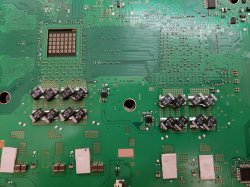
Yes i only replaced 4 tokins on top of the board. I covered the tantalums with heatshrink tubing material however the metal shield pressed very hard against them, probably more so than usual because some capacitors were sitting crooked. Here's a pic
 

Attachments

  • 20190802_182021.jpg
    20190802_182021.jpg
    5.2 MB · Views: 1,256
Actually, today i cut the metal shield above my tantalums and the three beep error went away without replacing the tokins on the bottom of the board. I guess my capacitors just didn't like being pressed really hard.

Also, i did always cover them with rubber, so they wont short against something else.
Interesting.
One thing that is new about the replacement Tantalums is that they are around .5mm taller then the original NECs.
See when I replaced 2 NECs last week I didn't need to modify the metal shield. after I did all of the NECs I needed to cut up the shield, I also used black electrical tape to cover the Tantalums.

good work btw, I hope your ps3 lasts years to come. (you definitely should do the rest of the NECs though)
 
Alright so I replaced the thermal pads on my CECHB01 system. The heat sinks where too big but I don't think they were needed on the Grey Caps.
I played GTA IV for around 10 minutes and I noticed the CELL runs 6•C more then usual(more then my last test). I also noticed the EE+GS side of the system(under the curve of the shell) that it's a bit warmer then it was before with 50% fan speed, and it is also a bigger surface area now. so idk if by making the thermal pad bigger I increased the heat since the old pad was just in the middle of the chip.

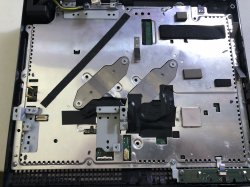
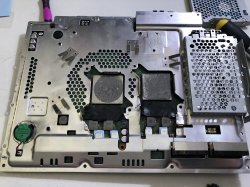
Anyways here are the photos of the shield after I cut it.
@Naked_Snake1995 @sandungas
 

Attachments

  • E36BFA06-67BD-4090-8152-F005A4D33C07.jpeg
    E36BFA06-67BD-4090-8152-F005A4D33C07.jpeg
    2.5 MB · Views: 978
  • A8E7A6BE-B110-4208-8E36-4C1D30B9E872.jpeg
    A8E7A6BE-B110-4208-8E36-4C1D30B9E872.jpeg
    3 MB · Views: 795
  • E286E919-06F3-4E0F-870A-D81ED8C24405.jpeg
    E286E919-06F3-4E0F-870A-D81ED8C24405.jpeg
    3.2 MB · Views: 1,016
Last edited:
Alright so I replaced the thermal pads on my CECHB01 system. The heat sinks where too big but I don't think they were needed on the Grey Caps.
I played GTA IV for around 10 minutes and I noticed the CELL runs 6•C more then usual(more then my last test). I also noticed the EE+GS side of the system(under the curve of the shell) that it's a bit warmer then it was before with 50% fan speed, and it is also a bigger surface area now. so idk if by making the thermal pad bigger I increased the heat since the old pad was just in the middle of the chip.

Anyways here are the photos of the shield after I cut it.
@Naked_Snake1995 @sandungas
Honestly why i need pictures of the EMI Sheild lad? I just asked for your wiring Tantalum work, thats all so i can analyse what you did there, not to mention its blocked by the Electrical tape, board pictures there are plenty. [emoji19]

Sent from my G8141 using Tapatalk
 
Honestly why i need pictures of the EMI Sheild lad? I just asked for your wiring Tantalum work, thats all so i can analyse what you did there, not to mention its blocked by the Electrical tape, board pictures there are plenty. [emoji19]

Sent from my G8141 using Tapatalk
Oh sorry...

will be repasting it later so I'll probably do that then. Pulled off the tape earlier and a cap came off because the tape was so strong on it.

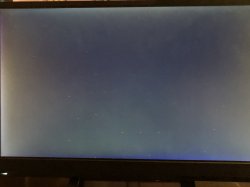
EDIT: as I wrote this to you my ps3 froze and I reboot it and it did this :( great...
Now it has the GLOD ugh now i gotta check the caps...

Just checked the caps and they look/feel fine... so is it heat? why did it freeze after i played GTA 5 and opened TempMON and it froze then it gave me the static red dots again

Put it back together and booted up GTA V and it froze after 20 seconds in game. i made sure little to no pressure was on the Tantalums
i turned off the system now it wont even display picture. it has something to do with pressure again... i have no idea how to fix it this time since there really isnt any pressure on both sides
i feel like giving up on this system tbh
@sandungas
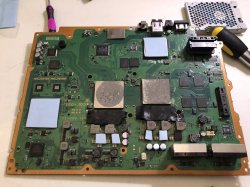
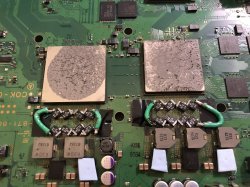
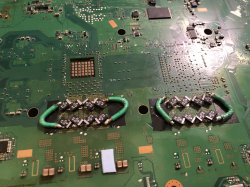
here's the photos of my wiring since I just took it apart
 

Attachments

  • 248344C8-7861-40ED-BD36-4816C83A83CF.jpeg
    248344C8-7861-40ED-BD36-4816C83A83CF.jpeg
    2.3 MB · Views: 876
  • B426DE5F-6E36-4543-A1BE-BDAAD80D3791.jpeg
    B426DE5F-6E36-4543-A1BE-BDAAD80D3791.jpeg
    3.8 MB · Views: 987
  • 587C83CF-74F7-4F3E-B39C-A1DABF734806.jpeg
    587C83CF-74F7-4F3E-B39C-A1DABF734806.jpeg
    3.7 MB · Views: 1,193
  • 5E2872C1-528F-4AC8-9329-726CBA7ACB68.jpeg
    5E2872C1-528F-4AC8-9329-726CBA7ACB68.jpeg
    2.5 MB · Views: 890
Last edited:
i turned off the system now it wont even display picture. it has something to do with pressure again... i have no idea how to fix it this time since there really isnt any pressure on both sides
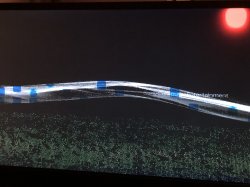
Dunno, but whatever is happening is related with he RSX, that visual artifacts of your last photo are very typical
 
Dunno, but whatever is happening is related with he RSX, that visual artifacts of your last photo are very typical
Highly Unlikely that the RSX is the issue

the wires are so thick that ANY pressure on them from even the retention Brackets are causing issues and these artifacts are from pressure of the CELL Wire
i may redo my work and try out the X method that a user poster earlier and have the bridge wire be straight across as seen in the other users post.
GTA 5 ran fine
only thing weird was how i quit GTA 5 from the XMB in game screen and opened TempMON and it froze the system in the Homebrew app then i rebooted when it gave me the red spot screen as seen in one of my last photos
 
Oh sorry...

will be repasting it later so I'll probably do that then. Pulled off the tape earlier and a cap came off because the tape was so strong on it.

EDIT: as I wrote this to you my ps3 froze and I reboot it and it did this :( great...
Now it has the GLOD ugh now i gotta check the caps...

Just checked the caps and they look/feel fine... so is it heat? why did it freeze after i played GTA 5 and opened TempMON and it froze then it gave me the static red dots again

Put it back together and booted up GTA V and it froze after 20 seconds in game. i made sure little to no pressure was on the Tantalums
i turned off the system now it wont even display picture. it has something to do with pressure again... i have no idea how to fix it this time since there really isnt any pressure on both sides
i feel like giving up on this system tbh
@sandungas
here's the photos of my wiring since I just took it apart
Ill have to agree with the lads on this one, your RSX Substrate its about to fail, now the question is when is going to fail?

Usually systems that get the GLOD from a faulty GPU don't come back to life, unless you reflow the RSX or replace it, due to the substrate failure within the GPU itself,this is why i always recommend deliding the RSX and keep it as cool as possible, its more important than the CELL B/E itself.

GPU artifacts come and go, usually it can go away, but eventually it will come back, one little test you can do, its pick a heat-gun, just for diagnostics, and heat the RSX Chip at approximately 150°Cs for a 5 min mark, this will make sure the substrate makes proper contact with the Chip Die, thus eliminating any artifacts present, but eventually it will come back, and if it does then the RSX is the problem, you'll need to find a 90nm donor to replace the faulty one, ive seen the RSX artifacting on many Backwards Compatible machines, some more heavy artifacting than others, such as corrupted XMB wave, incorrect colour palet, flickering screen and many others,but you can recheck the Tantalums on the RSX area again,but i don't think you've done a bad solder job to detach that easily.

You can also Delid the RSX and replace the thermal paste underneath, this also can Fix GPU artifacting if is a light artifacting due to thermal stress, which upon replacement it should go away,but its not guaranteed.


Sent from my G8141 using Tapatalk

 
So do we need to bridge both the top and bottom of the motherboard?
Yes, just like the example in the Tutorial, i thought ive done it wrong, but its exactly as the lad did, just make sure you use a high gauge wire, and bridge each pair of Tantalums on they're positive side, if you replace them all at once of course.

Sent from my G8141 using Tapatalk
 
Ill have to agree with the lads on this one, your RSX Substrate its about to fail, now the question is when is going to fail?

Usually systems that get the GLOD from a faulty GPU don't come back to life, unless you reflow the RSX or replace it, due to the substrate failure within the GPU itself,this is why i always recommend deliding the RSX and keep it as cool as possible, its more important than the CELL B/E itself.

GPU artifacts come and go, usually it can go away, but eventually it will come back, one little test you can do, its pick a heat-gun, just for diagnostics, and heat the RSX Chip at approximately 150°Cs for a 5 min mark, this will make sure the substrate makes proper contact with the Chip Die, thus eliminating any artifacts present, but eventually it will come back, and if it does then the RSX is the problem, you'll need to find a 90nm donor to replace the faulty one, ive seen the RSX artifacting on many Backwards Compatible machines, some more heavy artifacting than others, such as corrupted XMB wave, incorrect colour palet, flickering screen and many others,but you can recheck the Tantalums on the RSX area again,but i don't think you've done a bad solder job to detach that easily.

You can also Delid the RSX and replace the thermal paste underneath, this also can Fix GPU artifacting if is a light artifacting due to thermal stress, which upon replacement it should go away,but its not guaranteed.


Sent from my G8141 using Tapatalk
Honestly you may be right and I'm in denial.

BUT it doesn't explain how it fails to work until I relive pressure off the CELL/RSX Tantalums. I switched back to the old thin wires I used last week and they work fine my solderjob was poor on the last attempt.
Whenever I remove my electrical tape off the Tantalums it is like glue and it usually takes one cap off. I've resolderd all the Tantalums maybe the board is that weak?
And how before I replaced all the NECs I NEVER had this issue at all.
I rebuilt database using pwr buttons since it GLOD on me and it disabled webMAN and I don't like using it for long without fan because the CELL gets to 80•C in a minute
The RSX stays cool though
Anyways I still don't think the GPU is failing something else is going on
 
Last edited:
Honestly you may be right and I'm in denial.

BUT it doesn't explain how it fails to work until I relive pressure off the CELL/RSX Tantalums. I switched back to the old thin wires I used last week and they work fine my solderjob was poor on the last attempt.
Whenever I remove my electrical tape off the Tantalums it is like glue and it usually takes one cap off. I've resolderd all the Tantalums maybe the board is that weak?
And how before I replaced all the NECs I NEVER had this issue at all.
Anyways I still don't think the GPU is failing something else is going on
I also would like to say this
Pls don't remove all the NECs unless you absolutely have too...
 
Yes, just like the example in the Tutorial, i thought ive done it wrong, but its exactly as the lad did, just make sure you use a high gauge wire, and bridge each pair of Tantalums on they're positive side, if you replace them all at once of course.

Sent from my G8141 using Tapatalk
What high gauge wire do you recommend?
 
I also would like to say this
Pls don't remove all the NECs unless you absolutely have too...
Why is that? You can remove all of them, in fact it makes your repair and life easier, you do a one time full replacement and never touch the machine again, as with Partial replacement, you'll have to worry when your machine its going to die again, so you can replace one more NEC again.

Sent from my G8141 using Tapatalk
 
Back
Top