PS3 (Research/Experimental) - NEC/TOKIN Capacitors Replacement - YLOD

Hey guys.

Has anyone ever used 10V 470uf caps to fix a fat PS3 successfully? Ordered 30 of them, not realizing that 10V is not recommended.
 
Hi again..thank you so much for your answer..i read that post but there was not any photo from which NEC CAPACITOR should be solder to which Wire..
which one of that NEC is for RSX?
and there was not a visible photo of which capacitor should replace..please tell me how many and which capacitor should replace?
near the cpu and RSX there is 4 each capacitor and should i replace these?
and other side of motherboard there is 4 each NEC..should replace these?

Hi, what PS3 board do you have? Or what is its serial number?

For the test using external capacitors, you want to leave all the NECs on the board, then you just solder 2 x wires to only one of the NECs, on the RSX.

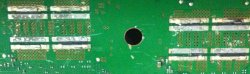
(See the picture below) Red wire to the (+) Black wire to the (-).

COK-001_BOTTOM.jpg


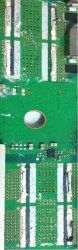
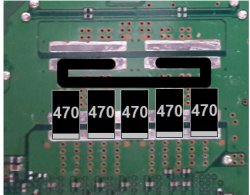
Then you can solder these 2 x wires from the RSX NEC to either:- a combination of 2 x 2200uF - 6.3V Electrolytic Capacitors, or to 1 x 4700uF - 6.3V Electrolytic Capacitor, or if you want to some Tantalum Capacitors 10 x 470uF 2.5V, externally (see photo below).

Tan_Cap_Bank.JPG


Then see if the PS3 boots, if the PS3 does not boot, you could try the same thing on the CELL processor.
 
yeah sure i took photos for the neses i removed them and what i should do to clean the area and make it clean but it has some scratch will it take efact
https://ibb.co/4YFKQv7
https://ibb.co/Qnyq9Pz
https://ibb.co/fk8n8Y3
View attachment 25915

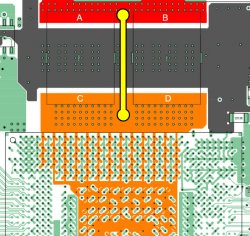
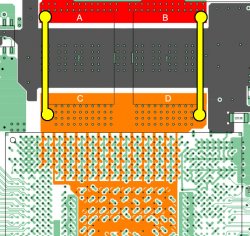
Ah nice work, the scratches are o.k because in those areas it's either all (-) or it's all (+) under the surface. Exactly the same as on top of the surface. See image below (from Sandungas - on Page 103)

The Grey area = Negative (-)
Red & Orange = Positive (+)

PS3_NEC_Positive_Ground_Areas.jpg


So next... you need to just clean up a little the NEC area where you removed them. Try to remove any black plastic left over from the NECs you removed, but the rest you can leave as it is, because that grey stuff on top of the contact strips, is like a dried solder paste and you can solder on top of that again when you solder new Tantalums on those contact areas. It melts into the rest of the solder.

And those thin layers of metal, sitting (soldered) on the contact strips, can stay there also, because it's all conductive anyway and sometimes trying to remove them can cause accidents on the board, but if you are not new to soldering, etc, then you can try to remove them, it makes no difference, just makes the Tantalums sit slightly higher, like 0.1mm, so it's nothing.

I would suggest, you leave all the original solder from the NECs on the board, and you can re-use that again later for soldering in your Tantalums.

Also, maybe for now, only work on those 4 NECs, and no more, for now. Then you can find out if that burnt NEC was the problem for your PS3, and if that's the case, then maybe the other NECs can stay on the board for now, if they work well.

EDIT: If you also take off the NECs on the RSX & CELL side, you will need to add bridge wire(s) and it's easier to leave those NECs in place, more success stories were done that way. Test and see what you get before taking all of the NECs off.

 
Last edited:
Just for reference heres a photo of some burnt Tokins from a recent console i just completed and sent back to its owner and FINALLY got one under my belt (1 of 13) and got one to work using new tant caps.

Heres the original Owners post @SeanRanklin so u can follow his own issues and the repair

https://www.psx-place.com/threads/cecha00-60gb-ps3-shuts-off-in-only-one-game-ylod-style.20826/

Long story short with the GPU side replaced the console still shut down during game play, it wasnt until the CPU side was done also when results were seen and Games could now be completed with no shut downs at all.


20200514_145734.jpg

20200514_160016.jpg
 
On the only 3 verified I've found, 1 of them looked brand new when I popped the tops. If I remember right, the other 2 were burnt to a crisp. Obviously a small sample size. You're clearly already replacing them if you're ripping the tops off, so just go ahead from there, but I wouldn't put too much stock in the visual inspection.


That's still better odds than I'm seeing. Did you end up getting an o-scope?
 
Ah nice work, the scratches are o.k because in those areas it's either all (-) or it's all (+) under the surface. Exactly the same as on top of the surface. See image below (from Sandungas - on Page 103)

The Grey area = Negative (-)
Red & Orange = Positive (+)

View attachment 25916

So next... you need to just clean up a little the NEC area where you removed them. Try to remove any black plastic left over from the NECs you removed, but the rest you can leave as it is, because that grey stuff on top of the contact strips, is like a dried solder paste and you can solder on top of that again when you solder new Tantalums on those contact areas. It melts into the rest of the solder.

And those thin layers of metal, sitting (soldered) on the contact strips, can stay there also, because it's all conductive anyway and sometimes trying to remove them can cause accidents on the board, but if you are not new to soldering, etc, then you can try to remove them, it makes no difference, just makes the Tantalums sit slightly higher, like 0.1mm, so it's nothing.

I would suggest, you leave all the original solder from the NECs on the board, and you can re-use that again later for soldering in your Tantalums.

Also, maybe for now, only work on those 4 NECs, and no more, for now. Then you can find out if that burnt NEC was the problem for your PS3, and if that's the case, then maybe the other NECs can stay on the board for now, if they work well.

EDIT: If you also take off the NECs on the RSX & CELL side, you will need to add bridge wire(s) and it's easier to leave those NECs in place, more success stories were done that way. Test and see what you get before taking all of the NECs off.

i saw a video for someone used a heat to clean the area from the past nec and did solder again and add his tantalums should i do that and why should i add wires rsx and cell side and what is the best way to put tantalum on and how to add that wire and how much volt should be
 
Last edited:
Just for reference heres a photo of some burnt Tokins from a recent console i just completed and sent back to its owner and FINALLY got one under my belt (1 of 13) and got one to work using new tant caps.

Heres the original Owners post @SeanRanklin so u can follow his own issues and the repair

https://www.psx-place.com/threads/cecha00-60gb-ps3-shuts-off-in-only-one-game-ylod-style.20826/

Long story short with the GPU side replaced the console still shut down during game play, it wasnt until the CPU side was done also when results were seen and Games could now be completed with no shut downs at all.


View attachment 25921

View attachment 25919

Oooooo, it's those mini "instant BBQ" boxes, shove a couple steaks on the barbie mate! :very drunk:

P.S. i'm vegetarian :-p
 
i saw a video for someone used a heat to clean the area from the past nec and did solder again and add his tantalums should i do that and why should i add wires rsx and cell side and what is the best way to put tantalum on and how to add that wire and how much volt should be

Hiya again, well i would recommend going through this thread for photos of people's work, when they soldered the Tantalum capacitors to the board, because there are many examples.

Important, if you take off all the NECs then the current cannot pass to the RSX / CELL. See the image below, the NECs bridge the current from the red area to the orange area...

PS3_NEC_Positive_Ground_Areas.jpg

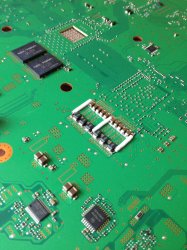
...no NECs means you must add a bridge wire, see photo below (just as an idea of what i mean)

ps3_caps.JPG

So to start (like the guide says on page 1) only replace the NECs on the motherboard side where you don't see the RSX & CELL. And leave the NECs on the other side (for now). Then see if your PS3 boots past the YLOD. If not, then you can consider replacing all the NECs, from both sides of the motherboard, at that point adding a bridge wire is obligatory.

P.S. ...your area is clean enough, i mean you could scrub the area with some isopropyl alcohol, but if you haven't got any then it should be fine. Just make sure there is no black plastic left where the NECs have been removed. Then you are ready to solder the new Tantalums to that area, as it is. Just remember to use "lead-free" solder wire (or solder paste) to match what's already on the board.
 
Last edited:
Hiya again, well i would recommend going through this thread for photos of people's work, when they soldered the Tantalum capacitors to the board, because there are many examples.

Important, if you take off all the NECs then the current cannot pass to the RSX / CELL. See the image below, the NECs bridge the current from the red area to the orange area...

View attachment 25923

...no NECs means you must add a bridge wire, see photo below (just as an idea of what i mean)

View attachment 25922

So to start (like the guide says on page 1) only replace the NECs on the motherboard side where you don't see the RSX & CELL. And leave the NECs on the other side (for now). Then see if your PS3 boots past the YLOD. If not, then you can consider replacing all the NECs, from both sides of the motherboard, at that point adding a bridge wire is obligatory.

P.S. ...your area is clean enough, i mean you could scrub the area with some isopropyl alcohol, but if you haven't got any then it should be fine. Just make sure there is no black plastic left where the NECs have been removed. Then you are ready to solder the new Tantalums to that area, as it is. Just remember to use "lead-free" solder wire (or solder paste) to match what's already on the board.
i did took all of them i guess i mast take it to someone know about how to solder and ask him to add tantalum with wire as the photo but what kind of wire and tantalum should add because i don't want mass up and should i add wire on all neses
 
i did took all of them i guess i mast take it to someone know about how to solder and ask him to add tantalum with wire as the photo but what kind of wire and tantalum should add because i don't want mass up and should i add wire on all neses

Ahhh, o.k, well... for the bridge wire(s), some people used these gauges:- 20AWG, 18AWG, 16AWG solid copper wire. You only need 1 x wire for the RSX and 1 x wire for the CELL, in total. But you can put 2 x wires per processor, or even 3 x wires if you want. But 2 x wires is probably ideal.

See this image below, with 2 x (yellow) bridge wires (in total per processor). From page 103, posted by Sandungas.

PS3_Bridge_Wires.jpg

Tantalums:

• Option A:- For every 1 x NEC capacitor you removed, you should replace with 4 x 470uF Tantalums. So if you took off 8 x NECs you will need (8 x 4) = 32 Tantalum capacitors.

• Option B:- For every 1 x NEC capacitor you removed, you could replace with 3 x 470uF Tantalums. So if you took off 8 x NECs you will need (8 x 3) = 24 Tantalum capacitors.

But if you are getting another person to do the soldering work, then you probably only want to do that once, so go with Option A.

Suggestion for Tantalums:- Panasonic, 470uF - 2.5V, case size D, height = 1.8mm. Here is the part number:- 2R5TPE470M9
 
On the only 3 verified I've found, 1 of them looked brand new when I popped the tops. If I remember right, the other 2 were burnt to a crisp. Obviously a small sample size. You're clearly already replacing them if you're ripping the tops off, so just go ahead from there, but I wouldn't put too much stock in the visual inspection.

That's still better odds than I'm seeing. Did you end up getting an o-scope?

Well TBH this is the worst ive seen visually but taking this job on with its known history i was keen on doing work on it. The caps on the opposite side were all good with no burn marks in the corners at all so i was pretty confident it was going to be this set that were bad.

I did get that O-scope, the images are a pain to capture and the variation in its readings was a little hard to compare with ur own to work off and class them the same as such, so for now ive just documented the images just to see if i get another and hopefully i will try compare them and see if they are the same or if the o-scope just cant capture it very well.

heres an example of a good working GPU with original tokins. (assuming i have it set correctly).

20200504_143606.jpg
 
Ahhh, o.k, well... for the bridge wire(s), some people used these gauges:- 20AWG, 18AWG, 16AWG solid copper wire. You only need 1 x wire for the RSX and 1 x wire for the CELL, in total. But you can put 2 x wires per processor, or even 3 x wires if you want. But 2 x wires is probably ideal.

See this image below, with 2 x (yellow) bridge wires (in total per processor). From page 103, posted by Sandungas.

View attachment 25925

Tantalums:

• Option A:- For every 1 x NEC capacitor you removed, you should replace with 4 x 470uF Tantalums. So if you took off 8 x NECs you will need (8 x 4) = 32 Tantalum capacitors.

• Option B:- For every 1 x NEC capacitor you removed, you could replace with 3 x 470uF Tantalums. So if you took off 8 x NECs you will need (8 x 3) = 24 Tantalum capacitors.

But if you are getting another person to do the soldering work, then you probably only want to do that once, so go with Option A.

Suggestion for Tantalums:- Panasonic, 470uF - 2.5V, case size D, height = 1.8mm. Here is the part number:- 2R5TPE470M9

i found a photo in page 12 i guess i can do like that to my ps3 but should i solder the wire first then i add the tantalum and what the best wire of those do you think if i arrange the tantalum in that column is the best with wire?
 

Attachments

  • p0EgyxF.jpg
    p0EgyxF.jpg
    128 KB · Views: 77

Looks like the sampling rate is a little low on that model to really get all the detail? Which might actually be a little easier to read since you're really looking for that underlying waveform without all the noise. Dancing around the expected voltage with some kind of rhythm = good. Clear, perfect sawtooth or sine wave = bad.

Like you said, just keep saving images for reference. If it turns out that it's not up to the task, any model with specs in that range will get most of your money back if you toss it on eBay.

edit: this should help you visualize the difference between your images and mine (lower sampling rate). I think the probe with that kit might be a little off too, so your amplitude is squished a bit. All in all, it's gonna be a little tough to read the images, but it should still hopefully be pretty obvious when you get a bad one.


memory-depth-2.jpg
 
Last edited:
i found a photo in page 12 i guess i can do like that to my ps3 but should i solder the wire first then i add the tantalum and what the best wire of those do you think if i arrange the tantalum in that column is the best with wire?

In that image / photo you chose, that is a negative / ground wire. Black = negative (-). You don't need a negative bridge wire. You just need to focus on the positive (+) bridge wire.

So these types of examples (below) are good ones, here the Blue wire = positive (+).

(From Littlebalup, Page 12)
bridge_wire_1.png


Or can be like this also:-

bridge_wire_2.png


Here below, an example of (+) bridge wire on the sides, please note: the wire is black, but it's still being used to bridge (+)
PS3_AVX_Photo-2.JPG


EDIT: Also... you can solder the Tantalums first then the wire after, or the other way around, whatever suits you and the shape you did best, these things will come into play when you place the Tantalums on the board to see how to arrange them, then it will become clear to you. It's always harder to work with theory than practise. ;):D
 
Last edited:
Looks like the sampling rate is a little low on that model to really get all the detail? Which might actually be a little easier to read since you're really looking for that underlying waveform without all the noise. Dancing around the expected voltage with some kind of rhythm = good. Clear, perfect sawtooth or sine wave = bad.

Like you said, just keep saving images for reference. If it turns out that it's not up to the task, any model with specs in that range will get most of your money back if you toss it on eBay.

edit: this should help you visualize the difference between your images and mine (lower sampling rate). I think the probe with that kit might be a little off too, so your amplitude is squished a bit. All in all, it's gonna be a little tough to read the images, but it should still hopefully be pretty obvious when you get a bad one.


memory-depth-2.jpg

@squeept ...can i ask, what is the make & model of your o-scope?
 
Back
Top