PS3 (Research/Experimental) - NEC/TOKIN Capacitors Replacement - YLOD

Just my 2 cents on this.

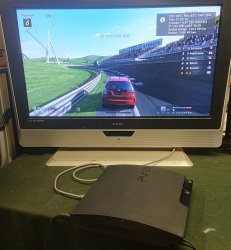
In my own experience GT6 is the game I find roots out most issues with PS3 consoles rather quickly. I usually run it for an hour as I have had machines fail even at like the 55 minute mark so I find an hour minimum is best.

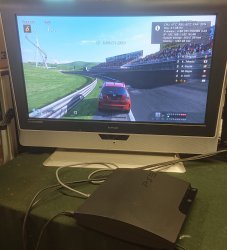
I usually use the first proper race you are put into and I park the car on the inside of the corner just before the bridge ( you can see this in a screenshot I posted on the Syscon thread ) I don't know why this corner in particular seems to heat things up or push things but it just does for whatever reason?
You mean here?
_20210608_205031-jpg.33632

I'm guessing it has to do with the crowd. If crowds are difficult to render or something, then maybe I stumbled upon NBA Live 2010 by accident. I have used it as my benchmark for awhile, but I always assumed it wasn't that taxing, but it has lot's of people in a crowded stadium. So maybe? I know it does heat saturate the console and the fan has to kick up to about 35%-40% to keep the console cool (fresh MX-4, fully delided, otherwise unmodified A01). But yeah, GT6 is a game many people already have or would want to get, whereas NBA live 2010 isn't (cheap though).
 
Yea that's the one, it could be to do with the crowds never really looked at them close enough fairly certain they are 3D models.

Usually when I get the early fat PS3s, again this is in my experience might be just luck but it tends to be like this. If the console powers off when it's about to render the first 3D scene in the tutorial it can indicate an issue with the RSX tokins ( Or a possible BGA defect somewhere ). If it powers off during that first race within that hour generally it can point towards an issue with the CELL tokins.

Though to be clear this was mostly all before I started to use the Syscon for fault codes so it could be a bit hit or miss with accuracy.

I did have a slim today 2003A model with a tokin issue on the RSX ( it would power off as it was about to display the first race ) swapped it and did a delid and it seems to be good to go.
 

Attachments

  • _20210610_190215.JPG
    _20210610_190215.JPG
    1.7 MB · Views: 79
Yea that's the one, it could be to do with the crowds never really looked at them close enough fairly certain they are 3D models.

Usually when I get the early fat PS3s, again this is in my experience might be just luck but it tends to be like this. If the console powers off when it's about to render the first 3D scene in the tutorial it can indicate an issue with the RSX tokins ( Or a possible BGA defect somewhere ). If it powers off during that first race within that hour generally it can point towards an issue with the CELL tokins.

Though to be clear this was mostly all before I started to use the Syscon for fault codes so it could be a bit hit or miss with accuracy.

I did have a slim today 2003A model with a tokin issue on the RSX ( it would power off as it was about to display the first race ) swapped it and did a delid and it seems to be good to go.
The SYSCON is useful in ruling out BGA defects and proving TOKIN faults, but it's a relatively recent development. Before the codes, exactly the type of testing you're referring to is what we had to rely on to diagnose tokin faults. It's not 100%, but it's a hell of alot better than assuming you'll get lucky or that every YLOD is because of the tokins (like the Cretins on youtube over the last few years. No offense to anyone with thyroid dysfunction or from modern day Crete. I'm sure you guys are cool!)
 
You mean here?
_20210608_205031-jpg.33632

I'm guessing it has to do with the crowd. If crowds are difficult to render or something, then maybe I stumbled upon NBA Live 2010 by accident. I have used it as my benchmark for awhile, but I always assumed it wasn't that taxing, but it has lot's of people in a crowded stadium. So maybe? I know it does heat saturate the console and the fan has to kick up to about 35%-40% to keep the console cool (fresh MX-4, fully delided, otherwise unmodified A01). But yeah, GT6 is a game many people already have or would want to get, whereas NBA live 2010 isn't (cheap though).
Hehehe, those are rock bottom temperatures!
I don't know what your ambient is, but if you take a thermocouple you will probably find that the board itself its probably sitting at about 50c too!
Your PSU might be 80 or 90c and your southbridge might as well be the hottest running chip there, closest to 60c.

If you go lower than that you would be risking some "inverse thermal warping" with relative coldspots in the board where the chips are sitting hahaha.
Just kidding, but simply closing the top cover will distribute the heat better and help the PSU not cook. Although the CPU RSX temperatures can go up almost 10c. This is why some people may like to go and drill some holes, which is a subjective tradeoff.

The PSU itself can probably take like 120c no problem anyway, even for long periods of time. The heat will eventually radiate outward though. The southbridge is protected by the Syscon. Which is somewhat representative of the overall temperature of the board, perhaps indirectly including things like BEVR or RSXVR (IOR voltage regulators)
But those rarely fail either. They run hot but they probably can take like 120c fine too.

Do you have a power meter? I'm curious if we can find some game scene or test where we can reach the highest we can. I'm not sure if a game like gran turismo could do that. Maybe yes I don't know.

I talk about this now because I've been having the funny tokin machine under observation this time. Seems stable still. But I have not closed the plastic yet.
 
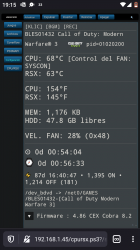
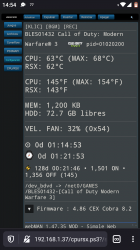
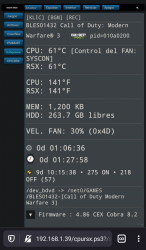
Yeah, @Rozus why are those temps so low? Maybe that spot doesn't tax the system all that much after all? Or are you in a freezer or something? What was the ambient room temp?

...The PSU itself can probably take like 120c no problem anyway, even for long periods of time. The heat will eventually radiate outward though...
I hope your kidding. You really don't want the PSU getting over 60C. So long as you keep the case intact, SONYs airflow design will work fine. I did cut a hole in my case on one console (before I knew better), but I have since removed the card reader and installed a custom 3D printed fan duct that mounts to a Noctua 40mm fan. It keeps the PSU cool. I haven't jail broken or SYSCON moded that console. It's my OG working model I have on the PSN. I don't want risk getting banned - not that I would...IDK. I haven't looked into it much, I'm more interested in the HW aspects of modding, than the software side of it.
 
Haha no I am not in a freezer, temps are mainly like that because it's disassembled. It ran abit hotter once I put the lid back on but forgot to take any pictures. CELL was around 55-56 and RSX was about 58-59 which is usually what I get with these units.

Slim was in the same environment but just seemed to run hotter no matter what seems to be abit luck of the draw sometimes. Another slim I did earlier in the day 3003B turned out like this.
 

Attachments

  • _20210610_131519.JPG
    _20210610_131519.JPG
    1.2 MB · Views: 68
Haha no I am not in a freezer, temps are mainly like that because it's disassembled. It ran abit hotter once I put the lid back on but forgot to take any pictures. CELL was around 55-56 and RSX was about 58-59 which is usually what I get with these units.

What thermal paste did you use and what is your ambient temperature? Mine is 28 C (82.4 F) these days and CPU jumps to 67 rather easily.
 
Last edited:
Yeah, @Rozus why are those temps so low? Maybe that spot doesn't tax the system all that much after all? Or are you in a freezer or something? What was the ambient room temp?

I hope your kidding. You really don't want the PSU getting over 60C. So long as you keep the case intact, SONYs airflow design will work fine. I did cut a hole in my case on one console (before I knew better), but I have since removed the card reader and installed a custom 3D printed fan duct that mounts to a Noctua 40mm fan. It keeps the PSU cool. I haven't jail broken or SYSCON moded that console. It's my OG working model I have on the PSN. I don't want risk getting banned - not that I would...IDK. I haven't looked into it much, I'm more interested in the HW aspects of modding, than the software side of it.
Ohh, sorry I thought the picture was yours too.
Anyway I know he is not "cheating" or anything. Those temperatures are pretty reproduceable. These machines are just built like that. I don't get why people complain all the time about the thermals of these old fat models.

Maybe because of the default Syscon fan curves? I don't think they're so bad either. But now I always edit them first thing. It's way superior to webman fan control.
And it's not even a "mod". It can be done with official firmware. This just what Sony would do with their own tools.

About the PSU... well it depends how you look at it. The thing is built to last too and it's only running at half their rated capacity. Sure keeping it at 60c would be ideal, but no need to go crazy about that either.
There are tons and tons of lonely PSUs in the wild, with nothing to feed because something else in the board failed first.
Maybe 120c is starting to push it, but trading 15 or 20 degrees from the PSU to keep the main chips 10c cooler may not be the end of the world either.
You may notice also that cooler chips will draw a bit less current too.

Again, it's just a tradeoff. I don't think it's necessary either, but I wouldn't run to cover any holes if I had made some hahaha. Maybe now we should start looking for the unicorn failed PSU? And investigate if it was inside a case with holes or not hahaha.
Probably no holes, but maybe completely caked in dust thanks to the negative air pressure. That's probably worse than the holes, and it may not necessarily kill it either.

My pictures are just 3 examples. 30% 0x4d seems nice operating fan speed. 0x54 is OK too, but that's where I draw the comfort line for me.
Ambient is around 26c now summer is beginning.
 

Attachments

  • Screenshot_20210610-191526.png
    Screenshot_20210610-191526.png
    311.3 KB · Views: 76
  • Screenshot_20210608-145457.png
    Screenshot_20210608-145457.png
    321.2 KB · Views: 73
  • Screenshot_20210606-235844~2.png
    Screenshot_20210606-235844~2.png
    298.2 KB · Views: 72
Three months ago I bought CECHB from ebay, with warranty sticker intact. Three days ago it died, short YLOD.
When I opened it, it was delided. So I was pretty much scalped.

Anyway, syscon is giving me error 3034 which means that bad BGA solder joint. My question is, how can I tell if it is really bad BGA solder joint or if it is bad RSX chip? As far as I know, dead graphics chip can work for few more months just by heating it up.
 
Three months ago I bought CECHB from ebay, with warranty sticker intact. Three days ago it died, short YLOD.
When I opened it, it was delided. So I was pretty much scalped.

Anyway, syscon is giving me error 3034 which means that bad BGA solder joint. My question is, how can I tell if it is really bad BGA solder joint or if it is bad RSX chip? As far as I know, dead graphics chip can work for few more months just by heating it up.
Great question.

The short but definitive answer is... By reballing sadly.
Reballing is not magic, but it will make sure that nothing is wrong under the chip, isolating the problem to the top of the chip.
If the balls were the problem and the chip was fine, then it should last a long time. Probably more than a random machine that never failed before.

If it fails again in a relatively short time... Then of course you already know why.
The funny thing is that this can still last months. But you only need to reball once to see what's going on.

(Can you provide the full error log and eepcsum? I'm curious about B model with "3034")

Good luck
 
Hi everyone, if I have a PS3 Fat with ylod and change the nec/tokin, after the removal of the nec/tokin it turns on, and I can play heavy games on it, will you tell me that you still have BGA problem?
 
Great question.

The short but definitive answer is... By reballing sadly.
Reballing is not magic, but it will make sure that nothing is wrong under the chip, isolating the problem to the top of the chip.
If the balls were the problem and the chip was fine, then it should last a long time. Probably more than a random machine that never failed before.

If it fails again in a relatively short time... Then of course you already know why.
The funny thing is that this can still last months. But you only need to reball once to see what's going on.

(Can you provide the full error log and eepcsum? I'm curious about B model with "3034")

Good luck

Thank you.

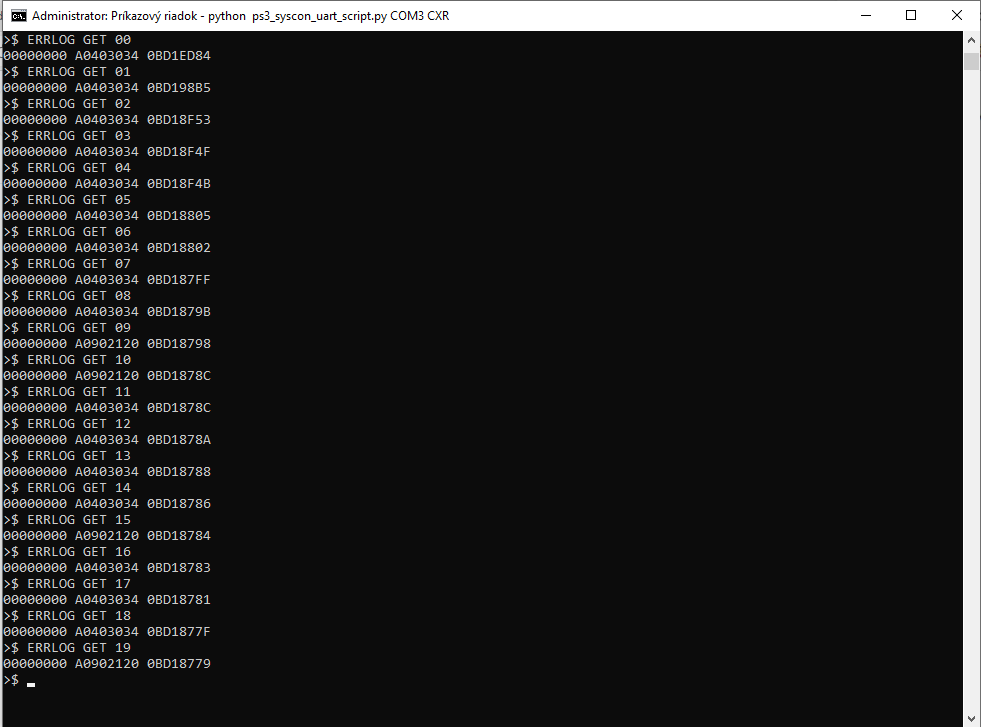
Here is the error log. I cant get eepcsum because I already desoldered syscon diag.
errors.png


I have bad feeling that RSX chip is dead, and it was only revived with reflow. What if I tried to revive it again with hairdrier? It should do the trick. If ps3 will be alive again after that, it means that RSX is dead and that there is no problem on BGA side (because hairdrier cant melt solder). Just a thought

I saw many chips for sale on aliexpress, but thats probably just gamble again.
Maybe I will just wait what will happen with those 65 and 40nm chips frankensteined into the FAT systems. That would be definitive problem solving I suppose
 
Hi everyone, if I have a PS3 Fat with ylod and change the nec/tokin, after the removal of the nec/tokin it turns on, and I can play heavy games on it, will you tell me that you still have BGA problem?
If yo perform the SYSCON and it say's the YLOD was caused by a 3034/40xx SYSCON error then yes, I woud tell you that you are most likely going to experiance another YLOD soon, because you didn't fix what was broken. If it was a 1002, then no. That code is diagnostic of a tokin fault. Without the error codes however it's harder to say. Based on my experience and that of many on the thread, if you have a false positive it'll YLOD again within 2 weeks of the mod.

The type of YLOD can give you a clue...
  • 83% of Intense YLOD (only in intense games) reported initial success.
  • 71% of Random YLOD (Normal stress) reported initial success.
  • 72% of Delayed YLOD (10s - 5 minutes) reported initial success.
  • 41% of Non-Instant YLOD (1-10s) reported initial success.
  • 33% of Instant YLOD (<1s) reported initial success.
The shorter your YLOD was, the less likely it's a tokin fault. This doesn't mean a long YLOD is likely to be a tokin. You still need a 1002 error code to diagnose it. It's just more likely than short YLOD. If you see a 3034, then it's the dreaded RSX faults (Bumps, dead die, BGA defects, etc).

Some have mentioned they thought slim models have more tokin failuers? Here are the numbers based on what people have reported in this thread.
  • 61% Of Backward Compatible consoles reported initial success
    • Only 18% were "reported" working at least 2 weeks later.
  • 50% Of Non-Backwards Compatible consoles reported initial success.
    • Only 17% were "reported" working at least 2 weeks later.
These results suggest that the NEC/TOKINs are not the problem in the majority of cases (regardless of model). However, the chances a tokin failure is causing a Delayed, Randon or intense YLOD is increased. Taken together with a 1002 SYSCON error code, that can diagnose a TOKIN fault. No oscilloscope needed.
 
Hi everyone, if I have a PS3 Fat with ylod and change the nec/tokin, after the removal of the nec/tokin it turns on, and I can play heavy games on it, will you tell me that you still have BGA problem?

Just curious when you removed the original Tokins did you use a heatgun to get them off? You can indirectly 'Revive' a PS3 by doing this and it's easy to go ah it was tokins after all but in reality you dumped a load of heat into the board which puts one component or another on life support.

At that point it's anyones guess how long it would last, could be months but it is more likely to be weeks/days usually.
 
I have bad feeling that RSX chip is dead, and it was only revived with reflow. What if I tried to revive it again with hairdrier? It should do the trick. If ps3 will be alive again after that, it means that RSX is dead and that there is no problem on BGA side (because hairdrier cant melt solder). Just a thought
That won't work. Well, yes it'll probably allow the console to boot a few more times, but it doesn't tell you anything. The reason it works is because the board warps and solder balls reconnect mechanically. This is why there are so many fals positives on this thread. Heat from solering iron warps board = tokin fix. Heat from hot air warps board = hair drier trick. Hit it with a hammer warps board = Hammer time (probably won't work afterward, but it's cathartic).

What you want to do is measure the resistance from the +/GND rails on the tokins. If you get a reading under 1 ohm, that could indicate your RSX is dead (not as good as removing the RSX and ohm testing it directly). Over 1 ohm is fine. 3.2 ohms is basically brand new. This is kinda like a RSX health meter.
 
Thank you.

Here is the error log. I cant get eepcsum because I already desoldered syscon diag.
errors.png


I have bad feeling that RSX chip is dead, and it was only revived with reflow. What if I tried to revive it again with hairdrier? It should do the trick. If ps3 will be alive again after that, it means that RSX is dead and that there is no problem on BGA side (because hairdrier cant melt solder). Just a thought

I saw many chips for sale on aliexpress, but thats probably just gamble again.
Maybe I will just wait what will happen with those 65 and 40nm chips frankensteined into the FAT systems. That would be definitive problem solving I suppose
Well... Then I suggest you solder DIAG wire back.
As the name suggests... You can't really do much diagnostic without the DIAG wire.

The thing is, 3034 is a data error. (If you look at the sony document from 2007 it is listed as a CPU error)
It's a failure in communication between CPU and... whatever.
It could be between CPU and RSX, but it could also be between CPU and Southbridge. Who knows.

The point is, that seeing 3034 in the log alone isn't enough to say much.
You need to run bringup and see more details.
If it's really a failure between CPU and RSX, then the syscon will mention "RSX bittraining errors" or something like that.
That would narrow down the problem to CPU, RSX... and everything in between. But exclude the south bridge area and reduce the chance of CPU problem.
In these cases normally a 4xxx error appears together.
(I have another hypothesis about this, especially for the oldest models such as your B model. But soon to talk about it.)

3034 alone.... It may as well be the CPU.
I'm not saying it is, but it could really be. Good thing we don't have to jump to conclusions so fast.
So please don't.
Also you are missing some errors there. The log holds 32 errors, not 20.

About the "heat test"... Well even if the low heat revives the thing... It's not definitive evidence. Yes it decreases the chance of being really "fixable" but it still doesn't rule anything out. I'm oversimplifying here but yeah.
"Heat test" by itself isn't definitive at all.
 
Last edited:
Hi everyone, if I have a PS3 Fat with ylod and change the nec/tokin, after the removal of the nec/tokin it turns on, and I can play heavy games on it, will you tell me that you still have BGA problem?
I will come at a slightly different angle as Felix...And say yes.
It is called a false positive.

The fact that you remove/replace capacitors and the machine works again... Does not mean that the capacitors were causing the problem.

If you do "not" perform the SYSCON diagnosis and find that you have error 80 1002 or 09 3004...
Then the chance of you having a problem with capacitors and nothing else is very low. Very low.
Meaning your YLOD is being caused by something else. Most of the time RSX problems. Possibly BGA problem as you say yes.

When you replace the capacitors blindly... Even if it looks like it "worked", probably all you did was apply heat or pressure to the board and the RSX area. (The capacitors are right there very close)
And this simple thing can change the behavior of the machine.

Confusing you and confusing everybody because it's nothing to do with the capacitors. And it can still last even months.
 
Hello Everyone.
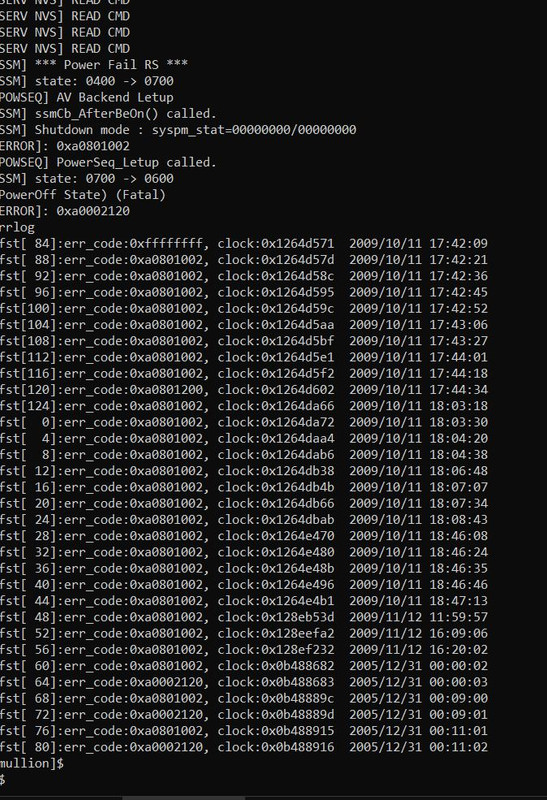
I followed the tutorial very carefully and finally i managed to get some errors via Internal diag. Here are the errors (The new ones are the 2005 one's because i removed the internal battery):
Erros-novos.jpg


I've managed to found that it is an HDMI IC error related, can someone give me his/her input on this to see if it is INDEED hdmi related or maybe, MAYYYYBE tokins lol ?
Thanks in advance.
 
What you want to do is measure the resistance from the +/GND rails on the tokins. If you get a reading under 1 ohm, that could indicate your RSX is dead (not as good as removing the RSX and ohm testing it directly). Over 1 ohm is fine. 3.2 ohms is basically brand new. This is kinda like a RSX health meter.
I just checked, and it give me 2,7ohm, which according to your knowledge, should be great. Now I am starting to be confused :)
Is this now deffinitive that it is not problem with my RSX?

Well... Then I suggest you solder DIAG wire back.
As the name suggests... You can't really do much diagnostic without the DIAG wire.

The thing is, 3034 is a data error. (If you look at the sony document from 2007 it is listed as a CPU error)
It's a failure in communication between CPU and... whatever.
It could be between CPU and RSX, but it could also be between CPU and Southbridge. Who knows.

The point is, that seeing 3034 in the log alone isn't enough to say much.
You need to run bringup and see more details.
If it's really a failure between CPU and RSX, then the syscon will mention "RSX bittraining errors" or something like that.
That would narrow down the problem to CPU, RSX... and everything in between. But exclude the south bridge area and reduce the chance of CPU problem.
In these cases normally a 4xxx error appears together.
(I have another hypothesis about this, especially for the oldest models such as your B model. But soon to talk about it.)

3034 alone.... It may as well be the CPU.
I'm not saying it is, but it could really be. Good thing we don't have to jump to conclusions so fast.
So please don't.
Also you are missing some errors there. The log holds 32 errors, not 20.

About the "heat test"... Well even if the low heat revives the thing... It's not definitive evidence. Yes it decreases the chance of being really "fixable" but it still doesn't rule anything out. I'm oversimplifying here but yeah.
"Heat test" by itself isn't definitive at all.

I understand, so I just soldered again the syscon diag and here is the log:
C:\Users\Dell\Desktop\ps3syscon>python ps3_syscon_uart_script.py COM3 CXRF
>$ AUTH
Auth successful
>$ eepcsum
eepcsum
Addr:0x000032fe should be 0x4fb7
Addr:0x000034fe should be 0xeade
sum:0x0100
Addr:0x000039fe should be 0x0f38
Addr:0x00003dfe should be 0x00ff
Addr:0x00003ffe should be 0x00ff
>$ w 39fe 38 0f
w 39fe 38 0f
w complete!
[mullion]$
>$ eepcsum
eepcsum
Addr:0x000032fe should be 0x4fb7
Addr:0x000034fe should be 0xeade
Addr:0x000039fe should be 0x0f38
Addr:0x00003dfe should be 0x00ff
Addr:0x00003ffe should be 0x00ff
>$ errlog
errlog
ofst[ 12]:err_code:0xffffffff, clock:0x0bd18781 2006/04/13 22:04:49
ofst[ 16]:err_code:0xa0403034, clock:0x0bd18783 2006/04/13 22:04:51
ofst[ 20]:err_code:0xa0902120, clock:0x0bd18784 2006/04/13 22:04:52
ofst[ 24]:err_code:0xa0403034, clock:0x0bd18786 2006/04/13 22:04:54
ofst[ 28]:err_code:0xa0403034, clock:0x0bd18788 2006/04/13 22:04:56
ofst[ 32]:err_code:0xa0403034, clock:0x0bd1878a 2006/04/13 22:04:58
ofst[ 36]:err_code:0xa0403034, clock:0x0bd1878c 2006/04/13 22:05:00
ofst[ 40]:err_code:0xa0902120, clock:0x0bd1878c 2006/04/13 22:05:00
ofst[ 44]:err_code:0xa0403034, clock:0x0bd1878e 2006/04/13 22:05:02
ofst[ 48]:err_code:0xa0902120, clock:0x0bd1878e 2006/04/13 22:05:02
ofst[ 52]:err_code:0xa0403034, clock:0x0bd18793 2006/04/13 22:05:07
ofst[ 56]:err_code:0xa0902120, clock:0x0bd18793 2006/04/13 22:05:07
ofst[ 60]:err_code:0xa0403034, clock:0x0bd18796 2006/04/13 22:05:10
ofst[ 64]:err_code:0xa0403034, clock:0x0bd18798 2006/04/13 22:05:12
ofst[ 68]:err_code:0xa0902120, clock:0x0bd18798 2006/04/13 22:05:12
ofst[ 72]:err_code:0xa0403034, clock:0x0bd1879b 2006/04/13 22:05:15
ofst[ 76]:err_code:0xa0403034, clock:0x0bd187ff 2006/04/13 22:06:55
ofst[ 80]:err_code:0xa0403034, clock:0x0bd18802 2006/04/13 22:06:58
ofst[ 84]:err_code:0xa0403034, clock:0x0bd18805 2006/04/13 22:07:01
ofst[ 88]:err_code:0xa0403034, clock:0x0bd18f4b 2006/04/13 22:38:03
ofst[ 92]:err_code:0xa0403034, clock:0x0bd18f4f 2006/04/13 22:38:07
ofst[ 96]:err_code:0xa0403034, clock:0x0bd18f53 2006/04/13 22:38:11
ofst[100]:err_code:0xa0403034, clock:0x0bd198b5 2006/04/13 23:18:13
ofst[104]:err_code:0xa0403034, clock:0x0bd1ed84 2006/04/14 05:20:04
ofst[108]:err_code:0xa0003001, clock:0xffffffff
ofst[112]:err_code:0xa0003001, clock:0xffffffff
ofst[116]:err_code:0xa0003001, clock:0xffffffff
ofst[120]:err_code:0xa0003001, clock:0xffffffff
ofst[124]:err_code:0xa0003001, clock:0xffffffff
ofst[ 0]:err_code:0xa0003001, clock:0xffffffff
ofst[ 4]:err_code:0xa0003001, clock:0xffffffff
ofst[ 8]:err_code:0xa0003001, clock:0xffffffff
[mullion]$
>$ bringup
bringup
[SSM] state: 0000 -> 0101
Bringup Mode #0 (0xFF)
[SSM] ssmCb_OnStartingBePowOn() called.
[SSM] First Boot.
[SSM] Bringup mode : syspm_stat=00000000/00000000
[POWSEQ] PowerSeq_Setup called.
[SSM] state: 0101 -> 0301
[SSM] PowSeq Fail : Detected !
[SSM] state: 0301 -> 0700
[POWSEQ] AV Backend Letup
[SSM] Shutdown mode : syspm_stat=00000000/00000000
[ERROR]: 0xa0003001
[ERROR]: 0xa0003001
>$
The 3001 errors are all probably from today, I tried few times to power up the disassembled console :)
Why is the last 3034 code from 2006? It is because I removed cmos battery?
Do you see anything in this log, which should give me more info where to find my problem?
Should I do "bringup" command with fully assembled console? The command above was performed on fully disassembled console (just pcb and psu)

Thank you guys
 
Last edited:
Back
Top