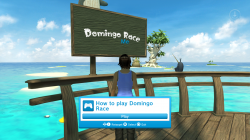
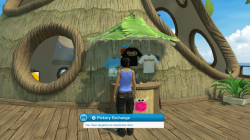
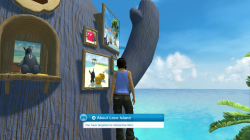
PS3 [RESEARCH] Playstation Home Developer Build - Information for fixing and modding stuff

DeViL303

Developer
PSX-Place Supporter
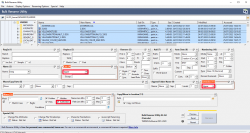
So on Monday I noticed Nagato had released a PS Home POC late last year that works on HEN. Now the install seemed a bit complicated and there were only like 3 scenes included so I decided to see it could be done with just one pkg, turns out it can and I made some other discoveries along the way too. Keep in mind this is just what I learned in a few days so don't expect too much.:)

upload_2022-7-27_22-35-34.png


I am starting this thread to document some of the basics as I learn them, As there seems to be almost no information about how to fix broken Home Scenes/Spaces. I could be wrong but from what I gather the Destination Home team are not documenting anything publicly. I know we have the HDK, but that can be a bit daunting as its a bit like asking someone to look in the SDK documentation when they want to build a pkg. Hopefully this can act like a dumbed down version and include some info not found in the HDK docs too.

I would prefer to see it opened up so lots of people can collaborate. I think for preservation purposes it would be great if we had everything working from one pkg TOTALLY OFFLINE, with no special skills needed to install or run, and with ALL resources included in the download so there is no need to rely on any online services.

Now I know there are many people who know much more than me about how Home works, but they are not sharing so we will have to figure it out ourselves, I am only one person too, so it will be slow going but my hope is that once I start posting some of the basics, some other modders will get involved too.

I have a 20GB package with 220+ scenes added that I can release as a base for others to add to and work on, play with etc, it's definitely not going to be for everyone, it takes me 20 minutes to FTP the package to dev_hdd0 , and then another 160 minutes to install it.

Once that pkg is installed, it is easy update the installed folder with smaller patch packages from then on, the hard bit was getting the 280,000 files onto the system which this 20GB package solves.

NOTE: I have not used the Home Development Kit (HDK) at all for any of this, its not required here. Basically the main reason we could not get it to boot on CEX CFW is down to the files not being in the correct locations. I literally got everything seen in the video working just by moving files and folders around and editing some paths here and there to match file locations. No major hacking required.

There is a lot of information included in the HDK help files, but its hard to tell what's required to get broken stuff working, there is also a lot of stuff in there that is not required unless you want to make your own spaces.

No download link just yet, if anyone is interested in testing or helping out with it, let me know.
 
Last edited:
Progress so far, So far I have everything showing up like in the video, I have not had time to test every scene but everyone I have tried launches. Some scenes have missing items like furniture etc but all this can be solved with enough time. The Home data that has been archived is all over the place, and so are the developer builds, lots of typos, out of date comments etc.

Mostly what fixing stuff involves is launching the scene, then checking which files it looks for, making sure they exist, sometimes they have wrong names, are in wrong folder or are missing but can be found on the net.

For example if a sky texture is missing, we can take the sky texture from another version of the same scene and stuff like that.

HUBSTARTUP.TXT

Some important files and what I think they do so far, the first important file worth noting is HUBSTARTUP.TXT

Located at dev_hdd0/game/NPIA00010/USRDIR/SCRIPTS/HUBSTARTUP.TXT

Here is an example:
Code:
# Load some useful scripts for the console.
lc RunScript("Scripts/ArcadePause.lua")
lc RunScript("Scripts/ResetGame.lua")
lc RunScript("Scripts/ScreenShot.lua")
lc RunScript("Scripts/DebugCam.lua")
lc RunScript("Scripts/Console.lua")
# Press F5 to disable MLAA (HUGE fps boost)
lc RunScript("Scripts/TextureFix.lua")
# Press F11 to TELEPORT TO CAMERA (Fix Glitch Mistakes)
lc RunScript("Scripts/TELEPORT.LUA")
# Press F7 to Change Runngin Speed (Change Your Running Speed)
lc RunScript("Scripts/SPEED.LUA")
# Use content from your local Build folder
useOfflineContent 1
# Disable scene downloading, enable this if you are accessing your scenes from the server.
enableSceneDownloads 0
# Add all objects from your local Build folder into the Object Catalogue
objcat enableCatEntryScan
# Add all objects from your local Build folder to your inventory so the player can access them.
# Note: If you are testing rewarded items you will probably want to remove this flag so that the
# rewards aren't automatically added to your inventory.
inv adddevobjects
# Allow non-reward objects to be stored in the rewards inventory.
# Objects added to the inventory in the debug catalogue browser will persist between sessions.
inv disableValidation


This file is checked as the app launches, it includes flags and other startup stuff like the CSO, the CSO is the content server override, this is where we can force the application to look to a different server for online content, by default the developer version of Home looks to its own local USRDIR folder, but we can change that to look online too.

Ideally we need to document every possible flag in this file, and figure out the possible values each one can take, and is expecting.

Here are some that we know of already, some are self explanatory, some we need to figure out if they are used in the latest version and if so what do they do.

Code:
assertsEnabled 0
disablessfwError 1
mlaaEnable 0
contentServerOverride http://link.to.server/
useOfflineContent 1
objcat enableCatEntryScan
inv adddevobjects
inv disableValidation
enableSceneDownloads 0
disablevsyncmode 0
SetDipSwitch 0 1
SetDipSwitch 3 0
overrideUserType regular
dnsOverride
muisOverride

I need to take a look through the EBOOT.BIN and the HDK docs again too.

Here the main flags of interest for me so far are the contentServerOverride and the dnsOverride, these are probably more of interest to people trying to get online mode working, but the contentServerOverride is also handy for testing stuff from a local server too.


EDIT: Actually it seems all of these are documented in the HDK, or a lot of them are anyway.
 
Last edited:
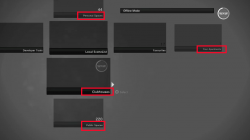
LOCALSCENELIST.XML

The next interesting file is the LOCALSCENELIST.XML. This controls which scenes show up on the main XMB type GUI. It's just a simple XML with <SCENELIST> tags and then one line per scene, if a SCENE file is mentioned here the system will attempt to load it. If it does not exist the system will skip that one and move onto the next one.

Located at dev_hdd0/game/NPIA00010/USRDIR/ENVIRONMENTS/LOCALSCENELIST.XML

Example:
Code:
<SCENELIST>
<SCENE Name="Harbour Studio" SceneID="88c92afa-dc36-5eed-bccd-d7fa5bdea71f" Type="Home" HOMEUID="9999" version="0" Group="Home" KEYWORDS="Home" config="Environments/Home_internal_SCEE/Personal_Spaces/Basic_Apartment/Basic_Apartment.scene" />
<SCENE Name="Basic Clubhouse" Type="Home" SceneID="" version="0" Group="Home" KEYWORDS="Awesome, Home" config="Environments/Home_internal_SCEE/Home_Lobbies/Club_Houses/Club_House_V1/clubhouse.scene"/>
</SCENELIST>

Few variables here on each line:

Name = This is the name shown on screen, not important and you can change these to anything you want.

SceneID = Not 100% sure on this, but scenes seem to load even with it left empty. Might be important though and some scenes do include one , more research needed, probably related to linking up with objects.

Type = This decides where on the GUI the item is shown, known values include:
  • "Home" - This is for Personal Spaces
  • "PublicLobby" - This is for Public Spaces
  • "Clubhouse" - this will show in clubhouse section
  • "Apartments" - These will show in Your Apartments (I think)
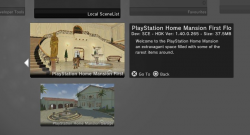
Important to note here, if you change the type for a "PublicLobby" to "Home", then you can place furniture in it, which is kind of fun to remove that restriction. Normally in public spaces the Decorate menu is disabled. Well this little trick enables it.

These are the locations I am referring to:

upload_2022-7-27_15-8-35.png

version = Seems to not be used anywhere for OFFLINE, always shows 0. Probably not important but maybe the minimum application version for that scene is put here (not tested yet)

EDIT: Turns out it is important for online, it controls whether a scene in the cache is up to date or not and if a new one should download. If its set to 0 when online then it will never download and will assume its a local scene.


KEYWORD = Keywords for search terms, you can add anything here, multiple words accepted separated by commas.

HOMEUID = There are a few examples of this being used, but most scenes do not use it, I think its not important. Possible related to the owner of the item.

config = the path to the item, NOT including the prefix dev_hdd0/game/NPIA00010/USRDIR/, This can also be the path at the end of the URL if you are using a webserver.


SDC FILES

So the next step, once the system reads a SCENE path in the LOCALSCENELIST.XML it checks for that file, If it does not find it then it does nothing and shows nothing, but if there is a SCENE file at that path, then next it will check for a SDC file at the same path and with the same name.

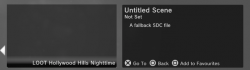
So just remember that for every SCENE file, there must be a corresponding SDC file in the same folder. If there is just a SCENE file but no SDC file, then you will get something like this.


upload_2022-7-27_15-33-36.png


It has a title on the left, that came from the LOCALSCENELIST.XML, but notice it has no Thumbnail, and it will just say "Untitled Scene" on the right side with generic info. This means the SCENE file loaded, but the SDC file had an issue.

It's not a big problem, as the SDC file is optional anyway. Its just there to give more info.

In that case it defaults back to dev_hdd0/game/NPIA00010/USRDIR/FALLBACK.SDC and shows the "Untitled Scene" as the title on the right hand side.

SDC files will open with a normal text editor, they are just XML. Here is an example of a SDC file, as you can see it just contains the paths to thumbnails. This file is not really that important for offline, visual only and optional (For online they may be more important)
Code:
<?xml version="1.0" encoding="utf-8"?>
<XML hdk_version="1.60.17">
  <SDC_VERSION>1.0</SDC_VERSION>
  <LANGUAGE REGION="en-GB">
    <NAME>DISGAEA 3 Mao's Room</NAME>
    <DESCRIPTION>Mao's Room in DISGAEA 3 was brought here to be a lounge!</DESCRIPTION>
    <MAKER>Nippon Ichi</MAKER>
    <MAKER_IMAGE>[BUILD_ROOT]thumbnails/dis3mao/mao.png</MAKER_IMAGE>
    <SMALL_IMAGE>[BUILD_ROOT]thumbnails/dis3mao/maosmall.png</SMALL_IMAGE>
    <LARGE_IMAGE>[BUILD_ROOT]thumbnails/dis3mao/maolarge.png</LARGE_IMAGE>
  </LANGUAGE>
  <age_rating minimum_age="0" parental_control_level="1" />
</XML>

SCENE FILES

These are also XML format, This file is used to build the scene. Links to lots of rresources at the top, then lots of code at the bottom. references to any object UUIDs can be found here. We can use these resource links to find and fix paths. We can also do lots of stuff here easily with a text editor like change spawn points etc, add spawn points, change scene links, add new scene links. More to come on these.

SCENE files are the first place to start when trying to fix stuff and see what resources a scene will require.
 
Last edited:
So the big elephant in the room, Why could we not get all this going locally years ago.. Why did we need to load all the content from PC to a DEX console via ProDG.

Well it's a really funny story, and I bet some people are going to be kicking themselves really hard when they find out.. Did anyone notice the way in the example files I posted above, how they are all messy when it comes to capitalization. For example:
Code:
Scenes/Bramble_Nook_Apt_BB4B_1E68/farm_bramblenook.BAR

Its the same everywhere, it's like who ever wrote it all had a broken caps lock button.

At first I did not know what was going on, I first noticed that combining the source folders of 2 packages on PC was not behaving the same as installing the same 2 packages on PS3, then I started to notice folder duplicates. I realized that almost all the dev stuff was named wrong for the PS3 file system. Obviously this did not matter when serving it from a windows PC or a server online, but it becomes incredibly important when you try run the files locally.

So the whole issue was the Windows file system is not case sensitive, but as we know the PS3 file system IS case sensitive. So it turns out once I went through and capitalized about 100,000 file names, loads of stuff started working. lol. So what Sony seem to have done is that they made it so on the console when loading files locally, EVERY file and folder is looked for in UPPERCASE, regardless of what is written in the XML, TXT, SDC etc.

What makes this even more tricky of an issue to diagnose is that the ingame DEV console, also shows the filenames in lowercase when a file is missing, lol.

Now for all I know Nagato and Destination Home team have figured this out years ago and were just keeping it quiet as a form of obfuscation to stop other people having success but anyway regardless.

Now we all know. Capitalize EVERYTHING! There might be some stuff at lower levels that needs lowercase, so take everything I say with a pinch of salt, but so far making everything uppercase has helped loads.

P.S. I used a tool called Bulk Rename Utility on the whole USRDIR folder with these options:

upload_2022-7-27_17-14-46.png


Playstation Home XMB icon Functionality

I have also been working on restoring the original Playstation Home icon functionality to the XMB via XML, this is where it would allow us to download and install Home if its not already installed, but then once Home is installed it launches it instead. If we deleted Home it reverted back which is handy for reinstalls too. See HERE. I had it almost perfect but it needed a manual XMB reload/reboot for it to change from a downloading to a launching function. Thanks to @LuanTeles for giving me a tip we can now restore the original Playstation Home icon to what it used to be perfectly.

I have also found a way to get this function working by just adding one XML to OFW as well (no registry.xml mod required). This could open up some interesting possibilities for the Destination Home team as they are now working on online mode with the retail client on OFW. Right now to get it working on OFW they need to install HEN, then install the pkg , then revert back to OFW. With this method they could just use a web exploit to patch one firmware xml with a few bytes and add the original pkg downloader back to the XMB using their own URL. Then the same web exploit could patch whatever app files they need to get it redirecting to their own server URL or whatever. I suspect they will be using a custom DNS server to do the redirect though so its likely they do not need to patch the app files at all.

Anyway, it is another way to distribute this 20GB too, I will share an XML shortly with some testers, that xml will allow the offline version to download and install from the XMB. It is a little bit slow downloading 20GB on the PS3 from dropbox, but it saves the user needing FTP set up, or NTFS set up, or copying large files, and it saves them needing 20GB free space on their PC. Basically all they need is the ability to get one xml onto dev_flash and 40GB of free space on the PS3 (20GB for the pkg and 20GB for it to extract to). I will not be able to make the XML public as its just downloading from a basic personal Dropbox account.
 
Last edited:
SCREENLINKS.XML

For any scenes that have screens, with videos, slide shows or text. The links to these sources are contained in XMLs like this. A lot of these original URLs point to either SCEE DEV domains that we do not have access to, or other domains that are no longer active. Some of these also point to local files.

Known file types supported:

Images: DDS,JPG and PNG
Videos: MP4 (MPEG-4 Part 2 Simple Profile video format)
Text: XML via HSML (a "Home Screen Markup Language")
RSS: XML

There are a lot of screens not working and it will be a fairly big task to try and find all the relevant media files, then add them to the PS3 HDD and then edit the XMLs to point to them. A lot of this stuff is available in various home resource backups or elsewhere on the internet.. I will just take one scene at a time and work on that, hopefully others do the same.

Here is an example of a screenlinks.xml , sometimes the name of this XML is slightly different, but that does not really matter. We have good info on how it works here in this example. They also support HSML for text, a "Home Screen Markup Language"

Fairly self explanatory what needs to be done here, for every screen in any scene that is not working there is a dead URL or a dead path, we need to find all of these dead screens and fix them with working links to local files (or working URLs). Ideally for preservation I think it would be great to make a 100% offline version that has everything included.
Code:
<XML>
<!--
Set up channels for displaying on the screens in your lobbies in a screen links file.
Set the 'Screen ID' property in the Scene Editor to match the ID you give you channel
in the screen links file.
-->
<!--
Image screens cycle through a collection of images. We support dds, jpg and png image formats.
-->
<SCREEN ID="OnlineImages">
<TYPE>IMAGES</TYPE>
<SOURCE>http://homeps3-content.online.scee.com:10010/Alpha/Tutorials/ScreenTutorial/screencontent/images/image1.dds</SOURCE>
<SOURCE>http://homeps3-content.online.scee.com:10010/Alpha/Tutorials/ScreenTutorial/screencontent/images/image2.dds</SOURCE>
<SOURCE>http://homeps3-content.online.scee.com:10010/Alpha/Tutorials/ScreenTutorial/screencontent/images/image3.dds</SOURCE>
<SOURCE>http://homeps3-content.online.scee.com:10010/Alpha/Tutorials/ScreenTutorial/screencontent/images/image4.dds</SOURCE>
<SOURCE>http://homeps3-content.online.scee.com:10010/Alpha/Tutorials/ScreenTutorial/screencontent/images/image5.dds</SOURCE>
</SCREEN>
<SCREEN ID="LocalImages">
<TYPE>IMAGES</TYPE>
<SOURCE>environments/screentutorial/screencontent/images/image1.dds</SOURCE>
<SOURCE>environments/screentutorial/screencontent/images/image2.dds</SOURCE>
<SOURCE>environments/screentutorial/screencontent/images/image3.dds</SOURCE>
<SOURCE>environments/screentutorial/screencontent/images/image4.dds</SOURCE>
<SOURCE>environments/screentutorial/screencontent/images/image5.dds</SOURCE>
</SCREEN>
<!--
Video Screens play a video on continual loop.
We support the MPEG-4 Part 2 Simple Profile video format.
-->
<SCREEN ID="VideoScreen1">
<TYPE>VIDEO</TYPE>
  <SOURCE>http://www.hellfiregames.com/NebulonAlphaDemoScreen.mp4</SOURCE>
</SCREEN>
<SCREEN ID="LocalVideo">
<TYPE>VIDEO</TYPE>
  <SOURCE>hellfiretest/video/NebulonAlphaDemoScreen.mp4</SOURCE>
</SCREEN>
<!--
HSML, or Home Screen Markup Language, screens display structured
pages of text, image and video and works like a subset of HTML.
-->
<SCREEN ID="BigScreenOnlineHsml">
<TYPE>HSML</TYPE>
  <SOURCE>http://www.hellfiregames.com/novusprime/screens/NovusPrimeBigScreenHSML.xml</SOURCE>
</SCREEN>
<SCREEN ID="LocalHsml">
<TYPE>HSML</TYPE>
  <SOURCE>file://environments/screentutorial/screencontent/hsml/offlinehsml.xml</SOURCE>
</SCREEN>
<!--
Media RSS screens are used for displaying dynamic video and image file sequences.
-->
<SCREEN ID="OnlineMediaRss">
<TYPE>MEDIARSS</TYPE>
  <SOURCE>http://homeps3-content.online.scee.com:10010/Alpha/Tutorials/ScreenTutorial/screencontent/mediarss/onlinerss.xml</SOURCE>
</SCREEN>
<SCREEN ID="LocalMediaRss">
<TYPE>MEDIARSS</TYPE>
  <SOURCE>environments/screentutorial/screencontent/mediarss/offlinerss.xml</SOURCE>
</SCREEN>
</XML>
 
Last edited:
maybe it is possible to make big pack files (of any kind) from the mass of loose files @DeViL303 ?
the more files on hdd the slower it gets :(

edit
breaking mentioning...well, I was thinking about maybe CRI filesystem?
though, this can only work if you have source for the main executable, to source the bigfile
 
Last edited:
Yeah, I think the scenes could be ran as BAR files too. But even better is to just run it as ISO completely. I will try pack it all into one ISO.
hm, it is worth a try, but then, I dunno if iso would help here, cause PS3 is probably using cache for this or maybe doing temp install if referenced. anyways, nice stuff and if this really works completely offline, I am in to try it
 
Awesome, I will DM you as soon as I have something. I will have a download together in the next few days. I keep thinking i have it ready and then i find something else to fix. Loads of stuff is just broken because files are in the wrong locations.

On the bright side it works great from pkg, apart from long install time of about 2.5 hours, and maybe 2 minutes load up time initially, then it works really quick.
 
Just fixed another scene. There was a conflict between Granzella Southern Island Hideaway and the special valentines 2013 event version. I have them both showing up and working from separate folders now with thumbnails and information showing correctly.

Also got another 2 dev samples showing up. Now up to 26. These are currently not working due to a missing BAR file afaik, also they were probably made with really old HDK so might never work. But I am adding them anyway as its something to be looked at.

EDIT:

Just got another 4 scenes working.. yay.
 
Last edited:
I have learned so much over the last few days. I don't know where to start.

I've decided to go back to the original Home files and extract everything fresh. The archive I have been working out of is just too crazy with 280k files. This way I can optimize everything, make sure there are no duplicates etc.

I am converting each SCENE into an installable addon pkg, so there will be a BASE install pkg. This will come with the default apartment and default HDK tools (Thumbnail maker and Object Profiler), Then users can choose exactly what spaces they want to install after that.

So to explain how it works. I will just have to do it a little bit at a time. Keep in mind I might have some things wrong, this is just my understanding so far. And if I talk about a tool I am not allow to talk about, I'm sorry, this is just research. let me know. There are a few steps to this process, none are particularly that difficult, but I am trying to automate some of it.


STEP 1: SDAT Files

So the Home devs seem to have distributed the partially completed project scenes in SDAT files, These SDATS have NPD type encryption. We can strip that off with tools like npdtoolv4, and maybe others but that is what I used.

So I take my SCENE.SDAT file, put it next to npdtool.exe and decrypt it with cmd line.

Code:
npdtool ds SCENE.SDAT SCENE.DAT

This will take a few seconds


STEP 2: DAT Files

So now you have DAT files. These can be different formats per game afaik so they are a little tricky to deal with sometimes.

Luckily for us these DAT files are really just BAR files afaik which are a type of compressed archive a bit like RAR, we have been able to extract BAR files for like 10+ years. I found old posts referencing extracting them (offzip.exe -a -z -15)

Big thanks to a Destination Home developer Gaz for making the tool for this step. I think it leaked around the time of the latest HDK leaked, not 100% sure but there was a bit of drama there, so I ended up with a copy of this a couple of years ago anyway, its fully public now from what I hear but idk. Back when I got it I did not really look at it much as I had no instructions, and it would not run on my system due to needing some old version of .NET framework. So I put it away and forgot about.

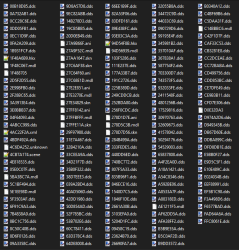
Anyway its called GazUNBAR. After I was stuck at the DAT stage for a while I pulled it out again and got it working. Turns out it can also decrypt SDAT (Wish I had checked it sooner), and it unpacks the Home DAT files too. Home DAT files, (aka BAR files) are a bit like RCOs. A container of files,

BUT when you extract them you end up with a load of files like this. Its like we get the raw files but not the table of contents.

upload_2022-8-3_14-29-51.png

STEP 3: Mapping

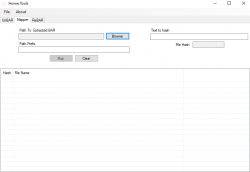
On very small scenes with like 20 files, I figured out I could manually convert these to working scenes by using the Cobra debug output to rename the file, see what files were being looked for and making guesses based on the file extension and a bit of luck. That was only to prove it was possible and it was ridiculously tedious. It would definitely not work on the bigger scenes. Then I was asking around a bit looking for some help and I got this other tool made by Gaz called HomeTool. I have since asked Nagato and I was told this is also public. I have not seen any downloads or tutorials anywhere but maybe I just cant find them.


HomeTool

So Hometool has 3 functions. It can UnBAR and ReBAR. More on these in a bit. but the important thing it can do is "Map" the files in an extracted DAT or BAR. So it gives it the file structure that we need to be able to run the scene from a resource folder. This makes it much easier to mod scenes too as you can just drag and drop textures/sounds etc.

upload_2022-8-3_14-51-43.png


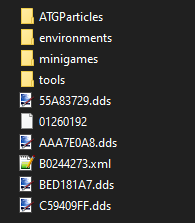
So After running Mapper on the extract BAR we get something like this, it's not perfect, there are still some unknown files, but it's much better. This is the same file structure we see in NPIA00010/USRDIR/

upload_2022-8-3_14-54-54.png

STEP 4: MANUAL STEPS

After using HomeTool to to the mapping there are some manual steps that slow the process down a lot:

1. There will be an xml file (sometimes a *.scene file) in the root of the folder. This file needs to be renamed to same name as the SDAT, and moved into a freshly created SCENES folder.

2. The other files in the root need to be moved into a freshly created UNKNOWN folder. This folder needs to be moved into the environments\XXXXX\ folder. This is different on each scene but can be found by searching for a PROBE file. These are just moved here so they are not in the root as they will get lost among other files there. and also so they are kept in the scenes subfolder for later.

3. Every file and folder from the root down needs to be renamed so they are UPPERCASE - VERY IMPORTANT

4. Now we need to manually create the SDC file. This is a bit like the PARAM.SFO for a scene. Its a small xml with a few simple fields. These are optional, but its nice to have a title and thumbnail in the app. Normally the HDK will create these the first time you launch a scene from the scene editor, but its easy enough to just use a basic template and fill out these 4 fields.

upload_2022-8-3_16-0-13.png


  • NAME - you can put anything here
  • DESCRIPTION - You can put anything here
  • MAKER - you can put anything here. I have been abbreviating the developer name, and putting HDK ver and size here so its easier to tell the different version of the same scenes apart. This is not official but I find it useful.
  • IMAGE PATHS - Here I find it best to use same names for the 3 images, and jus change the sub folder. This makes it easier to use a template. Really only the LARGE.PNG image is used afaik, the others were for other places like online mode, and the store so no need to add them really unless you want to. LARGE.PNG should be 320x176 , SMALL.PNG and MAKER.PNG should be 128x128.
This SDC needs to be created and named the same as the SCENE file, and put in the SCENES folder along side the corresponding SCENE file. This SCENES folder will become USRDIR/SCENES/ when we install the scene.

Here is what the above SDC produces on the console:
upload_2022-8-3_15-57-57.png

Vs if no SDC file exists:
upload_2022-8-3_15-45-14.png

5. The thumbnails need to be created in the THUMBNAILS folder (USRDIR/THUMBNAILS). This is optional, if the thumbnail is not found there is no issue.


That is about the basics of converting a SDAT scene into a folder of resources. To test this scene all you need to do is get all those files into the NPIA00010/USRDIR folder for testing. Some scenes will have more stuff that this, but you should have something like this to make up a basic scene called MYTEST.
  • NPIA00010/USRDIR/ENVIRONMENTS/MYTEST/*.* (PROBE, MDL, HKX, DDS etc in here)
  • NPIA00010/USRDIR/ATGPARTICLES/MYTEST/*.* (More shite in here, EFX, DDS)
  • NPIA00010/USRDIR/SCENES/MYTEST.SCENE (xml with paths to resources)
  • NPIA00010/USRDIR/SCENES/MYTEST.SDC (xml file with info and thumbnail path)
  • NPIA00010/USRDIR/THUMBNAILS/MYTEST/LARGE.PNG

To test that scene all you need to do is add this one line to the NPIA00010/USRDIR/ENVIRONMENTS/LOCALSCENELIST.XML like this:
Code:
<SCENE Name="My Test" SceneID="" version="0" Type="Home" Group="Home" KEYWORDS="Test" config="SCENES/MYTEST.SCENE" />

6. Then we have to find out what those missing files are. I have had some look by opening them all in Notepad++ and HEX and looking for paths. Often they can be found this way.

If that does not work then loading the scene and looking for missing stuff, this can be checked in the dev console if you get that far. Cobra output is also handy here, can compare log of open_path to the existing files.

More to come in a while. I am hoping to automate most or all of this.

I can share the tools I used if anyone asks, but I can not vouch for them being safe etc so it will be 100% at your own risk. I think they are fine but you know what its like with these kind of tools, they can give false positive for malware in virus scans.
 
Last edited:
I don't know when right now, But I am still working on it.

I have made some discoveries since. I think this is probably why Destination Home stopped working on offline. Their files are far from complete due to a major issue.

When PS Home normally runs scenes, it mounts the contents of the SDAT to the file system. Then when you load another scene, it unmounts the first one, and mounts the next SDAT (SDAT is basically an encrypted BAR file, BAR files are mounted in the same way)

What I figured out recently is that some of the supposedly "common" files such as USRDIR/SCRIPTS/COMMON/*.LUA and USRDIR/SETTINGS/*.LUA and many RSS related files too, are not actually "common" at all. Each scene can have unique versions of these files. Basically what it looks like happened is that the devs used templates that all linked to same generic file names, Some of the devs, edited these paths so that the resources used by a scene were unique, but many did not. So when you try to run the scenes as folders and put all the resources into one folder, you end up overwriting tonnes of unique files every time you add a scene, and breaking stuff that was added previously.

The devs got away with being messy like this because only the files for one scene were visible to the system at a time. Now we need to fix it. Its not hard really, extract SDATS again, load each scene on its own, then move all resources into unique folder name for each, then edit all paths that link to those resources, its just that resources can be linked in any one of hundreds of places, as each scene uses unique folder layout and unique file names in most other places. and they can call on dozens of objects, So its basically following path of xmls and lua files, to make sure what its looking for exists.

I have done this with 2 scenes, and loads of stuff that did not work before now works. Maybe I can create a tool that will search for and fix these paths.. not sure. But anyway it's all good really, and more progress towards getting it working properly.


Some examples of stuff that was not working before I started debugging it, all this done just by adding correct files in the right places, and making sure there are file conflicts with other scenes, there's more working too, like sound effects located and linked up. Special thanks to @esc0rtd3w and @bguerville for helping with the payload, its made everything much easier. And thanks to SplicedWave for sharing the CACHE data he has collected.

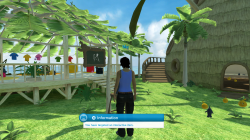
RSS screen idle image now showing up with pop up, Kulche animations working:
PlayStation®Home_4.png

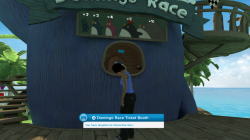
betting place pop up showing with betting numbers overhead:
PlayStation®Home_3.png

Lua game play instructions mini game now working fully:
PlayStation®Home_2.png

All 7 shops showing pop ups, Bit more work to be done to get the shops fully working:
PlayStation®Home .png

This RSS item showing main image and pop up:
PlayStation®Home_5.png
 
Last edited:
What I figured out recently is that some of the supposedly "common" files such as USRDIR/SCRIPTS/COMMON/*.LUA and USRDIR/SETTINGS/*.LUA and many RSS related files too, are not actually "common" at all. Each scene can have unique versions of these files. Basically what it looks like happened is that the devs used templates that all linked to same generic file names, Some of the devs, edited these paths so that the resources used by a scene were unique, but many did not. So when you try to run the scenes as folders and put all the resources into one folder, you end up overwriting tonnes of unique files every time you add a scene, and breaking stuff that was added previously.

The devs got away with being messy like this because only the files for one scene were visible to the system at a time. Now we need to fix it. Its not hard really, extract SDATS again, load each scene on its own, then move all resources into unique folder name for each, then edit all paths that link to those resources, its just that resources can be linked in any one of hundreds of places, as each scene uses unique folder layout and unique file names in most other places. and they can call on dozens of objects, So its basically following path of xmls and lua files, to make sure what its looking for exists.

It looks like these folders are cache folders. The files were overwritten when a scene was downloaded.

Probably an easier approach could be using a PS3_EXTRA menu with the scenes, so all the required files are installed before launch it, without having to edit anything.
 
It looks like these folders are cache folders. The files were overwritten when a scene was downloaded.

You could say that yes, but they are actually like a mini file system that matches what is in USRDIR, when the SDAT is mounted/extracted whatever you want to call it, the files are accessed just like normal files, its a bit like if you mounted an ISO to dev_hdd0, so that the contents are mixed in.

Normally on OFW, The SDAT downloads once, then stays in the CACHE folder, and gets mounted again next time you load that scene.
Probably an easier approach could be using a PS3_EXTRA menu with the scenes, so all the required files are installed before launch it, without having to edit anything.

That is a possibility. I can make every scene use a different content ID too quite easily, have each scene built in on top of a base pkg of 80MB, so they can run alongside each other on the XMB, but its a bit restrictive, normally you can move from scene to scene within the game and that would break that.

What I need to do is not too bad, its just I've only got to the stage where I know it needs to be done. It's only since I went back to the SDATs that I realized the DH files are no good really for what I want.

I think I can automate some of it too.
 
Back
Top