I think i will be able to re-activate Online Updater->Core Updater to external somewere to open a text file with cores list and to download cores (to update them). But i need a free hosting web working with HTTP (https will not work with PS3). Some advice?
Btw, i been taking a look at this and works fine https://docs.libretro.com/guides/import-content/
I used the option to "Scan Directory" with a folder named ROMS located in the root of dev_usb_001... the folder contained many invalid files and other valid games, some files inside compressed .zip... and retroarch was scanning even inside the .zip files fine... then it created several playlists with the games that was found
After that some new icons appeared in the main menu (in the column at left in the ozone interface) one for every console found in the scanning
Works perfect here, and with nice performance btw, i was using one of the xbr shaders (that seems to a be a bit demanding), with the video output resized at 1920x1080, and i had 59 fps
Your talking about the LATEST retroarch for PS3 ?
where we can find it ? on retroarch.com i can only see under PS3 PLAYSTATION 3 Download PSL1GHT version
when i click on download it open a webpage saying : 404 - Not Found
Your talking about the LATEST retroarch for PS3 ?
where we can find it ? on retroarch.com i can only see under PS3 PLAYSTATION 3 Download PSL1GHT version
when i click on download it open a webpage saying : 404 - Not Found
I dont remember my version installed , but what you would choose personally between 1.9.0 & PSL1GHT ?
Last question to everyone (only about MAME roms this time) , i know Crystal is involved in both FB RL Plus & Retroarch Community Edition.
For a simple user that want his MAME roms to simply start/play without risking to freeze the console 8x time out of 10 try...
what you would recommend to me : only stick with whatever the retroarch you judge stable & efficient OR adding FB RL Plus Homebrew to my HDD on my Slim CFW PS3 (Rebug 4.86) ...only about Arcade Mame Roms speaking ?
EDIT : what roms set you would suggest to get (either for FB or Retroarch or for both ?)
its a real headache for me...
Last question to everyone (only about MAME roms this time) , i know Crystal is involved in both FB RL Plus & Retroarch Community Edition.
For a simple user that want his MAME roms to simply start/play without risking to freeze the console 8x time out of 10 try...
what you would recommend to me : only stick with whatever the retroarch you judge stable & efficient OR adding FB RL Plus Homebrew to my HDD on my Slim CFW PS3 (Rebug 4.86) ...only about Arcade Mame Roms speaking ?
EDIT : what roms set you would suggest to get (either for FB or Retroarch or for both ?)
its a real headache for me...
Because it will have fixes that the last versions does not have, like scanning of content as one example..
This is BETA because the original PKG of RetroArch has been such a mess and we as a community are trying to restore and fix and remove (unneeded) as much as possible. Lead by developer @Crystal..
Right now the goal is getting as many bugs corrected that create a black screen freeze in various menus
Creating a proper core set for the PS3. (Stable) and making sure all playable cores are included and non working ones excluded.
Then a look at lighting the pkg size as there is ALOT that does not pertain to ports like the PS3 version.
If you installed RA 8-10 months ago, this could be 1.8.X version. I would stick with it. I can't advise about MAME - I don't use it.
I have to agree with that, this is the best version of retroarch PS3 ever released
Dont get me wrong... if some of you is waiting for a retroarch PS3 version completly stable and ready to be configured and usable with libraries of games customized by you etc... this version is not ready yet but is very usable
We are trying to find the problems (to either remove that feaure or to fix it), and optimize it for PS3
Keep in mind the original retroarch is very focused in nintendo consoles... i dont want to offend anyone but there are some things in it that doesnt makes sense in PS3
Edit:
Just ot mention a couple of details...
The ozone interface contains an icon named "switch.png" with a nintendo switch... this is wrong in concept because the interfaces should be "console agnostic"
Some of the overlay images and the "touch screen" functions are pointless for PS3... some of that overlays images are intended to be displayed on top (or outside) of the game screen... are the same controls used in smartphones with touch screens, etc... where you see an icon of the sticks and buttons and you press in them with your finger (and they moves when you touch them)
There are some "wallpapers" images with a size bigger than 3000x2000 pixels (4MB in a single file)
Some of the icons inside ozone interface named "battery***.png" are intended for portable devices with a battery (portable consoles, notebooks, smartphones, etc...), the PS3 doesnt needs them, are 9 icons for every "theme" and we have 10 or 12 themes, so we are talking about around 90 files just for the battery icons (his total size is small, but are pointless for PS3 anyway)
I edited your first post @Crystal.. (added some tabs at bottom with the cores and Issues.) (still updating but we needed to isolate some of it to one post )
Personally i think is fine if the PKG size is some hundreds of MB, because retroarch is in his own category, is not a single emulator
The other day i was thinking in how to store it and eventually i thought i could burn a CD-ROM with it (so the limit could be around 700MB), i have not recorded a CD-ROM since years ago, but dunno, this have something nostalgic in it... i could even take a permanent ink marker and paint some logos in the CD-ROM like i was doing decades ago
Anyway.. that idea about burning it into a CD-ROM is not useful right now because is going to be updated several times in the incoming months
Also, think in it this way... on average every core is around 5MB... we are trying to reduce the size of the PKG but we have hundreds of files that are bigger than the cores (best example is the wallpaper image i mentioned that have 4MB)
Lets say... if we have 5MB to spend what we prefer, to spend it in a core or in a wallpaper PNG that is massive ?
With this i mean... dont get alarmed by the actual PKG size because we dont know yet the final size that is going to have after we cleanup... sure is going to be something over 300MB, but thats not so bad
*Actually, i been thinking in adding to it some databases with the "boxart", "titles", "ingame snapshots", romsets, etc... and create a ISO with everything (using PSN liberator from rudi rastelli)... this would require a backup manager to boot it, but instead of having thousands of files we would have a single ISO file (nice for the filesystems and storage devices)
I think first matter is just getting a good stable core lineup. That is not going to be an issue for anyone setting up and get going.
Lets check the cores in Beta 2.
One canidate for removal in the pkg i think is virtual jaguar (would be so much better in an addon package and i am sure there will be other cores in the libretro lineup like this). I have tested various cores and have my results in the first page and also comb a bit through this thread but there is little reports of the cores.
@JediKnight007 is a great tester for this type of thing but i know he is on a limited internet situation currently and not sure if he will be able to help with testing so will need others. I have some reporting i need to get done on the mainpage so not sure how much more i can provide in testing but will try and test some more but need your guys help.
Test cores from Beta 2 and report. Look at the first post and anything not colored needs a test
If we really want to make a ligther package the logical answer is having a base and expansion packages. (as well as removing the non-used files for this port)
If you look at the file sizes, its the emus that have bulk of the size.
When you dive deeper you are left with many options and often duplicate options.
We have a base pkg.
If we leave one of the 4 snes cores
if we have one of the mame of the two
if we have one of the fba cores (only one now, but noirmally we seen multiple.)
if we have only lynx emu of the two
if we have only one of the 3 nes cores.
if we remove fbneo as its not needed with a mame or fba core
If we remove gearboy as we already have genesis_plus_gx (or vice versa)
well i think you guys see the point,..
I love the options and i do not think we should boot them but there could be a base pkg and an extended addon package as well. Where some of the other options can be added.
Then also the usual FULL version as well.. but this approach will ligthen it up alot and STILL give the same type experience for most with just the base package.
edit:
but i think the first matter of business is figuring out what cores work and which do not for the PS3 and what should be included
The interface of retroarch is supposed to have sounds ? (you know, a sound for "ok", "cancel", etc...), im taking a look at the contents of the "assets" directory and there is a folder named "sounds" with 9 files in .OGG format (1.29MB total size) but it looks retroarch PS3 is not using them ?
The audio library used in iris supports .OGG format as far i know
Add vice (commodore) to that list of duplicated cores, there are 9 vice cores only for commodore (total size 43.6MB), i wonder if are needed so many, incase there is one of them able to run all commodore games then thats the winner
We could apply the same rule for game boy, snes, and even mame, if there is one that works fine then the others are not needed
The following programs are included:
x64, a C64 emulator;
x64sc, a C64 emulator focused on accuracy;
xscpu64, a C64 emulator with a SuperCPU cart;
x128, a C128 emulator;
xvic, a VIC20 emulator;
xpet, a PET emulator;
xplus4, a PLUS4 emulator;
xcbm2, a CBM-6x0/7x0 emulator;
xcbm5x0, a CBM-5x0 emulator;
From that list i would keep only x128 because the original model is the x64, and i guess x128 superceedes x64
In other words... all games published for the x64 should work in the x128
The Commodore 128... is the last 8-bit home computer that was commercially released by Commodore Business Machines (CBM). Introduced in January 1985 at the CES in Las Vegas, it appeared three years after its predecessor, the bestselling Commodore 64.
The C128 is a significantly expanded successor to the C64, with nearly full compatibility.
After a second inspection of the retroarch files... it seems there are 4 database files for commodore (in path USRDIR/database/rdb)
Commodore - VIC-20.rdb (51 KB)
Commodore - Plus-4.rdb (2 KB)
Commodore - 64.rdb (61 KB)
Commodore - Amiga.rdb (653 KB)
By looking at the sizes of the databases we can get a rought idea of how many games was published for each platform
It looks that 4 platforms have good support in retroarch, the fact that there are databases for them means we can use the scan functions to generate playlists with them
The emulation is made by this cores:
Commodore - VIC-20 <--- vice_xvic_libretro_ps3.SELF
Commodore - Plus-4 <--- vice_xplus4_libretro_ps3.SELF
Commodore - 64.rdb <--- vice_x64_libretro_ps3.SELF (...or vice_x128_libretro_ps3.SELF ?)
Commodore - Amiga <--- puae_libretro_ps3.SELF
Add vice (commodore) to that list of duplicated cores, there are 9 vice cores only for commodore (total size 43.6MB), i wonder if are needed so many, incase there is one of them able to run all commodore games then thats the winner
We could apply the same rule for game boy, snes, and even mame, if there is one that works fine then the others are not needed
From that list i would keep only x128 because the original model is the x64, and i guess x128 superceedes x64
In other words... all games published for the x64 should work in the x128
The BASE PKG and ADD-ON PKG are simply idea's but even with those i think there should be a FULL version no matter what.
but if that approach was done (Crystal decision) some of the above would be along the lines to approach it in my opinion. I think the focus should be a full version now and then once that is stable then secondary pkgs can be looked at if needed or if they make sense.
Also so can then lighten the overall package.
I think the main things are seeing what works and what needs to be added.
Also problematic options and menus.
From there things should fall in line better and give a stable platform which overall its about there thanks to some of @Crystal 's noticeable optimizations
edit: Also the psx-place com in the title on the xmb might be a bit much . I think a logo on some of the art is more then enough. I appreciate it but i think it would be better without it.
Im a bit divided, but there is something i know for sure, if we remove 2 or 3 cores the only thing we are going to achieve is to reduce the PKG size in 20MB or so, and that 20MB needs to be considered in relationship with the original PKG size
Lets say... if the original PKG is 400MB and we reduce it to 380MB then it doesnt makes much difference in size because 380MB is still big
Incase we decide to remove cores from the base PKG is needed to remove a lot to make it worthy
Also, is imposible to have a PKG of 50MB because this would mean to keep only 5 cores or so, and thats too bad
Also, we are not far away to complete the list of cores that technically "could" work in PS3 (not sure how many are missing, imo the most notable missing core is scummVM). I mean... there are some cores from the official retroarch that are not going to work ever in the PS3 (XBOX360, wiiU, PSVita, etc...), if we dont count that ones the list is not far away from the cores we have working
Im not sure if the actual code can do that, i know there is an option to "update core" that can download new versions of the cores from internet but...
1) It requires a previous installed core to compare his versions ?
2) It takes in consideration the presence of the playlists ?
Btw, the other day i was reading about retroarch and i realized they have a "dummy" core https://docs.libretro.com/library/dummy/
Im not sure how many things can be made with it or how to use it, but i think we dont have this core in the PS3 version
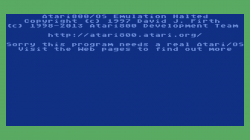
Has anyone had any luck with running Atari 5200 on Atari800?
I have had luck i can get the emu to boot but only to this screen.
I have bios in system folder.
Edit: (just add another detail)
Have not been able to get ColecoVision working on blueMSX (it has worked before on the PS3 for reference, but never directlty you always had to boot a MSX / MSX II game to have access to the ingame Options (or edit the cfg file for that game manually) to change the emulated setting to coleco. When RA scan and creates a playlist they do not autoboot or by the method i just detailed.
As i continue to play around with this, It's by far one of the best builds i seen in a long time in regards to retroarch. Its very very very close to where it needs to be. Nice work @Crystal



 )
)