RetroArch CE (Unofficial - Community Edition)

PS3 RetroArch CE (Unofficial - Community Edition) Beta 4

@Crystal I'm not sure if I should report this to you or if I should post it on github:
The core "Commodore - CMB-II 5x0 (VICE xcmb5x0)" does not download. It causes that "Update Installed Cores" get stuck downloading that core. All the other cores can be downloaded fine using the option "Core Downloader".

The free web host that i found to simulate a BuildBot server, has only 300 MByte of free space, so i had to sacrifice few cores that are hardly used.. I forgot to remove it from the list.
 
How to fix atari800 core?
I use webman to play retro games. I've also used the appropriate path to play atari5200 /dev_hdd0/ROMS/ATARI5200/

I also found problems with other core, such as hatari. when I run a ROM it only shows a black screen.

Is the Jaguar Core still unstable? because when I run a roms game I play having fps problems. slower than other core.

What core are used to play NEO GEO CD?

Sorry if iask a lot of question. Thank's
 
How to fix atari800 core?
I use webman to play retro games. I've also used the appropriate path to play atari5200 /dev_hdd0/ROMS/ATARI5200/

I also found problems with other core, such as hatari. when I run a ROM it only shows a black screen.

Is the Jaguar Core still unstable? because when I run a roms game I play having fps problems. slower than other core.

What core are used to play NEO GEO CD?

Sorry if iask a lot of question. Thank's

To play well with atari800 core you have to wait my next update to retroarch layer 1.9.1 for that core. WIth 1.9.1 update you will have per-folder core option save, to save core setting for the folder where are sub-system core roms....and there isn't a specific name folder for roms.
Jaguar Core i dont remember well about it.
For neo geo cd use fbneo core and put isos in a folder named neocd

Byez.
 
Last edited:
Can we play multiplayer in 1 screen, especially for the GBA, GBC, GB games? so we run the same core and game on 1 PS3, like we play split screen
does it only apply to Retroarch PC?
 
Just now you can download atari800, mgba, fbneo, fceumm and bluemsx updates.
Cores with Retroarch layer udated to 1.9.1.

It looks like there is a bug in the update information about the cores. If I go to Core Downloader, select to update a core manually, wait until it completes the update, then try to download the same core; for some cores it says that the latest version is already installed, but for others the core is downloaded again.

These icons are swapped. Also at certain distance from the screen they look like d-pad icons.
upload_2021-4-16_15-42-55.png
 
Last edited:
It looks like there is a bug in the update information about the cores. If I go to Core Downloader, select to update a core manually, wait until it completes the update, then try to download the same core; for some cores it says that the latest version is already installed, but for others the core is downloaded again.

These icons are swapped. Also at certain distance from the screen they look like d-pad icons.
View attachment 32976

I have to check CRCs.... meanwhile puae core was updated.
 
How to fix atari800 core?
I use webman to play retro games. I've also used the appropriate path to play atari5200 /dev_hdd0/ROMS/ATARI5200/

I also found problems with other core, such as hatari. when I run a ROM it only shows a black screen.

Is the Jaguar Core still unstable? because when I run a roms game I play having fps problems. slower than other core.

What core are used to play NEO GEO CD?

Sorry if iask a lot of question. Thank's

Jaguar core has always been too slow to be playable.
 
Last edited:
Is there a way to generate dat from FBNeo core?

I tried to use Fbneo windows DAT and i cannot creat a playlist with it, because retroarch says that file is "bigger" and dont have memory to use it.

Some games that run on FBNeo are recognized as mame games when i do a folder scan...
 
@Crystal
What about a picodrive core for 32x? It should be than powerful enough to run on PS3.
Either way nice work.

Edit: I now know why it probably wasn't on there before. picodrive wasn't ported to Big Endian, but now it is as it's on the Wii with 32x support and as of this posting 32x only works on interpreter aka without Dynamic Recompilers. It could probably get full speed on the PS3's PPC even in interpreter mode.
 
Last edited:
Created a neocd folder, put samsho2 iso and cue inside, did a scan...nothing happened, didn't worked here.
upload_2021-4-26_9-38-24.png


upload_2021-4-26_9-38-50.png


upload_2021-4-26_9-39-25.png


samsho2.cue:
Code:
FILE "samsho2.bin" BINARY
  TRACK 01 MODE1/2352
    INDEX 01 00:00:00
  TRACK 02 AUDIO
    INDEX 00 03:43:19
    INDEX 01 03:46:19
  TRACK 03 AUDIO
    INDEX 01 04:54:62
  TRACK 04 AUDIO
    INDEX 01 06:43:62
  TRACK 05 AUDIO
    INDEX 01 10:44:15
  TRACK 06 AUDIO
    INDEX 01 13:49:21
  TRACK 07 AUDIO
    INDEX 01 17:15:17
  TRACK 08 AUDIO
    INDEX 01 20:59:02
  TRACK 09 AUDIO
    INDEX 01 22:38:44
  TRACK 10 AUDIO
    INDEX 01 25:16:57
  TRACK 11 AUDIO
    INDEX 01 28:33:15
  TRACK 12 AUDIO
    INDEX 01 31:56:40
  TRACK 13 AUDIO
    INDEX 01 33:09:70
  TRACK 14 AUDIO
    INDEX 01 36:38:43
  TRACK 15 AUDIO
    INDEX 01 39:34:61
  TRACK 16 AUDIO
    INDEX 01 42:33:31
  TRACK 17 AUDIO
    INDEX 01 46:02:06
  TRACK 18 AUDIO
    INDEX 01 48:58:66
  TRACK 19 AUDIO
    INDEX 01 51:03:05
  TRACK 20 AUDIO
    INDEX 01 53:56:39
  TRACK 21 AUDIO
    INDEX 01 56:50:33
  TRACK 22 AUDIO
    INDEX 01 57:16:01
  TRACK 23 AUDIO
    INDEX 01 57:57:49
  TRACK 24 AUDIO
    INDEX 01 58:14:52
  TRACK 25 AUDIO
    INDEX 01 58:28:54
  TRACK 26 AUDIO
    INDEX 01 58:53:58
  TRACK 27 AUDIO
    INDEX 01 59:12:61
  TRACK 28 AUDIO
    INDEX 01 59:48:67
  TRACK 29 AUDIO
    INDEX 01 60:11:70
  TRACK 30 AUDIO
    INDEX 01 60:58:03
  TRACK 31 AUDIO
    INDEX 01 61:47:09
  TRACK 32 AUDIO
    INDEX 01 62:40:70
  TRACK 33 AUDIO
    INDEX 01 63:05:66
  TRACK 34 AUDIO
    INDEX 01 64:20:52
  TRACK 35 AUDIO
    INDEX 01 64:56:54
  TRACK 36 AUDIO
    INDEX 01 66:03:70
  TRACK 37 AUDIO
    INDEX 01 66:52:64
  TRACK 38 AUDIO
    INDEX 01 67:14:64
  TRACK 39 AUDIO
    INDEX 01 67:27:67
  TRACK 40 AUDIO
    INDEX 01 67:54:46
 
View attachment 33136

View attachment 33137

View attachment 33138

samsho2.cue:
Code:
FILE "samsho2.bin" BINARY
  TRACK 01 MODE1/2352
    INDEX 01 00:00:00
  TRACK 02 AUDIO
    INDEX 00 03:43:19
    INDEX 01 03:46:19
  TRACK 03 AUDIO
    INDEX 01 04:54:62
  TRACK 04 AUDIO
    INDEX 01 06:43:62
  TRACK 05 AUDIO
    INDEX 01 10:44:15
  TRACK 06 AUDIO
    INDEX 01 13:49:21
  TRACK 07 AUDIO
    INDEX 01 17:15:17
  TRACK 08 AUDIO
    INDEX 01 20:59:02
  TRACK 09 AUDIO
    INDEX 01 22:38:44
  TRACK 10 AUDIO
    INDEX 01 25:16:57
  TRACK 11 AUDIO
    INDEX 01 28:33:15
  TRACK 12 AUDIO
    INDEX 01 31:56:40
  TRACK 13 AUDIO
    INDEX 01 33:09:70
  TRACK 14 AUDIO
    INDEX 01 36:38:43
  TRACK 15 AUDIO
    INDEX 01 39:34:61
  TRACK 16 AUDIO
    INDEX 01 42:33:31
  TRACK 17 AUDIO
    INDEX 01 46:02:06
  TRACK 18 AUDIO
    INDEX 01 48:58:66
  TRACK 19 AUDIO
    INDEX 01 51:03:05
  TRACK 20 AUDIO
    INDEX 01 53:56:39
  TRACK 21 AUDIO
    INDEX 01 56:50:33
  TRACK 22 AUDIO
    INDEX 01 57:16:01
  TRACK 23 AUDIO
    INDEX 01 57:57:49
  TRACK 24 AUDIO
    INDEX 01 58:14:52
  TRACK 25 AUDIO
    INDEX 01 58:28:54
  TRACK 26 AUDIO
    INDEX 01 58:53:58
  TRACK 27 AUDIO
    INDEX 01 59:12:61
  TRACK 28 AUDIO
    INDEX 01 59:48:67
  TRACK 29 AUDIO
    INDEX 01 60:11:70
  TRACK 30 AUDIO
    INDEX 01 60:58:03
  TRACK 31 AUDIO
    INDEX 01 61:47:09
  TRACK 32 AUDIO
    INDEX 01 62:40:70
  TRACK 33 AUDIO
    INDEX 01 63:05:66
  TRACK 34 AUDIO
    INDEX 01 64:20:52
  TRACK 35 AUDIO
    INDEX 01 64:56:54
  TRACK 36 AUDIO
    INDEX 01 66:03:70
  TRACK 37 AUDIO
    INDEX 01 66:52:64
  TRACK 38 AUDIO
    INDEX 01 67:14:64
  TRACK 39 AUDIO
    INDEX 01 67:27:67
  TRACK 40 AUDIO
    INDEX 01 67:54:46

I have neocdz.zip inside retroarch system folder... I ll try this way.
 
At this point use same files in a PC folder, use retroarch for PC with logs on screen, then see if it works or not. if not then you can see why, reading logs.
 
At this point use same files in a PC folder, use retroarch for PC with logs on screen, then see if it works or not. if not then you can see why, reading logs.

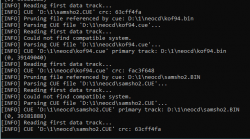
Tested on windows.
"could not find compatible system."
Bios are in system folder, named neocdz.zip, using FBNeo core...

Works on windows only selecting subsystems and finding iso.

EDIT: your screenshots are from FBNeo. I´m using Retroarch CE.
 

Attachments

  • Screenshot 2021-04-26 164139.png
    Screenshot 2021-04-26 164139.png
    33.1 KB · Views: 33
Last edited:
Back
Top