
- Forums
- PlayStation 3 (PS3)
- PS3 Homebrew
- PS3 Homebrew Apps / Plugins / Emulators
- Emulators for PS3
- RetroArch
You are using an out of date browser. It may not display this or other websites correctly.
You should upgrade or use an alternative browser.
You should upgrade or use an alternative browser.

PS3 RetroArch CE (Unofficial - Community Edition) Beta 4


JediKnight007
Member
Got Pier Solar enhanced music to work! Patch the Pier Solar rom, and stick it in a folder with the CD iso and the CUE sheet, like this...
Pier Solar.md
Pier Solar.iso
Pier Solar.cue
CUE file should look like this...
FILE "Pier Solar.iso" BINARY
TRACK 01 MODE1/2352
INDEX 01 00:00:00
TRACK 02 AUDIO
INDEX 00 48:21:14
INDEX 01 48:23:14
TRACK 03 AUDIO
INDEX 00 49:43:43
INDEX 01 49:45:43
TRACK 04 AUDIO
INDEX 00 54:07:29
INDEX 01 54:09:29
Run the game file, not the iso or CUE. Unfortunately, I couldn't transfer my save over with a simple renaming, it just said "Disc disabled" on boot. I guess CD access is written into the save file, but I don't know where. Need to do some hex experimenting here...
Rock n Roll Racing hack also works, that game has OGG music files rather than a CD iso. It also has features like new drivers, cars, weapons, tracks, 6 cars on the track, plus other stuff.
Pier Solar.md
Pier Solar.iso
Pier Solar.cue
CUE file should look like this...
FILE "Pier Solar.iso" BINARY
TRACK 01 MODE1/2352
INDEX 01 00:00:00
TRACK 02 AUDIO
INDEX 00 48:21:14
INDEX 01 48:23:14
TRACK 03 AUDIO
INDEX 00 49:43:43
INDEX 01 49:45:43
TRACK 04 AUDIO
INDEX 00 54:07:29
INDEX 01 54:09:29
Run the game file, not the iso or CUE. Unfortunately, I couldn't transfer my save over with a simple renaming, it just said "Disc disabled" on boot. I guess CD access is written into the save file, but I don't know where. Need to do some hex experimenting here...
Rock n Roll Racing hack also works, that game has OGG music files rather than a CD iso. It also has features like new drivers, cars, weapons, tracks, 6 cars on the track, plus other stuff.

Lambada
Member
Did you use the SRAM save or Snapshot? Try both types of Retroarch saves.Got Pier Solar enhanced music to work! Patch the Pier Solar rom, and stick it in a folder with the CD iso and the CUE sheet, like this...
Pier Solar.md
Pier Solar.iso
Pier Solar.cue
CUE file should look like this...
FILE "Pier Solar.iso" BINARY
TRACK 01 MODE1/2352
INDEX 01 00:00:00
TRACK 02 AUDIO
INDEX 00 48:21:14
INDEX 01 48:23:14
TRACK 03 AUDIO
INDEX 00 49:43:43
INDEX 01 49:45:43
TRACK 04 AUDIO
INDEX 00 54:07:29
INDEX 01 54:09:29
Run the game file, not the iso or CUE. Unfortunately, I couldn't transfer my save over with a simple renaming, it just said "Disc disabled" on boot. I guess CD access is written into the save file, but I don't know where. Need to do some hex experimenting here...
Rock n Roll Racing hack also works, that game has OGG music files rather than a CD iso. It also has features like new drivers, cars, weapons, tracks, 6 cars on the track, plus other stuff.
Where did you get the IPS patch, romhacking.net or archive.org?
reddermanu
Forum Noob
Hi @Crystal, please add the Blargg's NTSC RGB Filter/Shader for Snes9x in PS3 Retroarch
(http://blargg.8bitalley.com/libs/ntsc.html#snes_ntsc)
In Snes9x for Windows is amazing!!
Thank for your incredible work!
(http://blargg.8bitalley.com/libs/ntsc.html#snes_ntsc)
In Snes9x for Windows is amazing!!
Thank for your incredible work!
JediKnight007
Member
Actually, maybe it wasn't patched at all, as this game supports CD music on real hardware (game cart + CD). I used SRAM, it loads the save correctly, but it won't let me select PCM music.Did you use the SRAM save or Snapshot? Try both types of Retroarch saves.
Where did you get the IPS patch, romhacking.net or archive.org?
At least, one can use the CHD version, it saves over 200 megs versus the ISO. You need to edit the CUE sheet like this (the CHD has a CUE sheet embedded in it). There is about a 10-15 wait before the title screen comes up when using a CHD.
FILE "Pier Solar.chd" BINARY
TRACK 01 MODE1/2352
INDEX 01 00:00:00
INDEX 01 00:00:00
Last edited by a moderator:

JediKnight007
Member
Did you use the SRAM save or Snapshot? Try both types of Retroarch saves.
Where did you get the IPS patch, romhacking.net or archive.org?
I confirmed no patch is neccessary to get the enhanced soundtrack to work, just the rom, ISO, and CUE file in the same folder. I also found out why I couldn't get PCM music with my old save. My original rom was the Reprint version, but the new one I had was not - I was mixing 2 different versions. So I switched to the original rom, and now I can continue playing with the enhanced music.
However, further testing has revealed that the enhanced soundtrack is NOT compatable with a CHD, you need an ISO.

Bat_Rastard
Member
Don't know if this was mentioned before but I've been having a problem since installing Retroarch: it freezes after the 3rd ROM I load or -- after 90 mins of play -- unloading the ROM. I have to get off my couch and force a 3 beep shutdown. Perfect scenario: play one 20 min game of mk1, play one 20 min game of MK2, then either load another ROM or unload current ROM, or exit entirely = freeze with garbled screen ...
Any ideas?!?
Any ideas?!?

STLcardsWS
Administrator
Don't know if this was mentioned before but I've been having a problem since installing Retroarch: it freezes after the 3rd ROM I load or -- after 90 mins of play -- unloading the ROM. I have to get off my couch and force a 3 beep shutdown. Perfect scenario: play one 20 min game of mk1, play one 20 min game of MK2, then either load another ROM or unload current ROM, or exit entirely = freeze with garbled screen ...
Any ideas?!?
Every core has the potential to behave differently.
Likely a single core issue, or is this a widespread problem across various cores?
Bat_Rastard
Member
Every core has the potential to behave differently.
Likely a single core issue, or is this a widespread problem across various cores?
It happens with every core I've tried so far (MAME, NES, SNES, Genesis) which leads me to believe its not related to cores at all but something else. Possibly a bug/memory leak with the GUI?!?

60fpshacksrock
Member
It happens with every core I've tried so far (MAME, NES, SNES, Genesis) which leads me to believe its not related to cores at all but something else. Possibly a bug/memory leak with the GUI?!?
No problems like that on my end.
STLcardsWS
Administrator
It happens with every core I've tried so far (MAME, NES, SNES, Genesis) which leads me to believe its not related to cores at all but something else. Possibly a bug/memory leak with the GUI?!?
Each Core has the GUI in it Its like 40 apps in one. so because there is an issue in the GUI on one core does not means it on the other.
I have not noticed this bug on this version but i have seen the bug before in retroarch. usually it was a core doing it.
See if it happens if you do not use mama at all. if you have not already.
Bat_Rastard
Member
Care to list your installed cores?!?No problems like that on my end.
I can do a process of elimination that way.
60fpshacksrock
Member
Care to list your installed cores?!?
I can do a process of elimination that way.
I have not done extensive testing so to speak. But, my brother played all through Castlevania III using fceu with no crashes or anything.
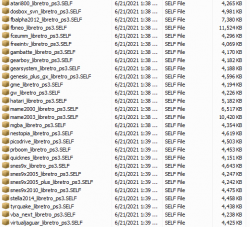
The only cores I actually use are:
fceu
snes9x_current
genesis plus gx
mame2003.
I deleted quite a bit of cores that I would never use to free up space.
Also, sometimes it does get to the point where it goes back to the XMB. The easiest fix I found was just to delete the salamander config file, whatever that is. It is really annoying if you have to
delete your main retroarch config file and then set everything back up. I have the ROMs, saves and cheats all on USB.
I have had quite a bit of experience with retroarch on console (Wii) even before I used it on PS3 so I know how unstable it can be.
Attachments
Last edited:
Bat_Rastard
Member
Okay, that's about what I went ahead and did. Deleted every core that I'm not using and started testing. "Goonies I" on fceu and "Q-Bert 3" on Snes9x Current played fine without any issues, but attempting "Gauntlet 4" on Genesis Plus GX resulted in multiple immediate freezes. That was fixed by loading as unzipped rom. I'll be testing Mame 2003 later today. Even set the file system check flag with Evilnat 2.88 and rebooted because all of these forced 3 beep shutdowns just to be safe ...
Alas if only Killer Instinct 1 and 2 weren't slide shows ... ... but I've got my PC for them!
Does 32x emulation work very well?!? Does it require the BIOS file to be in a specific place?!?
Alas if only Killer Instinct 1 and 2 weren't slide shows ...
... but I've got my PC for them! Does 32x emulation work very well?!? Does it require the BIOS file to be in a specific place?!?
Last edited by a moderator:
60fpshacksrock
Member
The issue could be with your CFW.
Speaking of 32x emulation, not yet as its slow as there is no Dynamic Recompiler for it (yet). And no, a BIOS is not required for 32x emulation.
Hopefully you can find and fix the problem.
Speaking of 32x emulation, not yet as its slow as there is no Dynamic Recompiler for it (yet). And no, a BIOS is not required for 32x emulation.
Hopefully you can find and fix the problem.
Bat_Rastard
Member
Well, I updated from Ferrox 4.87 to Evilnat 4.88 before testing. The only freeze so far was the junk Gauntlet 4 zipped rom.
60fpshacksrock
Member
It would be nice if team Rebug would release CFW for newer firmware version. I have heard that Rebug has the overall best compatibility for homebrew and stuff.

Install Evilnat 4.88. It is as good as Rebug Lite CEXIt would be nice if team Rebug would release CFW for newer firmware version. I have heard that Rebug has the overall best compatibility for homebrew and stuff.
It is uncertain if there will be another Rebug REX in the future.
60fpshacksrock
Member
Install Evilnat 4.88. It is as good as Rebug Lite CEX
It is uncertain if there will be another Rebug REX in the future.
Thanks, but no thanks. I will stick with Rebug unless I need to update.
Similar threads
-

-
 PS2 RETROLauncher (Launcher created on Enceladus for Retroarch, POPStarter, Neutrino, wLE_ISR and OPL)
- Started by Boon Tobias
- Replies: 124
-
 PS5 [PS2 on PS5 / PS4] RetroArch PS2 (via Mast1c0re hack) - Includes 10 Libretro Retro Core's playable
- Started by STLcardsWS
- Replies: 8
-
 PS2 [POC/Outdated] unofficial Open PS2 Loader (uOPL)
- Started by Ripto
- Replies: 58