RetroArch (PS3)

PS3 RetroArch (PS3) - Guide (2018 - WIP) __

That's the problem I have with emulating ps2 is having the pre configuration for each game as a shortcut to a separate version of in my case (pcsx2) one for opengl/avx some for dx9 /11 3ect ect ECT but having it gone through thouroughly is gonna breath life upscaling ps2 has got to be hard because alot of glitches I see have to do with forced resolutions. But I'm no dev and it's also probopbly more native to run on ps3vspc. What can I use to run a ps2 iso and see what engine / setting/ res the game would use native. If there's a tool for that let me know, it would save me alot of time, and golden fixes for games ( San Andreas shadowing effects or bimapping/opengl r∆tchet and cl∆nk ect ECT.)

you would have to have the a config file for each game or categorys would work

SCAJ20109 Ratchet & Clank 3 - Up your Arsenal vu1 = X VU2 = X gRAPHICS DRIVER =(avx,avx2,gsdxSSE2-4 OGL! or w/e implimentation for ps3) 9SW or HW,11SW/HW,12SW/HW,OGL SW/HW! NATIVE! Bitmapping! ECT...
sort them into categorys

and run the config into liberto/ w/e emu like the ps2 classics configs.
 
Last edited:
I was going to say, why does anyone need to configure this stuff, can one person not configure it all correctly and then share their config files/file structure, things like paths should be pre configured at least. As the PS3s all have the same file structure there should not be a need for all this individual setup imo, each emulator should have preset defaults that are known to work the good on the PS3.
 
That's the problem I have with emulating ps2 is having the pre configuration for each game as a shortcut to a separate version of in my case (pcsx2) one for opengl/avx some for dx9 /11 3ect ect ECT but having it gone through thouroughly is gonna breath life upscaling ps2 has got to be hard because alot of glitches I see have to do with forced resolutions. But I'm no dev and it's also probopbly more native to run on ps3vspc. What can I use to run a ps2 iso and see what engine / setting/ res the game would use native. If there's a tool for that let me know, it would save me alot of time, and golden fixes for games ( San Andreas shadowing effects or bimapping/opengl r∆tchet and cl∆nk ect ECT.)

you would have to have the a config file for each game or categorys would work

SCAJ20109 Ratchet & Clank 3 - Up your Arsenal vu1 = X VU2 = X gRAPHICS DRIVER =(avx,avx2,gsdxSSE2-4 OGL! or w/e implimentation for ps3) 9SW or HW,11SW/HW,12SW/HW,OGL SW/HW! NATIVE! Bitmapping! ECT...
sort them into categorys

and run the config into liberto/ w/e emu like the ps2 classics configs.
The PS3 firmware contains official emulators for PS1, PS2, PSP so we dont need that cores running in retroarch, is better to forget about them
Actually, i think could be a good idea to remove them from the PS3 port @Ezio not sure if im mising some reason for not removing them, but imo are a bit pointless
I was going to say, why does anyone need to configure this stuff, can one person not configure it all correctly and then share their config files/file structure, things like paths should be pre configured at least. As the PS3s all have the same file structure there should not be a need for all this individual setup imo, each emulator should have preset defaults that are known to work the good on the PS3.
Agreed, and i would add to that list the dualshock3 button mapping for some rare cores (specially the ones that needs a keyboard)
Im not so used to retroarch and the cores, but if we can make them run without need to connect a keyboard could be handy

If someone prepares that keyboard mappings to dualshock3 buttons share the files, eventually can be added to the PS3 port
 
[11:33 PM] Autechre: you shouldn't use the stable pkg but the nightly one
[11:33 PM] Autechre: 1.7.1 was not a good release
[11:33 PM] Autechre: 1.7.2 will be much better

Admin in Retroarch Discord Server
Yes 1.7.1 is great, it would only be good to make some corrections and better stability, improve some cores and add support for a few things
 
I heard the opposite. I can't remember where

More then likely a post of mine in one of the retroarch threads.
In most cases Stable is the best option, but in some cases nighties can fix issues, but they can also bring issues in itself as well so it a bit of a mixed bagged with Nigthly and usually no one is talking about the same one often (or properly detail which build they have).

There is pros and cons to using both, best to test both if having issues, but overall your going to be better with STABLE builds but also some stable builds are well not put together as well as they should with missing cores and such. just have to test and see what does or does not fix whichever issues you may have.

The PS3 firmware contains official emulators for PS1, PS2, PSP so we dont need that cores running in retroarch, is better to forget about them
Actually, i think could be a good idea to remove them from the PS3 port @Ezio not sure if im mising some reason for not removing them, but imo are a bit pointless

Not sure what this guy was talking about but there is no PS2 Cores in any RetroArch PS3 builds.

I was going to say, why does anyone need to configure this stuff, can one person not configure it all correctly and then share their config files/file structure, things like paths should be pre configured at least. As the PS3s all have the same file structure there should not be a need for all this individual setup imo, each emulator should have preset defaults that are known to work the good on the PS3.

Some cores need system files and copyrighted content like BIOS,
Also if you (anyone) does not understand how to make it work, when it breaks you do not know how to fix it :) . Part of the scene is getting your hands dirty and learning.

Also there is new cores and there is little to no documentation (especially for the PS3 port) So just finding out how these work is a challenge and your in the dark because your not even sure if it will work if you do the step correctly.
 
Last edited:
Part of the scene is getting your hands dirty and learning
I agree with you 100% on that. I've followed guides before where they do all the work for your and just have you download a zip file and extract it and it works. Which is great because now I have everything working. But if I want to change, add, or tweak anything I'm lost.
 
@STLcardsWS I found another good site that may be helpful in your guide. It is http://nonmame.retrogames.com/. It lists every system and the best emulator for it. A lot of the times it recommends Retroarch and even tells you what core is the best. It's still being updated too with the last revision to the list on 3/27/18. What I found interesting if I've heard for a long time that the Nestopia core was the best core for NES games. However, the list was updated on 1/23/18 saying that a core called Mesen is now the best core. Not sure if that core is included with the PS3 version of Retroarch but it would be interesting to see how well it works if it is. The only additional thing would be to see whether or not it works with RetroAchievements.
 
@STLcardsWS I found another good site that may be helpful in your guide. It is http://nonmame.retrogames.com/. It lists every system and the best emulator for it. A lot of the times it recommends Retroarch and even tells you what core is the best. It's still being updated too with the last revision to the list on 3/27/18. What I found interesting if I've heard for a long time that the Nestopia core was the best core for NES games. However, the list was updated on 1/23/18 saying that a core called Mesen is now the best core. Not sure if that core is included with the PS3 version of Retroarch but it would be interesting to see how well it works if it is. The only additional thing would be to see whether or not it works with RetroAchievements.

Yea there may be some good bits of info in here,
http://nonmame.retrogames.com/#retroarch

No Mesen on PS3, best emulator is a broad subject though, many times one emu will play certain games better then the other one and some other games that may not be the case,
 
best emulator is a broad subject though
Yeah, I know. And while best is subjective to the user, we should at least try and set people up with a good starting point and let them decide from there.

Like I mentioned earlier, i believe most people would use the Nestopia core. However Nestopia doesnt support retro achievements but FCEU does. I found a list that tells you every retroarch core that supports retro achievements here (https://docs.libretro.com/guides/retroachievements/). What I'd like to do now is compare the list of cores that come with the PS3 version of retroarch and compare that list with the nonmame list and the retro achievements list to come up with a base list of cores that everyone should start off with for the best experience and then go from there.

Speaking of the cores that come with the PS3 version, I can't find any official information on the libretro site for what cores are included. The only place I found was on brewology here (https://store.brewology.com/ahomebrew.php?brewid=152). Is that version there the same official version that can be found over at xbins.org? Also while searching, I came across another post here that listed cores but it was called 1.7.1 extended version (http://www.psx-place.com/threads/retroarch-1-7-1-extended-version.17068/). Is that version better since it has more cores? Is it another official version or did someone fork it to add more cores?

Wow. You have been busy. While trying g to figure out what cores are in the PS3 version I decided to look at your first post to see what you put and I see you've done a lot of work on your guide. So I guess I should stop drawing out my post and read what you've written so far. I'll let you know what I think.
 
Yeah, I know. And while best is subjective to the user, we should at least try and set people up with a good starting point and let them decide from there.

Like I mentioned earlier, i believe most people would use the Nestopia core. However Nestopia doesnt support retro achievements but FCEU does. I found a list that tells you every retroarch core that supports retro achievements here (https://docs.libretro.com/guides/retroachievements/). What I'd like to do now is compare the list of cores that come with the PS3 version of retroarch and compare that list with the nonmame list and the retro achievements list to come up with a base list of cores that everyone should start off with for the best experience and then go from there.

Speaking of the cores that come with the PS3 version, I can't find any official information on the libretro site for what cores are included. The only place I found was on brewology here (https://store.brewology.com/ahomebrew.php?brewid=152). Is that version there the same official version that can be found over at xbins.org? Also while searching, I came across another post here that listed cores but it was called 1.7.1 extended version (http://www.psx-place.com/threads/retroarch-1-7-1-extended-version.17068/). Is that version better since it has more cores? Is it another official version or did someone fork it to add more cores?

Wow. You have been busy. While trying g to figure out what cores are in the PS3 version I decided to look at your first post to see what you put and I see you've done a lot of work on your guide. So I guess I should stop drawing out my post and read what you've written so far. I'll let you know what I think.

The official release of
1.7.1 had some issues
(missing cores from previous versions and since the PS3 version was moved from libretro to xbins)

1.7.1 extended release by @Ezio and @Zar Who have been maintaining the PS3 port for the most part (besides clienthax who did some great work as well in v1.7.0) This added the missing core and some experimental cores (and a few that did not work). Since some of these were new on the PS3 they did not have any PS3 documentation.


Here was the cores included in the Extended release (some actually may not work and a few like jaguar have low speed)


    • 81_libretro_ps3
    • 2048_libretro_ps3
    • atari800_libretro_ps3
    • bluemsx_libretro_ps3
    • dosbox_libretro_ps3
    • fbalpha_libretro_ps3
    • fbalpha2012_libretro_ps3
    • fceumm_libretro_ps3
    • fmsx_libretro_ps3
    • freeintv_libretro_ps3
    • gambatte_libretro_ps3
    • genesis_plus_gx_libretro_ps3
    • gw_libretro_ps3
    • handy_libretro_ps3
    • hatari_libretro_ps3
    • lutro_libretro_ps3
    • mame2000_libretro_ps3
    • mame2003_libretro_ps3
    • mednafen_lynx_libretro_ps3
    • mednafen_ngp_libretro_ps3
    • mednafen_pce_fast_libretro_ps3
    • mednafen_pcfx_libretro_ps3
    • mednafen_snes_libretro_ps3
    • mednafen_supergrafx_libretro_ps3
    • mednafen_vb_libretro_ps3
    • mednafen_wswan_libretro_ps3
    • mgba_libretro_ps3
    • nestopia_libretro_ps3
    • nxengine_libretro_ps3
    • o2em_libretro_ps3
    • pokemini_libretro_ps3
    • prboom_libretro
    • prosystem_libretro
    • puae_libretro_ps3
    • quicknes_libretro
    • snes9x_libretro_ps3
    • snes9x2005_libretro
    • snes9x2010_libretro
    • stella_libretro_ps3
    • tyrquake_libretro_ps3
    • vba_next_libretro_ps3
    • vecx_libretro_ps3
    • virtualjaguar_libretro_ps3
 
Someone needs to get ahold of pcsx2 and see about them trying there hands at a PS3 port but they would need to know exactly what the PS3 hardware is and how to control things like using the CPU and RAM and not just the gpu for rendering. I would think it would be easier to emulate on the PS3 than PC. The bios you have to rip from YOUR ps2. .... Foot in mouth
 
Last edited:
Your guide is coming along quite nicely. I really like it. Some suggestions I had while reading though:

-For each core you should have a line that says "RetroAchievements Supported:" with a yes or no next to it.

-Under settings for putting in RetroAchievements UserName and Password, you should make a note that the password will not be masked. Meaning that if someone else were to use their PS3 and find that setting, that person can find their password which could be bad especially if they use the same password for everything. For this reason I personally use a totally unique password for RetroAchievements.

-Under Netplay when you talk about cross platform play, my understanding was that only PS3 netplay with Wii U worked. Everything else didn't and had to be the same device in order to work. I could be mistaken. Maybe a list of what platforms work with each other would be a nice addition.

-Under Known Issues, you say that Database Scanning / Collections/ Playlist Building doesn't work. I haven't tried this out yet but if it really doesn't work, then maybe a guide for creating a playlist using a third party program would be good. And that will fit in nicely with your Third Party App sections.

That's all that I could come up with right now. Keep up the good work and if there is anything I can do to help let me know. I am off of work tomorrow night (Eastern Time) and I'm going to try and stay awake all night by messing around with my PS3. Let me know if you want me to test anything out like NetPlay or something.
 
-For each core you should have a line that says "RetroAchievements Supported:" with a yes or no next to it.

All core feature will be added Still alot of work to be done on that area of the guide yet.
Kind of basic right now on the info and details.

-Under settings for putting in RetroAchievements UserName and Password, you should make a note that the password will not be masked. Meaning that if someone else were to use their PS3 and find that setting, that person can find their password which could be bad especially if they use the same password for everything. For this reason I personally use a totally unique password for RetroAchievements.

Thanks will add

-Under Netplay when you talk about cross platform play, my understanding was that only PS3 netplay with Wii U worked. Everything else didn't and had to be the same device in order to work. I could be mistaken. Maybe a list of what platforms work with each other would be a nice addition.

Have not used NETPLAY myself so any help on that would be great.

-Under Known Issues, you say that Database Scanning / Collections/ Playlist Building doesn't work. I haven't tried this out yet but if it really doesn't work, then maybe a guide for creating a playlist using a third party program would be good. And that will fit in nicely with your Third Party App sections.

Rather hound the devs to get it working :)

but you can create one manually (i will note that eventually as well or anyone else is welcome to before i do. i did it in a post a couple months ago in some retroarch thread here),

i am sure there is a program that could be made or even maybe someone has made something?
That's all that I could come up with right now. Keep up the good work and if there is anything I can do to help let me know. I am off of work tomorrow night (Eastern Time) and I'm going to try and stay awake all night by messing around with my PS3. Let me know if you want me to test anything out like NetPlay or something.

Just keep doing what you are doing :) (keeps me motivated )
but if you see a section or area you know something about or could add just detail it in a post here and i can add it where ever it fits.
 
Someone needs to get ahold of pcsx2 and see about them trying there hands at a PS3 port but they would need to know exactly what the PS3 hardware is and how to control things like using the CPU and RAM and not just the gpu for rendering. I would think it would be easier to emulate on the PS3 than PC. The bios you have to rip from YOUR ps2.

Anything with homebrew emulation that is 3d is a no go or very slow.on the PS3
 
Is pce fast still broken with cd rom games? I haven't been able to run this in a year..
It used to play Dracula X english patched just fine... I have the syscard3 in both the system and roms folder.
The cue structure is correct too. Sega cd runs fine but this.. What gives?
 
I didn't have as much free time last night to do everything I wanted to test but here's what I did so far and the outcome. I am using the official stable release of retroarch 1.7.1 from the xbins site. Not the extended version.

I have a complete No-Intro NES romset minus duplicates using the latest parent/clone datfile. I transferred all those roms in .zip format to the internal PS3 hard drive to the folder recommended in that Italian Webman Mod guide which was hdd01/ROMS/NES. All roms immediately showed up in Webman and loaded into retroarch just fine.

Next I tried to scan in my NES roms into retroarch even though I was told that the scanning feature didn't work. I was surprised when it actually started to scan but seem to crash at the same spot every time. I narrowed it down to two games called "Game Master Kid (Unknown) (Proto) (Unl).bin" and "Game Master Kid (Unknown) (Proto) (RAM) (Unl).bin" that was causing the issue but I don't know why. Here is those games information from the No-Intro datfile in case anyone can figure out why it was causing the crash.

Code:
<game name="Game Master Kid (Unknown) (Proto) (Unl)">
<description>Game Master Kid (Unknown) (Proto) (Unl)</description>
<rom name="Game Master Kid (Unknown) (Proto) (Unl).bin" size="16384" crc="8A247477" md5="4C5B210A3D960BF48621C54DED5A2F75" sha1="DC7A75C433622E4E8A5600D5297DB267F101E20B"/>
</game>
<game name="Game Master Kid (Unknown) (Proto) (RAM) (Unl)">
<description>Game Master Kid (Unknown) (Proto) (RAM) (Unl)</description>
<rom name="Game Master Kid (Unknown) (Proto) (RAM) (Unl).bin" size="2048" crc="AA416453" md5="2574A379BF7C2CB0A6AE096A165D7EDF" sha1="B0A8BD85C22F486A012331AE873F87DBD855F016"/>
</game>

So I deleted those 2 games from my PS3 and scanned again and everything scanned in just fine.

Now that I had all my NES games scanned in and showing up in retroarch, I wanted to try and download the thumbnails for the games. So I created a thumbnails folder in the retroarch cores folders and pointed retroarch to it. When I tried to download the thumbnails from the online updater, the percentage would count up from 0% to 8% downloaded and then start over again. It did this several times before finally freezing and locked up my PS3 to where I had to hold down the power button to turn it off. I could have sworn that before I created the thumbnails folder that when I tried to download them that it actually got to 100% downloaded but then never extracted.

And that's it. Hope you find this interesting. I'm going to bed now but when I get to work tonight I'm going to post my findings in the retroarch discord and see if anyone there finds my issues interesting and if there is a thing they can do to fix it.
 
I didn't have as much free time last night to do everything I wanted to test but here's what I did so far and the outcome. I am using the official stable release of retroarch 1.7.1 from the xbins site. Not the extended version.

I have a complete No-Intro NES romset minus duplicates using the latest parent/clone datfile. I transferred all those roms in .zip format to the internal PS3 hard drive to the folder recommended in that Italian Webman Mod guide which was hdd01/ROMS/NES. All roms immediately showed up in Webman and loaded into retroarch just fine.

Next I tried to scan in my NES roms into retroarch even though I was told that the scanning feature didn't work. I was surprised when it actually started to scan but seem to crash at the same spot every time. I narrowed it down to two games called "Game Master Kid (Unknown) (Proto) (Unl).bin" and "Game Master Kid (Unknown) (Proto) (RAM) (Unl).bin" that was causing the issue but I don't know why. Here is those games information from the No-Intro datfile in case anyone can figure out why it was causing the crash.

The Extended Version the Content Scanning is broken (FYI @Ezio & @Zar)

In the latest Nightlies for v1.7.1 it is fixed. (at least its scanning now, will have to confiirm when it finishes but before would not scan)


Which i know the next version by Ezio/zar (or RetroArch) will have these fixes, but just wanted to note it is broken on the Extended version but i can confirmed (at least NES scanning is working) Same set was not detected on Extended version

Thanks @Clutz450 your post have been great and we need more user's like yourself posting experiences and test :)

Edit:
"Game Master Kid (Unknown) (Proto) (Unl).bin" and "Game Master Kid (Unknown) (Proto) (RAM) (Unl).bin"

Results Stopped on Game Master Kid as well.

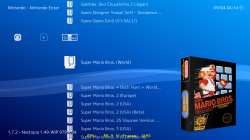
Cover working as well:)
Will be able to update the guide with some fun stuff soon as well :)
RetroArch PS3_1.png

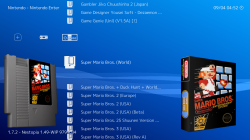
also the new feature of left side thumbnails
RetroArch PS3_2.png

edit:
There is still some scanning issues/
- Can only scan one time per boot of app.
on 2nd scan stays at 0% preparing to scen
 
Last edited:
Yeah, tbh I already knew (I heard) that 1.7.0 had definitively fixed the scan issues, so I wonder why it doesn't work on extended version. It could be cause of the fact that the frontend source code get daily updated, so a commit can break stuff and the next one can fix it, if you use the one introducing the regression then you can meet these issues i guess. :P Anyway i'll check it. :)

A new release with fully working and updated cores seems to be necessary, possibly with only cores set like 'green' from list, once the various tests are finished. :)
 
Last edited:
Back
Top