PS2 “Skip Sony Logo” not working on latest FMCB v1.966

BrownKen07

Forum Noob
I have set the option to "Skip Sony Logo" to be off as I want to see the PS2 logo before it takes me to menu. I have FMCB installed with the latest update along with the latest OPL (v1.2.0). I only have my configuration settings saved in slot 2 (and my it is not saved anywhere else) which is where my Free McBoot card is inserted (and is the only place it will read it from, it does not read it on my memory card which is inserted in slot 1). It booted the PS2 logo the first time but it stopped doing this the next time. Is this some sort of glitch/ problem. Or is there something I am doing wrong?
 
It is not a glitch to still skip the sequence on an "exit" from an app for example, because that is the original behavior.
 
I do not have this issue.
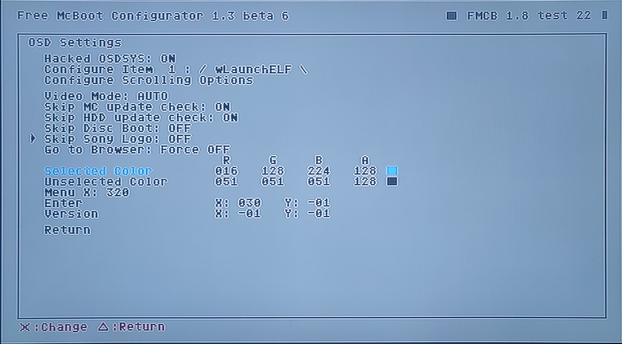
Here are my OSD Settings:
logo-skip.png


When I exit FMCB Configurator, OPL and at 1st time boot I have this animation:
logo-2.png


I have installed FMCB 1.966 (normal install) onto 2nd memory card (mc1:/).
Tested on SCPH-75004 & 70004.
 
Ok so it worked. I'm confused. What's the difference between "skip song logo" and "skip disc boot logo"? Cause that's why it was not working earlier as I had "skip disc boot logo" to on. What is "Skip Sony logo" then?
 
Such an option like "skip disc boot logo" does not exist.

Post your OSD Settings here.
Additionally try to change Go to Browser: Force OFF.
 
  • Like
Reactions: TnA

Similar threads

Back
Top