SNESticle

PS2 SNESticle LBA Fixed

Hugostoso

Member
This is a Super Nintendo emulator for PS2. Can run many games at full 60fps. Is much faster than Snes Station. However compatibility with games that uses aditional chips like DSP-1 and SA1 chips is buggy and very limited. Mode-7 is implemented but not 100% finished. Don't expect full compatibility.

Brief history of SNESticle :

SNESticle apeeared for the first time on 2005 EA's Fight Night Round 2. Exclusive to the Gamecube version included a emulated version of the SNES Super Punch-Out!! game, and within the game's code is a reference to the term "SNESticle". The name "SNESticle" is no coincidence – Icer Addis aka "Sardu"is probably best known as the author of the NESticle emulator, a relatively early and wildly popular NES emulator. "Sardu" later went on to work on several EA Sports titles, including this one. A reverge engeering project was on the way to get the emulator out from the game but in 2022 Sardu seeing the community work to reverse the emulator he himself released the SNESticle's source code including some PS2 binaries with MIT license.

Download SNESticle on Github Repository : https://github.com/tmaul/SNESticle

You can also download a ISO project bellow I made using the files on Github. This ISO can be played using OPL. This is just an ISO with no roms. You must find your own roms.
Those who want to create their own ISO. Go to the github page download SNESticle extract the zipped file then go to SNESticle\ Project\ ps2 here you find all files you need to make a ISO.

SNESticle Navigation controls :
  • Press X to confirm
  • Press ⛛ to go back
  • Press R2 and L2 during gameplay to bring the emulator navigation menu and also to make Sram saves to your memory card. There is no savestate support. It does support zipped roms.

Some games known to run at full speed :
  • Super Mario World
  • F-Zero
  • Contra 3 - Alien Wars
  • Donkey Kong County
  • Super Ghouls and Ghosts
  • Super Castlevania IV
  • Pilot Wings
 

Attachments

Last edited:
bring the emulator navigation menu and also to make Sram saves
How SRAM saves can be made on demand? This is controlled by game (or emulated game), not by machine (or emulator). Am I wrong?
 
A
How SRAM saves can be made on demand? This is controlled by game (or emulated game), not by machine (or emulator). Am I wrong?
After you have made at least one save inside a game (that has battery save in the first place of course) you will see a message "saving Sram" after you press R2 and L2. What it actually does is it just takes the save from the carturidge and copy to your memory card.
 
Last edited:
How SRAM saves can be made on demand? This is controlled by game (or emulated game), not by machine (or emulator). Am I wrong?
Do you think that some other dev on PS2 dev scene can make the source code compile under the PS2SDK ? SNESticle seems to have been compiled using Sony's SDK. If compiled with PS2SDK it could have features implemented like button configuration, save states, usb support and other things.
 
Last edited:
Testing this out now. I've already figured out that this only supports SMC formatted roms, not SFC. No ZIP support, either.

Mega Man X is amazing, sound is fantastic, too! Only strange bug I've encountered was pressing pause causes temporary graphical garbage on the screen, but simply continuing through the game stage fixes the issue.. running the 1.0 version of Mega Man X to see if the infamous piracy reset loop gets triggered.
 
Last edited:
All ROM tests are NTSC US. I seriously can't stress enough how good the sound emulation is (so far).

I was expecting to run into early SNES emulator glitches, but performance is rock-solid.

::There seems to be a consistent bug in games where pressing start and switching to menu screens causes garbage on the screen, but is remedied when progressing enough through a level. I will be calling this the 'menu issue' from here on out.

Watch this space for more updates as I continue to test.

::Mega Man X - Full speed/perfect sound. Suffers from 'menu issue'.

::Super Metroid - Full speed/perfect sound.
Suffers from 'menu issue'. Transparencies cause temporary graphical corruption. Glitch occurs where shooting through blocks will sometimes cause all of the blocks to disappear.

::Final Fantasy III - Full-speed/sound inaccuracies.

::Street Fighter II Turbo - Full-speed/perfect sound. No issues.
 
Last edited:
Testing this out now. I've already figured out that this only supports SMC formatted roms, not SFC. No ZIP support, either.

Mega Man X is amazing, sound is fantastic, too! Only strange bug I've encountered was pressing pause causes temporary graphical garbage on the screen, but simply continuing through the game stage fixes the issue.. running the 1.0 version of Mega Man X to see if the infamous piracy reset loop gets triggered.
Well something is wrong. My zipped roms all worked just fine. Are you using Winrar to zip it ?
 
After you have made at least one save inside a game (that has battery save in the first place of course) you will see a message "saving Sram" after you press R2 and L2. What it actually does is it just takes the save from the carturidge and copy to your memory card.
Oh, so saving SRAM in emulated game doesn't saving it on PS2 Memory Card but in PS2 RAM and user must do this by hand to tell emulator to copy it there? That's... strange, and annoying. ;p

Testing this out now. I've already figured out that this only supports SMC formatted roms, not SFC. No ZIP support, either.
*.smc can be headered and unheadered. The last are actually *.sfc. If my memory doesn't failed me. ^^

Do you think that some other dev on PS2 dev scene can make the source code compile under the PS2SDK?
If emu was wrote and compiled by PS2RTL, then can be rewritten for PS2SDK but not without changes in code. The good information is that we actually have source code, while for SNES-Station we have not and all mods like modules updates are made via hex edits. So I believe, sooner or later someone will fork it. ^^
 
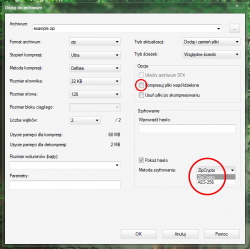
7-Zip optimizing compression by various of ways. Maybe this makes them problematic in this case? Or did You checked "compressed shared files"? Then uncheck this. In addition, which is obviously, also do not encrypt archives by typing anything in password field. And/or do not compress roms inside folders but roms alone. And/or lower the compression level. And/or lower the dictionary size (PS2 have only 32MiB of RAM ;]). Also do not change compression method, stays with Deflate as SNESticle for sure will not handle anything else.

Well, there is a lot of factors to check as 7-Zip is kind a advanced compressor which works great with default settings on PC, but preparing archives for ancient machines, You need know their limitation in basics of target archive/algo.

7zgui_zip.png

If this still will not work, try another packer like default one build in Explorer in Windows or from binutils in Linux (via i.e FileRoller or any other GUI).
 
Last edited:
As I said on the post SNESticle does support zip files.I myself ziped dozens of roms and tested all successfully. I ziped using standard Winrar zip compression, just right click at your roms,"add to archive..." > Seletc zip format > best compression > Files > Put each file to a separate archive and that's it. Follow these steps and don't change anything else
 
Not everyone have WinRAR, not everyone want to have it. ;]
Worth to mention any working alternative solutions. Especially, free and/or open src.
 
OPL !??
--------------------------------------------------
File Name : SNESticlePS2\SLUS_999.99.SNESticle.iso
File Size : 22 216 704
Image Mode : DVD 5
Size Error : Correct Size + Lock Sector
ESR Patch : No
--------------------------------------------------
Created On : 31.01.2022
Created By : ULTRAISO 8.0
Disk Name : SLUS-999-99
Application: PLAYSTATION
Volume : 20220131_084922
--------------------------------------------------
Sony ID :INCORRECT !!!!!!!!!!!!!!!!!!!!!!!!!!!!!!!!!!!!!!!!!!!!!!!!!!!!!!!!!!!!!!!!!!
Sony LOGO : Absent
--------------------------------------------------
REAL MD5 : 868589ae5c1141b135a490c91f06c4ea
4 REDUMP : 868589ae5c1141b135a490c91f06c4ea
--------------------------------------------------
REAL SECTORS: 10848 SIZE: 0x1530000
LOCK SECTOR1: 10848 END: 0x1530000
USED SECTORS: 605
ZERO SECTORS: 0
==================================================
 
It doesn't matter, it should boot anyway. Yet image is incorrect by other means (like i.e having boot image for PC ;p).
 
  • Like
Reactions: TnA
I copied the files from the ISO, added my roms and generated a proper CD image using CDGEN, then transferred to my hard drive via HDLDump.
 
Those who want to create their own ISO. Go to the github page download SNESticle extract the zipped file go to SNESticle\ Project\ ps2 there you find all files you need to make a ISO
 
To see this sort of emulation performance with this high of quality sound on PS2 is nothing short of crazy. A few days ago I started a thread on the forums speculating about whether or not the PS2 could deliver full-speed SNES emulation if one were designed from the ground-up on the system and now I have my answer.
 
I haven't tried it yet, but in any case, we need to make ELF, iso has lost its value in our time!
If you just launch SNESticle ELF you won't be able to play anything without a DVD burned with rom, SNESticle only has disc drive support to load roms or you have to use mc which has very low memory. Plus in "our time" PS2 systems are very old is just a matter of time to all disc drives to die. Using a ISO with OPL is always the best option. Even if your PS2 have a perfect funcional disc drive using OPL helps to preserve the drive. So just thinking a little bit more more we can conclude that ISOs are very useful
 
Last edited:

Similar threads

Back
Top