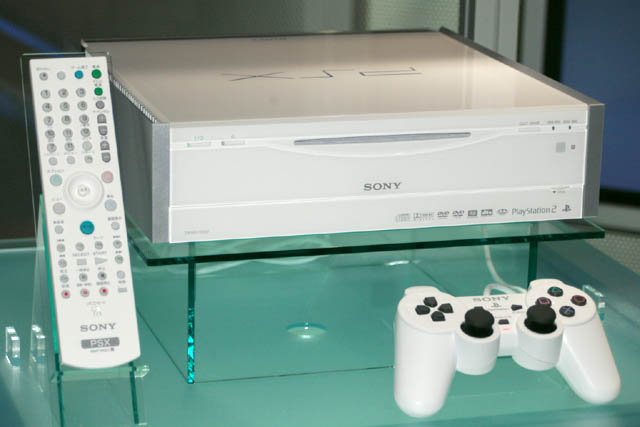
PS2 Sony PSX XMB resource files ?

sandungas

Developer
I would love to take a peek at the files that composes the XMB of the Sony PSX console
Just by looking at it i can tell is made by using the same "construction blocks" than the XMB of PSP and PS3, is not just the icons and how it moves, also the "display modes" for every "contruction block" are the same
There are too much coincidences, like the system settings screen with the installed firmware version, MAC address, IP... this "construction block" is exactly like in PSP and PS3, or how the icons "unfolds" in "depth levels" and when you enter in the second level the level at top moves out of the screen and blurries, and even the music player, etc... there are small differences but is the same stuff really, im sure about it :)

I been reading about it and it seems the PSX had an additional flash storage (a NAND chip ?)
Additionally it was shipped from factory with an internal hdd protected (i remember to read l_oliveira about dumping it but it had some kind of encryption)
Also, in wikipedia it says the system allowed to be updated (with some kind of PSXUPDAT.PUP ?)

Someone knows if:
-that software updates are availables ?
-there is an extractor to extract the contents from that software updates ?
-someone was able to dump (and decrypt i guess) flash and hdd contents ?


Video gallery
 
Firmware is BOOTROM and DVDROM, plus EPROM (from ODD) like on any other PS2. The rest is Linux distribution pre-installed on HDD. Well, that's what I heard but fw dumps confirms this I think. @sp193 should know more about it because FMCB 1.9 boot on those consoles.

I have some translations but I don't know if it's completed and where to put.
 
There were updates. The system could be either updated via the Internet (servers are now offline) or via update discs. For reasons, Sony did not seem to consider supporting USB Mass Storage devices for this. Neither was the HDD designed to be user-replaceable. Thank goodness they changed this for the PS3, and allowed users to use any generic ATA disk!

The XMB is stored on the HDD unit. The partitioning is exactly the same as on the PS2. Some XMB files are encrypted, as in scrambled. As with all other executable files, executable files on the HDD are protected by MagicGate.

There is a 8MB flash storage, but it seems to only contain boot code. For reasons, Sony did not seem to store the XMB there.
 
There were updates. The system could be either updated via the Internet (servers are now offline) or via update discs. For reasons, Sony did not seem to consider supporting USB Mass Storage devices for this. Neither was the HDD designed to be user-replaceable. Thank goodness they changed this for the PS3, and allowed users to use any generic ATA disk!

The XMB is stored on the HDD unit. The partitioning is exactly the same as on the PS2. Some XMB files are encrypted, as in scrambled. As with all other executable files, executable files on the HDD are protected by MagicGate.

There is a 8MB flash storage, but it seems to only contain boot code. For reasons, Sony did not seem to store the XMB there.
Thanks, good to know, so the files im looking for are in a partition of hdd
I guess i could find an image of one of that psx update discs, but im guessing there is not a tool to extract the contents from the installer ? :/

I think at this point i should explain a bit what im looking for exactly. And this explain is going to be a bit long and confusing because covers 3 playstation consoles (PS2/X, PSP, PS3) and im going to use some unnofficial terms (that in some way became unnofficial standard because rcomage tool), but here we go...

The XMB is build using predefined "objects", this is an unnofficial term taken from rcomage (and i use to talk about them as LEGO blocks because is a very explicit term), and there are some parts of the PS3 firmware where are named "widgets" (thought this could be confusing because inside PS3 firmware there are several different things named "widgets")
Anyway... the common way to refer to this is "rcoxml objects", and this is another unnofficial term from rcomage. What rcomage does is to "extract" info that is embedded inside the rco file structure and represent it as an xml... this is why rcomage creator decided to name this xml files "rcoxml" and the info inside them related to objects (the definitions of the LEGO construction blocks) is a "rcoxml object"
I wrote a huge page in wiki about them, no need to read or understand it completly, just scroll a bit on it to get the overall concept
http://www.psdevwiki.com/ps3/RCOXML_Objects

Most of the rcoxml objects contains a group of attributes that are common, you can see them here: http://www.psdevwiki.com/ps3/Template:RCO_TOC_Objects_standard_attributes
And after that comes more attributes that are specific for every object, as example, if we are talking about one of the "list" objects (and after the standard atributes) appears other attribute that tells how many "children" are in the list (in the wiki page are named *ItemCount)

Well... al this is inherited from PSP, actually a lot of what is written in that wiki page applyes to PSP
And one of the things that was inherited from PSP was the rco format itself, as a "resource container" to store stuff loaded by executable files

So in PSP and PS3 the definitions of the "rcoxml objects" and the "rco format" comes together (seems to be the same thing but are not)
My guess is the rco format was implemented for first time for PSP
But the "objects" (the definitions of the LEGO blocks) im sure that comes from the PSX :)

And finding them could be a long search, the most simple way is if they stored all this info as XML (probably, this is why the idea of extracting contents as xml works so well in rcomage, because the file originally was xml before "packed" into the rco)
Or maybe are stored inside another container format used in PS2 (replaced later by RCO), or a primitive variant of RCO
Or maybe this info is embedded inside executables (this is the worst scenario)

Dunno, but im very used to all this and messing around in a hexeditor, so if at some point i have the chance to take a look at this files from PSX (in unencrypted format) i think i will understand how it was made the XMB of PSX :)
 
Last edited:
I been reading about it and it seems the PSX had an additional flash storage (a NAND chip ?)
Yes, but like it was mentioned it was only 8MB and related at all on what you are aiming at.
Additionally it was shipped from factory with an internal hdd protected (i remember to read l_oliveira about dumping it but it had some kind of encryption)
I think the protection form was checking the HDD was a genuine Sony(console related) one rather than encryption of file but I am not sure on this..
Also, in wikipedia it says the system allowed to be updated (with some kind of PSXUPDAT.PUP ?)
PSXUPDAT.PUP bring barely any results while searching. Accessing the update url does not work either.
-that software updates are availables ?
Yes, in official update discs(which absolutely have to be the originals for the update to work), or with online updating. I never had a PSX and this is some info from here and there.
-there is an extractor to extract the contents from that software updates ?
There is FILES.PAK and INSTALL.PAK , there is an extractor and it's written by @sp193 itself! Here
-someone was able to dump (and decrypt i guess) flash and hdd contents ?
Check your PM.

Thanks, good to know, so the files im looking for are in a partition of hdd
There is a xosd folder/partition, not particulary sure. It's there where you should look. But not only there, even in other places.
I guess i could find an image of one of that psx update discs, but im guessing there is not a tool to extract the contents from the installer ? :/
You can find images and extract files but some of the "firmware" are generated in the process of updating, so investigating the complete HDD dump is better idea.
I think at this point i should explain a bit what im looking for exactly. And this explain is going to be a bit long and confusing because covers 3 playstation consoles (PS2/X, PSP, PS3) and im going to use some unnofficial terms (that in some way became unnofficial standard because rcomage tool), but here we go...
You know, you were right all along.
The XMB is build using predefined "objects", this is an unnofficial term taken from rcomage (and i use to talk about them as LEGO blocks because is a very explicit term), and there are some parts of the PS3 firmware where are named "widgets" (thought this could be confusing because inside PS3 firmware there are several different things named "widgets")
Anyway... the common way to refer to this is "rcoxml objects", and this is another unnofficial term from rcomage. What rcomage does is to "extract" info that is embedded inside the rco file structure and represent it as an xml... this is why rcomage creator decided to name this xml files "rcoxml" and the info inside them related to objects (the definitions of the LEGO construction blocks) is a "rcoxml object"
I wrote a huge page in wiki about them, no need to read or understand it completly, just scroll a bit on it to get the overall concept
http://www.psdevwiki.com/ps3/RCOXML_Objects
The PSX XMB has folders for each app, section, widget or whatever we can call it.
So in PSP and PS3 the definitions of the "rcoxml objects" and the "rco format" comes together (seems to be the same thing but are not)
My guess is the rco format was implemented for first time for PSP
But the "objects" (the definitions of the LEGO blocks) im sure that comes from the PSX :)
They do, the apps mentioned above, all have an "art" folder I think, which contains plain images, and a plain XML aswell. Seems familiar?
And finding them could be a long search, the most simple way is if they stored all this info as XML (probably, this is why the idea of extracting contents as xml works so well in rcomage, because the file originally was xml before "packed" into the rco)
Or maybe are stored inside another container format used in PS2 (replaced later by RCO), or a primitive variant of RCO
Or maybe this info is embedded inside executables (this is the worst scenario)
There is a XML for each app, there is a XML for all the section of the XMB, and the XML come really close to the ones of the PSP and PS3 we get after extracting the rco, you got to love this.

Dunno, but im very used to all this and messing around in a hexeditor, so if at some point i have the chance to take a look at this files from PSX (in unencrypted format) i think i will understand how it was made the XMB of PSX :)
The PM should be more than enough.
There is absolutely no doubt that PSX was the base of the PS3 and PSP.

There is a .db file in one of the HDD dumps, it's a SQLite database. It's fields are something like: xosc/ButtonLayout.... THE xRegistry.sys!!!!!!!!

There is even something like x1/UpdateURL..... hence confirming your theory: x1 for PSX, X2 most likely for PSP and x3 for the PS3.

So yes, you are a heck of a clever man @sandungas
 
Thanks :)
I have not spend much time looking at the files, but i have to admit in the english translation files posted by uyjulian there is a lot less coincidences than i was expecting to find

Anyway, there are a few codenames that matches, and i realized about another coincidence that called my attention
In the english translation files there are lot of xml files, but (i think) can be grouped in categories, is needed to open the xml file to see it (at the name of the first tag)
Some of them are for <App> (this ones doesnt matters for what im going to explain), and some others are <PSML2> (this ones was what called my atention)

It seems the PSML2 files are who stores the definitions of the contents that are displayed in the horizontal and vertical XMB bars, and are doing the same functions than the XMBML files of PS3
Actually both names PSML2 and XMBML are a acronyms made by a "contraction" of 2 words (word1 + XML)

PS2 + XML = PSML2 (for PSX)
XMB + XML = XMBML (for PS3)

I dont remember to see any file like this for PSP, as far i remember PSP was not using external xml files, but i guess it doesnt have much importance if PSP was using them or not, this detail doesnt debunks what im explaining

The XMBML files of PS3 are the ones at path dev_flash/vsh/resource/explore/xmb/****.xml (open the file and look at the name of the first tag)
The format of PSML2 and XMBML are very different though (but the point is the purpose seems to be the same... are different ways to achieve the same goal)
 
Last edited:
While reading i had the coolest flashback ever! Nice discussion!
I bet the PSX-update-disks are scrambled in any way like the PS2-update disks.
 
So I guess you guys are going to see if it is possible to add the XMB to the PS2 system? That would be pretty damn cool.
 
So I guess you guys are going to see if it is possible to add the XMB to the PS2 system? That would be pretty damn cool.

In theory that would be possible as everything unique to DESR models is on HDD as OSD Update. At least this is how I understand it. So in theory this would work the same as PSBBN which was hacked sometime ago to work with custom ATAD(whatever). Would be super cool if we could keep both them at once, with switching on next boot somehow. ^^
 
@sandungas. That sound pretty cool. Does the Ps3 use .DLL files (I'm kinda' a noob lol)
No, is from the PSX (the first PlayStation console with the XMB interface), this thread is a bit about XMB archaeology :D
Console_psx.jpg
 
i always told my fellow hispanic friends from spain and almost all south america from mexico to argentina. that the PSOne is not the PSX as some (many many) pirated games had in the cover.

sorry this dont contributes anything to the thread
 
@sandungas Could be just name coincidence. Isn't DLL files are only Windows oriented?

@xXxPiKaChArUxXx PSX is a proper shortcut for PlayStaton. It was codename (like i.e Dolphin for GC or Katana for DC), so everyone in those times take this acronym (well, look at header of the executables ;)). Years later when PlayStation One appeared, peoples start using "PS1". And when Sony give birth to their set top box with PS2 entrails, they decided to mess with us giving DESR models the PSX name. But the king can only be one and every old geezers keep in their hearts PSX, the PlayStation-X. :D
 
@sandungas Could be just name coincidence. Isn't DLL files are only Windows oriented?

@xXxPiKaChArUxXx PSX is a proper shortcut for PlayStaton. It was codename (like i.e Dolphin for GC or Katana for DC), so everyone in those times take this acronym (well, look at header of the executables ;)). Years later when PlayStation One appeared, peoples start using "PS1". And when Sony give birth to their set top box with PS2 entrails, they decided to mess with us giving DESR models the PSX name. But the king can only be one and every old geezers keep in their hearts PSX, the PlayStation-X. :D


ha ha yeah we now know that, i even remember a mexican gaming magazine calling the SNES CD, SNES playstation, and Playstation project X, as codename for the know unreleased console, which could all be correct.

but what most people call the PS1 as PSX is because piracy games, those had in the cover PSX instead of the full word playstation. most people didnt even know about codenames of consoles or executables. :indecisiveness:
 
Package dumps and HDD dumps have surfaced. Look for "Looking for PSX DVR related files"

The "DLL files" are not actually Windows PE files. They aren't ERX either, so I'm not sure what they are. Their file names end in .rel

Hurricane is probably an internal codename.

PSML is used for PSBBN, and Pawn (formerly called Small) is used as its scripting language.

The image assets are a mix of PNG, TGA, and TIM2 formats. Not sure why they didn't settle on one image format.
 
Code:
UpdateCenter/server_uri
https://jaft.psupdate.us.playstation.com/psja/psx1
*xUpdateCenter/dns_ip
64.157.7.44 =
%xUpdateCenter/set_dns

http://ft.npt.us.playstation.com/bbn1/
162.49.100.70

http://d1.us.playstation.com:8001/bbn-us/EN/
http://d2.us.playstation.com:8002/bbn-us/EN/
http://d3.us.playstation.com:8003/bbn-us/EN/
 
Back
Top