
You are using an out of date browser. It may not display this or other websites correctly.
You should upgrade or use an alternative browser.
You should upgrade or use an alternative browser.
PS3 Switch X and O on Japanese Consoles Imported To EUROPE or USA
- Thread starter Joscah
- Start date

jcorrea
PSX-Place Supporter
I think it's possible with Rebug (maybe with rebug toolbox), because I saw some strings about it when I was checking the translation for Evilnat CFW: "msg_button_assignment_title" and "msg_button_assignment_info".Hello everyone, I just recently realize that my Japanese PS3 Slim hadand
buttons toggled.
So,
The problem is in the PS3, not in the controller device.
I have checked Debug Settings seeking for an option, but I think it's not possible. I would like to figure out if using any hombrew such as MultiMAN, WebMAN or even @LuanTeles PS3 Proffesional Mod could solve this problem? Would be funny if you could set any action to any button you choose.
Pray for me, I don't want to get used to it!
Code:
<Text name="msg_button_assignment_title">Button Assignment</Text>
<Text name="msg_button_assignment_info">Switches and buttons </Text>Maybe @Evilnat know something about it.

Joscah
Member
I think it's possible with Rebug (maybe with rebug toolbox), because I saw some strings about it when I was checking the translation for Evilnat CFW: "msg_button_assignment_title" and "msg_button_assignment_info".
Code:<Text name="msg_button_assignment_title">Button Assignment</Text> <Text name="msg_button_assignment_info">Switches and buttons </Text>
Maybe @Evilnat know something about it.
Let me have a look... I have HEN on that console, so I forgot about Rebug Toolbox...
jcorrea
PSX-Place Supporter
Oh, I don't think it will work then. Probably it's dangerous to try because I think it change something on flash.Let me have a look... I have HEN on that console, so I forgot about Rebug Toolbox...
Joscah
Member
Oh, I don't think it will work then. Probably it's dangerous to try because I think it change something on flash.
I'll ask more people...
Joscah
Member
@DeViL303 @esc0rtd3w Could I break my console runing Rebug Toolbox on HEN and toggling those buttons?

@DeViL303 @esc0rtd3w Could I break my console runing Rebug Toolbox on HEN and toggling those buttons?
You will not find an option for that in Rebug Toolbox. However there are a few ways to change that setting on any CFW or HEN.
- Webman mod has a web command for changing it. http://PS3IPaddress/pad.ps3?cross=swap - Swaps the behavior of X and O (PS3 is rebooted)
- You can also edit your xregistry manually on PC with xregistry editor
Joscah
Member
You will not find an option for that in Rebug Toolbox. However there are a few ways to change that setting on any CFW or HEN.
- Webman mod has a web command for changing it. http://PS3IPaddress/pad.ps3?cross=swap - Swaps the behavior of X and O (PS3 is rebooted)
- You can also edit your xregistry manually on PC with xregistry editor
Why I'm getting this?
Attachments
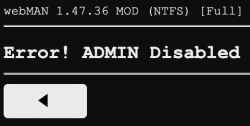
Why I'm getting this?
I don't know really. Maybe you messed with wMM settings, or maybe you need the full version for the feature you are trying to use.
Hold L1 while running the wMM installer app to get the full version.
Joscah
Member
I don't know really. Maybe you messed with wMM settings, or maybe you need the full version for the feature you are trying to use.
Hold L1 while running the wMM installer app to get the full version.
I don't think I messed up with settings, didn't do anything tbh. I have the Full Version. @aldostools could you have a look?

Swapping pad buttons is originally a DEX (development) feature so you get the option to swap on XMB when you are using DEX system files like Rebug CFWs do. As you are using HEN over standard CEX system files, this feature is not available to you on XMB.
The only ways I know to swap buttons on HEN is either to use an app like wMM that will modify the system settings for you or to modify the system settings yourself by editing the appropriate data manually.
Afaik you are getting this error message because admin mode is currently disabled in your wMM settings, every feature that requires admin rights is unavailable as long the admin mode is not re-enabled.
Admin mode can usually be toggled with the pad combo L2+R2+TRIANGLE & you could have disabled it by accident too.
And those are the web commands related to admin mode:
1. enable admin mode:
/admin.ps3?enable&pwd=<password>
2. disable admin mode:
/admin.ps3?disable
or
/admin.ps3?0
The only ways I know to swap buttons on HEN is either to use an app like wMM that will modify the system settings for you or to modify the system settings yourself by editing the appropriate data manually.
Admin mode is a wMM feature.Why I'm getting this?
Afaik you are getting this error message because admin mode is currently disabled in your wMM settings, every feature that requires admin rights is unavailable as long the admin mode is not re-enabled.
Admin mode can usually be toggled with the pad combo L2+R2+TRIANGLE & you could have disabled it by accident too.
And those are the web commands related to admin mode:
1. enable admin mode:
/admin.ps3?enable&pwd=<password>
2. disable admin mode:
/admin.ps3?disable
or
/admin.ps3?0
Last edited:

Hello everyone, I just recently realize that my Japanese PS3 Slim had
So,
The problem is in the PS3, not in the controller device.
I have checked Debug Settings seeking for an option, but I think it's not possible. I would like to figure out if using any hombrew such as MultiMAN, WebMAN or even @LuanTeles PS3 Proffesional Mod could solve this problem? Would be funny if you could set any action to any button you choose.
Pray for me, I don't want to get used to it!
I included this option on the up comming release, but you can do it easily with webMAN MOD, @Evilnat xai plugin or via xRegistry edit.
If you can't use the webman /pad.ps3?cross=swap command as @DeViL303 said, lemme know, so i'll make a PKG with a toggle for it.

I don't think I messed up with settings, didn't do anything tbh. I have the Full Version. @aldostools could you have a look?
You probably activated the combo Admin/User in /setup.ps3
You can toggle to admin mode pressing L2+R2+TRIANGLE
Or delete /dev_hdd0/tmp/wm_config.bin to restore the default settings
Joscah
Member
SOLVED
Follow this steps:
1. Enable HEN
2. In XMB Menu, Enable WebMAN Administration Mode pressing L2+R2+TRIANGLE
3. Go to WebMAN Games, then WebMAN SetUp and finally PS3 WebMAN [SetUp]
4. Once inside your PS3 Browser, go to your PC and type this URL in your browser:
Example:
5. You are done. Console is rebooting. This will keep saved, so no need to repeat it in every boot.
Thanks all for your time and help!
Follow this steps:
1. Enable HEN
2. In XMB Menu, Enable WebMAN Administration Mode pressing L2+R2+TRIANGLE
3. Go to WebMAN Games, then WebMAN SetUp and finally PS3 WebMAN [SetUp]
4. Once inside your PS3 Browser, go to your PC and type this URL in your browser:
http://YourPS3IPAddress/pad.ps3?cross=swap
You can get your IP Address in System Settings or by using START + SELECT combo.
You can get your IP Address in System Settings or by using START + SELECT combo.
Example:
5. You are done. Console is rebooting. This will keep saved, so no need to repeat it in every boot.
Thanks all for your time and help!
Last edited:
SOLVED
Follow this steps:
1. Enable HEN
2. In XMB Menu, Enable WebMAN Admin Mode pressing L2+R2+TRIANGLE
3. Go to WebMAN Games, then WebMAN Setup and finally PS3 WebMAN [Setup]
4. Once inside your PS3 Browser, go to your PC and type this URL in your browser:
http://YourPS3IPAddress/pad.ps3?cross=swap
You can get your IP Address in System Settings or by using START + SELECT combo.
Example:
5. You are done. Console is rebooting. This keeps saved, no need to repeat it in every boot.
Thanks all for your time and help!
FYI If the URL is opened from PS3 browser, you can replace YourPS3IPAddress with one of the following ones:
http://0/ <= this is recommended because is the shortest
http://127.0.0.1/
http://localhost/
Joscah
Member
FYI If the URL is opened from PS3 browser, you can replace YourPS3IPAddress with one of the following ones:
http://0/ <= this is recommended because is the shortest
http://127.0.0.1/
http://localhost/
Nice...

Last edited:
Hi how can Can I switch the Accept(X) and Cancel(O) buttons on the PS3? cfw 4.82 ferrox cobra
Debug settings or see the comments in the thread.
My PS3 doesn't have an IP address (it's blank).Debug settings or see the comments in the thread.

Similar threads
-
 PS1 Transitioning To Parasite Eve II Disc 2 With A Japanese Soft-Modded Console Method Discovered
- Started by alexfree
- Replies: 4
-
PS1 Freeing The Launch PSX Consoles In 2022 - The Story Of The SetSessionSuperUltraCommandSmash
- Started by alexfree
- Replies: 7
-
-
 Retro Install Batocera on USB and create your retro console.
- Started by gamerman 5000
- Replies: 0