PS3 TestBench Firmware (Automated fault detection used in the factory)

M4j0r

Developer
Story time:
In early 2024, two faulty NPX-001 boards where bought by @chattrapat_s and subsequently the eMMC was dumped. @zecoxao and me then analysed the dumps.
We noticed some things in the dumps, more exact, the eEID: The bd drive related parts were not initialized and the IDPS was set to a fallback/fake value (00 00 00 01 00 83 04 00 03 FF FF FF D4 16 F2 BB). The cISD also suggested that the Wifi was disabled.
We came to the conclusion that these boards were dumped from the production line because they didn't pass the automated tests so they never went through the final steps.

The firmwares contained in the flash image were also interesting: One firmware contained a full 4.40 "JIG" firmware (like the already known 2.43) which can be e.g. used to remarry the bd drive, remarry syscon, initialize the RTC, etc. .
The other firmware only contained lv0, lv1ldr and lv1. However the lv1 is not like a normal lv1, it is special.
It's actually the third TestBench firmware that has been dumped, the other two are from 2005 and only work with CEB prototypes (no RSX support).
The TestBench firmware is used in the factory for automated tests to check if the PS3 is working correctly.

I started to do some tests with the TestBench firmware on my DECR-1000A, starting with loading it over the network and checking how it behaves. It worked fine so I built an ebootrom next and flashed it to the DECR.
That also worked fine so I emulated a CECHA using the DECR (see here).
Next, I created a PUP and flashed it to my DECHA prototype, the results can be seen here.

So how can you profit from that?
Well, you can find a TestBench PUP based on 3.55 DECH OFW here: 3.55 DECH TestBench PUP (it was tested on a DECHA prototype, DECHA, DECHJ and DECHL prototype). Only the CoreOS was changed.
The TestBench firmware (the same CoreOS) will work on all targets (CEX/DEX/TOOL/ARCADE....) but I only have DECH/DECR hardware for tests, so I can't provide PUPs for other targets.

How to install it safely and prepare the automated test?
Well, I did my test the following way:
1. Install 3.55 DECH OFW
2. Install 3.55 DECH OFW again (to affect both firmware banks)
3. Install 3.55 DECH TestBench firmware
4. Make sure the South Bridge UART output is enabled (Syscon EEPROM value).
5. Connect to the SouthBridge UART (115200, 8N1).
6. Start the PS3 and watch the serial console.

How to start the tests?
The PS3 will ask you for the input parameter:
Code:
# Input args from SB-UART.
[INFO]: input-args:
You can then type/paste your test config.
For a CECHA/DECHA this is the config which Sony used back in 2007 (tweaked so it will work with the newer TestBench suite):
Code:
diag_suite=1 display_isd=1 HoldPrintfOutput=0 RestrictPrintfOutput=0 spu_noise_chirp_en=0 spu_noise_chirp_vmx_en=0 rsx_ioif_test_spu_dma_test23_small=1 RsxIntegrateStopTime=5,5,5,1,1 AudioMuteOn=0,0,1,1,1 RsxIntegrateDispMode_0=3,4,5,3,60 RsxIntegrateDispMode_1=3,4,5,3,1 RsxIntegrateLoopCtrl=1,0,1,1,1 RsxIntegrateOutputFormat=0,9,9,0,0 RsxIntegrateRefCRC0_0=0x16360bbe,0x5e05530b,0x37d1ee61,0,0x1b664efd RsxIntegrateRefCRC1_0=0x68881f0c,0x5e05530b,0x37d1ee61,0,0x1b664efd RsxIntegrateRefCRC0_1=0x68ed0dee,0x51c3ee63,0x08ab0ee3,0,0x3493a097 RsxIntegrateRefCRC1_1=0x16fb0a17,0x51c3ee63,0x08ab0ee3,0,0x23501270 RsxIntegrateRefCRC_F0_0=0x327513f8,0x7b5bb004,0x2373e04e RsxIntegrateRefCRC_F1_0=0x27623615,0x7b5bb004,0x2373e04e RsxIntegrateRefCRC_F0_1=0x327513f8,0x7b5bb004,0x2373e04e RsxIntegrateRefCRC_F1_1=0x27623615,0x7b5bb004,0x2373e04e sb_diag_config=cookie_base sb_pci_config=sif_bridge sb_gbe_en=1 sb_ata0_en=1 sb_misc_en=1 sb_uhc1_en=1 sb_ebus_en=1 tb_sb_pci_test=1 rsx_ioif_test_gsif_en=1 ps2gokan_test_en=1 ps2gokan_gx_with_spu_matmult=1 tla_test=1 spu_load_max=7
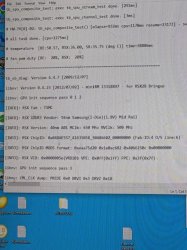
During the tests, you'll also get some output on the screen, but the progress/results are logged via the SB UART (example).
To poweroff the PS3 just press the power button or hit enter and then enter "shutdown".
To get out of the TestBench firmware you need to change the active bank (as seen here).
The input parameter is just
Code:
switch_bank_indicator=1

I hope some people can make use of that and diagnose some faults earlier or just easier in the future.

FYI: @RIP-Felix
 
Last edited:
Wow, this is really amazing!.

@M4j0r, can the switch ROS bank code be extracted to be used in some flasher homebrew?. That would be a pretty good safety measure while flashing a patch or whatever other flash exploit out there: first flash the non-active ROS, triple check everything, then swtich active ROS with the exploit in place.
 
Very interesting. So this should theoretically work on retail unts as well? If it worked in an emulated A model environment, it should work on retail.

I'm in a small discord group of repair techs. I bet someone will be eager to try it out!
 
M4j0r, can the switch ROS bank code be extracted to be used in some flasher homebrew?. That would be a pretty good safety measure while flashing a patch or whatever other flash exploit out there: first flash the non-active ROS, triple check everything, then swtich active ROS with the exploit in place.

Hmm, normal lv1 does also have that function, it should be located in update manager. The actual flag is stored in flash or syscon eeprom, depending on the storage type.

Very interesting. So this should theoretically work on retail unts as well? If it worked in an emulated A model environment, it should work on retail.
Yes, it originally came from a retail (NPX-001) unit. All the factory firmwares work on all targets. Normally they can only be installed in FSM, that's why I based my PUP on OFW and didn't create a custom factory PUP. Testing was done on 3 different units (COK-001, DIA-002, VER-001).
 
What additional arguments we can use?
That's still under research. Most other commands won't enable more in-depth tests and some can corrupt/factory reset your system. The TestBench is built for all systems (even some units with 2x CELL and no RSX), but not all commands are meant for all systems. The input args string is also already at its limit, so other tests need then to be disabled.
Can we enable more output logs to see details?
No, all logs are already enabled. More than they'll ever enable in the factory.
E.g. there's no output if the PS2 Subsystem is fine. It'll only show something if there's an error.
I saw SYSCON errorlogs in one of M4j0r's pics.
That function is broken on some (almost all?) consoles. It only worked on my DECR.
 
image0.jpeg
Story time:
In early 2024, two faulty NPX-001 boards where bought by @chattrapat_s and subsequently the eMMC was dumped. @zecoxao and me then analysed the dumps.
We noticed some things in the dumps, more exact, the eEID: The bd drive related parts were not initialized and the IDPS was set to a fallback/fake value (00 00 00 01 00 83 04 00 03 FF FF FF D4 16 F2 BB). The cISD also suggested that the Wifi was disabled.
We came to the conclusion that these boards were dumped from the production line because they didn't pass the automated tests so they never went through the final steps.

The firmwares contained in the flash image were also interesting: One firmware contained a full 4.40 "JIG" firmware (like the already known 2.43) which can be e.g. used to remarry the bd drive, remarry syscon, initialize the RTC, etc. .
The other firmware only contained lv0, lv1ldr and lv1. However the lv1 is not like a normal lv1, it is special.
It's actually the third TestBench firmware that has been dumped, the other two are from 2005 and only work with CEB prototypes (no RSX support).
The TestBench firmware is used in the factory for automated tests to check if the PS3 is working correctly.

I started to do some tests with the TestBench firmware on my DECR-1000A, starting with loading it over the network and checking how it behaves. It worked fine so I built an ebootrom next and flashed it to the DECR.
That also worked fine so I emulated a CECHA using the DECR (see here).
Next, I created a PUP and flashed it to my DECHA prototype, the results can be seen here.

So how can you profit from that?
Well, you can find a TestBench PUP based on 3.55 DECH OFW here: 3.55 DECH TestBench PUP (it was tested on a DECHA prototype, DECHA, DECHJ and DECHL prototype). Only the CoreOS was changed.
The TestBench firmware (the same CoreOS) will work on all targets (CEX/DEX/TOOL/ARCADE....) but I only have DECH/DECR hardware for tests, so I can't provide PUPs for other targets.

How to install it safely and prepare the automated test?
Well, I did my test the following way:
1. Install 3.55 DECH OFW
2. Install 3.55 DECH OFW again (to affect both firmware banks)
3. Install 3.55 DECH TestBench firmware
4. Make sure the South Bridge UART output is enabled (Syscon EEPROM value).
5. Connect to the SouthBridge UART (115200, 8N1).
6. Start the PS3 and watch the serial console.

How to start the tests?
The PS3 will ask you for the input parameter:
Code:
# Input args from SB-UART.
[INFO]: input-args:
You can then type/paste your test config.
For a CECHA/DECHA this is the config which Sony used back in 2007 (tweaked so it will work with the newer TestBench suite):
Code:
diag_suite=1 display_isd=1 HoldPrintfOutput=0 RestrictPrintfOutput=0 spu_noise_chirp_en=0 spu_noise_chirp_vmx_en=0 rsx_ioif_test_spu_dma_test23_small=1 RsxIntegrateStopTime=5,5,5,1,1 AudioMuteOn=0,0,1,1,1 RsxIntegrateDispMode_0=3,4,5,3,60 RsxIntegrateDispMode_1=3,4,5,3,1 RsxIntegrateLoopCtrl=1,0,1,1,1 RsxIntegrateOutputFormat=0,9,9,0,0 RsxIntegrateRefCRC0_0=0x16360bbe,0x5e05530b,0x37d1ee61,0,0x1b664efd RsxIntegrateRefCRC1_0=0x68881f0c,0x5e05530b,0x37d1ee61,0,0x1b664efd RsxIntegrateRefCRC0_1=0x68ed0dee,0x51c3ee63,0x08ab0ee3,0,0x3493a097 RsxIntegrateRefCRC1_1=0x16fb0a17,0x51c3ee63,0x08ab0ee3,0,0x23501270 RsxIntegrateRefCRC_F0_0=0x327513f8,0x7b5bb004,0x2373e04e RsxIntegrateRefCRC_F1_0=0x27623615,0x7b5bb004,0x2373e04e RsxIntegrateRefCRC_F0_1=0x327513f8,0x7b5bb004,0x2373e04e RsxIntegrateRefCRC_F1_1=0x27623615,0x7b5bb004,0x2373e04e sb_diag_config=cookie_base sb_pci_config=sif_bridge sb_gbe_en=1 sb_ata0_en=1 sb_misc_en=1 sb_uhc1_en=1 sb_ebus_en=1 tb_sb_pci_test=1 rsx_ioif_test_gsif_en=1 ps2gokan_test_en=1 ps2gokan_gx_with_spu_matmult=1 tla_test=1 spu_load_max=7
During the tests, you'll also get some output on the screen, but the progress/results are logged via the SB UART (example).
To poweroff the PS3 just press the power button or hit enter and then enter "shutdown".
To get out of the TestBench firmware you need to change the active bank (as seen here).
The input parameter is just
Code:
switch_bank_indicator=1

I hope some people can make use of that and diagnose some faults earlier or just easier in the future.

FYI: @RIP-Felix

Works on A01
 
Well, I'm hoping there are EEGS related diagnostics. There are some consoles witout PS2 functionality and this may shed some light on what exactly is going wrong. A actually have one here I could try it on.
 
Works on A01
Nice!
However, no tests were executed because the inputs args don't look right (shouldn't start with ```).
The log of successful test should look like this .

Well, I'm hoping there are EEGS related diagnostics. There are some consoles witout PS2 functionality and this may shed some light on what exactly is going wrong. A actually have one here I could try it on.
Only very basic tests, as far as I can tell the TestBench firmware is too new and Sony already stripped some tests.
 
well crap! So this is the only TestBench FW we have. The other 2 "JIG" FW are are different thing? Or would it be possable to recover some of the original functionality?

Also, do I have to downgrade to 3.55 to install this or can I install it from any CFW? And I should add that the console I want to try this on (A01) has had a 40nm RSX installed, with the hacky training data.
 
Last edited:
well crap! So this is the only TestBench FW we have. The other 2 "JIG" FW are are different thing? Or would it be possable to recover some of the original functionality?
Well we don't have official names for the internal firmwares, the "JIG" firmware is used to finalize/(re)marry the components (BD Drive, SC, Console Info, ...) and the TestBench firmware is used before the "JIG" firmware to test if the system is OK.
We do have 0.85, 2.43, 4.20 and 4.40 "JIG" firmwares and 0.30 (030.019), 0.40 (040.012) and 4.40 TestBench firmwares.

Also, do I have to downgrade to 3.55 to install this or can I install it from any CFW? And I should add that the console I want to try this on (A01) has had a 40nm RSX installed, with the hacky training data.
Well I would advise to downgrade to 3.55 first, but I guess any CFW is fine as long as it supports downgrading to <= 3.55.
 
Ok, @Gramsone has done another on a 40nm Frankie without PS2 (noPS2_menu category). I'm still reading through the log, but Something has already been gleaned to make this all worth it.

Code:
======================================================================

tb_sb_diag: Version 6.4.7 [2009/12/07]

libnv: Version 0.4.23 [2012/07/02] - miniRM 13318897 - for RSX28 Bringup

libnv: GPU init sequence pass 0 1 2

[INFO]: RSX Fab : TSMC

[INFO]: RSX GDDR3 Vendor: 56nm Samsung(I-Die)(1.8V) Mid Rail

[INFO]: RSX Version: 40nm A01 MClk: 650 Mhz NVClk: 500 Mhz

[INFO]: RSX ChipID: 0x04BAE557_41635058_30A86602_00000000 (Fab-ID:4 D/S Line:6)

[INFO]: RSX ChipID MODS format: 0xeaa75d20 0x1a0ac682 0x4066150c 0x00000000

[INFO]: RSX VID: 0x0000005e(VRD10) VPE: 0x0ff(0x1ff) FPE: 0x3f(0x7f)

libnv: GPU init sequence pass 3

libnv: CML_CLK dump: PREDI 0x0 DRVI 0x3 DRVZ 0x18

libnv: IOIF trim: 0x0 (Fuse Val)

libnv: nvInit() completed.

# diagSuiteInitialize done. [cpu=3918ms]

======================================================================

This means we know know that Fab ID 4 = TSMC, 1 = TOSHIBA, 2 = SONY. And yes the irony of TSMC making the 40nm is very ironic!

This can be obtained from the lvl1 dump instead of going through this TestBench FW, now that we know what the ID's corespond to. With more console perhaps we can fin the other FAB IDs too. This could be added to several tools, Like evilnat, bgtoolset, etc...for a more convenient method to get this information from working consoles.
lvl1.png

"D/S" likely stands for the Design/Specification line at the fab facility. "Line 2" would make sense. TOSHIBA's Nagasaki FAB2's 90nm wafer line was on the 2nd floor.
Sale of FAB2 1st floor to toshiba.JPG

EDIT: Interestingly @M4j0r's log shows SONY as the fab of his DECR's 90nm RSX. And the retail 90nm in @Gramsone's was TOSHIBA. The Design/Specification Line was different too. I wonder if this means some 90s were made in different facilities. Or that was before SONY has sold the FAB2 facility to TOSHIBA and they put their name on early RSXs made for debug/tool consoles. If so, what does line 3 stand for? AFAIK there wasn't a 3rd floor at that FAB. It could have been one of their other facilities. And perhaps they did make small quantities at another facility before ramping up production at Nagasaki FAB2 2nd floor for retail.

This could explain binned chips. @M4j0r does your debug unit have a VIDbin 2 or 3 RSX? Could you dump LVL1 if you don't know off the top of your head. His 90nm TOSHIBA RSX was Bin3 (normal).

Edit 2:
One of @M4j0r's posts showed a bin2 RSX from the TOSHIBA fab line 2. So we now know that a good and normal bin can come from the same fab. Which rules out the hypothesis the good bin came from a different fab. This makes sense, since more efficient dies generally come from the center of the wafer and those near the edge tend to have more defects and loose efficiency. This would be true regardless of fab.
 
Last edited:
Story time:
In early 2024, two faulty NPX-001 boards where bought by @chattrapat_s and subsequently the eMMC was dumped. @zecoxao and me then analysed the dumps.
We noticed some things in the dumps, more exact, the eEID: The bd drive related parts were not initialized and the IDPS was set to a fallback/fake value (00 00 00 01 00 83 04 00 03 FF FF FF D4 16 F2 BB). The cISD also suggested that the Wifi was disabled.
We came to the conclusion that these boards were dumped from the production line because they didn't pass the automated tests so they never went through the final steps.

The firmwares contained in the flash image were also interesting: One firmware contained a full 4.40 "JIG" firmware (like the already known 2.43) which can be e.g. used to remarry the bd drive, remarry syscon, initialize the RTC, etc. .
The other firmware only contained lv0, lv1ldr and lv1. However the lv1 is not like a normal lv1, it is special.
It's actually the third TestBench firmware that has been dumped, the other two are from 2005 and only work with CEB prototypes (no RSX support).
The TestBench firmware is used in the factory for automated tests to check if the PS3 is working correctly.

I started to do some tests with the TestBench firmware on my DECR-1000A, starting with loading it over the network and checking how it behaves. It worked fine so I built an ebootrom next and flashed it to the DECR.
That also worked fine so I emulated a CECHA using the DECR (see here).
Next, I created a PUP and flashed it to my DECHA prototype, the results can be seen here.

So how can you profit from that?
Well, you can find a TestBench PUP based on 3.55 DECH OFW here: 3.55 DECH TestBench PUP (it was tested on a DECHA prototype, DECHA, DECHJ and DECHL prototype). Only the CoreOS was changed.
The TestBench firmware (the same CoreOS) will work on all targets (CEX/DEX/TOOL/ARCADE....) but I only have DECH/DECR hardware for tests, so I can't provide PUPs for other targets.

How to install it safely and prepare the automated test?
Well, I did my test the following way:
1. Install 3.55 DECH OFW
2. Install 3.55 DECH OFW again (to affect both firmware banks)
3. Install 3.55 DECH TestBench firmware
4. Make sure the South Bridge UART output is enabled (Syscon EEPROM value).
5. Connect to the SouthBridge UART (115200, 8N1).
6. Start the PS3 and watch the serial console.

How to start the tests?
The PS3 will ask you for the input parameter:
Code:
# Input args from SB-UART.
[INFO]: input-args:
You can then type/paste your test config.
For a CECHA/DECHA this is the config which Sony used back in 2007 (tweaked so it will work with the newer TestBench suite):
Code:
diag_suite=1 display_isd=1 HoldPrintfOutput=0 RestrictPrintfOutput=0 spu_noise_chirp_en=0 spu_noise_chirp_vmx_en=0 rsx_ioif_test_spu_dma_test23_small=1 RsxIntegrateStopTime=5,5,5,1,1 AudioMuteOn=0,0,1,1,1 RsxIntegrateDispMode_0=3,4,5,3,60 RsxIntegrateDispMode_1=3,4,5,3,1 RsxIntegrateLoopCtrl=1,0,1,1,1 RsxIntegrateOutputFormat=0,9,9,0,0 RsxIntegrateRefCRC0_0=0x16360bbe,0x5e05530b,0x37d1ee61,0,0x1b664efd RsxIntegrateRefCRC1_0=0x68881f0c,0x5e05530b,0x37d1ee61,0,0x1b664efd RsxIntegrateRefCRC0_1=0x68ed0dee,0x51c3ee63,0x08ab0ee3,0,0x3493a097 RsxIntegrateRefCRC1_1=0x16fb0a17,0x51c3ee63,0x08ab0ee3,0,0x23501270 RsxIntegrateRefCRC_F0_0=0x327513f8,0x7b5bb004,0x2373e04e RsxIntegrateRefCRC_F1_0=0x27623615,0x7b5bb004,0x2373e04e RsxIntegrateRefCRC_F0_1=0x327513f8,0x7b5bb004,0x2373e04e RsxIntegrateRefCRC_F1_1=0x27623615,0x7b5bb004,0x2373e04e sb_diag_config=cookie_base sb_pci_config=sif_bridge sb_gbe_en=1 sb_ata0_en=1 sb_misc_en=1 sb_uhc1_en=1 sb_ebus_en=1 tb_sb_pci_test=1 rsx_ioif_test_gsif_en=1 ps2gokan_test_en=1 ps2gokan_gx_with_spu_matmult=1 tla_test=1 spu_load_max=7
During the tests, you'll also get some output on the screen, but the progress/results are logged via the SB UART (example).
To poweroff the PS3 just press the power button or hit enter and then enter "shutdown".
To get out of the TestBench firmware you need to change the active bank (as seen here).
The input parameter is just
Code:
switch_bank_indicator=1

I hope some people can make use of that and diagnose some faults earlier or just easier in the future.

FYI: @RIP-Felix

Removed that bit off the end and it's working now. Tried it on a 40nm Frankie and it also functions.
 

Attachments

  • image0.jpeg
    image0.jpeg
    73.7 KB · Views: 107
This is really amazing, thank you for this. I am curious if it would be possible to use a hardware flasher to install this firmware on a GLOD system?
 
This is really amazing, thank you for this. I am curious if it would be possible to use a hardware flasher to install this firmware on a GLOD system?
Yes, even on consoles which are "unhackable" (3000, 4X00). The original Testbench is signed with 4.40 keys but I changed it to 3.55. It does have no hash checks, so flashing it via hardware is fine, that's also Sony's way.
 
Yes, even on consoles which are "unhackable" (3000, 4X00). The original Testbench is signed with 4.40 keys but I changed it to 3.55. It does have no hash checks, so flashing it via hardware is fine, that's also Sony's way.
So could I just write the 256MB .bin dump that was released to a separate pair of nands, then install them to any nand based motherboard? Or would I need to dump the original nands, then "patch" them with the .PUP update file that you created? (If so, this is something I would need to learn how to do).
 
So could I just write the 256MB .bin dump that was released to a separate pair of nands, then install them to any nand based motherboard? Or would I need to dump the original nands, then "patch" them with the .PUP update file that you created? (If so, this is something I would need to learn how to do).
You need to extract the ros from the original dump and patch into the active bank of your console.
 
So the 1st time you install TestBench it switches the ROS bank automatically. Then when you type in the command to switch the ROS bank and get out of TB it reboots into 355. But how do I get back into testbench from there?I could install 355 again to wipe the TB ROS, and then install TB again, but that seems convoluted.
 
Back
Top