
PS2 [Testers Needed] Open PS2 Loader with ZSO support (compressed ISO)

Windows 7 users need KB-3020369 and KB-3125574-v4 (in other words, needs updated Windows 7 SP1 to at least Convenience Update called by community by SP2) to be able to install last Python 3 for those systems, the 3.8.10 version.

Choose those options during install:
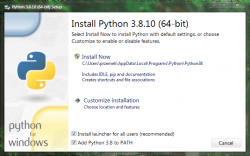
python_win7_ziso_1.png python_win7_ziso_2.png

Once it is installed, run CMD and install LZ4 package:

python_win7_ziso_3b.png


Go to dir where ziso.py is plus game and run the script:

python_win7_ziso_4b.png


To see it will NOT work! :D
Now, go to post no. 33 to see how to do it on Linux where it works.


edit: Works but without -m parram. I compared checksums from files generated on Windows and Linux and both are the same.

- - -

@60fpshacksrock: Solution for You
@Acid_Snake: Could You add links for both mini guides to Your first post? It will help people generate valid compressed disc images.
 
Last edited:
Windows 7 users need KB-3020369 and KB-3125574-v4 (in other words, needs updated Windows 7 SP1 to at least Convenience Update called by community by SP2) to be able to install last Python 3 for those systems, the 3.8.10 version.

Choose those options during install:

View attachment 37134 View attachment 37135

Once it is installed, run CMD and install LZ4 package:

View attachment 37139

Go to dir where ziso.py is plus game and run the script:

View attachment 37138

To see it will NOT work! :D
Now, go to post no. 33 to see how to do it on Linux where it works.


edit: Works but without -m parram. I compared checksums from files generated on Windows and Linux and both are the same.

- - -

@60fpshacksrock Solution for You
@Acid_Snake Could You add links for both mini guides to Your first post? It will help people generate valid compressed disc images.

@Berion. Thank you much. I will test this out ASAP.

Edit: I'll just use the exe by @GDX. Thanks to both of you.
 
Last edited:
  • Like
Reactions: TnA
To bad we cannot use stronger compression. In example:
  • Uncompressed Shadow of The Colossus (NTSC-U): ~2,5GB
  • LZ4: ~1,7GiB
  • LZMA: ~670MiB

But hey, better than nothing. ^^
Out of all the known Compressed ISO formats, I went for ZSO due to speed and lightweight.
Consider the following: ZSO reading and decompression is done by the IOP, in other words, the PS1 CPU, with its full 2MB of PS1 RAM, most of which is already eaten up by the game and OPL.
 
Works but without -m parram. I compared checksums from files generated on Windows and Linux and both are the same.

Yes, I confirm, encountered same beaviour and omitting multithread option works.

I converted the script to .exe you don't need python or other dependencies

https://github.com/GDX-X/PFS-BatchKit-Manager/blob/main/PFS-BatchKit-Manager/BAT/ziso.exe?raw=true

ziso.exe -c2 "GTA Vice City.iso" "GTA Vice City.zso"

Many thanks, added Windows batch script that works with your conversion.

Link to batch script post.
 
Last edited:
@Acid_Snake Oh, but it wasn't irony or some hidden ask to check LZMA. I just wanted to show how current in use common algo (in 7Z, RAR5, CHD etc.) can efficiently compress those games in compare what we have. I was thinking before that this is even not possible for PS2, so absolutely great surprise in this year for PS2 scene. ^^
 
@Acid_Snake Oh, but it wasn't irony or some hidden ask to check LZMA. I just wanted to show how current in use common algo (in 7Z, RAR5, CHD etc.) can efficiently compress those games in compare what we have. I was thinking before that this is even not possible for PS2, so absolutely great surprise in this year for PS2 scene. ^^
Yes I know, I was just explaining why I decided to implement ZSO and not other formats.
The key to this is that it needs to work as best as possible on a PS1 CPU and RAM, hence why I didn't even consider plain old CSO.
 
@Acid_Snake

What is the best compression to use? I know 9 is the best, but what about IOP usage? Wouldn't this be a strain on it? Well, I'll try it anyway and compare loading speed.

@Okeanos
Also would it be possible for a zso to iso decompress batch script?
 
Last edited:
  • Like
Reactions: TnA
@Okeanos

I know it supports both. I was just asking for a script. I have one, but I'm not an expert with cmd so I name all my games game.zso and then run my script to decompress the iso then have to rename the game to what it is.

@Acid_Snake

I used ziso.exe to compress ATV Offroad Fury (USA) 1 V3 again. It has the same issue as when compressed with maxcso. Mode 1 is required, or it will lock up after the first FMV is played. The Analog light also turns off when it locks up if it helps to know. I also use VMC generic_0.bin.
This is all on USB by the way.

Sounds reasonable but it is against human brain intuition. ^^ Media like PSS or ADPC are already compressed, so isn't decompression of twice compressed data is a lot longer? Isn't decompressor will decompressing faster blocks which have less patterns (i.e isn't faster is decompress compressed i.e 1234000012340000 than 1234567890ABCDEF)?

Forgot to mention: thank You for Your work. PS2 environment more than any other Sony consoles (right after PSP) needs compressed disc images. And now it became reality.

@Berion
But some PSS video files have uncompressed .ads/.ss2 audio.

And I agree with your earlier assessment about PS2 needing compressed ISO support.

I hope in the future developers of loaders for GC, Wii and PS3 add support for this format for their loaders.

@Acid_Snake

I used the batch script and ziso.exe provided by other users and Resident Evil 4 now skips with FMV's and it did not when uncompressed and in USBExtreme format.
Update: FMV skipping is eliminated by enabling Mode 2 on RE4 for me.

Update 2: Turning off the built-in cheat feature (ps2rd) and skipping is eliminated without needing Mode 2. It seems that ps2rd is slowing down the read speed a bit.

The batch script is set to compress at level 9 so maybe that is the problem?

@GDX

There seems to be a decompress issue with ziso.exe. I tried to decompress Resident Evil 4 with this tool and it stopped around 5MB with an error. I have to use maxcso to decompress it.
 
Last edited:
  • Like
Reactions: TnA
In next revision I'll add comp. level choice.
The compression level doesn't actually change anything since I'm using the standard LZ4 compression.
For compression level you have to use an LZ4 variant called LZ4-HC (High Compression).
But the last time I tried a ZSO with LZ4-HC I couldn't get it working, though I may have done something wrong, go ahead and test and let us know how it goes.

@Okeanos
@Acid_Snake

I used ziso.exe to compress ATV Offroad Fury (USA) 1 V3 again. It has the same issue as when compressed with maxcso. Mode 1 is required, or it will lock up after the first FMV is played. The Analog light also turns off when it locks up if it helps to know. I also use VMC generic_0.bin.
This is all on USB by the way.

@Acid_Snake
I used the batch script and ziso.exe provided by other users and Resident Evil 4 now skips with FMV's and it did not when uncompressed and in USBExtreme format.
Update: FMV skipping is eliminated be enabling Mode 2 on RE4 for me.

Update 2: Turning off the built-in cheat feature (ps2rd) and skipping is eliminated without needing Mode 2. It seems that ps2rd is slowing down the read speed a bit.

The batch script is set to compress at level 9 so maybe that is the problem?
For the mode 1 thing, it might make sense since ZSO files completely change the way IO is done, since it needs to arbitrarily access te ZSO file and read arbitrary sizes. This could cause issues with games that require accurate reads and such.

As for the PS2RD on RE4, remember that this is all running on the PS1 CPU with PS1 RAM, which is also the responsible for IO, so too many things running on it will cause it to drop the speed at which data is fed to the main CPU.
My recommendation here is to play with the Device Cache size until you find the minimum that works well for you.
 
Last edited by a moderator:

I've decrompressed an zso image correctly with ziso.exe. You added -c0 option for decompress?

Edit: encountered same beaviour with RE4 PAL reverting image from zso to iso. ziso on both linux and windows gave: Error: data too large or corrupt

WBFS is file system, not supporting compression. So how? ;]

Yes, you are correct, my mistake. From Save disk space for ISOs: the WBFS format, used for shrinking Wii discs, is not archive-quality since it may be missing padding content and upgrade partitions..

The compression level doesn't actually change anything since I'm using the standard LZ4 compression.

All right, I've missed the ziso help suggestion: use any non-zero number it has no effect.

My recommendation here is to play with the Device Cache size until you find the minimum that works well for you.

Have you already post how to change Device Cache?
 
Last edited:
A bit offtopic, but you are the same @Acid_Snake that was registered in dark-alex.org forum and was publishing some tutorials in it about the CELL IBM SDK, right ?. At that time i had no PS3 yet so i was not paying much attention to your researchs, but i remember you was very passionate about it :encouragement:
Ive seen your nick in the forum some days ago but i was not sure, now that i see you talking about stuff related with the PSP i guess it should be you :D
 
  • Like
Reactions: TnA
Have you already post how to change Device Cache?
You can change it in OPL Settings menu.

A bit offtopic, but you are the same @Acid_Snake that was registered in dark-alex.org forum and was publishing some tutorials in it about the CELL IBM SDK, right ?. At that time i had no PS3 yet so i was not paying much attention to your researchs, but i remember you was very passionate about it :encouragement:
Ive seen your nick in the forum some days ago but i was not sure, now that i see you talking about stuff related with the PSP i guess it should be you :D
yeah that'll be me. Been a while since I go into dax-hordes, is the site still active?
 
  • Like
Reactions: TnA
yeah that'll be me. Been a while since I go into dax-hordes, is the site still active?
I mean even before, in the forum hosted under the official dark-alex.org domain (where the dax firmwares was released), daxhordes.org was created by Kravenbcn after the dark-alex.org forum was closed... and some people moved on to it, i registered and wrote some posts but eventually i stopped writing in forums completly
 
There's a catch though: ZSO decompression is done by the IOP, while the FMVs are processed by the EE and other hardware decoders, not the IOP itself (the PS1 CPU can't possibly work with the FMVs that the PS2 uses).
Also LZ4 decompression is equivalent to doing 3 memcpy, that's EXTREMELY fast.
i have compressed the games but how i load them into the hard disk? i can use winhip as always? also i have 3 opl into the rar, wich one i need?
 

Similar threads

Back
Top