nikeymikey
Member
Anybody had issues with Artwork not showing when using 1.2.0.5? Mine doesn't want to show for some reason.



its working with a new iso. but opl latest version still have the bug that i see 2 hdd games list and one empty.i have the latest opl and exfat hdd internal, crash wrath of cortex pal refuse to boot, black screen. its the iso i have dumped from ps2 hdd before formatting it (today) i'll test a new iso soon
is this game tested?


Would it be possible to disable BDM in the BDM Block Devices menu but still keep HDD enabled? Or possibly change the order devices are shown? I imagine the majority of people are using an HDD with OPL.
Basically with the latest update I'm seeing this when starting OPL
If I press d-pad right I get the list of games.
It's not a big deal or anything, but I don't plan on ever running anything other than games off the SSD. If there's any way to get the default menu to show games from the SSD it would be nice.
You only need hdd enabled if you want to use an APA formatted drive. You can turn it off and leave BDM mode set to auto, with the HDD block device enabled. It will auto load the hdd page on startup. That delay in the page loading is the hdd being recognized in the background. The original build took longer to load which gave time for the page to load. The latest quicker but as a trade off the page takes a second or two to load in.i just updated to the most recent version to see if it fixed compatibilty for forbidden siren 2 in ntsc land, and i too am seeing this now, however i set my settings in OPL for:
bdm > auto> block device
hdd > auto
with this it boots to the empty bdm page, hangs for about a second, then automatically jumps to the hdd page and loads game list. its not as streamlined as the very first version, but its still automatic. it would be nice to have the behavior from the first version when it just auto-booted to the hdd list, but i can't seem to figure that out. anyone else???
It's surprising you were even able to get the game to load that far as I haven't been able to get it to load on the official OPL builds nor my own. It's something I've been meaning to looking into but haven't had the time.Been playing with this for about a week with great results! Here's my current specs:
I'm in the US
Using a Pound ps2 to HDMI cable to play in on an LCD tv in 720p i think
retro fighters ps2 controller
Fat PS2 SCPH-50001
Not modded
Original Sony HDD adapter with SATA mod
SSD Crucial 1TB 2.5 in
Original Sony Magic Gate memory card with FMBC installed
Transferred your OPL v1.2.0.3-beta onto the memory card from USB via wLaunchELF on the memory card
Running OPL v1.2.0.3-beta via memory card on slot 1
I've had success with playing the following games for about 10-30 minutes each, no stutters, lag, sound issues, saving issues, loading issues:
I ran into an issue with one game. It crashed about 20 minutes in:
- super monkey ball deluxe
- twinkle star sprites: la petite princesse
- dodonpachi DaiOuJou
- Marvel vs Capcom 2
- Street fighter anniversary collection
- super bust a move
- blood will tell
- juon
- arcana heart
- ibara
- Kim possible - what's the switch
- Simple 2000 Series Vol105 - The Maid Fuku to Kikanjuu
Other than this one game it's been really easy to use and load and play! Great job on this software, so much better than loading these on the old way! Thank you!
- Game: The Simpsons: Hit & Run
- Installed on the SSD in the DVD folder
- Game ID: SLUS_206.24
- MD5: 9efe68564fbc397fd6eb0e5b1e7085da
- I used the WinMD5Free.exe program to get this info
- The game froze as I was completing the 'follow the fbi van' mission driving towards a barn. The picture froze and the sound was looping the sfx and music every 1 second or so. This was about 20-25 minutes into the game. Here's a photo of where it was stuck. I was able to press start+select+r1+r2+l1+l2 and go to the memory card menu. From there I just turned off the console.
Set BDM mode to auto and turn the HDD block device option on. You can set HDD support (on the main settings page, not in the block devices page) to disabled, it's only for APA formatted HDDs.its working with a new iso. but opl latest version still have the bug that i see 2 hdd games list and one empty.
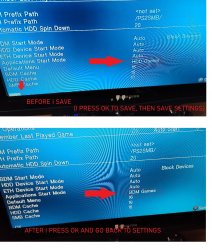
also if i disable bdm than the hdd is not detected anymore, why? also if i select default window hdd games, the setting is not saved


Thanks for the crash reports! Do you have any other devices connected? And do you have any custom themes on any of the connected devices?Hello, super noob here, decided to jump in after seeing the Macho Nacho video.
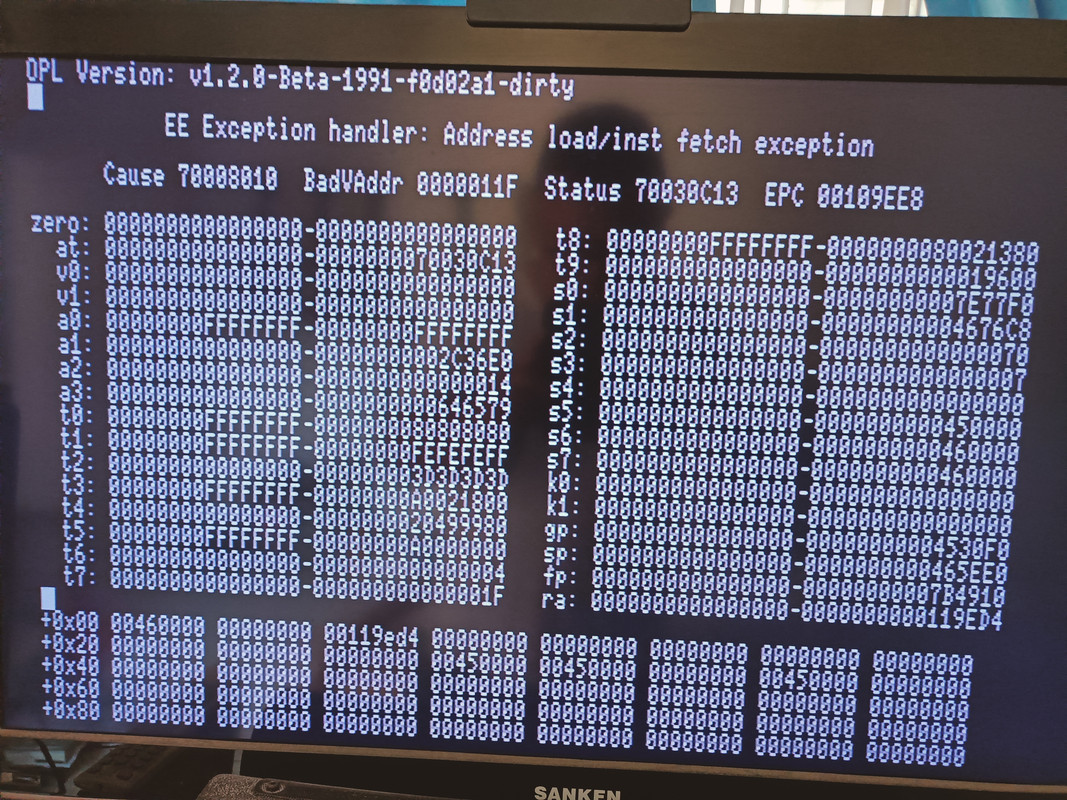
The experience has been pretty much plug and play with your latest few builds. I have a couple crash screens if that's still useful to you. Unfortunately I haven't been able to reproduce the issues so I don't know the exact sequence of events that led to these crashes. They occurred after changing some of the main settings and pressing OK. Additionally, I sometimes select a game and become stuck at the black screen, only for it to work perfectly fine after a reboot.
Apologies if this is not useful without more info, Happy to continue testing, as I'll be playing a bunch this week.
Running a 16TB HDD, OPL 1991 build on the FMCB MC.
Thank you Grimdoomer for all your amazing work! Off to play some Tony Hawk Underground.
hi even if i put the language file in the right folder i can't see the language file in settings why? i use a custom theme also, is for that or not?Thanks for the crash reports! Do you have any other devices connected? And do you have any custom themes on any of the connected devices?
Both issues appear to be memory corruption around the theme system. Not really surprising and I figured themes were going to be an issue at some point.
You could just copy ulaunchelf.elf file to memmory card , and make config_apps.cfg file that point to ullanuch directory. To use it you can switch to apps tab on opl menu

That won't make ulaunchelf see the exfat hdd or copy files to the exfat hdd. I want ulaunchelf with exfat hdd support so I can copy my VMC files and new games from a usb stick, rather than taking the hdd out and putting it on a Windows PC.