PS2 True "256mb" memory card capacity?

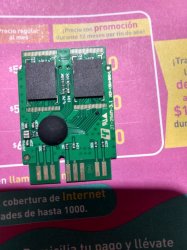
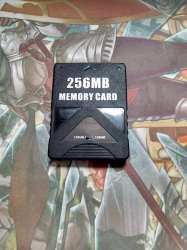
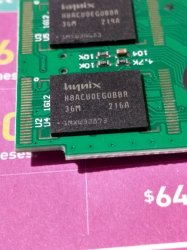
I bought that card in Aliexpress 1 year ago, I installed OPL and Ulauncher since My ps2 can boot files from MC with a modchip, It worked pretty fine and I saved a good ammount of savefiles, one day I tried to delete an old version of OPL to install a new one in Ulauncher, sadly the memory card went full blank showing 0kb free space, I managed to recover some savefiles dumping the card data with MCA software and many data was corrupted, I reformatted using MCA 2.0 and it shows 128mb free space again, I tear down the card and I found 2 memory banks.
With a physical switch attached to the card I can swap these 2 "128mb" capacity at will but, are these chips truly 128mb each or they're fake?

I attached pics of the memory card, since I don't know how to read chip stuff, can you help me telling the real size of these memory banks so I can reformat them with MCA to its real size or should I just throw that MC in the trash bin.

Thanks in advance.
 

Attachments

  • memory card 128mb1.jpg
    memory card 128mb1.jpg
    70.7 KB · Views: 183
  • memory card 128mb2.jpg
    memory card 128mb2.jpg
    84.7 KB · Views: 215
Probably this card have 64MiB but this is blind shot based on "36M" tag (32MiB + internal 4 for ECC). But hard to say anyway.

Testing procedure looks like this:
  1. Format card as i.e 64MiB by MCA2.
  2. On PC, create 63MiB file filled by zeroes and change first and last values for something else (i.e first would be AAh and last FFh, what You will choose doesn't matter, it is important to be not 00h).
  3. Calculate checksum for this file (CRC32, MD5, SHA1 or whatever)
  4. Copy it to this MC.
  5. Copy it back to USB but on different name or different place to not overwrite old file.
  6. Calculate checksum for it and compare with old file. If both will be the same, it means that this size is safe for this card. If not, it means it is still to high and try with smaller sizes (both, the card and the file).
Example in attachment.
 

Attachments

Last edited:
Probably this card have 64MiB but this is blind shot based on "36M" tag (32MiB + internal 4 for ECC). But hard to say anyway.

Testing procedure looks like this:
  1. Format card as i.e 64MiB by MCA2.
  2. On PC, create 63MiB file filled by zeroes and change first and values for something else (i.e first would be AAh and last FFh, what You will choose doesn't matter, it is important to be not 00h).
  3. Calculate checksum for this file (CRC32, MD5, SHA1 or whatever)
  4. Copy it to this MC.
  5. Copy it back to USB but on different name or different place to not overwrite old file.
  6. Calculate checksum for it and compare with old file. If both will be the same, it means that this size is safe for this card. If not, it means it is still to high and try with smaller sizes (both, the card and the file).
Example in attachment.
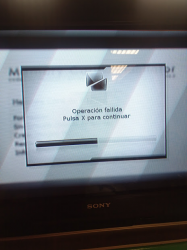
When I tried to copy the 63MiB file into the card I got this error :´c.
 

Attachments

  • imagen_2022-02-12_122159.png
    imagen_2022-02-12_122159.png
    304 KB · Views: 186
You didn't copy a file but trying write as mc image... :P
So, launch uLE and copy this file on memory card after formatting by MCA2 by 64MiB.
Oh My mistake, sorry, thanks for the hint, I'm pretty new at this stuff thanks to you I'm adquiring new knowledge.
The card looks like this, with a switch to swap memory chips
 

Attachments

  • imagen_2022-02-12_130456.png
    imagen_2022-02-12_130456.png
    479.2 KB · Views: 166
Even if this is real 128MiB card, You will not damage anything by formatting as 64MiB. Later can be undone if necessary (but only in version 1.0 or 2.0, not 2.0a).

Above procedure is to detect by experience if card is indeed i.e 64MiB in size. If it is smaller or have looped sectors in fs table or have bad blocks, it will refuse to copy or copy damaging data in the process and copying back this data will tell us if it was damaged or not. So this is the reason to making dummy with different values on start and end and calculating checksumes.

So now, try on one bank, as both chips are the same (I was thinking before that controller creating a raid from them).

Forgot to mention that assumption is fake mc size which could not be the case but chips data rot. Anyway, if You want to better test 128MiB, I can create perfect fit size dummy, but for this I need reported free size on this mc by uLE after quick formatting by MCA as 128MiB and without copying there any data (so turn off console after formatting card and insert this card again after uLE was launched). uLE will show for You free space in bytes and this value paste here so I could create such dummy for You.
 
Last edited:
Even if this is real 128MiB card, You will not damage anything by formatting as 64MiB. Later can be undone if necessary (but only in version 1.0 or 2.0, not 2.0a).

Above procedure is to detect by experience if card is indeed i.e 64MiB in size. If it is smaller or have looped sectors in fs table or have bad blocks, it will refuse to copy or copy damaging data in the process and copying back this data will tell us if it was damaged or not. So this is the reason to making dummy with different values on start and end and calculating checksumes.

So now, try on one bank, as both chips are the same (I was thinking before that controller creating a raid from them).

Forgot to mention that assumption is fake mc size which could not be the case but chips data rot. Anyway, if You want to better test 128MiB, I can create perfect fit size dummy, but for this I need reported free size on this mc by uLE after quick formatting by MCA as 128MiB and without copying there any data (so turn off console after formatting card and insert this card again after uLE was launched). uLE will show for You free space in bytes and this value paste here so I could create such dummy for You.
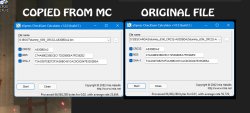
It seems like the file integrity is right and the 63mb file was not corrupted when pasting from usb drive and then I copied the file from MC to the usb drive, I think i'm going to cap both chips to 64mb if that makes the card more reliable.
 

Attachments

  • MEMORY DUMP PROOF.jpg
    MEMORY DUMP PROOF.jpg
    293.5 KB · Views: 136
Yes, checksums matched. So at least You know now that this one specific bank is ok.

Or consider to make second bank as 8MiB because some games have problems with cards above this size (never experienced this myself but heard about it).
 
Yes, checksums matched. So at least You know now that this one specific bank is ok.

Or consider to make second bank as 8MiB because some games have problems with cards above this size (never experienced this myself but heard about it).
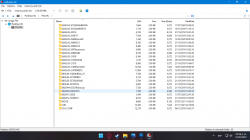
Thank you so much for the help, Yesterday I dumped the 128mb damaged partition with MCA2 in an attempt to rescue as many savefiles as I could but I don't know which folder belongs to each game, is there a software which can read the .bin file so I can know which savefiles can I rescue? thanks in advance. I tried to copy paste the savedata dumping the card into folders with ULTRAISO but when I paste then into the MC using ulauncher I get at least 2 blocks with "damaged data" on them
 

Attachments

  • imagen_2022-02-12_144002.png
    imagen_2022-02-12_144002.png
    113.9 KB · Views: 112
Game title is written in "mc0:/<game save ID>/icon.sys" file but encoded by SJIS (besides that, it is binary file anyway).

There is easier solution. Look i.e at folder named "BASCUS-97328GAMEDATA". And now look carefully at disc or disc case. ;) Eventually put this GameID into Google and You will know which game is which.

When You extracting saves, be sure to copy whole folder, not only files from inside; and if You packing or something this data, use packer which preserves time stamps (i.e 7-Zip or WinRAR) because some games using them as copy protection measure. Normally saves should be exported into PSU container from uLE, but You have no choice.

Also, while this card have switch for banks, remember to dump both banks as MCA don't know about their existence and revealed for PS2 it is only current one.
 
Game title is written in "mc0:/<game save ID>/icon.sys" file but encoded by SJIS (besides that, it is binary file anyway).

There is easier solution. Look i.e at folder named "BASCUS-97328GAMEDATA". And now look carefully at disc or disc case. ;) Eventually put this GameID into Google and You will know which game is which.

When You extracting saves, be sure to copy whole folder, not only files from inside; and if You packing or something this data, use packer which preserves time stamps (i.e 7-Zip or WinRAR) because some games using them as copy protection measure. Normally saves should be exported into PSU container from uLE, but You have no choice.

Also, while this card have switch for banks, remember to dump both banks as MCA don't know about their existence and revealed for PS2 it is only current one.
Thanks for all the help, now my ps2 can boot funtuna from slot 2 using an original magicgate card and save my games from slot 1 with that aliexpress card :D.
 
Or consider to make second bank as 8MiB because some games have problems with cards above this size (never experienced this myself but heard about it).

Yes, and it can be an insidious issue, since depending on the game it can lead to very different problems and you don't know where to look.
For example, 007 Agent Under Fire is pretty straight forward (if you already tried the game with a 8MB MC/VMC...), you get BSOD after the intro (so just when it should appear the MC check).
On Metal Arms: Glitch in the System instead, you get the main menu animation to run as a slideshow, greatly slowered down.

Resident Evil 4 and Jak X too don't work on MC bigger than 8MB (I seems to remember Jak X also need a Sony MC, it doesn't see clones, even if 8MB).
 
Yes, and it can be an insidious issue, since depending on the game it can lead to very different problems and you don't know where to look.
For example, 007 Agent Under Fire is pretty straight forward (if you already tried the game with a 8MB MC/VMC...), you get BSOD after the intro (so just when it should appear the MC check).
On Metal Arms: Glitch in the System instead, you get the main menu animation to run as a slideshow, greatly slowered down.

Resident Evil 4 and Jak X too don't work on MC bigger than 8MB (I seems to remember Jak X also need a Sony MC, it doesn't see clones, even if 8MB).
Yes I read about it, good thing I sold my RE4 ps2 dvd ages ago and I have the Steam version now.
 
Memory Cards doesn't have consciousness so it is not that she like it or not. ;p If write operation frozen, there was reason. And maybe this reason is some bug in support such large tables? To be honest, when uLE was actively developing (and QA testing by authors and community) first fake cards appears as 32MiB (real size often even smaller) and no one really care about them (and You brings on the table a real Leviathan, 2@128MiB :D). But this is blind shot.

Some stress tests can be designed to test file operations i.e on current wLE builds.

Anyway, copy/rename/move/delete/create file/dir are normal operations and from card perspective it is just: read this from here and here, write this from here and here. ;)
 
Memory Cards doesn't have consciousness so it is not that she like it or not. ;p If write operation frozen, there was reason. And maybe this reason is some bug in support such large tables? To be honest, when uLE was actively developing (and QA testing by authors and community) first fake cards appears as 32MiB (real size often even smaller) and no one really care about them (and You brings on the table a real Leviathan, 2@128MiB :D). But this is blind shot.

Some stress tests can be designed to test file operations i.e on current wLE builds.

Anyway, copy/rename/move/delete/create file/dir are normal operations and from card perspective it is just: read this from here and here, write this from here and here. ;)

Wow this is new info for me thanks for sharing it, since I resized the card to 64mb I hope the writing operations become more stable.
 
ps2 mc max size 512mb or 256mb?
I believe that max size determine file system which is used. To be served as PS2 Memory Card, it is MCFS. For MX4SIO/SD2SIO it is FAT32.

MCFS is FAT family so probably it is 2GiB. Maybe there is another limit by mc modules in PS2 firmware, I dunno. But based on specification from here: http://www.csclub.uwaterloo.ca:11068/mymc/ps2mcfs.html I don't see any limit, as long as I understand it. ;p Maximum clusters that can be used are FFFFFFFFh (4294967295 bytes) but cluster and page size can be any and large as bit field in table.
 
Last edited:

Similar threads

Back
Top