PS2 [Tutorial] The Great PS2 AIO Guide

  1. Burn the Hybrid-Disc
  2. Insert it into the PS2.
  3. wLE should start
  4. Put the FMCB-Noobie-Package, the Fortuna-PSUs and @HWNJ's OSDSYS-Launcher on the USB-Storage-device.
  5. Start the FMCB/FHDB-Installer via wLE's Filebrowser.
  6. I'd choose Multi-Install
  7. Copy the Fortuna-PSU via "Copy" & "PSUPaste" to the MC!
  8. Replace the BOOT.ELF with HWNJ's OSDSYS-Launcher!
Once you reboot, it either launches FMCB automatically (if you have an old SCPH-900XX) or you can manually launch FMCB via the Fortuna-Icon!
Will be best to do it in this order:
12346785
 
About internal HDD, max capacity should be used are 2TB note that not all HDDs are compatible with PS2 internal HDD setup. You just need a right HDD for internal PS2 setup especially making FHDB boot correctly on every reboots.

Seagate HDDs are pretty ideal for internal PS2 setup but its reliability is often being questioned by others. Meanwhile, WD HDDs are pretty tricky to use until found out that several WD disks that have SMR technology implemented could boot FHDB with well on multiple reboots unlike past WD HDD models which fail to boot FHDB.

The only WD disks known to work are 2TB 3.5" (desktop size) model WD20EZAZ and also 1TB 2.5" (laptop size) HDD due to these disks have SMR technology inside it. You will need to format the disks on uLaunchELF/wLaunchELF only and install the game into HDD via HDL Dumper Helper only. WinHIIP may not work with these disks.
 
Haven't looked into anything larger than 500gb (I don't own enough ps2 games to fill that up, also didn't want to buy more HDDs, as I have loads).

I will add things as I go over them, this guide isn't complete yet (I want to go over BB Navigator and browser 2.00, as well as cover some hardware related things like SATA upgrade boards for first release slim/network adaptors)

There's actually way
more tiny bits of info like you mentioned, I just covered the basics/intermediate.

Another part of the guide you can add and talk about later is how to play PS2 games online again. Here are a few links for you to get information about this from in case you didn't know.

https://ps2online.com/
http://www.bobzent.info/
http://obsrv.org/

And I'm sure there's more but that should at least get you started in case you had no idea. Hope this information helps.
 
Another part of the guide you can add and talk about later is how to play PS2 games online again. Here are a few links for you to get information about this from in case you didn't know.

https://ps2online.com/
http://www.bobzent.info/
http://obsrv.org/

And I'm sure there's more but that should at least get you started in case you had no idea. Hope this information helps.

I had some idea of this, but I imagined there wasn't a huge audience for online on the ps2. But I'm more than happy to go over it again, most of what I learned was quite sometime ago, back when sksapps.com existed, I think around 2007/2008. I only went through and learned developments that have happened in the past few years, but didn't really look into more current online options.
 
Finally got my hands on a SCPH-39001!
DVD player firmware 2.12U, though. Looks like I'll be waiting a tad until I can get FMCB on my memory card. At least CTurt seems like they're still updating their repo with new versions.

Does anyone know if he has posted a guide to DIY an ISO or if there's a good method I can use that isn't buying a card pre-loaded with FMCB?

Edit: I'm looking into FreeHDBoot but I still need to get my hands on a network adapter and HDD first. What HDD model should I look for? I want something relatively inexpensive and less than 500GB or so. I won't need a ton of space.

Another Edit: Likely going with the OEM PS2 network adaptor since the off-brand SATA one lacks network stuff. Is the Hitachi HCS725025VLAT80 a good drive to use?
 
Last edited:
Finally got my hands on a SCPH-39001!
DVD player firmware 2.12U, though. Looks like I'll be waiting a tad until I can get FMCB on my memory card. At least CTurt seems like they're still updating their repo with new versions.

Does anyone know if he has posted a guide to DIY an ISO or if there's a good method I can use that isn't buying a card pre-loaded with FMCB?

Edit: I'm looking into FreeHDBoot but I still need to get my hands on a network adapter and HDD first. What HDD model should I look for? I want something relatively inexpensive and less than 500GB or so. I won't need a ton of space.

Another Edit: Likely going with the OEM PS2 network adaptor since the off-brand SATA one lacks network stuff. Is the Hitachi HCS725025VLAT80 a good drive to use?

If you can find a new one at a decent price, I can't see why it wouldn't work although on some IDE HDDs, the molex power connector is too far away from the IDE pins. Although the official adaptor does consider this having slightly adjustable plugs, the HDD I originally used didn't fit and I had to make some slight modifications to the NA to make it fit.

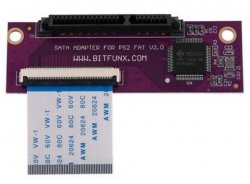
There's another option that allows to use SATA HDDs on an official network adaptor:
20200719_184021.jpg
This board is a drop in replacement for the IDE board in official network adaptors, pretty cheap also at around £20 (if your in UK) and a very simple swap.

This allows you more HDD choices, and also a much bigger 'New' market availability, as well as keeping the original network functionality.
You always take a slight risk buying used HDDs, especially something like IDE which will more than likely be heavily used and more than a decade old.
 
  • Like
Reactions: TnA
Finally got my hands on a SCPH-39001!
DVD player firmware 2.12U, though. Looks like I'll be waiting a tad until I can get FMCB on my memory card. At least CTurt seems like they're still updating their repo with new versions.

Does anyone know if he has posted a guide to DIY an ISO or if there's a good method I can use that isn't buying a card pre-loaded with FMCB?

Edit: I'm looking into FreeHDBoot but I still need to get my hands on a network adapter and HDD first. What HDD model should I look for? I want something relatively inexpensive and less than 500GB or so. I won't need a ton of space.

Another Edit: Likely going with the OEM PS2 network adaptor since the off-brand SATA one lacks network stuff. Is the Hitachi HCS725025VLAT80 a good drive to use?
Here is a link to the network adapter I bought. It's a real PS2 network adapter that has the working ethernet port and has been modified to support SATA drives. Hope this helps.

http://www.maxdiypower.com/index.php?main_page=product_info&cPath=20&products_id=102
 
Here is a link to the network adapter I bought. It's a real PS2 network adapter that has the working ethernet port and has been modified to support SATA drives. Hope this helps.

http://www.maxdiypower.com/index.php?main_page=product_info&cPath=20&products_id=102

I ended up ordering the original network adaptor and a new Hitachi HCS725025VLAT80 IDE drive. The drive is on the HDD compatibility list and some reviews say it fits perfectly in the PS2, so it seemed like a safe bet. If the drive fails, Amazon's generous return policy has me covered. If I need to upgrade to a SATA drive down the line, I can get an upgrade kit and mod the adaptor myself. It's a lot cheaper that way. All my stuff should be in by the end of the month so I'll post another update on things then. Thanks for your suggestions and help!
 
Hi, I'm having some problems with FHDB and the RAW files, when my PS2 boot the FreeMcboot logo appears but I can't see the menu to access the Ulaunch. I make a Ps2 memory card with FMCB and have access the HDD files and everything is there but I can't get to boot the FHDB.

After that I try to install just de FHDB (not using the raw files) and it work.

Thanks for your help if you need anymore info let me know I'm really new to this and BTW english is not my first language LOL, greetings from Puerto Rico
 
Probably conflict with modchip (i.e I must turning it off by pressing reset by ~5s in cold boot, otherwise I'm unable to boot applications; problems kind depend of modchip and it's firmware).

What do You mean by RAW files?
 
Probably conflict with modchip (i.e I must turning it off by pressing reset by ~5s in cold boot, otherwise I'm unable to boot applications; problems kind depend of modchip and it's firmware).

What do You mean by RAW files?

I think this is a reference to the premade hdd Raw images you write to hdd with hdd raw copy tool
 
So then maybe he wrote disk image from larger hard drive to smaller one. I never did that so I don't know how PS2 will act in such case.
 
Yes I'm talking about the pre-made HDD images I try to use a 3.0 Gb on a 500Gb all the files are in the HDD but the FHDB doesn't start
 
  1. Actually it DOES start, or you wouldn't see the FMCB-Logo to begin with! What you are talking about, is the OSDSYS!
  2. Images are trash... Make a PROPER and CLEAN install with the apps (wLE&FMCB/FHDB-Installer)!
  3. You can also access wLE via R1 (during the logo) on a standard-setup/config...
 
Why exactly do I need an official memory card? I don't have any sort of access to one. What's different about my unofficial card that makes FMCB not work?
 
Why exactly do I need an official memory card? I don't have any sort of access to one. What's different about my unofficial card that makes FMCB not work?

Not 100% sure on this one, but I think it's something to do with MagicGate. Which is specifically only available on official memory cards.
@sp193 will have much better knowledge of this than myself.
 
Why exactly do I need an official memory card? I don't have any sort of access to one. What's different about my unofficial card that makes FMCB not work?

I used FMCB on 64MB MC for a long time. The only problem I got was occasional freezes at FMCB logo.

I installed FMCB on a unofficial 8MB MC too and never had problems, but I used it only for a couple times so it doesn't matter so much as a test, but it's possible you won't have any problem with a 8MB MC even if not official.

Always use 8MB MC also for gamesaves. Many games gives any kind of problems with bigger MCs.
 
I used FMCB on 64MB MC for a long time. The only problem I got was occasional freezes at FMCB logo.

I installed FMCB on a unofficial 8MB MC too and never had problems, but I used it only for a couple times so it doesn't matter so much as a test, but it's possible you won't have any problem with a 8MB MC even if not official.

How? When I tried to install FMCB it said "failed to bind file to MagicGate" or something like that.
 

Similar threads

Back
Top