PS2 [Tutorial] The Great PS2 AIO Guide

You know you guys can use uLE to skip the logo checks, right?

Nope... I am an absolute Noob at this Point when it comes to PS2 Exploits/Homebrew :D

But I guess you mean instead of inserting dvd into drive ---> Game boots up automatically its insert dvd into drive ---> use a "workaround" to boot up the Game ?

Is that even using MechaPwn anymore then or just FMCB or something ?
 
FMCB (*+uLE) +MechaPwn

uLE is needed in case of 1.9x
You can use FastBoot in 1.8 USED AS STANDALONE ELF (FunTuna) or using MechaPwn 3.x (which is a work in progress)
 
FMCB (*+uLE) +MechaPwn

uLE is needed in case of 1.9x
You can use FastBoot in 1.8 USED AS STANDALONE ELF (FunTuna) or using MechaPwn 3.x (which is a work in progress)

Doesnt that just let me play PS2 Master Discs from all regions on a PAL pre 75004 PS2 ?

PS1 Imports or even Games still wouldnt work wouldnt they ?
 
Yes that's correct.

Internal HDD is faster than the DVD drive.
USB HDD slower than the DVD drive.

I have changed it to reflect this.

Hi I just got my 2sio and I noticed the game file I see online are different than I have so is there a program to convert or rename them so the sio will see them? sorry newbie on this stuff including forums
 
Hi, I'm on a fat ps2 trying to use FDVDB to install FMCB.
FDVDB works perfectly, and I'm able to run other programs, but when I try to actually install FMCB, when I launch the Elf, I just get taken to a infinite black screen that I can only get out of by resetting.
Any help would be appreciated
 
Hi, i got a matrix infinity modchipped PS2, working well, i am curios about partion my drive, i can't find the command in uLaunch, do i need to reformat my drive following this guide or i need a specific version of uLaunch?
TIA
 
You need launch uLE/wLE by any method, go to HDD Manager and format HDD.
Or do this on PC via PFS Shell.

Never write HDD images for another purpose than to boot from "hdd0:/__mbr" and format it. But since You saying You have soldered modchip, this method is not for You anyway but for people who have only NA+HDD and no other way to boot application like uLE.
 
You need launch uLE/wLE by any method, go to HDD Manager and format HDD.
Or do this on PC via PFS Shell.

Never write HDD images for another purpose than to boot from "hdd0:/__mbr" and format it. But since You saying You have soldered modchip, this method is not for You anyway but for people who have only NA+HDD and no other way to boot application like uLE.

I want to use the PS2 only for backups, since i have some physical games and want to avoid using the laser for playing, but patitioning seems interesting for putting roms in a separate partition, for example.
 
Then good luck with that. ;)
You must format HDD to follow APA schemes anyway as nothing else like MBR or GPT is supported by any of homebrew.
 
Hello,

Long time no post lol.
I am currently working on this for me and my daughter, I have run in to a snag and this post has a ton of replies. So, I am hoping no one will get upset for asking a question that may have been answered or is just plain dumb.

I have a PS2 Fat. I bought the sata network adapter and a 512gb sata drive. The DVD on this unit has a hard time reading any DVDs so I was hoping to go this route. Here is the issue.

I have gotten all the files loaded to the hard drive (also tried a 1tb 2.5" mechanical toshiba), it boots up fine, shows the OpenMCLoader splash, screen goes blank, then to the memory card browser screen. Then nothing. I go to home menu and nothing other than the original two selections. This is happening with the ssd and the toshiba.

I also have an hdmi adapter (which I think may be the culprit, I think I read that somewhere). I unfortunately dont have a TV with Yellow/Red/White component cables.
its a 30000/30001 model.

Console: SCPH-30001
Browser: 1.20
CD Player: 1.20
Playstation Driver: 1.10
DVD Driver: 2.12U

I am at a loss, I even tried the newest FreeDVD, hoping th DVD would read it. If I have to buy an official network adapter and IDE drive, I can. I can also buy a component to HDMI adapter (that is not like the current one I have with th power supplied via USB. Or I can even buy a FreeMCBoot Memory Card from amazon. I just would like to know the issue before I go out buying a ton of things and get the right one I need. I am guessing that it likely is not the adapter/ssd/hdd since its booting and I see the splash screen. Which is why I am thinking its that I am using HDMI adapter.

But, I would love some expert advise so I can get this done as soon as possible so I can get to work on the OG Xbox (stage 4 cancer survivor, so collecting all the systems back to OG Xbox and PS2 is my hobby right now and after this I only need OG Xbox and GameCube to be done and move on to my next hobby lol and that includes handhelds all the way to PS5/Series X are done lol)

Any advise would be appreciated. Money is not the issue, just dont want to spend a ton of time and well money on things I may not need. Thanks in advance, hope someone can help.
 
https://www.psx-place.com/threads/how-to-hack-playstation-2-in-2022-roadmap.37271/

Use MBR Boot road if You have NA already and HDD:
  1. Connect HDD to PC,
  2. Write uLE kHn disk image (i.e by HDD Raw Copy Tool) and since now it will boot on PS2 during start (remove memory card if You have some osd update hack on it).
  3. After that, go to HDD Manager and format HDD.
  4. Go to USB (mass:/) and start FHDB Installer. Remember that USB must have FAT32 file system on MBR, nothing else is supported.
  5. Install FHDB.
Links are in guide above.

And of course good luck with fighting with this cancer shit!
 
Last edited:
Use MBR Boot road if You have NA already and HDD:

Thank you!
I did... (My notes are in Red as to what I have done for each step)

1. Connect HDD to PC, (Done)

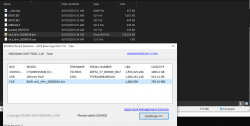
2. Write uLE kHn disk image (i.e by HDD Raw Copy Tool) and since now it will boot on PS2 during start (remove memory card if You have some osd update hack on it). (Done, I think, I used 'HDD Raw Copy Tool, to copy file included in the link (7z file) I copied the file named "wLE_kHn_20200810.bin" as seen in the attached image.) (Current step I am on)

3. After that, go to HDD Manager and format HDD. (This is where I am now. Is this done via PS2? I assume yes, since "Windows HDL Image Install Program v1.7.6" replies with "The Selected drive does not have a valid PS2 Master Boot Record")

4. Go to USB (mass:/) and start FHDB Installer. Remember that USB must have FAT32 file system on MBR, nothing else is supported. (Also via PS2 with the other files (in my pic) put on the root of usb flash drive?)

5. Install FHDB. (Is this in the file I downloaded from the link you provided? That should now be on my USB Flash drive.)

Thank you for your reply and I am kicking cancers butt! :)

And I am sorry, I do understand these questions are pretty basic, especially from someone such as myself. All done myself lol. By all metrics, I should be able to figure all of this out. I am going to now google and read about a thousand different guides based on what you linked..."MBR Boot". :)
 

Attachments

  • Untitled.png
    Untitled.png
    91.3 KB · Views: 53
Ironically I was getting an error trying to post that reply...after much trial and error it was when quoting with the link included in the OP from Berion. I removed the link from his post and it posted perfectly lol.
 
@Coragin Wrong, disk image is "__mbr.raw" file in that archive.

HDD Manager is in uLE. So yes, on PS2. But if You has burned disc image into HDD, for sure it didn't boot! So WTF? ;) How did You launched uLE then? The reason of writing disk image is to launching file manager by which You can run FHDB Installer, so the assumption is You don't have any method to boot apps until hack the console which is in this specific example a first step.

New users cannot post full links. It is anti spam measure to prevent viagra etc. bots.

PS2 don't have MBR. People wrongly named that because of name of first partition ("__mbr") where eg. partition index and pfs cache are stored. Both have completely different structure. Anyway, WinHIIP cannot be used on HDDs 1TiB and larger, avoid it anyway for various of other reasons. Use https://www.psx-place.com/resources/hdl-batch-installer.1173/
 
Last edited:
@Coragin Wrong, disk image is "__mbr.raw" file in that archive.

HDD Manager is in uLE. So yes, on PS2. But if You has burned disc image into HDD, for sure it didn't boot! So WTF? ;) How did You launched uLE then? The reason of writing disk image is to launching file manager by which You can run FHDB Installer, so the assumption is You don't have any method to boot apps until hack the console which is in this specific example a first step.

New users cannot post full links.

PS2 don't have MBR. People wrongly named that because of name of first partition ("__mbr") where eg. partition index and pfs cache are stored. Both have completely different structure. Anyway, WinHIIP cannot be used on HDDs 1TiB and larger, avoid it anyway for various of other reasons.

Thank you so much for your help!
Its finally booting into ULaunchELF (Grey screen, File Browser Etc)
I ran Boot.Elf
was worried about packed_BOOT.Elf so did not run it. But it is running elf files now. I have the install packs from this post, though they may be for mem card or something so I have not touched them as of yet.

Do I now, since its booting, pull out the hdd (no network on this card) and run hdl-batch-installer (already have it)? And allow it to format (if it does)? Will that erase the __mbr.raw?

I can try it, and if it dont work, just re-do the __MBR.raw and get there through trial and error lol. I never would have gotten this far without your help, I cannot thank you enough. Now its just the matter of...

1. Making sure the hack sticks. (Will find out after images copy)
2. how to get to home screen to run other stuff (as it always boots into LaunchELF)?
3. How to setup HDD to install games? (I already have WinHIIP, its just the formatting) (Got it, installing them now)
4. Installing emulators etc.

Thankyou again, so much. And that makes sense about the bot protection, good idea.

Edit: Sooooo, I have more to learn lol.
1. Yes, the hack stuck.
2. The game images installed correctly as per WinHIIP. But they do not show up in the HDD on the PS2. So I got something wrong lol. They are there, I found them somehow, but I can only unmask? The title from the SLUS file name, nothing further. Gonna have to look that stuff up.

Have not gotten to the other parts, since I have more to learn lol.

Edit 2:
Im learning, slowly lol. That has happened since thyroid removed ;)
So, I needed OPL. I have downloaded the latest release and will be messing with that next. Hopefully it will find the games I have already installed via WinHIIP.

Thank you again, so much. I have been out of the game for over 10 years, so I feel like a noob. And to think I used to help so many people with 360 and PS3 lol,

 
Last edited:
@Berion,

Thank you so much for all your help. I really cant thank you enough. After so much time banging my head against the wall, I finally got it all set up and running. Now, I am going to poke around the site and find out how to boot directly into OPL, play PSX backups, etc. I LOVE the OPL optioon for 1080p (took me a bit to figure out I had to configure the TV as well). But after booting into the boot loader, I can get to browser and get to OPL and run all the games. For now, its working and thats great! I will figure out all I want to do with it through reading the site and searching (now that I know more terminology and acronyms for searching).

Seriously, I cannot thank you enough for your help. What took you likely 20 seconds of brain power including the posts, that little bit has made my year! Thank you!
 
Slowdown cowboy. You didn't hacked Your console yet as You should, so You are not ready to configure it (at least based on Your posts, in case if You don't installed FHDB yet). :P

Booting uLE kHn (from disk image) is only for booting something which a.) can format HDD, b.) can run something else. So it is first step of Your journey, not for daily use. :P As I said, once You boot this app, go to HDD Manager (under misc) and format HDD, then of course without turning off the console because you cleansed whole HDD now, run FHDB installer from USB. Once You will install FHDB, You will have hacked OSDSYS (menu of the console) and You can start from there further configure Your environment to Your needs.

FMCB v1.966 and FHDB is in the same installer, the same file to launch.

Don't use WinHIIP until You want serious problems in future.

Do I now, since its booting, pull out the hdd (no network on this card) and run hdl-batch-installer (already have it)? And allow it to format (if it does)? Will that erase the __mbr.raw?
Formatting means deleting existing logic structure and replace it by new one. So yes, it will kill the uLE kHn.

how to get to home screen to run other stuff (as it always boots into LaunchELF)?
Autoboot uLE is temporary in "MBR Boot way". For hacked OSDSYS is FMCB (MC) or FHDB (HDD).

Installing emulators etc.
Ancient consoles like PS2 don't have operating systems working in the background. So there is no any rules where to put this or this. All depend of each application alone, what his author's choose or allow.

- - -
Seriously, I cannot thank you enough for your help. What took you likely 20 seconds of brain power including the posts, that little bit has made my year! Thank you!
You are exaggerating. ;p
Sure, no problem. You are welcome.

If You want blow out Your head, I recommend to read this:
https://www.psx-place.com/threads/a...thing-you-should-know-about-hdd-in-ps2.30912/
 
Last edited:
By label alone only by datecode but it is not 100% reliable test. 100% is reading "rom0:/ROMVER". Compatible SCPH-9xxxx will start from "0220" string, while incompatible from "0230".
 

Similar threads

Back
Top