
PS3 HAN [VERY] Simple Way To Direct Connect PS3 To PC

1. Connect your PS3 to PC with a Ethernet cable.
2. Change network settings on your PS3, Custom>Wired>Auto-Detect>Automatic>Do Not Set>Automatic>Automatic>Do Not Use>Enable>Press X To save settings.
3. Once this is done go to the "Network and Sharing Center" on your PC,
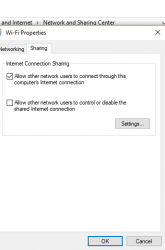
select your connection (in my case wifi), properties, sharing, and check "Allow other network users to connect through this computer's internet connection, Done..Enjoy!
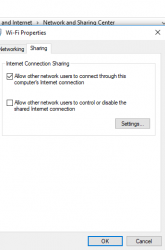
9908-c558ccda906d3c2d4c999742a093f855.jpg

Thanks to @CYB3R18 for posting this in another threat.
thought it would be useful for people having trouble direct connecting like i was.
 

Attachments

  • Screenshot (2).png
    Screenshot (2).png
    11.9 KB · Views: 6,052
You can also bridge a laptop to PS3:


1. Open Control Panel.
2. Search for Adapter in the Search Control Panelbox.
3. Select View Network Connections under Network and Sharing Center.
4. Hold the Ctrl key and select both your WiFi connection (usually has the SSID of the router/hotspot in it's name) and the Ethernet connection (Usually says Local Area Connection with Network Cable Unplugged underneath).
5. Right click and select Bridge Connections from the pop-up menu.
6. Connect the PS3 and the laptop using the cable.
7. Fix your PS3's network connection settings to work with your wired connection.

Very simple.
 
1. Connect your PS3 to PC with a Ethernet cable.
2. Change network settings on your PS3, Custom>Wired>Auto-Detect>Automatic>Do Not Set>Automatic>Automatic>Do Not Use>Enable>Press X To save settings.
3. Once this is done go to the "Network and Sharing Center" on your PC,
select your connection (in my case wifi), properties, sharing, and check "Allow other network users to connect through this computer's internet connection, Done..Enjoy!
9908-c558ccda906d3c2d4c999742a093f855.jpg

Thanks to @CYB3R18 for posting this in another threat.
thought it would be useful for people having trouble direct connecting like i was.
when i connect my ps3 to pc via lan ,the lan port of pc dont light up it dosent show that it is connected it was working fine tommorow.
 
Even better :

1) Connect your PS3 to your laptop with an ethernet cable.
2) Set your laptops ethernet IP to a static address, say 10.1.1.1.
3) Set your laptops DNS to 255.255.255.0
4) On your PS3 wired connection setup, enter all the same numbers like in the laptop, except IP to 10.1.1.2.
5) Complete setup.
6) Done! Enjoy PKG Linker and speeds upto 1 Gbps.

No router. No BS. No poo poo. No wookies were harmed in making this tuto. Beat that.
 
This is the full method, ur not showing anything in this, ur showing just 3 steps and ur not showing anything.
This was 3 simple steps to direct connect a ps3 to a PC. Your thread includes a ton of extra steps involving PKG linker. There are plenty of other threads people can read to learn how to use PKG linker. No need to act as if your thread is the end all be all.
 
Yes i know it, im not mad for him, but its simple one, and hes not telling anything about pkg linker people need to know more about pkg linker.. ! Because everybody knows how to link directly ps3 to pc.
 
Yes i know it, im not mad for him, but its simple one, and hes not telling anything about pkg linker people need to know more about pkg linker.. ! Because everybody knows how to link directly ps3 to pc.
Obviously everyone doesn't know as there are still plenty of people asking on the main PKG linker thread....
 
Hello by using this method my ps3 freezes after downloading the pkg file and idk if it's important but I don't have a WiFi card on my pc and wen I use the WiFi method it works normally but is so sloww do u guys know how can I avoid that freezing after downloading?
 
So this is for PKG linker right? I wonder when we'll be able to browse files on the PS3's internal memory... like an FTP connection
 
i was wondering if anyone can help me. i did everything like op said and it worked fine until yesterday. i was cleaning my room so i needed to unplug my setup (pc, router and ps3) and when i hooked it all back ps3 says it cannot obtain ip address. wi-fi works but ethernet connection doesn't.
 
i was wondering if anyone can help me. i did everything like op said and it worked fine until yesterday. i was cleaning my room so i needed to unplug my setup (pc, router and ps3) and when i hooked it all back ps3 says it cannot obtain ip address. wi-fi works but ethernet connection doesn't.
Try to disconnect the ehternet cable, then turn off PC and PS3 (to reset network cards/chips), then do this sequence:

-Turn ON PC
-Turn ON PS3
-Configure network settings in PS3... in the "connection test" that appears at the end it will fail... no problem
-Plug the ethernet cable in between PC and PS3

Wait couple of minutes... and you should see the notification window at top right corner on the PS3 advising the connection is working


--------
In my wired network sometimes i need to do this (for some unknown reason i have not discovered yet)
I think is because sometimes the PC network cards gets "stucked"... and the PS3 takes this (wrong) data fron the stucked network card
And after that is remains misconfigured forever (even after reboots)
The only solution i have is disconnect the cable and "reset" devices at both sides... the PS3 and PC as i explained
 
Hi. My PS3's built-in wireless is slow as feces through a funnel so I'd like to try this with my desktop PC's wifi across the room which is blisteringly fast. All I have though is a crossover cable that can reach from my PC to my PS3. So, can a crossover cable be used with this technique or do I need a regular Ethernet cable? Thanks for any help.
 
Hi. My PS3's built-in wireless is slow as feces through a funnel so I'd like to try this with my desktop PC's wifi across the room which is blisteringly fast. All I have though is a crossover cable that can reach from my PC to my PS3. So, can a crossover cable be used with this technique or do I need a regular Ethernet cable? Thanks for any help.
Yes, you can use either type of Ethernet cable with the PS3 as it has Auto-MDI/MDIX.
 
Well, I used the OP's excellent & concise guide (the most concise tutorial I think I've ever seen in my life,in fact! lol) and I'm happy to report that it worked. Now the bad news: PlayStation Network servers for my area SUCK! I know my wifi is capable of 8-10 megabytes per second download speed but the most I'm able to get with the PSN is a lousy 1.5 to 2 MB/sec. When I run my PS3's internet connection test it reports an estimate of around 20 Mbps downstream and an upstream of 5 Mbps (the last one is my actual upload speed, btw, but that download throughput is pretty shit, imo). I guess this is the norm for PSN servers in my area?

Is there an external speed test site that can be used with the PS3's built-in browsers? Speedtest net doesn't seem to work. I'm just curious as to what the actual download speed of my PS3 is now that it's connected to my main broadband.

Thanks for the help in this topic and for getting me hooked up, btw.
 
Boys! For some reason, my wired connection to my PS3 suddenly stopped working and I have no idea why. When I run my PS3's internal "Test Connection" test it repeatedly fails to obtain an IP. When I switch back to wifi it works, but at a much reduced download speed (half of what i typically got with the wired which is why I wanted to use wired in the first place). I have changed nothing in my configuration. I'm running a crossover cable from my PC located about 10 feet away. My PC has WiFi connected to my landlord's router downstairs and is working fine (70 Mbps download). I even ran the OP's tutorial again and it still won't work. What could have happened? I even rebooted my PC. I don't understand because wired was working fine before. Is it possible my PS3's Ethernet port has gone bad? It lights up at the other end on my PC.
 
Boys! For some reason, my wired connection to my PS3 suddenly stopped working and I have no idea why. When I run my PS3's internal "Test Connection" test it repeatedly fails to obtain an IP. When I switch back to wifi it works, but at a much reduced download speed (half of what i typically got with the wired which is why I wanted to use wired in the first place). I have changed nothing in my configuration. I'm running a crossover cable from my PC located about 10 feet away. My PC has WiFi connected to my landlord's router downstairs and is working fine (70 Mbps download). I even ran the OP's tutorial again and it still won't work. What could have happened? I even rebooted my PC. I don't understand because wired was working fine before. Is it possible my PS3's Ethernet port has gone bad? It lights up at the other end on my PC.
Its unlikely the port has gone bad, more likely its the cable or setup gone bad. If you are connecting directly it is likely you need to enter a manual IP address on the PS3 and PC due to having no DHCP server. Maybe before you had internet connection sharing or a bridged network setup so you did not need to do this, hard to say.
 
Its unlikely the port has gone bad, more likely its the cable or setup gone bad. If you are connecting directly it is likely you need to enter a manual IP address on the PS3 and PC due to having no DHCP server. Maybe before you had internet connection sharing or a bridged network setup so you did not need to do this, hard to say.

After trying everything including resetting my landlord's router downstairs, I finally corrected the issue by unticking then reticking "Allow Other Network Users To Connect Through This Computer's Network Connection" and unticking "Allow Other Network Users To Control or Disable The Shared Network Connection." Works fine now though I still only get 20 Mbps download with my PS3 apparently but it's a whole lot better than the shit WiFi the PS3 seems capable of (6-8Mbps). Thanks anyway.
 
Back
Top