PS3 HAN [VERY] Simple Way To Direct Connect PS3 To PC

Which actual speeds are people achiveing using this method?

I connect everything though the my gigabit router, and archieve approx 140mbit/s (~17MB/s). Also I have SSD in my PC, so no bottleneck there.
Not too bad speed, but if direct connection yields more, I'm all up for it.
Also gigabit allows for up to 1000mbit/s, so I believe its the PS3 not capable of more than around 140mbit/s, which is not the best.
My router allows me to transfer 900mbit/s to my NAS, so also no bottlenecks there.
If you remove the router in between PS3 <---router---> PC you have an small boost in transfers from PS3 to PC (but not in the other direction) of around 10MB/s is notable, but the real bottleneck is in the PS3 firmware
See some examples here, there are some with a gigabit switch
http://www.psdevwiki.com/ps3/Talk:GbLAN
 
Hi, i'm new to this forum, just make an account so i can ask a few question. Hehe

I can't connect my ps3 to my laptop via ethernet. In "network connections" settings (on laptop), it say "unidentified network" on my ethernet.
The driver is up to date, the cable is fine (because im used to transfer games by using my sisters laptop and its working fine.), have manually changed the IP (not work), change it back to auto (not work), change the DNS (not work), some CMD command (not work), disable the AV for a couple minutes (not work), disable all firewall (not work).

Any clue will be a big help. Thanks before.
 
I already tried some different methods but nothing seems to work for me. The lights on the lan connections don't even blink I tried different cables and another laptop but nothing worked for me I can use FTP with WLAN without any problem besides the ridiculous transfer speed but I can't get this direct connection to work it just does nothing at all
 
1. Connect your PS3 to PC with a Ethernet cable.
2. Change network settings on your PS3, Custom>Wired>Auto-Detect>Automatic>Do Not Set>Automatic>Automatic>Do Not Use>Enable>Press X To save settings.
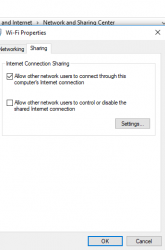
3. Once this is done go to the "Network and Sharing Center" on your PC,
select your connection (in my case wifi), properties, sharing, and check "Allow other network users to connect through this computer's internet connection, Done..Enjoy!
9908-c558ccda906d3c2d4c999742a093f855.jpg

Thanks to @CYB3R18 for posting this in another threat.
thought it would be useful for people having trouble direct connecting like i was.
Please, how can I get nat type 2 or 1 with this method, coz I have been trying all day long and nada
 
Back
Top