PS3 webman mod takes more ram and make games goign slower after 4+ horus of gameplay

ashura

Member
hi guys i have a quick question, i was using before webman mod but the thing is i noticed that it seems that there used to be a memory leak due to that when i played for more than 2 hours my games were going slower and also my ps3, then in order to me to fix that i needed to restart my ps3, but then i unninstall it and i do use multiman 4.85.1 this issue got fixed, also it gave me the same issue on multiman 4.91 maybe it was something related to exfat drivers? or anything related to a background app process or anything similar? thanks a lot and i will look foward for your response
 
In these 2 hours of game play, did you use any particular feature of webMAN-MOD? E.g. ftp transfer, temperature monitoring, FPS display, net or ntfs/exfat access, fan control, ps3mapi server?

As webMAN-MOD has many functionalities, it is required to identify where could be the issue. If you were using some of the features mentioned, try again without using them.

WebMAN-MOD is supposed to not use additional resources during game play.
 
In these 2 hours of game play, did you use any particular feature of webMAN-MOD? E.g. ftp transfer, temperature monitoring, FPS display, net or ntfs/exfat access, fan control, ps3mapi server?

As webMAN-MOD has many functionalities, it is required to identify where could be the issue. If you were using some of the features mentioned, try again without using them.

WebMAN-MOD is supposed to not use additional resources during game play.
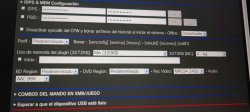
thanks Aldos, so far i do used fan control and exfat access, also i setup webman mod to be into the setup options as i showed on the picture, i was wondering if the setup that i did may affecto Aldos, thanks a lot, i will look foward for your response

also something that i saw as well happening with the latest version of multiman that you updated, ti was happening the same when i was using an exfat external usb disk, maybe can be something related to the exfat drive that is making perhaps this additional RAM usage? also my ps3 is slim model 2101B with a total of available RAM of 64kb if im not mistaken just in case if you need that information, i hope that this one can be useful
 

Attachments

  • IMG_20250525_192512_11zon.jpg
    IMG_20250525_192512_11zon.jpg
    633.2 KB · Views: 60
Last edited by a moderator:
also something that i saw as well happening with the latest version of multiman that you updated, ti was happening the same when i was using an exfat external usb disk, maybe can be something related to the exfat drive that is making perhaps this additional RAM usage? also my ps3 is slim model 2101B with a total of available RAM of 64kb if im not mistaken just in case if you need that information, i hope that this one can be useful
The settings in your picture look fine, and they should not affect the gameplay.
Also exFAT should not make a difference compared with NTFS. The games in both file systems are accessed in raw mode. However, games stored on these file systems use more memory than the internal hard drive or FAT32, because they require the rawseciso plugin to run on the slow 0 to help Cobra read the sectors.

The issue could be associated to the 64kb free. You should try switching to Lite edition or unload webMAN after mount the game to free the memory. Some games have a high demand of memory and could have random issues if the memory is full.

You also can test playing a different game with a lower memory demand.
 
The settings in your picture look fine, and they should not affect the gameplay.
Also exFAT should not make a difference compared with NTFS. The games in both file systems are accessed in raw mode. However, games stored on these file systems use more memory than the internal hard drive or FAT32, because they require the rawseciso plugin to run on the slow 0 to help Cobra read the sectors.

The issue could be associated to the 64kb free. You should try switching to Lite edition or unload webMAN after mount the game to free the memory. Some games have a high demand of memory and could have random issues if the memory is full.

You also can test playing a different game with a lower memory demand.

Good thing @ashura metioned. So, there is no gameplay difference setting memory usage higher or lower on Webman Mod's IDPS & MEM section? I could swear I noticed fps/gameplay improvement by setting it to MAX. I guess I was wrong then.

Thanks @aldostools
 
The settings in your picture look fine, and they should not affect the gameplay.
Also exFAT should not make a difference compared with NTFS. The games in both file systems are accessed in raw mode. However, games stored on these file systems use more memory than the internal hard drive or FAT32, because they require the rawseciso plugin to run on the slow 0 to help Cobra read the sectors.

The issue could be associated to the 64kb free. You should try switching to Lite edition or unload webMAN after mount the game to free the memory. Some games have a high demand of memory and could have random issues if the memory is full.

You also can test playing a different game with a lower memory demand.
great Aldos thanks a lot, actually i would like to test with sniper elite 3 which is also demanding and also it used to happen to me as well this same issue, sof ar i do have my external disk formatted on FAT32 to see if there may be a difference, its also interesting to know those additional details regarding the usage of the memory, i will let you know any updates that i can see, thanks a lot for your time and also for your response, have a great day Aldo
 
Good thing @ashura metioned. So, there is no gameplay difference setting memory usage higher or lower on Webman Mod's IDPS & MEM section? I could swear I noticed fps/gameplay improvement by setting it to MAX. I guess I was wrong then.

Thanks @aldostools

The setting for the memory usage mainly affects the memory used during the scanning for content, the file listing in the web file manager and the FTP transfer.

That setting is not used during gameplay. Therefore it has not effect.
 
The setting for the memory usage mainly affects the memory used during the scanning for content, the file listing in the web file manager and the FTP transfer.

That setting is not used during gameplay. Therefore it has not effect.
thanks a lot Aldos, so far i was able to test and i see that it made a difference, it goes much better now, thanks a lot for that information that you let us know, really appreciate it
 
Back
Top