PS3 webMAN MOD v1.43.11 - Auto- Play, Auto disable CFW syscalls, & Custom Combos .....

Developer Aldostools comes at us with another impressive update to webMAN MOD with his release of version 1.43.11. The developer adds support for a new Auto-Play Feature (IRISMAN and prepNTFS users will have to update their apps: see link). Ability to auto-disable cfw syscalls by adding the [online] tag to file names. Custom Combo Support and even [break]sss[/break] more seen in this latest update to the very popular ps3 plugin for cfw enabled consoles.


webMAn MOD.png

webMAN MOD v1.43.11
Aldostools (via psx-place.com) said:
Changes in webMAN MOD 1.43.11

  • Auto-Play (via combo R2/L2 during mount, setting in /setup.ps3 or [auto] tag in files or folders)
  • Auto-disable syscalls via [online] tag in file names
  • Custom combos (/dev_hdd0/tmp/wm_custom_combo)
  • Added log parameter to /klic.ps3 (saves klics into /dev_hdd0/klic.log)
  • Block FW update URL (added support for custom /dev_hdd0/ps3-updatelist.txt - use with caution)
  • Added command /browser.ps3$block_servers
  • Updater: Fixed re-enable Cobra when installing on Rebug

Matsumot0 (via github) said:
webMAN MOD 1.43.11 will support the re-definition of up to 12 combos, overriding their default behavior by creating the following files in the folder /dev_hdd0/tmp/wm_combo/:

  • wm_custom_r2_square // default: block online servers
  • wm_custom_r2_triangle // default: disable syscalls
  • wm_custom_r2_circle // default: show IDPS / Abort copy / Abort fix game / enable in-game screenshot (if VSH is not patched)
  • wm_custom_select_square // default: toggle gameDATA
  • wm_custom_select_triangle // default: reserved
  • wm_custom_select_circle // default: unmount disc image
  • wm_custom_select_l1 // default: mount _prev last game
  • wm_custom_select_r1 // default: mount _next last game
  • wm_custom_l2_r2_circle // default: open file manager in ps3 browser
  • wm_custom_l2_r2_r1_circle // default: open game list in ps3 browser
  • wm_custom_l2_r2_l1_circle // default: open /cpursx.ps3
  • wm_custom_l2_r2_l1_r1_circle // default: open /setup.ps3
and lot of bugfix and improvement of auto-play feature
prepNTFS 1.11 Changes
  • - Added support for folders with [auto] tag
Download(s):

 
Last edited by a moderator:
The real problem is still the same thing, some kids wanna ddos the server for nothing...
In any case i have some private server with different cfg, cloud openstack or dedicated but it's not free but not expensive in France.

How many GB has the complete database?
 
Last edited:
May be a stupid question...
Can i set up the "COVERS_PATH"-variable in LANG_XX.TXT to "ftp://[IP OF MY NAS]/PS3NETSRV/COVERS/" and webMAN will now take the covers from my NAS ?
Or will this only work on PS3s internal HDD ?

Btw... strange that u can only set this variable in the language files... 4 me this would belong to the wMM-settings.... so what's the sense behind this ?
 
Last edited:
The real problem is still the same thing, some kids wanna ddos the server for nothing...
In any case i have some private server with different cfg, cloud openstack or dedicated but it's not free but not expensive in France.

How many GB has the complete database?

271 MB (5660 EUR/USA + 3186 JAP + 5725 PS1/PS2 = 14571 covers)
 
May be a stupid question...
Can i set up the "COVERS_PATH"-variable in LANG_XX.TXT to "ftp://[IP OF MY NAS]/PS3NETSRV/COVERS/" and webMAN will now take the covers from my NAS ?
Or will this only work on PS3s internal HDD ?

Btw... strange that u can only set this variable in the language files... 4 me this would belong to the wMM-settings.... so what's the sense behind this ?

1. Yes you can use ftp: protocol, but you only will see the covers on the PC web browser.

It's better that you use http: like this: hxxp://<ip-of-your-nas>/path-of-your-images/%s.jpg or hxxp://localhost/net0/COVERS/%s.jpg (replace hxxp->http)
Or use a local path like /dev_usb000/COVERS/ <- notice that it doesn't need %s

2. As I mentioned earlier, the feature is "unofficially" supported. That's why it is not included in /setup.ps3

It is in the language files, because these files act like INI files. So you can edit them and webMAN use the parameters.

NOTES:
a) The external covers are used as last resource if the icons are not found locally.
b) Only in the HTML list of games the icons are replaced with a disc icon if the image is not found. On XMB the loading icon will be shown when the image is not found.


Oh that's all only 271MB XD

Yes. Most images are .jpg (260x300 or 220x300) not high quality. Average size is aproximately 20KB per image.

I think it could grow up to 300MB (max 400MB). Although the images are small, I estimate that you could have a demand of various GB per day.
 
Last edited:
2. As I mentioned earlier, the feature is "unofficially" supported. That's why it is not included in /setup.ps3
Sry... don't want to tell any secrets :o
I've read your post about "COVERS_PATH" yesterday so i thought it's not that feature u don't want to tell people about.
 
Sry... don't want to tell any secrets :o
I've read your post about "COVERS_PATH" yesterday so i thought it's not that feature u don't want to tell people about.

The source code is open... there are not "secrets"... I only don't want people abusing the feature.
 
It would be better if someone would donate a private server with unlimited bandwidth to host the images from the covers packs. Otherwise the external images feature has no sense.
What about this SVN? hxxp://svn.assembla.com/svn/xxx-yyy-zzz/
I'm open it for testing yesterday. It's free account limited to 1Gb space. Who want access to this svn (manage/update covers) tell my in this thread
 
Last edited:
i've got the same idea on github pages it's 1gb also
https://pages.github.com/

Did you read the ToS?
Code:
12. If your bandwidth usage significantly exceeds the average bandwidth usage (as determined solely by GitHub) of other GitHub customers, we reserve the right to immediately disable your account or throttle your file hosting until you can reduce your bandwidth consumption.
 
Local mapping via LANG-file work fine. But net0 share not work
hxxp://localhost/net0/COVERS/%s.jpg (replace hxxp->http)
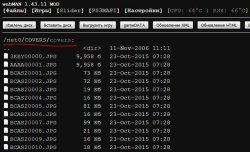
/net0/COVERS/covers visible via browser from PS3, connection stable.

wm_01.JPG

In LANG-file set:
Code:
COVERS_PATH			[http://localhost/net0/COVERS/covers/%s.jpg]

Where is problem?
 
Local mapping via LANG-file work fine. But net0 share not work

/net0/COVERS/covers visible via browser from PS3, connection stable.

View attachment 4098

In LANG-file set:
Code:
COVERS_PATH			[http://localhost/net0/COVERS/covers/%s.jpg]

Where is problem?

[strike]It was a bug with the boolean flags...[/strike]

EDIT:
To see the icons from tablet/laptop/smartphone/PC browser must use the real IP address of your PS3.

e.g.
Code:
COVERS_PATH			[http://10.0.0.8/net0/COVERS/%s.jpg]

The problem is that when the html is built using hxxp://localhost/... the PC tries to see its own IP address instead of the PS3 address.
 
Last edited:
Hhhhmmmm...
Not working doesn't matter. IP of my PC - 192.168.0.2, IP of PS3 - 192.168.04
Code:
COVERS_PATH	[http://192.168.0.4/net0/COVERS/covers/%s.jpg]
Inside 'COVERS' placed 'covers' folder with PS3 thumbs and 'covers_retro' folder
_______________
- net0
- - GAMES
- - PKG
- - COVERS
- - - covers
- - - covers_retro
- - PS3ISO
_______________

Also toggle 'Disable multiMAN covers' options - no effect for covers from net0. Now unchecked.
May be need to tune some else options ? Games/pkg from net0 works fine.
 
Last edited:
[MENTION=9455]RabinoVich[/MENTION]
Cover access via http is not for PS3 browser or XML.
How would you set up COVERS_PATH for local mapping "dev_hdd0/COVERS"

Regards
Rudi
 
Last edited:
Cover access via http is not for PS3 browser or XML.
For what need access to covers via http? Using covers load via net0 imposible now?
How would you set up COVERS_PATH for local mapping "dev_hdd0/COVERS"
Local mapping work fine but not recursive. Need to contain all covers (ps3, ps2, psx, etc.) to common folder. mM, for example, use subfolders. This very easy:
_______________
- covers (for ps3)
- covers_retro
- - gba
- - nes
- - psx
...
_____________
 
Sry mate... guess u got me wrong.
I just wanted to know how must i define COVERS_PATH when i have my covers in "dev_hdd0/COVERS" in order to see the covers in XML-view on PS3.
I've tried a lot but had no luck... may be it's not supposed to work that way !?

Regards
Rudi
 
Last edited:
For what need access to covers via http? Using covers load via net0 imposible now?

Local mapping work fine but not recursive. Need to contain all covers (ps3, ps2, psx, etc.) to common folder. mM, for example, use subfolders.


gba/nes/genesis covers are *not* supported by webMAN MOD.

Covers for PSX/PS2 from /dev_hdd0/game/BLES80608/USRDIR/covers_retro/psx are supported

PS3 covers can be read from /dev_hdd0/game/BLES80608/USRDIR/covers or /dev_hdd0/GAMES/covers (stealthMAN and multiman SingStar® Stealth folders are supported too)
ISO covers can be read from the same folder of the ISO, but with extension .jpg or .png (or .JPG or .PNG)

Covers from /net0 are supported but not suggested. To make it work, the PC must have ps3netsvr running, the custom URL must include the IP of the PS3.
The PS3 pull the covers from the PC, then publish them through the http server back to the PC. This is slow and inefficient. Local covers is what I suggest.

The best setup for remote covers is to configure a http server on the PC (or on Internet) and put all the covers in a single folder (e.g. hxxp://10.0.0.99/COVERS/%s.JPG)
or group them in 3 regions (US/EN/JA) using hxxp://10.0.0.99/COVERS/%s/%s.JPG
examples: /COVERS/US/BLUS30123.JPG /COVERS/EN/BLES12345.JPG /COVERS/JA/BLJM81234.JPG

For remote covers *http* is required to be able to show the icons on XMB and on the browser. Local covers on /dev_hdd0 or /dev_usb00x don't need the http protocol.
 
For remote covers *http* is required to be able to show the icons on XMB and on the browser
What options on PS3/wM needs toggle to this ? Because I testing with my own http-server (covers are opened via browser on PS3) but covers not works in wM. COVERS_PATH [hxxp://x.x.x.x/COVERS/covers/%s.jpg] (changed hxxt to http)

Sry mate... guess u got me wrong.
I just wanted to know how must i define COVERS_PATH when i have my covers in "dev_hdd0/COVERS" in order to see the covers in XML-view on PS3.
I've tried a lot but had no luck... may be it's not supposed to work that way !?
For example:
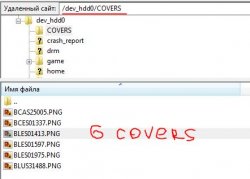
1. COVERS folder on PS3
wm_covers_01.JPG
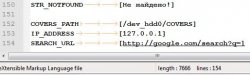
2. Path of COVERS in you LANG-file (for me - LANG_RU.TXT e.g.). Get it from /dev_hdd0/tmp/wm_lang
wm_covers_02.JPG

3. Copy edited LANG-file to ps3 in /dev_hdd0/tmp/wm_lang

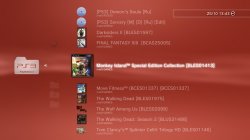
4. Reboot PS3 and Refresh XML/HTML
wm_covers_03.JPG

screenshot_2015_10_25.jpg

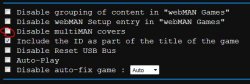
5. Also make sure wM option "Disable multiMAN covers" is uncheked
wm_covers_04.JPG
 
What options on PS3/wM needs toggle to this ? Because I testing with my own http-server (covers are opened via browser on PS3) but covers not works in wM. COVERS_PATH [hxxp://x.x.x.x/COVERS/covers/%s.jpg] (changed hxxt to http)

It won't work if you're using the build that is english only (because it doesn't read the language files) or if you're using a build previous to 1.43.12.

In my tests the remote covers worked using the paths that I mentioned in my previous posts... but I'll tell it again, the remote covers is a feature not "officially" supported.
 

Trending content

Back
Top