PS3 What’s the mysterious about this 4TB external HDD? PS3 can read it!

For this to work you need an external hard drive that doesn't use 512e sector emulation and exposes its physical 4k sectors. That way you can get 16TB to work at max with a MBR.

As for internal, at around 1.8 trillion bytes the format utility stops working but the rebuild database and file system recovery stop working when you go over 1 trillion bytes. Why that's different, don't know. Maybe it's something in the way Sony coded these programms.
 
[mention]cha0shacker [/mention] I'm getting confused. 512e drives have 4k physical sector size but they emulate 512. Is that true?
A 4k drive grater than 2TB could be formatted MBR but not using windows disk management? Because for WD drives I should use the WD format tool? I don't have such a drive to test it myself.
I'm talking about external drives. But I want to make my self one using a WD sata to usb bridge and a 3.5" hdd. Is that possible? I believe it is and I just need a drive which is 4k?
 
My guess what the tool does is to enable the 512 sector emulation or not. 4K sectors can be problematic with some software, that's most likely why it asks for Vista or newer OR XP. Since XP doesn't know what GPT is and only understands MBR.
 
For this to work you need an external hard drive that doesn't use 512e sector emulation and exposes its physical 4k sectors. That way you can get 16TB to work at max with a MBR.

As for internal, at around 1.8 trillion bytes the format utility stops working but the rebuild database and file system recovery stop working when you go over 1 trillion bytes. Why that's different, don't know. Maybe it's something in the way Sony coded these programms.

Nah it will still work past 1tb as I have a 1.75tb internal and works perfectly. When I tried partitioning a 2tb to 1.83tb it works great still you need to run a file system check. So I disabled it in QA settings. Most of the time it isn't an issue but when it is you have a forced format.
 
Nah it will still work past 1tb as I have a 1.75tb internal and works perfectly. When I tried partitioning a 2tb to 1.83tb it works great still you need to run a file system check. So I disabled it in QA settings. Most of the time it isn't an issue but when it is you have a forced format.
What i tried to say is that it is hit and miss going over 1TB. If you want your drive to work for sure 1TB is the safe option. I know a few native 1.5TB drives existed but they aren't sold anymore. These should in theory work too.
 
Worth to mention that if user have drive large enough to be problematic for PS3, he can limit its size by setting up HPA or DCO region, so in other words, it is possible to shrink eg. 4TB to 1TB on HDD fw config level.
 
What i tried to say is that it is hit and miss going over 1TB. If you want your drive to work for sure 1TB is the safe option. I know a few native 1.5TB drives existed but they aren't sold anymore. These should in theory work too.

Easy work around for this. Any problematic PS3 I have that doesn't like above 1tb has worked every single time I downgrade to 4.46 then install the new drive. Don't know why it works but it does. Done this for three systems that wouldn't take above 1tb but all were 4.8X firmwares. Then upgrade and enjoy
 
I'm honestly still wondering what the best drive for a PS3 is in the end. I usually use SSDs these days but the PS3 doesn't TRIM and sometimes it acts a little unusual with PS2 emulation.

So the best thing would be a good HDD i guess. But what kind? 7200, 5400, Hybrid, SMR, CMR, single platter or multi platter?
 
PMR/CMR, can be 5400 but with large cache (best SHDD with 3DXP (Optane's) instead NAND). Single platter, but You will not have choice anyway, most if not all have more than one nowadays. Write speed doesn't matter because it is SATA-I and because of encryption layers, so You will not achieve more than ~60MiB/s. IOps have matter and that's why SSD are faster in PS3.
 
I don't think a native SSHD with 3DXP exists but i found a dual platter SSHD with 32GB of NAND. Seagates ST1000LX001. Seems to be rare though. The 8GB NAND variant is much more common.

All recent single platter drives are SMR anyway and they suck.

IOPs seems to be better on 7200rpm drives though (not counting SSDs).
 
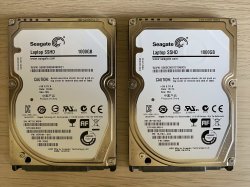
I just bought these two. Will be interesting to see how this performs in my incoming CECHA12
 

Attachments

  • IMG_8987.jpg
    IMG_8987.jpg
    951.8 KB · Views: 54
Of coarse it is old news. The whole thing is about this. Even the thread title says so. What I'm looking for is what features one HDD should have so it could be formatted MBR passed 2TB? Could you shed some light on this?
I'm looking for specific information so I can know the HDD I'm buying is going to work.

Thread title does not say anything about this being old. You have to give it a shot and if it works let us know. A list of working drives would be a good way to start for the community.
 
I want to come up with a summary of what people said here and what I read from other websites.
Please correct any wrong statement so I can edit the first post with the good information.
there are 3 types of HDDs in this regard.
The ordinary 512n. this kind of HDDs have physical sector size of 512 bytes which means the HDD can read/write 512 bytes in each cycle of working.
Then there are 512e which the physical sector size is 8 times bigger = 4096 bytes or 4 kilobytes "4K" but the controller emulates 512 bytes.
Finally there are 4Kn (aka AF. aka advanced format) HDDs which both physical and logical sector sizes are 4096 bytes.
PS3 can only read HDDs which initiated as MBR. But With MBR you are under the 2TB limitation. this is not true. Actually this limitation applies to 512n and 512e? HDDs. Because the limitation is a sector addressing limitation. With 8 times bigger sectors=4096 bytes, the limitation technically becomes 16TB. But windows disk manager doesn't use this feature and it doesn't allow greater than 2TB MBR no matter what. So you need special tools like WD format tool.
So in order to prepare a greater than 2TB "external" HDD for PS3 you need 1. A 4Kn HDD with physical and logical sector size of 4096 bytes and 2. A SATA to USB bridge which a Format tool accepts it and have the feature of formatting that large of HDDs as MBR.
For example this 4TB external WD my passport HDD in my hand have both the features which means the hdd inside is 4Kn, the SATA to USB bridge is made by WD which they provide the tool. so it works.
How should we know a HDD is 4Kn? You need to read it's data sheet or by connecting to windows and checking the system information (Type msinfo32.exe in search bar and double click msinfo32.exe to open the "System Information Screen, Go to Components -> Storage -> Disks to view a list of all drives. Locate the external USB drive and check the value for Bytes/Sector to determine if the external USB drive is 512 or 4k.). Be aware that Some tools like hard disk sentinel wrongly report every HDD as 4Kn. That is not true. But the windows system information is trustworthy.
But which vendors (except WD) has the good feature? I read somewhere seagate does the job too but I have not tested it myself.
 
Last edited:

Similar threads

Back
Top