
You are using an out of date browser. It may not display this or other websites correctly.
You should upgrade or use an alternative browser.
You should upgrade or use an alternative browser.
PS2 wLaunchELF Release Thread
- Thread starter sp193
- Start date
-
- Tags
- launchelf;


sp193
Developer
Changelog for build 2018/07/23:
LaunchELF build 2018/07/23: https://www.sendspace.com/file/jgqhhk
- Updated USBHDFSD.
- Refactored configuration menu for easier maintenance.
- Removed defunct interlace option.
- Enabled the use of the $gp register.
- Increased alignment of transfer buffer for better transfer performance.
LaunchELF build 2018/07/23: https://www.sendspace.com/file/jgqhhk
Welcome to Linux...It's probably nothing, but it's a little bit strange for me that I can copy almost identical files onto
PS2HDD.

Only extension for SLES_540.30_COV.png(PNG) is different (it's in lowercase or uppercase).
In Windows when I'll copy one of these files into the same directory it will be overwritten.

Hi, I have problem with some of the I/O modules, more specifically with "mass" and "DVD". When I boot the new version of uLE a message is displayed "Loading HDD modules" before I get to the file manager and when I step into "mass0" or "cdvdfs" they are always empty, no errors.
It feels like I'm missing something that should have been done but I'm not sure, do you know what it might be?
It feels like I'm missing something that should have been done but I'm not sure, do you know what it might be?
sp193
Developer
When I boot the new version of uLE a message is displayed "Loading HDD modules" before I get to the file manager
New versions of LaunchELF will support the HDD unit; they will load HDD modules and attempt to load LAUNCHELF.CNF from the HDD unit.
and when I step into "mass0" or "cdvdfs" they are always empty, no errors.
For USB devices: they must be formatted with FAT12, FAT16 or FAT32. NTFS and exFAT are not supported! Multi-function devices (devices with >1 LUN) like your multi-format SD card reader, are not supported.
For LaunchELF only: the device may have more than 1 partition, but this might not be supported by other homebrew software.
For CD/DVD: did you insert a disc that your PlayStation 2 supports?
I have tried multiple DVD discs including originals PS2 games, I have also tried some data discs I had around but without success.For CD/DVD: did you insert a disc that your PlayStation 2 supports?
I have a single partition on my USB stick that is FAT32, when I try it with v4.42d it works as expected so it shouldn't be the hardware.For USB devices: they must be formatted with FAT12, FAT16 or FAT32. NTFS and exFAT are not supported! Multi-function devices (devices with >1 LUN) like your multi-format SD card reader, are not supported.
I have also tried compiling from source but the same problem resides.
sp193
Developer
I have tried multiple DVD discs including originals PS2 games, I have also tried some data discs I had around but without success.
Is your PS2 actually able to read them? Have you been using this PS2 to play those game discs?
Normal data discs for the PC will not be accepted.
I have a single partition on my USB stick that is FAT32, when I try it with v4.42d it works as expected so it shouldn't be the hardware.
The old USBHDFSD module from v4.42d used to lack a check on whether there were actually partitions on the disk.
So if you had partitions but none were supported, then it would try to mount the whole disk as FAT32... which is wrong. Some people actually continued using it that way, until they upgraded and found that the new releases of LaunchELF reject those disks.
If you are certain that the partition is FAT32, then can you also ensure that it is made the active partition?

jolek
Senior Member
@sp193 I think that the old bug has return:
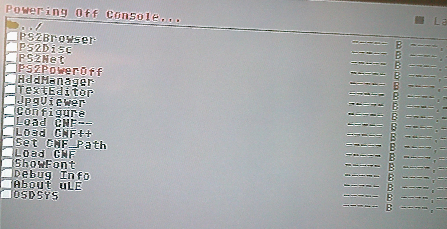
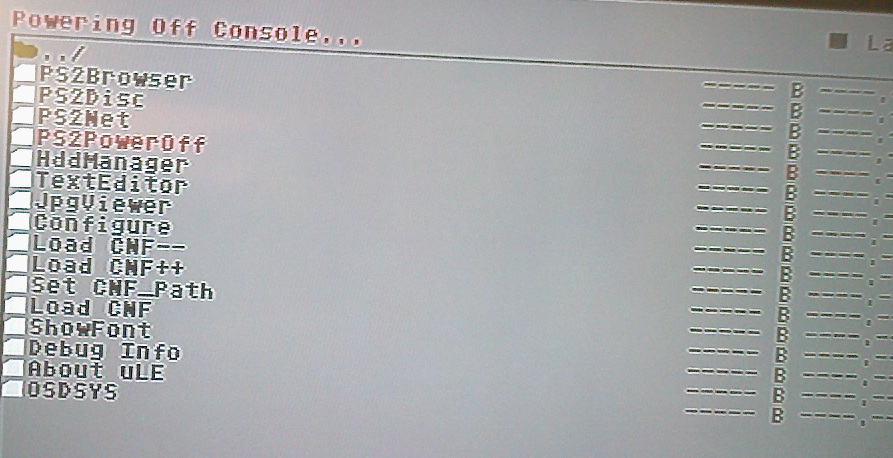
When I'm trying turn off my SCPH-50004 without HDD, wLe is crashing.
With HDD, everything is fine (console is switching off).
Tested on build from 23/07/2018.
EDIT 1: I also tried New Poweroff ELF from here:
http://www.psx-place.com/threads/fmcb-fhdb-v1-9-series-release-thread.13413/page-2#post-126749.
Everything is fine, no matter if I have HDD or not (PS2 will power off).
EDIT 2: I've made a test also with Network adapter (without HDD).
Also everything seems to be fine.
So it turns out that this option needs Network adapter,
hence no one with SLIM console is "complaining".
When I'm trying turn off my SCPH-50004 without HDD, wLe is crashing.
With HDD, everything is fine (console is switching off).
Tested on build from 23/07/2018.
EDIT 1: I also tried New Poweroff ELF from here:
http://www.psx-place.com/threads/fmcb-fhdb-v1-9-series-release-thread.13413/page-2#post-126749.
Everything is fine, no matter if I have HDD or not (PS2 will power off).
EDIT 2: I've made a test also with Network adapter (without HDD).
Also everything seems to be fine.
So it turns out that this option needs Network adapter,
hence no one with SLIM console is "complaining".
Last edited:

@sp193 I think that the old bug has return:
When I'm trying turn off my SCPH-50004 without HDD, wLe is crashing.
With HDD, everything is fine (console is switching off).
Tested on build from 23/07/2018.
EDIT 1: I also tried New Poweroff ELF from here:
http://www.psx-place.com/threads/fmcb-fhdb-v1-9-series-release-thread.13413/page-2#post-126749.
Everything is fine, no matter if I have HDD or not (PS2 will power off).
EDIT 2: I've made a test also with Network adapter (without HDD).
Also everything seems to be fine.
So it turns out that this option needs Network adapter,
hence no one with SLIM console is "complaining".
I'm currently upgrading from an old 320GB PATA drive to a 1.5TB 2.5" SATA with a modded official network adaptor, can confirm I had the same issue with the poweroff option when the network adaptor was removed, once it was re-attached it began working again.
This is using version of launchelf included with 'FMCB installer v0.983 (FMCB v1.964, 2018/07/22)'.
The new version you linked to worked correctly with the network adaptor disconnected.
jolek
Senior Member
The new version you linked to worked correctly with the network adaptor disconnected.
I've recently made few tests with two SCPH-50004.
None of them seems to power off,
when I select this option from wLe, when NA is disconnected.
Both freezes at this screen:
Are you sure that you was testing build from 23/07/2018 (commit c1becb0)?
What model have you got?
I've recently made few tests with two SCPH-50004.
None of them seems to power off,
when I select this option from wLe, when NA is disconnected.
Both freezes at this screen:
Are you sure that you was testing build from 23/07/2018 (commit c1becb0)?
What model have you got?
Sorry, I meant that I had the same freezing issue with the ps2poweroff option in wle when the NA was disconnected, but the poweroff elf you linked works with or without the network adaptor.
Same results as you

sp193
Developer
LaunchELF commit, 2018/10/20
Changelog:
Downloads/Links
LaunchELF: https://www.sendspace.com/file/d3ugcf
Changelog:
- Consolidated hardcoded values as enumerations or definitions.
- Updated USBHDFSD, for compatibility with devices that have a single Alternate Interface configuration.
- Fixed loading & saving of configuration to the HDD unit, when LaunchELF is booted from the HDD unit.
- Settings like the video mode should now be binding, when LaunchELF is loaded from the HDD unit, since the GS is now initialized after the configuration file is loaded from the HDD unit.
- Removed support for being booted from the "pfs" device because it cannot happen and cannot be processed (unable to determine the partition it was booted from).
- Added more comments to explain the code that loads files from the HDD unit.
- Removed code for "triggering poweroff" that did not do anything.
- Fix for poweroff when there is no SPEED (no network adaptor) connected: check that DEV9.IRX successfully loaded and returned RESIDENT END.
Downloads/Links
LaunchELF: https://www.sendspace.com/file/d3ugcf
jolek
Senior Member
- Removed code for "triggering poweroff" that did not do anything.
- Fix for poweroff when there is no SPEED (no network adaptor) connected: check that DEV9.IRX successfully loaded and returned RESIDENT END.
YYYeeeppp, working and now it's as fast as

Thanks.
sp193
Developer
I think I have also fixed the problem with saving/loading network configuration to the HDD unit sometimes failing, due to the HDD partition not being mounted or the HDD modules not being loaded at the time.
It will now allow the settings to be saved to a directory on the HDD (same directory that LaunchELF is booted from).
But due to me changing unfamiliar code, I really hope that nothing else was ruined.
If there are no other problems, we could probably crown this as the next stable release: https://www.sendspace.com/file/r2168y
Maybe the long-overdue v4.50.
It will now allow the settings to be saved to a directory on the HDD (same directory that LaunchELF is booted from).
But due to me changing unfamiliar code, I really hope that nothing else was ruined.
If there are no other problems, we could probably crown this as the next stable release: https://www.sendspace.com/file/r2168y
Maybe the long-overdue v4.50.
jolek
Senior Member
I don't know if I understand correctly.
Both versions (BOOT-181021.ELF, BOOT-181020.ELF) has:
For know I haven't got any problems with BOOT-181020.ELF on SCPH-50004.
On Tuesday I can make extended tests with BOOT-181021.ELF on SCPH-77004.
During weekend on I'll try to also test BOOT-181021.ELF on SCPH-50004.
- Thanks.
Both versions (BOOT-181021.ELF, BOOT-181020.ELF) has:
Although:Fixed loading & saving of configuration to the HDD unit, when LaunchELF is booted from the HDD unit.
If there are no other problems, we could probably crown this as the next stable release...
For know I haven't got any problems with BOOT-181020.ELF on SCPH-50004.
On Tuesday I can make extended tests with BOOT-181021.ELF on SCPH-77004.
During weekend on I'll try to also test BOOT-181021.ELF on SCPH-50004.
- Thanks.
sp193
Developer
It sounds confusing because it is. 
Logically, you would have one function for saving and one for loading configuration. But LaunchELF has multiple functions for that (for main config, network and skins), and they don't work in the same way. That was the reason why I could not fix the problems it had with not totally supporting the HDD unit properly.
On second thought, I think it is okay to wait a while longer before deciding on how to update LaunchELF's version number again. I will re-release FMCB with just another build numbered "4.43a". Thank you for testing.
Since @akuhak also still has some things left in the TODO list, does @akuhak have anything to add on, which needs to be done?
Logically, you would have one function for saving and one for loading configuration. But LaunchELF has multiple functions for that (for main config, network and skins), and they don't work in the same way. That was the reason why I could not fix the problems it had with not totally supporting the HDD unit properly.
On second thought, I think it is okay to wait a while longer before deciding on how to update LaunchELF's version number again. I will re-release FMCB with just another build numbered "4.43a". Thank you for testing.
Since @akuhak also still has some things left in the TODO list, does @akuhak have anything to add on, which needs to be done?

sp193
Developer
LaunchELF commit 9db3bcc, build 2018/11/05
Changelog:
Downloads/Links
LaunchELF: https://www.sendspace.com/file/xdfrdb
This may be a bit too early to say, but I have no time to actually spend here these two weeks. However, due to the severity of this sort of bug, I have made new releases of LaunchELF, FMCB, PS2Ident and HDDChecker.
If @akuhak's bot will build with the patched SDK, then it is fine. But in case it does not, here is a good copy.
Well, I'm hoping the new commit fixes the last of the problems from June 8th. If not, then I will be feeling sad. But if I knew the reason why it has been so defective, then it would have been fixed long ago.
Hi,
I think I might have explained this to you before, but since we are on a new forum where the old explanation does not exist: this isn't a LaunchELF thing, but a problem with USBHDFSD. The "Spanish" characters are actually part of Unicode. But yet, USBHDFSD does not actually support it.
But since you have been asking nicely for some time, I have relaxed the restriction that restricts characters to the actual ASCII range (0-127). Although I would rather implement complete UTF-8 support for completeness, I cannot find a good way to do it:
So as a compromise, I just widened the accepted range to 0-255, which would give the old behaviour.
Changelog:
- Updated USBHDFSD: fix bug that prevented correct reading & writing. Also relaxed restriction on Unicode codepoints to support glyphs up to index 255.
- NEW 2018/11/05: Improved file-copying performance, by aligning buffer sizes and increasing the block size for transfers to USB devices.
- NEW 2018/11/05: It is now possible to access mass: directly from FTP.
- NEW 2018/11/05: Fixed graphical glitch in help text when highlighting some menu options in some menus.
Downloads/Links
LaunchELF: https://www.sendspace.com/file/xdfrdb
This may be a bit too early to say, but I have no time to actually spend here these two weeks. However, due to the severity of this sort of bug, I have made new releases of LaunchELF, FMCB, PS2Ident and HDDChecker.
If @akuhak's bot will build with the patched SDK, then it is fine. But in case it does not, here is a good copy.
Well, I'm hoping the new commit fixes the last of the problems from June 8th. If not, then I will be feeling sad. But if I knew the reason why it has been so defective, then it would have been fixed long ago.
Just for reminder if someday you can do the support again for the special latin characters
for the custom languages like spanish, thank you.
Hi,
I think I might have explained this to you before, but since we are on a new forum where the old explanation does not exist: this isn't a LaunchELF thing, but a problem with USBHDFSD. The "Spanish" characters are actually part of Unicode. But yet, USBHDFSD does not actually support it.
But since you have been asking nicely for some time, I have relaxed the restriction that restricts characters to the actual ASCII range (0-127). Although I would rather implement complete UTF-8 support for completeness, I cannot find a good way to do it:
I did this because somebody requested it. Some software like LaunchELF were crafted to support codepoints up to 255, which includes some Spanish characters.
I did make a new attempt with implementing proper Unicode conversion functions, for converting UCS-2 (the Unicode encoding used in FAT) to UTF-8, but I remembered why I gave up previously: the LFN entries are stored back to front, while UTF-8 characters make it difficult to insert characters in a non-sequential order. As a result, filenames are are jumbled up, and there doesn't seem to be an easy way to solve this, short of identifying and storing all LFN entries in memory, before converting the filename to UTF-8 with all of them.
So as a compromise, I just widened the accepted range to 0-255, which would give the old behaviour.
Last edited:

