

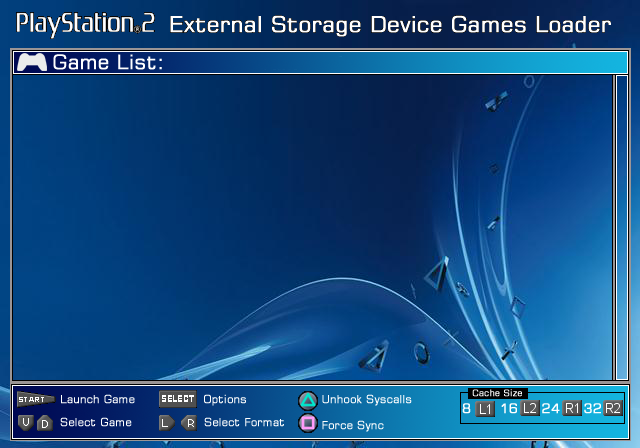
The Playstation 2 External Storage Device games Loader (PS2ESDL) is a Playstation 2 game loader.
It supports external devices
(Currently only USB devices with USBExtreme, ISO9660 disc images and it's own PS2ESDL).
-
PS2ESDL guide:
Setting up and using PS2ESDL
1. Download the latest copy of PS2ESDL.
2. Uncompress PS2ESDL.elf and patches.ppi into your USB disk.
The FAT32 filesystem must be used. NTFS is not supported.
3. Copy (ISO) to "CD" or "DVD" folder on your USB HDD or
install your games with a USBExtreme-compatible tool,
or with PS2DCDMP.
4. Defragment your disk (Your games should be 0% fragmented).
- PS2ESDL assumes that your games files are contiguous (Not fragmented).
- I've been using the Auslogics Disk Defragmenter.
5. Start PS2ESDL and run your games.
- Use left or right D-PAD to navigate between file formats.
- Up or down D-PAD to select game.
- Press either CROSS, CIRCLE or the START button to start a game.
- Hold any buttons and/or triggers you need to enable the desired compatibility modes, and to set/override the default cache size.
- If you used PS2DCDMP to install your game, you may still hold the buttons/triggers to set any compatibility modes that were not enabled at install time, and to also change the cache size.
Options (Hold while selecting your game)
- TRIANGLE: Unhook Syscalls (Aka HDLoader's "Mode 3"):
- SQUARE: Force Synchronization.
- L1/L2/R1/R2 -> 8/16/24/32 cache sizes respectively
How to enable the required mode(s):
Hold the required combination of buttons/triggers as your select your game.
Other options/functions:
- SELECT: Open the options/configuration menu.
- R1+SELECT: Exit to OSDSYS.
Games that don't work (And/or won't be supported):
- Ratchet and Clank: Up Your Arsenal
Holding either of these when starting PS2ESDL will change the video mode:
- L1: PAL 50Hz mode
- R1: NTSC 60Hz mode
-
PS2DCDMP utility:
- PS2ESDL supports the traditional USBExtreme, ISO9660 disc images and it's own PS2ESDL game format.
- PS2DCDMP is PS2ESDL's native game installer, and can be found here.
-
Plugins:
PS2ESDL v0.820 and later supports plugins:
PS2ESDL-iLink-bin.7zIEEE1394/Firewire/iLink.
How to install: Place the plugin into the same place where PS2ESDL is launched from.
How to use Plugins:
- Your plugins should be named as extensionX .plg (Where X is a number from 0 to 3).
- Place your plugins into the same folder where PS2ESDL is launched from.
PicoDrive for the Playstation 2 project homepage: https://sites.google.com/view/ysai187/home/projects/ps2esdl.
Original thread: Playstation 2 External Storage Device games Loader (PS2ESDL).


