PS3 4.81 STARBUCKS (+ COBRA 7.50) v1.02 CFW by habib

Following the release of 4.81 Starbucks v1.00 & v1.01 & his recent work with Fake Save Date/Game Quit Popups for REBUG CFW, developer HABIB has now turned his attention to COBRA once again and thus released a new version (v1.02) of his "Starbucks" firmware with an updated COBRA (v7.50) payload that of course comes with some new features included. The dev has included a new feature in the CFW that does not require the use of lv2 peek and other methods to get your console IDPS & also applied some patches that were once exclusive to MLT 's Firmwares. Cobra v7.50 adds some new functionality by adding PS2 ISO that are decryptted "Config Support", Backwards comparable console now will be allowed to use "ps2 netemu with cobra opcode 0x1ee9", Plus some additional PS2 changes for BC and Semi BC consoles.

Another interesting change includes will make updating to applications to work with Cobra easier as "modules can be updated, no more hash update needed", which should save developer's some time when supporting the payload. Additional details can be found below in HABIB's release quote
-STLcardsWS

4.81_habib_Cobra_starbucks.png


  • 4.81 STARBUCKS v1.02 + COBRA 7.50 CFW


    What's New:
    1.c00 without license
    2.possible bug fix when downloading pkgs
    3. cobra 7.50
    4: sc 870 patched(get_idps) sony blocked in 4.55, no more using lv2 peek etc to get idps xD​


    Cobra 7.50:
    • modules can be updated, no more hash update needed
    • ps2 iso decrypted config support
    • allow ps2 netemu on bc with cobra opcode 0x1ee9
    • stealth extension now disables sc15 as well
    • ps2 netemuu on bc and semi-bc ps3:
    bc_to_net(opcode, param)
    param=1 enable patch
    param=0 disable patch
    param=2 return current status​
    returns:
    return 1=enabled patch
    return 0=disabled patch
    return -1=its not a bc or semi bc ps3
    int ps2_netemu_cobra(int param)
    {
    lv2syscall2(8, (uint64_t)0x1ee9, (uint64_t)(int)param);
    return_to_user_prog(int);
    }

    ps2 with config:


  • 1. MADE OUT OF 4.81 OFW
    2. HAVE INSTALL PACKAGE FILES AND APP_HOME
    3. HAVE reActPSN COMPATIBILITY
    4. PATCHED LV0 TO DISABLE ECDSA CHECK
    5. PATCHED LV2 TO ADD PEEK/POKE SUPPORT
    6. PATCHED LV1 TO DISABLE LV2 PROTECTION
    7. PATCHED LV1 TO ADD PEEK/ POKE SUPPORT
    8. IT CAN RUN GAMES SIGNED WITH KEYS UP TO 4.81
    9. CAN BE UPDATED OVER ANY CFW.
    10. CAN BE UPDATED OVER 3.55 OFW
    11. NOT ADDED NO BT/BD PATCHES
    12. RSOD BYPASS
    13. REACTPSN OFFLINE PATCH ADDED
    14. BETTER SYSTEM STABILITY
    15. REMOVED CINAVIA DRM FOR HDD CONTENT
    16. REMOVED CINAVIA FOR BDMV
    17. REMOVED CINAVIA FOR BDVD
    18. QA FLAG ENABLED BY DEFAULT IF PS3 WAS QA ON 3.55
    19. COBRA 7.40
    20. SYSTEM ACTS AS A COMPLETELY NORMAL CFW WHEN COBRA DISABLED
    21. FSELF COMPATIBILITY ADDED
    22. PATCHED DOWNLOAD PLUGIN FOR DEX PKGS(FOR E.G XMBPD)
    23. ENCHANCED REMOTE PLAY
    24. REMOTE PLAY SFO FLAG OBSOLETE
    25. NO EPILEPSY WARNING
    26. SYSCALL 15 ADDED TO EXECUTE ANY LV2 INTERNAL FUNCTION
    UPDATE (v1.01) - day zero 1.01 update released.
    • fixed ps2 issue and whats new psn


Download: 4.81 Starbucks (v1.02) + Cobra 7.50
MD-5: BC87971E7ED9BED7A620418465EBB36C
 
Last edited by a moderator:
You cannot even mount your isos with Mamba? Does multiman start as mmCM?
In cfw rebug 4.81.1, mamba now I run it and it stays black screen all the time, it does not let me do absolutely anything at all, and I have to turn off the console by holding down the power button

I will install rebug 4.80 and continue with more tests in that, and if I see that nothing works, I will revert back to 4.81.2 and if I already see that nothing works I will leave the console again in 4.78 because there I did not fail anything
 
In cfw rebug 4.81.1, mamba now I run it and it stays black screen all the time, it does not let me do absolutely anything at all, and I have to turn off the console by holding down the power button

I will install rebug 4.80 and continue with more tests in that, and if I see that nothing works, I will revert back to 4.81.2 and if I already see that nothing works I will leave the console again in 4.78 because there I did not fail anything
Did you disable Cobra? When you ran mamba, do you use the XMB loader? auto loader? How many beeps?
 
Last edited:
If you disable cobra, when running mamba only emits 1 beep, but it is already that it does not return me to xmb, the black screen stays and I have to turn off the button
I cannot reproduce this either. Mamba works fine for me.
There should be a log file in /dev_hdd0/tmp, can you check it? 1 beep is good, not sure why the black screen...
 
Last edited:
I cannot reproduce this either. Mamba works fine for me.
There should be a log file in /dev_hdd0/tmp, can you check it? 1 beep is good, not sure why the black screen...
Tomorrow I tell you that my baby with fever and vomiting, the most certain that I have to take the doctor, sorry for the inconvenience, as soon as I can tell you something tomorrow. thank you very much
 
Tomorrow I tell you that my baby with fever and vomiting, the most certain that I have to take the doctor, sorry for the inconvenience, as soon as I can tell you something tomorrow. thank you very much
No worries. Take care of the wee one.
We can continue this later.

Btw, totally separate from the issue, when reviewing past posts I realised you used a 999 downgrader to go back to 3.55. It's fine as long as you reinstall another 3.55 cfw on top but it's not necessary unless you are having issues when downgrading. You could have installed any 3.55 (cfw or ofw) directly as long as QA is enabled.
 
Last edited:
No worries. Take care of the wee one.
We can continue this later.

Btw, totally separate from the issue, when reviewing past posts I realised you used a 999 downgrader to go back to 3.55. It's fine as long as you reinstall another 3.55 cfw on top but it's not necessary unless you are having issues when downgrading. You could have installed any 3.55 (cfw or ofw) directly as long as QA is enabled.
Achieved, at the end I had to downgrade to 4.78 again, but it was still the same, but before doing anything else completely remove official webman 1.44 and install webman mod 1.45.10, I again uninstalat all the data of the games again , I ran them again and reinstalled all of the games, and surprise, again they worked, but I wanted to do one last test, and it turns out that I came back to update habib cobra 4.81.2 and now all other time. Will it have been all by official 1.44 webman? Is very rare, I used to never use webman mod because I changed the names of the games at will, but seeing what I see I think in the end I stay with webman mod, a greeting, thank you very much for everything and a hug, really THANK YOU
 
Achieved, at the end I had to downgrade to 4.78 again, but it was still the same, but before doing anything else completely remove official webman 1.44 and install webman mod 1.45.10, I again uninstalat all the data of the games again , I ran them again and reinstalled all of the games, and surprise, again they worked, but I wanted to do one last test, and it turns out that I came back to update habib cobra 4.81.2 and now all other time. Will it have been all by official 1.44 webman? Is very rare, I used to never use webman mod because I changed the names of the games at will, but seeing what I see I think in the end I stay with webman mod, a greeting, thank you very much for everything and a hug, really THANK YOU
It's possible that removing webman to install webMAN-MOD removed a corrupted file. As multiman & webman have some cached files in common it is possible that it is the reason for your problems.
If it's the case you could safely reinstall webman 1.44, it should work.

Anyway am glad it finally works. Happy gaming!
 
It's possible that removing webman to install webMAN-MOD removed a corrupted file. As multiman & webman have some cached files in common it is possible that it is the reason for your problems.
If it's the case you could safely reinstall webman 1.44, it should work.

Anyway am glad it finally works. Happy gaming!
No, I do not install webman 1.44 anymore, I do not wiggle hahaha, I leave it as this one that often has a headache has given me, I repeat Thank you for everything
 
hi guys im a newbie hir..i have a ps3 4.80 version ..i want to jailbreak what cfw for 4.80 compatible for my console... i hope anyone could answer me...sory for my bad english..
 
Last edited by a moderator:

hi guys im a newbie hir..i have a ps3 4.80 version ..i want to jailbreak what cfw for 4.80 compatible for my console... i hope anyone could answer me...sory for my bad english..
It all depends on the model of your console. Any fat models or slim up to CECH25xx will be jailbreakable with a Hardware Flasher.
More recent models cannot be jailbroken at all so you can either use Cobra ODE or the backup injection hack although with 4.80 the data transfer hack is a pain & I don't recommend it.
Btw this is the wrong thread for such a post. Next time, please create your own!
 
Hello. Can someone please explain to me how to create the cofig file from psdevwiki? Thanks.
You need to create empty file (can be txt), then open it in HxD (https://mh-nexus.de/en/downloads.php?product=HxD). Now go to ps3devwiki and select config, as a example NPUC97142 Primal in this case.

Now you need to copy ONLY HEX STRINGS one by one. So first you need to copy one marked red

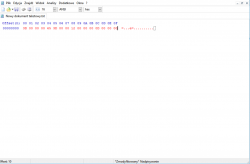
00000000 3D 00 00 00 65 3D 00 00 12 00 00 00 0D 00 00 00 =...e=..........

To your file, you will be warned that operation will change file size. Is OK. Now your config look like this:
ICON0.PNG

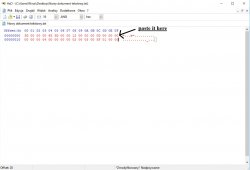
Go to dev wiki and copy next line, but remember to copy only hex string (marked red here):

00000010 00 00 00 04 00 00 00 00 02 00 03 00 5F 01 00 00 ............_...

Important is to paste it right after last one entry:

PS3_Peripheral_Hero_WirelessMics_vf3.jpg

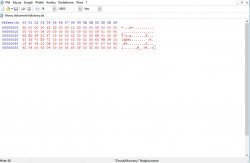
And follow above steps until your file will look exactly like on devwiki. Second way is to write hex strings manually using keyboard.

At the end file for NPUC97142 Primal should look like this:

orange.jpg

Save it and rename to YOURISO NAME.ISO.CONFIG. That's all.
Example of correct file: http://www.mediafire.com/file/2j8768m0oj1vr3y/PRIMAL.ISO.CONFIG
 

Attachments

Last edited:
You need to create empty file (can be txt), then open it in HxD (https://mh-nexus.de/en/downloads.php?product=HxD). Now go to ps3devwiki and select config, as a example NPUC97142 Primal in this case.

Now you need to copy ONLY HEX STRINGS one by one. So first you need to copy one marked red

00000000 3D 00 00 00 65 3D 00 00 12 00 00 00 0D 00 00 00 =...e=..........

To your file, you will be warned that operation will change file size. Is OK. Now your config look like this:
View attachment 8081

Go to dev wiki and copy next line, but remember to copy only hex string (marked red here):

00000010 00 00 00 04 00 00 00 00 02 00 03 00 5F 01 00 00 ............_...

Important is to paste it right after last one entry:

View attachment 8082

And follow above steps until your file will look exactly like on devwiki. Second way is to write hex strings manually using keyboard.

At the end file for NPUC97142 Primal should look like this:

View attachment 8083

Save it and rename to YOURISO NAME.ISO.CONFIG. That's all.
Example of correct file: http://www.mediafire.com/file/2j8768m0oj1vr3y/PRIMAL.ISO.CONFIG
Thank you so much for this guide. After creating the config file, all i need is to place it on PS2ISO folder inside my ps3 hdd where my ps2 games are located, right?
 
Thank you so much for this guide. After creating the config file, all i need is to place it on PS2ISO folder inside my ps3 hdd where my ps2 games are located, right?
Yes, but you need to name it exactly like your iso to make it work. Example, You have Syphon Filter The Omega Strain game iso named SFTOS.ISO then config should be named SFTOS.ISO.CONFIG And both files should be in dev_hdd0/PS2ISO folder
 
Yes, but you need to name it exactly like your iso to make it work. Example, You have Syphon Filter The Omega Strain game iso named SFTOS.ISO then config should be named SFTOS.ISO.CONFIG And both files should be in dev_hdd0/PS2ISO folder
Thanks again. Really appreciate your help.
 
Hi, Is it possible to get cobra 7.52 running on this?
Of course, it is possible. The only Cobra file that was modified in 7.52 is stage2.bin to add the homebrew blocker feature.
Make sure to use the right stage2.bin for your CFW though, especially on a Nand console!
 

Featured content

Trending content

Back
Top