• Official PS3 Toolset is now supporting 4.92 Firmware

    View Official Release Post for additional information HERE

PS3 [BG Toolset] User Issues and Dump Submissions

As a friend, you solved the problem, I have the same problem, I am left with the screen that says "please wait" and then I get an error the same as yours, all at the moment of hitting flash memory patch, explain to me how you solved it ? I want to install CFW, the model of my ps3 is CECHE11, please help me, or someone who knows how to solve it?
View attachment 27693


My last resource was rebuilding the database which I didn't considered because I'm a big dumbass :)))
But yeah, try resetting the console, formatting the HDD or rebuilding the database, it should work at some point.
 
There it stays in Please wait, and from there I get an error and it won't let me download the file to my USB: c
View attachment 27696
The download feature is a browser feature, I have no control over it, the browser was passed the right url, if the download keeps failing there is something wrong locally on your ps3 that messes with the file download checks, you might wanna try rebuilding the database & make sure your USB device is compatible with ps3 usage (mbr partition & fat32 formatting, gpt partitions will not work).

Anyway, you don't need to download the patch file to USB to jailbreak the console. The recommended way is to use the "patch via https" feature, which downloads the patch file data to memory using a more reliable ajax request rather than the file download to disk via the system's download_plugin.

Additionally, valid no-fsm patch files for all 4.8x OFW can be downloaded from littlebalup's github.com/littlebalup/PyPS3tools repository. The 4.86 no-fsm patch can be download directly from the master branch & older versions are easily accessible using the file history.
 
Code:
PS3 Model: CECH-2504B
Firmware Version: 4.86.1
Firmware Type: HFW CEX
IDPS Is Masked: Yes
Have Original Dump: Yes
Dump 1 URL: **REMOVED**
Have Patched Dump: Yes
Dump 2 URL: **REMOVED**
System Boots To XMB: Yes
System Boots To Recovery: Yes
Firmware Version Displayed In Recovery: 4.86
Minimum Firmware Version Displayed In Toolset: 1.0
Disc In Drive: No

In the second screenshot it appears "Custom Syscall: COBRA" because my System was too slow
to load the page, so (I know in theory I shouldn't have done it) I had to reboot the system
to make the screen and it seems to be everything fine. Now I guess I can install the CFW(?)

Screenshots: **REMOVED**
 
Last edited by a moderator:
In the second screenshot it appears "Custom Syscall: COBRA" because my System was too slow
to load the page, so (I know in theory I shouldn't have done it) I had to reboot the system
to make the screen and it seems to be everything fine. Now I guess I can install the CFW(?)
Not sure why you used this thread and bothered posting an issue report when you seem to have no issue at all.
Now that you patched the Flash memory & rebooted the console, all you need to do is install a CFW.

Btw you just posted your IDPS publicly!
That was a mistake & I suggest you remove the screenshot.
 
Last edited:
Ups-
How do I erase the comment or the attached files?
Actually, I posted it because the instructions said to do it to be sure
Not sure why you used this thread and bothered posting an issue report when you seem to have no issue at all.
Now that you patched the Flash memory & rebooted the console, all you need to do is install a CFW.

Btw you just posted your IDPS publicly!
That was a mistake & I suggest you remove the screenshot.
 
Instructions recommend adding screenshots so we can see what you see however you should always remove the IDPS (there is a FMM context menu option to do that) before posting a screenshot.

Anyway, now you need to edit your 1st post & remove the screenshot altogether. Don't bother replacing it.

Edit:
Just realised you are a new member & you haven't yet earned the post editing permissions so I temporarily deleted your post (it can be undeleted later).
 
Last edited:
I edited the post to remove the attached images, is needed to remove also the links to "Dump 1 URL" and "Dump 2 URL" ?
 
I edited the post to remove the attached images, is needed to remove also the links to "Dump 1 URL" and "Dump 2 URL" ?
Thanks sandy. ;-)
I couldn't delete the SS with Tapatalk, not sure why.
As to the dumps, I just removed those too & undeleted the first user post.
 
Hello, I'm having trouble with the flash dumper, it's keeps failing whenever I try to dump the memory to my usb.
(Sorry for my English)
"Failing" is too vague & insufficient to diagnose the exact problem and/or offer appropriate solutions.
You need to provide a detailed description of the error and if/when relevant, some screenshots (remember to hide the idps using the context menu).
 
Last edited:
"Failing" is too vague & insufficient to diagnose the exact problem and/or offer appropriate solutions.
You need to provide a detailed description of the error and if/when relevant, some screenshots (remember to hide the idps using the context menu).
Oh, sorry about that.
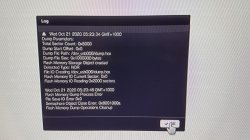
Here is the log that came up after the dump failed.
I'm not sure what to do now.
 

Attachments

  • 20201021_052406.jpg
    20201021_052406.jpg
    50.6 KB · Views: 103
Oh, sorry about that.
Here is the log that came up after the dump failed.
I'm not sure what to do now.
I need more information than this user log.
This shows a semaphore close error (resource busy) but that's likely to be the consequence of another earlier error, possibly file system or memory resources related.

Go to the logs tab & uncheck the logs messages, keep only the warnings & errors & post a screenshot.

If you already closed the browser, restart the console before trying to dump again.

FYI, this is the first time I see this error being reported by a user since the PS3 Toolset release. I have never encountered it during development & esc0rtd3w never reported anything like this during testing.

Just to eliminate a few hardware related issues, please try using another USB stick, simple stick, small size if possible, freshly formatted in fat32 & mbr partition type.
Try the other USB port too.
And never use USB hubs.

The PS3 Toolset relies on the same native IO functions as the XMB does so a USB device supported by the XMB for picture/sound/video file storage should work just as well with the PS3 Toolset.
 
Last edited:
I need more information than this user log.
This shows a semaphore close error (resource busy) but that's likely to be the consequence of another earlier error, possibly file system or memory resources related.

Go to the logs tab & uncheck the logs messages, keep only the warnings & errors & post a screenshot.

If you already closed the browser, restart the console before trying to dump again.

FYI, this is the first time I see this error being reported by a user since the PS3 Toolset release. I have never encountered it during development & esc0rtd3w never reported anything like this during testing.

Just to eliminate a few hardware related things.
Please try another USB stick, simple stick, small size if possible, freshly formatted in fat32 & mbr partition type.
Try the other USB port too.
And never use USB hubs.

I just tried another usb and it worked.
Thank you for your help!
 
i was on 4.86 cfw updated to 4.87 ofw im running cex and my model number is cech 2001b
im getting a message when initializing on ps3 toolset reading
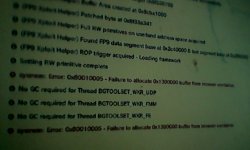
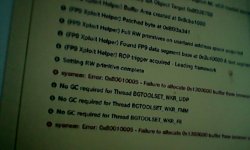
System error 0x800100005 failure to allocate 0x13000000 buffer from browser container
28104-28f834772319a5dce6e57da7d09b319e.jpg

28105-507fe26477dc98a66895cdc888e3f3cd.jpg

my ps beeps and then nothing. I look in the logs and get a error that read failure to allocate buffet from browser container I'm not sure what's wrong
 
i was on 4.86 cfw updated to 4.87 ofw im running cex and my model number is cech 2001b
im getting a message when initializing on ps3 toolset reading
System error 0x800100005 failure to allocate 0x13000000 buffer from browser container
28104-28f834772319a5dce6e57da7d09b319e.jpg

28105-507fe26477dc98a66895cdc888e3f3cd.jpg

my ps beeps and then nothing. I look in the logs and get a error that read failure to allocate buffet from browser container I'm not sure what's wrong
This error happens when there is not enough memory available for the PS3 Toolset to function properly.
You can clearly see in the logs that the Toolset attempts to acquire the memory it needs twice & fails twice.
Reboot the console & launch PS3 Toolset again, it should work fine. And as a last resort, if ever you get an error even after reboot, clear the browser cookies, reboot & try again.

FYI
The Toolset needs 19Mb of RAM from the system for its features to work, 16Mb for data buffering & 1Mb for each of the 3 worker threads it currently uses (needed for stack allocation & thread local storage)

After loading the ps3 browser, there is only a handful of Mb of system RAM left, never enough, therefore the Toolset has to borrow the memory it needs from the browser's memory container.
Just like vsh or an app or game, the browser has its own memory container which sucks up most of the system RAM directly on browser launching & gives it back on browser closing..
The Toolset must therefore borrow the memory from the browser memory container on loading & give it back to the memory container on unloading. On rare occasions, the memory is not given back & therefore cannot be borrowed again or reacquired through other means, a reboot is necessary.
This can only happen in specific circumstances, for instance when closing the browser without warning, which may not provide the conditions for the Toolset to give back the memory it borrowed to the browser memory container as it normally should.

 
Last edited:
Back
Top