PS2 Can we make the PS2 output 240p?

Maximus32

Developer
I cannot find any homebrew ps2dev/ps2sdk example of the ps2 outputting 240p resolution. So I've been trying to fiddle with some GS registers to get it working but have been unsuccesfull so far.

To be clear, 240p is NOT the same as 480i. 240p is used by most older game consoles. When displayed on a CRT monitor it gives a really nice retro look (with black lines between all display lines). 240p would be a cool feature to have for emulators on the ps2, RetroArch in particular.

Searching the internet I can find ps2 games that support 240p, and also hacks that modify some games to output 240p instead of 480i. So it has to be possible, but how?
 
What if you used NTSC/PAL in non-interlaced, frame mode? That's essentially 240P, isn't it?
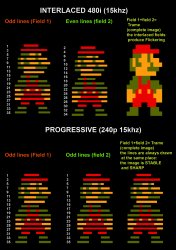
No, 240p is 60 frames per second and also looks very different becouse of the visible horizontal scanlines on CRT TV's, giving it the retro look:
1457324088208.jpg

NTSC/PAL in "non-interlaced" frame mode is still 480i/576i interlaced right? Just drawing all lines twice would result in 30 frames per second, not 60.

EDIT: I found this picture explaining it very clearly:
1398925767412.jpg
 
Last edited:
No, 240p is 60 frames per second and also looks very different becouse of the visible horizontal scanlines on CRT TV's, giving it the retro look:

If even playing a PlayStation game didn't give that result (where using a real PlayStation would), then I don't suppose it can be done? Sony didn't indicate it was a supported video mode for PS2 games anyway.

I never got to experience using the CRT with non-interlaced video. By the time I worked on the PicoDrive port, I was already using a LCD. I got feedback that the 240P mode worked as expected - which was just NTSC/PAL in non-interlaced, frame mode. It also has a vertical height of 224, which was why I thought it worked.

NTSC/PAL in "non-interlaced" frame mode is still 480i/576i interlaced right? Just drawing all lines twice would result in 30 frames per second, not 60.

If you put it that way, then I think the only way to know for sure, would be to analyze the signal output - which I cannot do.
I don't think we will get a 30Hz refresh rate though. Isn't the V-Blank after both sets of scan lines are drawn? I don't remember that anybody told me that PicoDrive runs at 30FPS when under the 240P mode.

EDIT: I found this picture explaining it very clearly:
View attachment 22316
I see. Thanks!
 
This is an example of the ps2 game ICO. I've taken closeup photo's of the game with and without GSM enabled.

The original looks like this:
20200110_210413~2.jpg


When GSM enabled (NTSC) it looks like this:
20200110_211023~2.jpg


I also tried GSM NI mode but it only shows the top half of the screen, and up close its not 240p also.

Would there be a way to capture how ICO sets up the GS registers?

Verstuurd vanaf mijn SM-G930F met Tapatalk
 
  • Like
Reactions: TnA
I don't know if this will be helpful, but the roms in mega man x collection and anniversary collection are in 240p. before I bought a framemeister, I couldn't see any picture, since my tv doesn't support it. what's odd is that x collection seems to shift from 240p to 480i/p when in the menus. anniversary collection seems to be the same resolution menus or not.
 
  • Like
Reactions: TnA
When GSM enabled (NTSC) it looks like this:
I'm not sure that I understand the differences shown.

I remember that setting NTSC on an NTSC game somehow changes the video output slightly, which technically isn't supposed to happen. There was some letterboxing, from what I remember. But this would perhaps mean that the formula used by GSM just didn't correctly resize the display area.

Would there be a way to capture how ICO sets up the GS registers?

Since the GS priviledged registers are write-only, you would need to either:
  • Patch the library functions/set a breakpoint there.
  • Make use of the hardware breakpoint functionality to trap onto the individual writes by the library - which is what GSM does to steal the display parameters
I think you may already know about this, but the meanings behind the registers that are usually used for defining a video mode like SMODE1, SYNCHV etc, are not documented in the Sony SDK. Most Sony and licensed software can be found setting the video mode with the SetGsCrt() syscall - and so I think it is unlikely that any game has a custom video mode. The only exceptions to this that I know of, are the pre-DECKARD versions of PS1DRV, which write directly to the undocumented GS privileged registers (perhaps because it's part of the boot ROM or was just developed a really long time ago).

Out of curiosity, have you tried writing a small program that uses both NTSC in interlaced, field mode, and NTSC in non-interlaced, frame mode?

I don't know if this will be helpful, but the roms in mega man x collection and anniversary collection are in 240p. before I bought a framemeister, I couldn't see any picture, since my tv doesn't support it. what's odd is that x collection seems to shift from 240p to 480i/p when in the menus. anniversary collection seems to be the same resolution menus or not.

Some games are multi-ELF. It is also possible to switch video modes.
 
well, it's a testament to how cheap capcom can be. the anniversary collection has remixed music, which isn't present on the legacy collection. they also forced you to buy the second half of both legacy collections via the eshop. I read that Japan got a physical release of all four games.
 
Most Sony and licensed software can be found setting the video mode with the SetGsCrt() syscall - and so I think it is unlikely that any game has a custom video mode. The only exceptions to this that I know of, are the pre-DECKARD versions of PS1DRV, which write directly to the undocumented GS privileged registers (perhaps because it's part of the boot ROM or was just developed a really long time ago).

Out of curiosity, have you tried writing a small program that uses both NTSC in interlaced, field mode, and NTSC in non-interlaced, frame mode?
That's it! You fixed it! I did test all modes using gsKit, but some combinations gave invalid output (stretched off centre). PAL/NTSC NONINTERLACED will result in a 240p or 288p :). FRAME/FIELD modes don't make any difference. They are related to how the framebuffer is read.

The fix for gsKit is simple and I will send a pull request shortly. Then other applications can start using these modes.

Thank you!

Verstuurd vanaf mijn SM-G930F met Tapatalk
 
Don't we only have to set interlaced of the gsKit global to GS_NONINTERLACED?
Yes, turns out it was that simple. But the screen is then stretched 2x vertically, and y-offset 2x becouse of a gsKit bug.

Verstuurd vanaf mijn SM-G930F met Tapatalk
 
  • Like
Reactions: TnA
Thats awesome! Looking forward to trying this out.

Is there a build available to test something like capcom classics 1 on?
 
It's part of gsKit for exactly 1 year now. Other than some test builds of RetroArch and OPL (used in the GUI) there is no software that uses this.

Verstuurd vanaf mijn Mi Note 10 Lite met Tapatalk
 
was there a solution or workaround to make RetroArch run at 240p?

I saw a few people comment saying if gsKit global set to GS_NONINTERLACED this would work.

But whats the best method of doing this? DO we have to run GSM from ULE and then launch RetroArch or is there an easier way?
 

Similar threads

Back
Top