PS3 CCAPI (Control Console API) v2.80-r2: 4.82 CFW Support / New VSH Menu / ps3 TOOL Support ...

PS3 Developer Enstone has released a new version of CCAPI (Control Console API), this update (v2.80-rev.2) not only adds the expected 4.82 CFW CEX Support, but also some new features are tucked away in this update. One of those new features as seen in the screenshot below is a new VSH Menu (XMB popup Menu) that provides various shortcuts for some of CCAPI Options/Features. Checkout the full list of changes in this release along with other useful information in the release notes provided below:​

cc280_vshmenu.png


  • CCAPI (Control Console API)
    CCAPI is a software that establishes a connection between your ps3 and another device such as your computer or your smartphone. You can control your ps3 with it.

    A few functions available:

    • Game modding
    • Debug non-fself & fself in real time
    • Wireless connection
    • Modify idps and psid
    • Edit console Leds
    • Ring console buzzer
    • Get ps3 temperature

    Latest Update -- CCAPI v2.80
    • (rev2) Reduced memory use
    • Added ps3 TOOL support (with DEX/CEX kernel only)
    • Added console finder into consolemanager
    • Added vsh menu
    • Added 4.82 CEX support

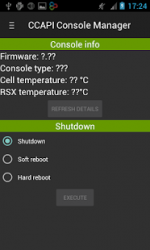
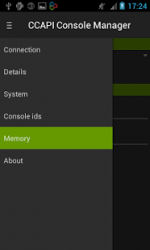
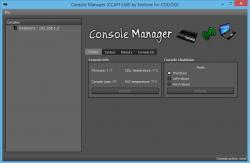
  • Console Manager
    • On Android, you can get it from the google play store >>> HERE
      • cmand.png cmand2.png
    • On PC, it is installed with the CcApi-setup.exe.
      • cm.jpg.png


  • Installation
    1. Download the CCAPI package at the bottom of this page
    2. Inside, you should find a folder called PS3 with a .pkg, put it on the root of a usb stick.
    3. Plug the usb stick on your ps3, then install it.
    4. You should also find a folder called PC with a .exe, run it and follow the instructions to install it.
    5. You have now CCAPI installed on your ps3 and on your pc.
    Uninstall
    • On PS3, you just run the pkg, again
    • On PC, use the configuration panel and the option "uninstall a program".

  • Changelogs
    • NEW -- 2.80
      • (rev2) Reduced memory use
      • Added ps3 TOOL support (with DEX/CEX kernel only)
      • Added console finder into consolemanager
      • Added vsh menu
      • Added 4.82 CEX support
    • 2.70
      • (rev6) Added 4.81 DEX support
      • (rev5) Added 4.81 CEX support
      • (rev4) Added 4.80 DEX support
      • (rev4) Added 4.80 CEX support
      • (rev3) Added 4.78 DEX support
      • (rev2) Added 4.78 CEX support
      • (rev2) Added 4.76 DEX support
      • Added other platform support
      • Optimized network bitrate
    • 2.60
      • (rev7) Added 4.76 CEX support
      • (rev6) Added 4.75 DEX support
      • (rev5) Added 4.75 CEX support
      • (rev4) Added 4.70 DEX support
      • (rev3) Added 4.70 CEX support
      • (rev2) Added 4.66 CEX support
      • Added 4.60/4.65 support
      • Added Cobra support
      • Added SetBootPsid/SetBootIdps/SetPsid
    • 2.50
      • Added 4.53/4.55 support
      • Added a console list
    • 2.00
      • Reduced memory use
      • DLL (C++ / C#) released to build programs for ccapi
    • 1.00
      • Original version


Download/Additional Details @ Official Website: www.enstoneworld.com
Updated (2020): NEVER USE CCAPI with PS3HEN
 
Last edited:
I had to downgrade back down to CCAPI 2.70 because it seems 2.80 literally kills webMAN, just makes the ps3 crash when you try mounting a game, etc.

Dunno if anyone else has had this problem or not.
 
I had to downgrade back down to CCAPI 2.70 because it seems 2.80 literally kills webMAN, just makes the ps3 crash when you try mounting a game, etc.

Dunno if anyone else has had this problem or not.

I've only tried once so far but it just made everything black screen. Uninstalled and I'll try it again in a day or two
 
i successfully connected my ps3 to my computer but how will i use it
CCAPI is not exactly a tool for noobs, it adds debugging capabilities to retail consoles, keeping in mind that debugging is for developers mostly.

However I assume you want to use Ccapi for RTM/Game modding & not for development purposes, in which case you need to read the CCAPI instructions thoroughly & check some tutorials about RTM, there are plenty of those tuts, in various languages, scattered all over the Internet.
 
I literally just installed this on my ps3 it automatically rebooted the system itself and now my system just stays on green light no picture no nothing then when I hit the power button nothing happens I try unplugging it I tried putting the system into safe mode and resetting it but nothing is working. What happened to my system? Is it bricked?
 
I literally just installed this on my ps3 it automatically rebooted the system itself and now my system just stays on green light no picture no nothing then when I hit the power button nothing happens I try unplugging it I tried putting the system into safe mode and resetting it but nothing is working. What happened to my system? Is it bricked?

are you using PS3HEN?
 

That's why, CCAPI can't be used on PS3HEN.

This news would of listed it here, but this is an older release thread and was prior to PS3HEN being developed and released, so its not listed on this particular report of ccapi like other newer ones that came after PS3HEN.. Surprised his site does not mention or have any warnings..

We have a thread about some dangerous apps that you should stay away from while using PS3HEN, i think its linked in the PS3HEN release thread here.

How to recover if you can, i am not sure off hand.. but i know this has been discussed many times on the forum as this is not the first time someone did this as it was unknown for a time until reports came in. Not sure if you will need a hardware flasher or there is another route. Search the forums here or wait for one of the many smarter people then i on this subject to chime in.
 
That's why, CCAPI can't be used on PS3HEN.

This news would of listed it here, but this is an older release thread and was prior to PS3HEN being developed and released, so its not listed on this particular report of ccapi like other newer ones that came after PS3HEN.. Surprised his site does not mention or have any warnings..

We have a thread about some dangerous apps that you should stay away from while using PS3HEN, i think its linked in the PS3HEN release thread here.

How to recover if you can, i am not sure off hand.. but i know this has been discussed many times on the forum as this is not the first time someone did this as it was unknown for a time until reports came in. Not sure if you will need a hardware flasher or there is another route. Search the forums here or wait for one of the many smarter people then i on this subject to chime in.
That's why, CCAPI can't be used on PS3HEN.

This news would of listed it here, but this is an older release thread and was prior to PS3HEN being developed and released, so its not listed on this particular report of ccapi like other newer ones that came after PS3HEN.. Surprised his site does not mention or have any warnings..

We have a thread about some dangerous apps that you should stay away from while using PS3HEN, i think its linked in the PS3HEN release thread here.

How to recover if you can, i am not sure off hand.. but i know this has been discussed many times on the forum as this is not the first time someone did this as it was unknown for a time until reports came in. Not sure if you will need a hardware flasher or there is another route. Search the forums here or wait for one of the many smarter people then i on this subject to chime in.
Okay thank you could you please send me a link?
 
Back
Top