PS3 Compatibility List - PS2 on PS3

I got past mission 2 by making the car AI more accurate but it dramatically slows down the frame rate. Maybe I can limit down the range and it will be playable...not sure though.
I made the same thing for Stuntman 4th mission (same game engine), but i never found way to make it playable in both ways same time. There was always perf penalty, or AI not good enough. I hope you will figure it out, fixing Driver will also make my Top 10 game (Stuntman) playable :)
 
@HeidenNaugler I managed to do a quick test on netemu: blur disabled should fix the speed better than shadows! That was unexpected, as pcsx2 struggles with shadows more than blur it seems. That caught me off guard though...maybe Sony did this on the PS2 on PS4 release?

Code seems to be disabled going into a building and leaving...so I will have to do this config a different way.
 
Okage: Shadow King (SCUS-97129)
Code:
3D 00 00 00 57 44 00 00 09 00 00 00 03 00 00 00
40 FA 18 00 2D 28 40 02 4A 3E 06 0C 00 00 00 00
00 00 00 00 48 FA 18 00 09 00 02 2A 01 00 10 26
00 00 00 00 00 00 00 00 50 FA 18 00 2D 20 00 02
FB FF 40 14 00 00 00 00 00 00 00 00 00 00 00 00
This sneakily disables the ingame blur while keeping the screen transition effect. Previous config disables all blur and screen transitions.

Please test @HeidenNaugler. Slowdown should be close to completely gone now, but I don't have a savefile to test further in!


@mrjaredbeta can u make a speedhack config for Colin McRae Rally 3 ,game have frame drops.
I was thinking of taking a look at those games to see if there's something that will speed it up.
 
Mafia (SLES-52279) German Fix
Code:
3D 00 00 00 57 44 00 00 09 00 00 00 05 00 00 00
50 61 3E 00 5C A1 0F 0C 9C 90 84 8F 00 10 01 3C
08 00 02 24 58 61 3E 00 08 00 02 24 01 00 05 24
9C 90 84 8F 10 3C 22 AC 60 61 3E 00 10 3C 22 AC
00 10 01 3C 01 00 05 24 5C A1 0F 0C 54 24 3E 00
FF FF 02 24 0A 00 50 10 FF FF 02 24 00 00 00 00
4C F0 16 00 00 60 80 44 50 07 42 8E 00 60 80 44
0D 00 00 10 00 00 00 00

To say the last word on this game. Previous config lacked the last memory patch. It would have caused a crash somewhere around the mission called "The Priest". All versions of this game should be playable now.

I was thinking of taking a look at those games to see if there's something that will speed it up.

The WRC series, especially Rally Evolved would be also worth inspecting.
 
Okage: Shadow King (SCUS-97129)
Code:
3D 00 00 00 57 44 00 00 09 00 00 00 03 00 00 00
40 FA 18 00 2D 28 40 02 4A 3E 06 0C 00 00 00 00
00 00 00 00 48 FA 18 00 09 00 02 2A 01 00 10 26
00 00 00 00 00 00 00 00 50 FA 18 00 2D 20 00 02
FB FF 40 14 00 00 00 00 00 00 00 00 00 00 00 00
This sneakily disables the ingame blur while keeping the screen transition effect. Previous config disables all blur and screen transitions.

Please test @HeidenNaugler. Slowdown should be close to completely gone now, but I don't have a savefile to test further in!
Played around 2 hours of the game, slowdown/jitter happens very rarely, mostly in cutscenes that have many characters in the screen and/or use some different camera angles and only when they take place in an outside area, basically it's slightly better than the first config and keeps the shadows! :D I'd say it is a good balance between performance and effects, but if you have any other ideas I will be glad to test.
Anyway, huge thanks, I've been wanting to play Okage since a long time. I'm going to play through the entire game and confirm if it is 100% playable in a few weeks.
 
I want to update a Gran Turismo 4 entry in the compatibility list. Looks like there is some misinformation. I do not understand why there are remarks about the backwards compatible models (in many games notes, not only GT4's). It is quite confusing since they are using a different emulator by default and the list is about the software one.

Anyway, let's start:

1. Config is needed to fix the freeze in the licence menu.
2. Short term frame rate drops possible.
3. Change brightness to 0 in the display settings to fix the rendering artifacts (could be forced by a config).
4. Game freezes after 10-15 seconds in the arcade mode track selection and during the opening intro (intro could be turned off in the settings).
5. Ghost cars are not transparent at all.
5. 480p performance is worse than 480i (confirmation needed, I do not have a NTSC version). 1080i mode does not work at all.
 
I want to update a Gran Turismo 4 entry in the compatibility list. Looks like there is some misinformation. I do not understand why there are remarks about the backwards compatible models (in many games notes, not only GT4's). It is quite confusing since they are using a different emulator by default and the list is about the software one.

Anyway, let's start:

1. Config is needed to fix the freeze in the licence menu.
2. Short term frame rate drops possible.
3. Change brightness to 0 in the display settings to fix the rendering artifacts (could be forced by a config).
4. Game freezes after 10-15 seconds in the arcade mode track selection and during the opening intro (intro could be turned off in the settings).
5. Ghost cars are not transparent at all.
5. 480p performance is worse than 480i (confirmation needed, I do not have a NTSC version). 1080i mode does not work at all.


I didn't notice any frame drops after setting brightness to 0,game freeze randomly on arcade selection even if u move really fast.
 
I have encountered some. But I have used the basic config from the gxemu/softemu. If you have used the last config by @mrjaredbeta, with 0x21, 0x41, 0x46 commands, the performance could be improved further.
 
I want to update a Gran Turismo 4 entry in the compatibility list. Looks like there is some misinformation. I do not understand why there are remarks about the backwards compatible models (in many games notes, not only GT4's). It is quite confusing since they are using a different emulator by default and the list is about the software one.
u38uop4hplb51.jpg
 
BUG / FREEZE REPORT ON SSX (2000)
I think the game can be listed under not fully fixable games as the freezes are dynamic and are not following a certain pattern.

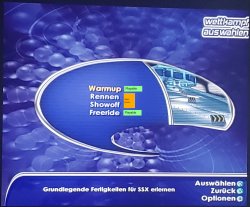
These are the modes attached with a remark about their playability,
20210205_183244.jpg

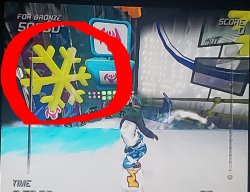
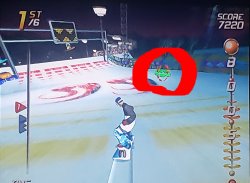
The racing and showoff modes are containing various objects that trigger a freeze like 40-60% of the time when picking them up. Freezes may also occur dynamic on different spots when racing normally without picking the objects up. Mostly after jumps. Bigger levels freeze more often than smaller levels. Warmup and Freeride modes are not having any objects.

Object in Showoff-Mode.
20210205_183409.jpg

Object in Racing-mode.
20210205_184105.jpg

I replayed the Racing-Mode levels with occuring freezes until I managed to get to the last level.

The last level is having the same freeze now in the beginning as the first level had, before the created custom config by @mrjaredbeta was attached to the game.

Thanks again for the help @mrjaredbeta.

20210205_183935.jpg


20210205_184301.jpg

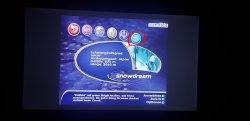
That's the last level with the occuring freeze in the beginning of the Racing-Mode.

As of now, those are the more or less certain patterns of the freezes.

I wanted to bundle up the information and attached the current savegame and the current config I worked with in a last post regarding the game.

As I mentioned above, I don't think the game can be fixed, as the freezes show up extremly disjointed and dynamic. The freezes are not following a certain pattern, therefore an all around config can't be created. Maybe a config fixing all the specific spots where freezes are occuring, but that would go beyond the scope.
 

Attachments

The racing and showoff modes are containing various objects that trigger a freeze like 40-60% of the time when picking them up. Freezes may also occur dynamic on different spots when racing normally without picking the objects up. Mostly after jumps. Bigger levels freeze more often than smaller levels. Warmup and Freeride modes are not having any objects
Im thinking that could be always that objects, it happens more often if you pick them but it could happen just by his presence
When you play in a big map maybe there are some of that objects located far away or behind a tree and you cant see them but the game engine is rendering them and this is why it freezes even without you being able to see the object
And when you jump... well... is a bit the same, in a jump you are "extending" the camera plane a lot, so there is a lot more enviroment visible (with some of that objects causing the freeze)

It could be interesting to find a way to disable that "snowflake" objects completly... just for a test to see if the game is stable without them
 
Im thinking that could be always that objects, it happens more often if you pick them but it could happen just by his presence
When you play in a big map maybe there are some of that objects located far away or behind a tree and you cant see them but the game engine is rendering them and this is why it freezes even without you being able to see the object
And when you jump... well... is a bit the same, in a jump you are "extending" the camera plane a lot, so there is a lot more enviroment visible (with some of that objects causing the freeze)

It could be interesting to find a way to disable that "snowflake" objects completly... just for a test to see if the game is stable without them

Yes, true, that could be a helpful thought, as the other 2 modes haven't gotten any freezes when I played them and they don't contain any objects at all.
 
Yes, true, that could be a helpful thought, as the other 2 modes haven't gotten any freezes when I played them and they don't contain any objects at all.
Yeah, your reports so far are very clarifying in my oppinion, in the first ones you wrote some weeks ago you realized that "snowflakes" was causing most of the freezes, and what you reported today doesnt differs much, in some way it looks like a confirmation to me that the snowflakes are doing something weird

While thinking in it i imagined maybe what the game engine could be doing is rendering them as a 2D layer and "merging" them with the 3D graphics
Like if they was "hud" elements, but located far away from the camera, and sometimes behind a tree or a mountain, etc...
Or maybe is just the rotation, because that snowflakes rotates, right ?... or the snowflake rotates an small amount to be always "faced" to the camera
Maybe disabling that rotation could work, or decreasing the arithmetic accuracy of that rotation calculations
 
Yeah, your reports so far are very clarifying in my oppinion, in the first ones you wrote some weeks ago you realized that "snowflakes" was causing most of the freezes, and what you reported today doesnt differs much, in some way it looks like a confirmation to me that the snowflakes are doing something weird

While thinking in it i imagined maybe what the game engine could be doing is rendering them as a 2D layer and "merging" them with the 3D graphics
Like if they was "hud" elements, but located far away from the camera, and sometimes behind a tree or a mountain, etc...
Or maybe is just the rotation, because that snowflakes rotates, right ?... or the snowflake rotates an small amount to be always "faced" to the camera
Maybe disabling that rotation could work, or decreasing the arithmetic accuracy of that rotation calculations

Yes, true, the snowflakes and other objects are rotating and that could also cause some trouble.

SSX 3 and SSX Tricky run flawlessly on the PS3 and I think they share the same engine with SSX. I think I'm replaying these games and take a look if they have maybe similar rotating objects.

Before the config has been released the game still froze, even in modes without these objects, that's why I'm not 100% sure if they cause these freezes, but might be worth a shot.
 
weird how can ssx3 and ssx tricky run flawless if both share the same game engine with ssx?

I'm not 100% sure if they share the same engine, but I think it is the same.
Yes, I also find it weird that SSX 3 and SSX Tricky run flawlessly and SSX (2000) is full of freezes. :(
 

Similar threads

Back
Top