PS3 Compatibility List - PS2 on PS3

SWB2 will freeze randomly without config, THU 2 is fixable by CONFIG, Same with KH2 freeze. I will explain how to use configs later, with configs emu should be able to get around 85% PS2 library to work, and around 70% to run perfect.

@PlayThirdStrike I have problem with Klonoa2, it looks like this game need fpu accuracy in two places. This make testing harder because it double amount of time needed to test it. But I'm still slowly working on it.

@chicco33 still nothing :(
No problem kozarovv and thanks for trying :)
 
so, about this configs... are those hard to make or to apply? i'm interested to look forward into those configs if they help me play some games that i can't on my dead ps2
 
so, about this configs... are those hard to make or to apply? i'm interested to look forward into those configs if they help me play some games that i can't on my dead ps2
Looks like is not easy for HAN users as there is no option to add them thru ps2classics GUI by @aldostools
So you need config for your version of game: https://github.com/Zarh/ManaGunZ/tree/master/pkgfiles/USRDIR/sys/CONFIG
Then you need to rename it to CONFIG.DEC ,and encrypt it using ps2classics GUI (it will be renamed to CONFIG). Finally you need to create pkg, and add config to it.
But I didn't found way to add it thru ps2classics GUI. So you need to use True Ancestor PKG repacker to add config, and then sign pkg like you always do.

Configs generally fix many titles, even some titles marked on devwiki as unplayable, are playable with config (just configs are new, full list is not retested yet since we had config files).

CONFIG file goes to the same directory as ISO.BIN.ENC.

Here is some advanced info "how it work", and some fix examples. http://www.psdevwiki.com/ps3/PS2_Emulation#Game_CONFIG
 
Last edited:
Looks like is not easy for HAN users as there is no option to add them thru ps2classics GUI by @aldostools
So you need config for your version of game: https://github.com/Zarh/ManaGunZ/tree/master/pkgfiles/USRDIR/sys/CONFIG
Then you need to rename it to CONFIG.DEC ,and encrypt it using ps2classics GUI (it will be renamed to CONFIG). Finally you need to create pkg, and add config to it.
But I didn't found way to add it thru ps2classics GUI. So you need to use True Ancestor PKG repacker to add config, and then sign pkg like you always do.

Configs generally fix many titles, even some titles marked on devwiki as unplayable, are playable with config (just configs are new, full list is not retested yet since we had config files).

CONFIG file goes to the same directory as ISO.BIN.ENC.

Here is some advanced info "how it work", and some fix examples. http://www.psdevwiki.com/ps3/PS2_Emulation#Game_CONFIG
thanks a lot for the info and the steps but it confused me more... kinda, hope someone make a video tutorial about it or something xD
 
Looks like is not easy for HAN users as there is no option to add them thru ps2classics GUI by @aldostools
So you need config for your version of game: https://github.com/Zarh/ManaGunZ/tree/master/pkgfiles/USRDIR/sys/CONFIG
Then you need to rename it to CONFIG.DEC ,and encrypt it using ps2classics GUI (it will be renamed to CONFIG). Finally you need to create pkg, and add config to it.
But I didn't found way to add it thru ps2classics GUI. So you need to use True Ancestor PKG repacker to add config, and then sign pkg like you always do.

Configs generally fix many titles, even some titles marked on devwiki as unplayable, are playable with config (just configs are new, full list is not retested yet since we had config files).

CONFIG file goes to the same directory as ISO.BIN.ENC.

Here is some advanced info "how it work", and some fix examples. http://www.psdevwiki.com/ps3/PS2_Emulation#Game_CONFIG

I have made a small change to ps2classics GUI 2.1.
This don't require True Ancestor PKG repacker. Also it is not required to rename the CONFIG file to CONFIG.DEC.

Simply select the ISO.BIN.ENC and the optional CONFIG file from the CONFIGS folder (included in the rar).
The tool will auto-encrypt the CONFIG file and include it in the PKG next to ISO.BIN.ENC.
If the game don't require a CONFIG, just cancel the dialog and the PKG will be made without it.

Link: https://www.sendspace.com/file/ew2yuh

New link: https://www.sendspace.com/file/vbzaxp

Note: This was a quick update... I didn't test it at all ;)
 
I have made a small change to ps2classics GUI 2.1.
This don't require True Ancestor PKG repacker. Also it is not required to rename the CONFIG file to CONFIG.DEC.

Simply select the ISO.BIN.ENC and the optional CONFIG file from the CONFIGS folder (included in the rar).
The tool will auto-encrypt the CONFIG file and include it in the PKG next to ISO.BIN.ENC.
If the game don't require a CONFIG, just cancel the dialog and the PKG will be made without it.

Link: https://www.sendspace.com/file/ew2yuh

Note: This was a quick update... I didn't test it at all ;)
Awesome! I will test after work. :)
 
Need for speed underground 2 pal (dump with original DVD with dvdshrik)
Start on console after installation pkg, but the game is not fluid...
 
Ok @aldostools I tested new app, and it seems to work fine, excluding that I wasn't able to make working configs with game ID at end (so almost full managunz archive). I think this is not app problem itself, but I need to make more tests to be sure. For now I can say it successfully encrypt config, and add it to pkg. So all that app is suppose to do, is done correct.

Note to anyone who want to use new config option:

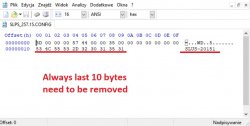
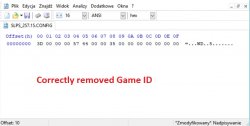
After downloading config, open it in hex editor, and remove game id at end of config:

Before (game refused to boot, return to xmb):
background.jpg

After (that one worked for me):

29440c344295bb2amed.jpg

So @aldostools good work! I will made some more tests when I will have some more free time. But one working config mean that all of them should work perfectly fine after removing ID! :)
 
Ok @aldostools I tested new app, and it seems to work fine, excluding that I wasn't able to make working configs with game ID at end (so almost full managunz archive). I think this is not app problem itself, but I need to make more tests to be sure. For now I can say it successfully encrypt config, and add it to pkg. So all that app is suppose to do, is done correct.

Note to anyone who want to use new config option:

After downloading config, open it in hex editor, and remove game id at end of config:

Before (game refused to boot, return to xmb):
View attachment 11359

After (that one worked for me):

View attachment 11360

So @aldostools good work! I will made some more tests when I will have some more free time. But one working config mean that all of them should work perfectly fine after removing ID! :)

Thanks for your feedback...

I think I can update the program to remove the game ID automatically from the CONFIG when I return to my home.
 
Thanks for your feedback...

I think I can update the program to remove the game ID automatically from the CONFIG when I return to my home.
Cool. But keep old one (not so old :)) still online as I made my tests using 3 pkgs only. 2 was klonoa game, one with game id config, one not. And third game was Ice Age 2 with config with game ID. Only one that worked was Klonoa2 with config without game ID.

But this need to be tested more, to confirm for sure. ;)
 
Cool. But keep old one (not so old :)) still online as I made my tests using 3 pkgs only. 2 was klonoa game, one with game id config, one not. And third game was Ice Age 2 with config with game ID. Only one that worked was Klonoa2 with config without game ID.

But this need to be tested more, to confirm for sure. ;)

I re-uploaded the rar with the CONFIGS without game ID. The original CONFIGs are also included.
https://www.sendspace.com/file/vbzaxp
 
Did anyone find a config that may work with tales of legendia (SLUS_212.01)??
(Btw, the JPN & USA version have the same problem but the UNDUB version crashes before going to the title screen. <Just telling in case anyone is curious about it>)
 
Did anyone find a config that may work with tales of legendia (SLUS_212.01)??
(Btw, the JPN & USA version have the same problem but the UNDUB version crashes before going to the title screen. <Just telling in case anyone is curious about it>)
I tested around 50 configs for that game, and nothing. I know how to fix game, just don't understand command 0x08 usage. :(
But you should know that even if someday someone fix it, it still will be slow in certain areas. This slowdown can't be fixed.
 

Similar threads

Back
Top