PS3 Compatibility List - PS2 on PS3

I want to negate the automatic switching to 16:9 from PS2 BIOS (games like the Burnout series auto default to 16:9 from your PS2 menu settings in System Configuration).
I believe that setting PS upscaller to None, or maybe even Normal will make it 4:3 at boot for games that use bios settings to recognize resolution.
Aside of that this can be patched directly in game, but this will be different offset, sometimes different function for every game.
 
Silent Hill 3 (NTSC-U)
Code:
3D 00 00 00 57 44 00 00 0F 00 00 00 34 AC 19 00 34 AC 19 00 00 00 00 00
Fixes all camera inaccuracies (wrong camera angles, camera clipping through walls).

Also, the wiki states there are shadow problems for both Silent Hill 2 and 3. AFAIK, all the shadows look fine and there's nothing wrong. Only issue is Douglas's beard now (and still tinkering with Silent Hill 2).
 
Tested "Tenchu:Wrath of Heaven" ntsc version extensively on a non bc compatible ps3 slim. Rikimaru's missions are playable, if you use a 100% save. Certain cutscenes during gameplay can freeze randomly, most of the time they don't, from what I experienced. The "heavy slowdowns" can be smoothed out, if you set vsync delay to - no ipu aggressive. Played through the first 3 missions from Rikimaru's campaign more or less without any problems. The cutscenes that play when you unlock a new skill have a very high chance of freezing the game.

Multiplayer plays perfectly on the first two maps - Village and Battleground - Versus mode. "Castle" and the very last map can freeze randomly at any point both on co-op mode and versus and I can point to the reason - the game hangs and game geometry is stripped off of textures, sometimes texture spikes appear and the game freezes. Im not even sure it is a freeze or an extremely slowed down version of the game. Screen switches between something like a textureless geometry mode and a normal one and player input has no effect. You can still quit the game safely from the home button. Tried using the Tony Hawk config and it didn't resolve the issue.

Does anyone know of a config file that could potentially help with the problems in the multiplayer mode? Been itching to play some tenchu co-op with a friend.

if u vsync delay to - no ipu aggressive,tenchu fatal shadows get smooth too.

how to transfer "vsync delay to - no ipu aggressive" to config file?
i searched,and wrote by myself,is it correct?
is 2nd group "57 44 00 00 " and last group "00 00 00 00" necessary?

3D 00 00 00 57 44 00 00 48 00 00 00
01 00 00 00 25 00 00 00 00 00 00
 
Last edited:
3D 00 00 00 57 44 00 00 48 00 00 00
01 00 00 00 25 00 00 00 00 00 00
Code:
3D 00 00 00 57 44 00 00 48 00 00 00
01 00 00 00 90 D0 03 00 00 00 00 00

Because value is in hex not in dec, and is little endian.
Your config (that is missing one 00 btw.), set it to No-IPU with 00000037 delay.
and last group "00 00 00 00" necessary?
Yes, afaik.
Silent Hill 3 (NTSC-U)
Code:
3D 00 00 00 57 44 00 00 0F 00 00 00 34 AC 19 00 34 AC 19 00 00 00 00 00
Fixes all camera inaccuracies (wrong camera angles, camera clipping through walls).

Also, the wiki states there are shadow problems for both Silent Hill 2 and 3. AFAIK, all the shadows look fine and there's nothing wrong. Only issue is Douglas's beard now (and still tinkering with Silent Hill 2).
Nice work, as always :)
 
@kozarovv
Agressive = 0x3D090 (250000)
why change it to '90 D0 03 00'?
Because the "endianness" https://en.wikipedia.org/wiki/Endianness

In decimal we are used to order the numbers "from left to right" (in the same order than big endian), as example the number 250000 (in decimal) when converted to hexadecimal can be represented like this:
0x0003D090 (in hexadecimal, big endian)
0x90D00300 (in hexadecimal, little endian)

On paper both are the same value, but the processor of the console is going to read the values always in a specific order (either big or little endian)... so you need to use the correct endianness

------
And the lenght of the value is always 4 bytes, in PS2 slang is named an "opcode" but as far i know it can be named a "word" too https://en.wikipedia.org/wiki/Word_(computer_architecture)

The point is... if i give you an hexadecimal value of 0x112233 (in big endian) you need to add zeroes at left up to 4 bytes
0x112233 (in big endian)
0x00112233 (in big endian)

Both are the same value, and in little endian would be 0x33221100
 
Works Fine

Super Robot Taisen Z [SLPS-25887]
Super Robot Taisen Impact [SLPS-25104]
Super Robot Taisen MX [SLPS-25345]
Super Robot Taisen Alpha 2 [SLPS-25228]
Super Robot Taisen Alpha 3 [SLPS-25537]

Of all PS2 Super Robot Taisen, only Z is officially PS2 Classic (Japan). All games work perfectly, probably because they use the same graphic engine.

Problems

Super Robot Taisen Original Generations [SLPS-25733]
Super Robot Taisen Original Generation Gaiden [SLPS-25836]

The only problems that these games present, is that both the cutscenes and the title menu have sttutering sound. If anyone knows of a config that fixes this problem, I would be very grateful.

Impact random freeze, even use ps2 machine with certain version OPL can fix.
 
I tried the 3 versions of Haunting Ground (Demento in JPN), and the results were funny.

NTSC-U: Only have 1 problem. As the wiki indicates, the sound of the cutscenes in real time it´s delayed, but in itself it is not the sound in general, it is only the voices.

NTSC-J: Everything works fine (Classic). I have not tried it personally, but this video shows that it works correctly.

PAL: Contains 3 modes.
  • 50 Hz: Everything works fine, but the game runs slower due to the loss of 10 Hz.
  • 60 Hz: Same as the american version.
  • Progressive mode: Same as the american version.

Result: If you want to play the game optimally, you have to play the PAL (50Hz) in exchange for a subpar gameplay or the NTSC-J version. (It has dubbing in English natively)

If the classic version contains a config, maybe it could fix the problems of the american version.


i finished the jap version,cutscenes not fix with voice.....,except this, can finished the game.
 
So, I found the memory address to disable shadows in Phase Paradox (SCPS_150.05) and I posted it here. On netemu, this game has some bad slowdown at points which causes audio desync (one scene gets around a whole minute out of sync!), and so far PCSX2 has shown that performance has improved a good deal with this code (just like Minna no Golf).

@kozarovv , do you think you could take a look at this and possibly make a CONFIG? It looks like it will be a 0x0B command when looking at the game executable in ps2dis, and I don't quite understand the offset on disc and sector id business surrounding that.:confused3:
 
So, I found the memory address to disable shadows in Phase Paradox (SCPS_150.05) and I posted it here. On netemu, this game has some bad slowdown at points which causes audio desync (one scene gets around a whole minute out of sync!), and so far PCSX2 has shown that performance has improved a good deal with this code (just like Minna no Golf).

@kozarovv , do you think you could take a look at this and possibly make a CONFIG? It looks like it will be a 0x0B command when looking at the game executable in ps2dis, and I don't quite understand the offset on disc and sector id business surrounding that.:confused3:
Sure, i will look into that. Maybe even today.
 
@kozarovv
I am trying to check something ps2 netemu. I have decrypted self and load elf in IDA.
But seems like a a lot of strings about configs I can't reference. Is there another section of code within elf which I need to unpack?
 
Thanks thanks thanks @kozarovv ! Not sure if it will fix the slowdowns entirely, but it will surely boost the performance.
Code:
3d 00 00 00 11 11 00 00 0a 00 00 00 09 00 00 00
00 c0 0f 00 00 00 00 00 4c 00 5b 3c 04 c0 0f 00
00 00 00 00 4c 0c 7b 37 08 c0 0f 00 00 00 00 00
02 00 71 17 10 c0 0f 00 00 00 00 00 2d 18 00 00
14 c0 0f 00 00 00 00 00 00 00 23 ae 18 c0 0f 00
00 00 00 00 00 00 5b 3c 1c c0 0f 00 00 00 00 00
a6 e4 0b 08 20 c0 0f 00 00 00 00 00 00 00 7b 37
90 92 2f 00 00 00 23 ae 00 f0 03 08 00 00 00 00

Please test. Not sure i did it correctly.
 
CONFIG works great, and shadows are gone. This improves the performance in many areas (first cutscene after new game, first playable area both have no issues), but I guess the high polygon scenes still struggle (especially scenes with Captain Mischa).

In other words, the CONFIG helps but doesn't solve it. Hope it didn't take too long to work on that, but thanks a lot for the effort! :sem blush:
 
@mrjaredbeta
Cheers for the silent hill configs! Wanted to play them for ages haha

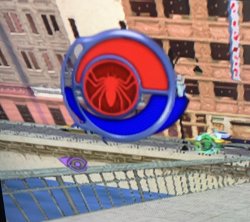
On another note does anyone know how to fix a problem I have in Spider-Man 2 (NTSC) with the widescreen patch I used from the widescreen archive? The energy bar seems to be glitched.... Cheers fellas!
 

Attachments

  • unnamed.jpg
    unnamed.jpg
    1.1 MB · Views: 55
@mrjaredbeta
Cheers for the silent hill configs! Wanted to play them for ages haha

On another note does anyone know how to fix a problem I have in Spider-Man 2 (NTSC) with the widescreen patch I used from the widescreen archive? The energy bar seems to be glitched.... Cheers fellas!
Looks like bugged widescreen patch, try asking on pcsx2 forum:


CONFIG works great, and shadows are gone. This improves the performance in many areas (first cutscene after new game, first playable area both have no issues), but I guess the high polygon scenes still struggle (especially scenes with Captain Mischa).

In other words, the CONFIG helps but doesn't solve it. Hope it didn't take too long to work on that, but thanks a lot for the effort! :sem blush:
It was fun to find out way how it is set. Game set that value at 0x2F9290, but is not only one value that is set using that address. So i created simple hook that check if write address is 0x4c0c4c, if yes then it write 0, if no then it follow original code. I used k1 register which is really bad idea, but shouldn't affect anything as i tested earlier that is used here anytime.
Nowy obraz mapy bitowej (2).jpg


Anyway, this game seems to use l2h so try to add command 46 00 00 00 , and 44 00 00 00 (both at 1 time). This can be some custom module audio streaming issue, then that will not gonna fix it.
 
Anyway, this game seems to use l2h so try to add command 46 00 00 00 , and 44 00 00 00 (both at 1 time). This can be some custom module audio streaming issue, then that will not gonna fix it.
Good suggestion, but unfortunately I don't think it makes any discernible difference. I think its the amount of polygons coupled with the 60fps that is slowing it down (many characters on screen in later phases slows gameplay and scenes down a lot). Maybe if frame rate was hacked down to 30, although that would take a lot away from the game. Thanks again for your help.
 
Sorry for bothering you @mysis

But I see you have added Marvel Rise of The Imperfects CONFIG at the wiki.
Unfortunately, it does not work completely. Same problem as here https://github.com/PSI-Rockin/DobieStation/pull/242

If you or anyone else are interested in this here are some useful links:

https://github.com/PSI-Rockin/DobieStation/issues/254
https://github.com/pcsx2/pcsx2/issues/1323
https://github.com/PCSX2/pcsx2/issues/2294
https://github.com/PCSX2/pcsx2/commit/10dd9412a1743c81f50538137aa727ed4bb73fda
 

Similar threads

Back
Top