PS3 Compatibility List - PS2 on PS3

@Rafaelrios This is an extremely hacky way of trying to bypass opening start menu screen. This is last one for now.

GT4 config someone posted a while ago cause it helps with car select jitter but slows down game speed.
 

Attachments

Last edited:
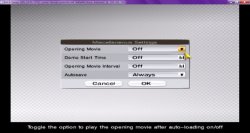
@Rafaelrios This is an extremely hacky way of trying to bypass opening start menu screen. This is last one for now.

GT4 config someone posted a while ago cause it helps with car select jitter but slows down game speed.

You could always create a save in pcsx2, the game has a option to disable the intro fmv.
Anyway i'd be interested to know your alternative skip fmv method, since some progressive scan codes hang on fmv but work fine in-game.
 

Attachments

  • Untitle-d.jpg
    Untitle-d.jpg
    186.7 KB · Views: 40
You could always create a save in pcsx2, the game has a option to disable the intro fmv.
Anyway i'd be interested to know your alternative skip fmv method, since some progressive scan codes hang on fmv but work fine in-game.
The config I posted is actually for Gitaroo Man. Sorry for not clarifying. :oops:
 
i finally discovered how avoid freezing on arcade mode on gt4,game is pretty playable.

@i was talking aboutthe config that was avaliable before urs,when i open the secret menu game is set to no ipu-agressive.
 
i finally discovered how avoid freezing on arcade mode on gt4,game is pretty playable.

@i was talking aboutthe config that was avaliable before urs,when i open the secret menu game is set to no ipu-agressive.
? Okay, so how did you do it?

And I answered you earlier about the no-ipu vsync. Someone made it cause they thought it helped with the jitter on car selection screen and ingame.
 
He had the Shadow of Memories config in mind.

@chibro, unpack, place it in the folder with the game and rename it as the ISO image with an extension, for example "Shadow of Memories.iso.CONFIG"
hi homis i try this and i will work but i can finish chapter 5 my console shutdown before the end of chapter 5, some minor low fram but its playable until chapter 5 but not to finish this game, thanks for your help
 
Gran Turismo 3: A-spec (SLUS-97102) (SLUS-97512) (SCES-50294) (SCPS-15009) (SCPS-55007) (PBPX-95502)
Code:
3D 00 00 00 57 44 00 00 21 00 00 00 00 00 00 00
00 00 00 00
Fixes all slowdown on intro FMV. It also improves in-menu FMVs, but it doesn't seem quite 100%. Not sure why Sony didn't use this on gx_emu... Still minor/major slowdown and jitter in races.
Was test it! Into plays good! in menu not see jitters. in some races slowdowns but not much!
 
hi homis i try this and i will work but i can finish chapter 5 my console shutdown before the end of chapter 5, some minor low fram but its playable until chapter 5 but not to finish this game, thanks for your help
Can you find a Youtube video where the freeze happens in chapter 5? It is probably the same effect in chapter 4 that causes the freeze. It shouldn't be difficult to fix!

@ex05 Possible fix for Growlanser V:
Code:
3D 00 00 00 57 44 00 00 0A 00 00 00 01 00 00 00
60 F6 50 00 00 00 80 3F FF FF 7F 3F 00 00 00 00

If not, we can try some more options.
 

Attachments

Last edited:
Musashi Samurai Legend (SLUS-20983)
Should fix SPS completely, config can cause really minor culling issues. Playing ~25 first minutes it seems to happen only on cutscenes at down of screen. Untested on ps3, as always..
Code:
3d 00 00 00 11 11 00 00 0a 00 00 00 02 00 00 00
a4 76 14 00 47 00 60 10 47 00 00 10 78 8d 2e 00
fc 5e 00 80 3c 03 00 80 00 00 00 00

Edit: Tested little bit more, culling is little bit worse at some stages. For now I can't do anything better, but it is fitting now into minor issue category :)
 
Last edited:
Thanks for attempting this! Really wanted this to work but both configs were unsucessful, unfortunately. Your effort will not be forgotten though :)
Try this one:
Code:
3D 00 00 00 57 44 00 00 0A 00 00 00 01 00 00 00
14 68 4B 00 00 00 80 3F 01 00 80 3F 00 00 00 00

I think this method will eventually fix it, but I need to figure out what float netemu wants. :-p

I managed to replicate it on pcsx2 so I know exactly where it is happening:
Capture.png
 

Attachments

Last edited:
Try this one:
Code:
3D 00 00 00 57 44 00 00 0A 00 00 00 01 00 00 00
14 68 4B 00 00 00 80 3F 01 00 80 3F 00 00 00 00

I think this method will eventually fix it, but I need to figure out what float netemu wants. :-p

I managed to replicate it on pcsx2 so I know exactly where it is happening:
View attachment 31177

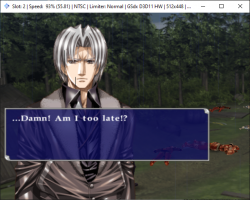
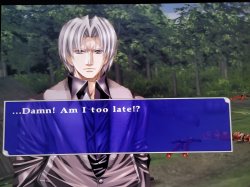
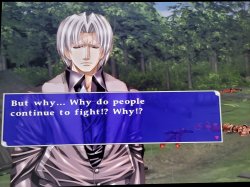
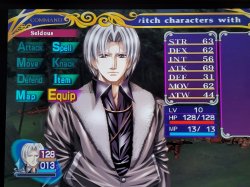
You did it! this works perfectly! black lines are no more! now everyone can play this free from this evil curse! I can't thank you enough! I wonder if I can apply this same config to the other titles (Growlanser II and III). They suffer from this same problem, but the black line is smaller and only gets more noticeable when some characters speak. I'll give it a test run and let you know.

Thank you so much for this! :)
 

Attachments

  • GrowVFIXED.jpg
    GrowVFIXED.jpg
    3.5 MB · Views: 40
  • GrowVFIXED2.jpg
    GrowVFIXED2.jpg
    3.2 MB · Views: 35
  • GrowVMenuFIXED.jpg
    GrowVMenuFIXED.jpg
    3.1 MB · Views: 32
You did it! this works perfectly! black lines are no more!
Nice! No problem, and thanks for testing! Config will be the same for other Growlanser games, but the memory address would need to be changed, so current config will not work. Btw, Sony's PS2 Classic config probably works in a similar way to this one.

Reposting here just cause it is confirmed working:

Growlanser: Heritage of War (SLUS-21571)
Code:
3D 00 00 00 57 44 00 00 0A 00 00 00 01 00 00 00
14 68 4B 00 00 00 80 3F 01 00 80 3F 00 00 00 00
Fixes horizontal black line on character sprites.
 
is it only that?because u said massive graphical glitch,i never payed attention to those mirrors,there is more glitchs?can u give me a save on that stage,i don't really remember any graphical glitch.
Ok, maybe I exaggerated, if you don't pay attention to the mirrors I guess you are fine. But I felt it was worth mentioning along with the sound bug, because the compatibility wiki made it sound like the only problem with klonoa 2 is the slowdown/shakes in the intro.
 
I remembered a minor error in KH1. Outside of battle, the low HP beep is notably much quieter than it should be (it's fine in battle). I know it's very minor, but still I added it.
 

Similar threads

Back
Top