PS2 Corrupted (?) FMCB after using Mechapwn

@vyjmecin What exactly model do You have and for what You have changed it in MechaPwn?

It's an SCPH-77004. When I launched Mechapwn for the first time, it told me to install multi-region FMCB, so I did. After that I installed the exploit and then had to choose between region unlocking and "Retail-DEX". I chose Retail-DEX and picked the third option (they were all the same but with different regions in brackets, this one said "Europe"). I clicked it, it installed and instructed me to unplug the system and plug it back in. I did that and voilâ - nothing. That's when the output signal changed to 60Hz NTSC and it refused to boot with the FMCB card inserted.
 
If You have chose Single install instead of multi, this is the reason why it is not work. Also we talking about FMCB 1.9xx, not 1.8x because older doesn't support DTL-Hxxxx in which Your console has been turned. But if You have chose multi this means something bad happened to the patching process.

On top of that; did You used DVD Player update? It could introduce some unexpected behaviours at least on OSDSYS side.
 
On top of that; did You used DVD Player update? It could introduce some unexpected behaviours at least on OSDSYS side.

Yeah, clearly something went wrong, and no I didn't use DVD Player update, still on 3.11. Are there any other ways to restore the BIOS? I guess that Mechapwn is the only one, right? FMCB version is indeed 1.966.
 
I've list all possible solutions in my previews post. There is no other ways than those to run a homebrew program for You.

Yes, it is the only one.
 
Maybe one of your friends has PS2?
If it is compatible with FreeDVDBoot, you can install (on your MC) FMCB (multi) with its help.
 
It's an SCPH-77004. When I launched Mechapwn for the first time, it told me to install multi-region FMCB, so I did. After that I installed the exploit and then had to choose between region unlocking and "Retail-DEX". I chose Retail-DEX and picked the third option (they were all the same but with different regions in brackets, this one said "Europe"). I clicked it, it installed and instructed me to unplug the system and plug it back in. I did that and voilâ - nothing. That's when the output signal changed to 60Hz NTSC and it refused to boot with the FMCB card inserted.

That's your problem!

You have an European Deckard console...
After installing MechaPWN, the console system update mechanism started to behave as if it was an American console...

To put this simple:

Your console needed
mc?:/BEEXEC-SYSTEM/osdmain.elf
Now it needs
mc?:/BAEXEC-SYSTEM/osdmain.elf
 
That's your problem!

You have an European Deckard console...
After installing MechaPWN, the console system update mechanism started to behave as if it was an American console...

To put this simple:

Your console needed
mc?:/BEEXEC-SYSTEM/osdmain.elf
Now it needs
mc?:/BAEXEC-SYSTEM/osdmain.elf

He should have all folders if he used the cross-region installation.
 
Maybe he didn't actually done the multi-install or cross-region. A photo of his mc?:\ folder would be appropriate.
 
Пока оптический привод работает и консоль может читать игры Ps2, вы можете их восстановить.

Вам нужно только заблокировать датчики (если у вас слим) или размонтировать дисковод (если у вас FAT). Очень просто, просто поищите любой гайд на YT.
Прикрепил Апач 1.0 и 2 файла для замены ID игры.

Привет. Была такая же проблема с Mechapwn, после разлочки - версия DVD Player сменилась на 3.11g теперь ничего не запускается. Ни Freemcboot, ни Freedvdboot, ни Video. Единственный способ, которым я не пробовал Swap Trick. Вы можете объяснить, как это сделать, желательно очень подробно. Спасибо

English (google translate):
Hello. There was the same problem with Mechapwn, after unlocking - the DVD Player version changed to 3.11g, now nothing starts. Not Freemcboot, not Freedvdboot, not Video. The only way I haven't tried the Swap Trick. You can explain how to do this, preferably in great detail. Thanks
 
Last edited by a moderator:
Привет. Была такая же проблема с Mechapwn, после разлочки - версия DVD Player сменилась на 3.11g теперь ничего не запускается. Ни Freemcboot, ни Freedvdboot, ни Video. Единственный способ, которым я не пробовал Swap Trick. Вы можете объяснить, как это сделать, желательно очень подробно. Спасибо

English (google translate):
Hello. There was the same problem with Mechapwn, after unlocking - the DVD Player version changed to 3.11g, now nothing starts. Not Freemcboot, not Freedvdboot, not Video. The only way I haven't tried the Swap Trick. You can explain how to do this, preferably in great detail. Thanks
you can post in any language, but please remember to include an english translation. :) welcome to the site!
 
It was already explained. You must install FMCB for target region or just for all models and regions. You didn't read readme before installing MechaPwn and this is the consequence of that.
 
  • Like
Reactions: TnA
Привет. Была такая же проблема с Mechapwn, после разлочки - версия DVD Player сменилась на 3.11g теперь ничего не запускается. Ни Freemcboot, ни Freedvdboot, ни Video. Единственный способ, которым я не пробовал Swap Trick. Вы можете объяснить, как это сделать, желательно очень подробно. Спасибо

English (google translate):
Hello. There was the same problem with Mechapwn, after unlocking - the DVD Player version changed to 3.11g, now nothing starts. Not Freemcboot, not Freedvdboot, not Video. The only way I haven't tried the Swap Trick. You can explain how to do this, preferably in great detail. Thanks

Download this: https://www.psx-place.com/threads/corrupted-fmcb-after-using-mechapwn.37144/#post-331363

You have to replace the game's ID with cogswap on one CD/DVD and with Ulaunchelf on the other.

Use Apache 1.0 (I think I included it in the link). update the filesize before replacing, (name both cogswap and ulaunchelf the same as game's ID). Don't change the LBA.
 
Download this: https://www.psx-place.com/threads/corrupted-fmcb-after-using-mechapwn.37144/#post-331363

You have to replace the game's ID with cogswap on one CD/DVD and with Ulaunchelf on the other.

Use Apache 1.0 (I think I included it in the link). update the filesize before replacing, (name both cogswap and ulaunchelf the same as game's ID). Don't change the LBA.

how do I work with Apache.exe?

Describe in detail !!! Do I need 1 licensed disk and 2 DVD? Correctly? Then what should I do? How can I work with Apache.exe?

And by the way, I don't start with DVD Video nor FreedVDBOOT (shows RSOD, i.e. insert a disc from PS2), there is also no launch in FreemCboot. I have a licensed DVD disk with a game. How do I need to record a disk so that I can start ULE?

It was already explained. You must install FMCB for target region or just for all models and regions. You didn't read readme before installing MechaPwn and this is the consequence of that.
There is no help from you. I clearly wrote that Mechapwn has changed my version of the DVD Player and now there is no launch from the disk, a console without a chip mod, as you think I should start installing Freemcboot ???????????????? By the way, the question was asked to another person !!!
 
Last edited by a moderator:
how do I work with Apache.exe?

Describe in detail !!! Do I need 1 licensed disk and 2 DVD? Correctly? Then what should I do? How can I work with Apache.exe?

And by the way, I don't start with DVD Video nor FreedVDBOOT (shows RSOD, i.e. insert a disc from PS2), there is also no launch in FreemCboot. I have a licensed DVD disk with a game. How do I need to record a disk so that I can start ULE?

If you have another Ps2 (or you can borrow one from a relative/friend) it'd be more simple to just use it for making a cross-region fmcb installation on a MC, so you'll be able to use it on your Ps2.

If you only have access to your one Ps2 (that I guess it's a slim, otherwise on a 5000X you'd also have internal HDD/FHDB as alternative solution) and it can start original Ps2 games, you need:

- the original game, either a Ps2 CD game (better/cheaper, so you'll need 2 blank CDs) a demo disc (good 'cause most probably you'd need just one blank DVD) or a DVD game (you'd need 2 blank DVDs, unless you have 007 agent under fire or a couple other specific multi-ELF games I don't remember).

Here an example:
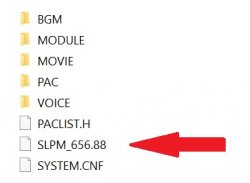
Immagine.jpg

That's the game's ID, in this case (as in most games) SLPM_656.88 is the only file we can replace, there isn't any other useful elf, so we'll need 2 blank DVDs.

1. name both cogswap.elf and uncompressedBOOT.elf as the game's ID. In this case it must be SLPM_656.88, it must be the entire name, you don't want something like SLPM_656.88.ELF, it won't work, so make sure that "show file name extensions" is checked on your PC.

2. Right click on cogswap.elf -> properties and write down its size (actual file size, not the size on the disc). Do the same with the uncompressedBOOT.ELF file

3. Make a copy of your game ISO (so to leave a clean ISO for the other file replacement). Open Apache 1.1 (I suggest you to open it as admin, you can check the box in properties -> compatibility), open your game ISO, click once on the ID for highlighting it, go to ISO tools -> change TOC for selected file. Now in Size (dec), write the cogswap size you noted (no spaces, periods, commas), click on update.

4. Still with the ID highlighted, ISO Tools -> update selected file. From the opened browser screen, select the cogswap.ELF file you renamed as the game ID.

Done, you're ready to burn the cogswap disc (use imgburn, 4x for DVDs, 10x max for CDs).
You now have to do exactly the same with uncompressedBOOT.ELF file on another clean ISO of your game.

Once you have the 2 discs ready, you have to insert the original disc. When the PlayStation 2 logo is fading out, quickly remove the disc and gently insert the cogswap disc, then as soon as the lens moves again, quickly remove the cogswap disc and gently (very gently) insert back the original disc. Then just follow cogswap on screen istructions, you'll only have to insert the uncompressedBOOT.ELF disc and Ulaunchelf will start.

Here a video for having an idea of the timing:

Ps2 - How to safely swap - YouTube

The important thing is to remove the discs with perfect timing (so to prevent the lens from reading from the wrong disc), while when inserting you can take all the time you need for perfectly center the disc on the rotor. When inserting the backups you don't have to worry too much, but the original disc, as you can see watching where the lens moves, has the boot sector in the inner end, so if you scratch it on the rotor, the game won't boot anymore.

Obviously you need to block the lid sensors before.

 
Get a wLE-ISO and Masterdisk-patch it.......

I didn't mentioned it 'cause I never managed to make a Ule disc to work (neither swapping nor patching with ESR). I think I tried with Ule 4.38 and another one or two versions. The Ps2 couldn't boot it.
 
Current wLE/uLE is more like minefield. I would suggest stable wLE (like the one from FMCB/FHDB installer) or uLE v4.42d. Of course for master disc, not for FreeDVDBoot with which they are incompatible.
 
Ule 4.42 iso didn't worked for me. So I tried other older versions that should have worked. If some of you have experience with a precise version that works, please, link it. It sure would be a quicker solution for this MechaPWN related problem.
 

Similar threads

Back
Top