how do I work with Apache.exe?
Describe in detail !!! Do I need 1 licensed disk and 2 DVD? Correctly? Then what should I do? How can I work with Apache.exe?
And by the way, I don't start with DVD Video nor FreedVDBOOT (shows RSOD, i.e. insert a disc from PS2), there is also no launch in FreemCboot. I have a licensed DVD disk with a game. How do I need to record a disk so that I can start ULE?
If you have another Ps2 (or you can borrow one from a relative/friend) it'd be more simple to just use it for making a cross-region fmcb installation on a MC, so you'll be able to use it on your Ps2.
If you only have access to your one Ps2 (that I guess it's a slim, otherwise on a 5000X you'd also have internal HDD/FHDB as alternative solution) and it can start original Ps2 games, you need:
- the original game, either a Ps2 CD game (better/cheaper, so you'll need 2 blank CDs) a demo disc (good 'cause most probably you'd need just one blank DVD) or a DVD game (you'd need 2 blank DVDs, unless you have 007 agent under fire or a couple other specific multi-ELF games I don't remember).
Here an example:
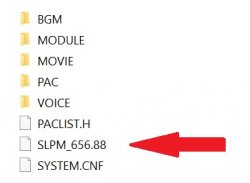
That's the game's ID, in this case (as in most games) SLPM_656.88 is the only file we can replace, there isn't any other useful elf, so we'll need 2 blank DVDs.
1. name both cogswap.elf and uncompressedBOOT.elf as the game's ID. In this case it must be SLPM_656.88, it must be the entire name, you don't want something like SLPM_656.88.ELF, it won't work, so make sure that "show file name extensions" is checked on your PC.
2. Right click on cogswap.elf -> properties and write down its size (actual file size, not the size on the disc). Do the same with the uncompressedBOOT.ELF file
3. Make a copy of your game ISO (so to leave a clean ISO for the other file replacement). Open Apache 1.1 (I suggest you to open it as admin, you can check the box in properties -> compatibility), open your game ISO, click once on the ID for highlighting it, go to ISO tools -> change TOC for selected file. Now in Size (dec), write the cogswap size you noted (no spaces, periods, commas), click on update.
4. Still with the ID highlighted, ISO Tools -> update selected file. From the opened browser screen, select the cogswap.ELF file you renamed as the game ID.
Done, you're ready to burn the cogswap disc (use imgburn, 4x for DVDs, 10x max for CDs).
You now have to do exactly the same with uncompressedBOOT.ELF file on another clean ISO of your game.
Once you have the 2 discs ready, you have to insert the original disc. When the PlayStation 2 logo is fading out, quickly remove the disc and gently insert the cogswap disc, then as soon as the lens moves again, quickly remove the cogswap disc and gently (very gently) insert back the original disc. Then just follow cogswap on screen istructions, you'll only have to insert the uncompressedBOOT.ELF disc and Ulaunchelf will start.
Here a video for having an idea of the timing:
Ps2 - How to safely swap - YouTube
The important thing is to remove the discs with perfect timing (so to prevent the lens from reading from the wrong disc), while when inserting you can take all the time you need for perfectly center the disc on the rotor. When inserting the backups you don't have to worry too much, but the original disc, as you can see watching where the lens moves, has the boot sector in the inner end, so if you scratch it on the rotor, the game won't boot anymore.
Obviously you need to block the lid sensors before.



 welcome to the site!