PS2 Discussion: "App-System Implementation"

TnA

Moderator
Developer
  • Alright, so this discussion is solely about how a "proper App-System" could be achieved, while:
    • keeping compatibility to most apps
    • making it easier for users to recognize & copy/delete apps to other MCs (HDDs, etc.) and easier to "install" them, via simple folder-copying and less interfering with other apps, their drivers, etc.

    The APPS-Folder ever was and still is a placeholder-folder to junk all your apps into, but apps actually ever were meant to be in their separate folders (at least in most of my packages... I hesitated a bit for the Noobie-Package, but SMS, ESR GUI and OPL are meant to be external apps in their own respective folders. Mini-ESR & wLE, however should remain in the BOOT-folder, because they are rather "system/exploit-related")!
    We just don't have icons for a lot of them and especially not icons where you can easily distinguish between APPS and Saves! That's what the MemoryCard-Logo with "APPS" written on it was meant to do in a miniaturized Form within the apps MC-Icon! You see the Mini-MC in the upper left corner and instantly know it is an APP!
  • So the current idea is:
    • Have a folder per app!
    • Every App has a custom 3D-Icon with the miniaturized "APPS MC Logo" in the upper left/right corner and only with "APP" written on it. Probably not feasible for every app, hence a big APP-MC-Icon as a placeholder and
    • The folder-names to be like this.--> "PREFIX_APPNAME", like "APP_SMS" with a "APPNAME.ELF" (SMS.ELF), or BOOT.ELF inside! The prefixes could vary IMO, but it might be useful to keep the length of the prefix the same, like "EMU_", "SYS_", etc.
    • Possibly show the prefix in the Save-Name as well, but it is not mendatory I suppose, if the Mini-MC would be shown in the Logo!
    • the title.cfg-file from OPL could be included (if OPL would search for folders with prefixes which have these inside, it could also list them automatically)
    • Possibly "packing" them in PSU-Files, to make it easy for everyone to copy one or multiple APP-Folders easily!
    I bet I missed a lot, but I will add it to the thread later.
    This is a first-shot post to start the discussion! :)

    Ideas are welcome!
  • Placeholder!
  • I started the same thread, over at psxtools.de! https://psxtools.de/index.php/Thread/80970-App-System/
 
Last edited:
You can create the folders and move all apps to them. Can you provide a screenshot of how this would look when we don't have special icons, but just dummy ones with text? Can you also provide screenshot of the APPS logo in the upper right corner? I'm not sure how this is supposed to look.

What tools do we have to create these 3D icons? Is it simple to create 3d cubes from a single image, like the "APPS" one?
 
  • Like
Reactions: TnA
You can create the folders and move all apps to them. Can you provide a screenshot of how this would look when we don't have special icons, but just dummy ones with text? Can you also provide screenshot of the APPS logo in the upper right corner? I'm not sure how this is supposed to look.

What tools do we have to create these 3D icons? Is it simple to create 3d cubes from a single image, like the "APPS" one?


U can use Milkshape 3D with this plugin.

https://www.ps2savetools.com/download/milkshape-ps2-icon-importer-exporter/
 
@Maximus32:

Creating "Icons with text simply" is quite easily possible via wLE as far as I can remember.
Yes, I can do that!
I can make it for the Noobie-Package-Apps, but am not too keen to do it for much more...

Regarding the App-Icon (Mini-MC in the upper left corner): Well, I think I can create a "skeleton"/basic example-icon with the Mini-MC in the appropriate place and possibly a smaller cube or blob or whatever in the middle, which gets replaced or modified for the app it is meant to represent.


Regarding cubes: Yes, that's the simplest method and is only mapping a texture onto every side.
I know there are some tutorials and some icons out there, but none for proper 3D-Icons.
Even animated icons are quite possible!


Blender + Milkshape + Plugin + PS2 Save Builder should work (like @Nameless32 pointed out for Milkshape and the Plugin)!
 
U can use Milkshape 3D with this plugin.
Great! I'm hoping we don't need windows 98 to run these ;-). But if the tools are available then perhaps there's users/designers who can create icons.
An icon for wLE and OPL would be great, we could hold a contest... but I'm afraid no-one would be interested :-(.

Creating "Icons with text simply" is quite easily possible via wLE as far as I can remember.
Yes, I can do that!
I can make it for the Noobie-Package-Apps, but am not too keen to do it for much more...
Just a simple example to get a feel for how it would look, don't put too much effort into it.

Regarding the App-Icon (Mini-MC in the upper left corner): Well, I think I can create a "skeleton"/basic example-icon with the Mini-MC in the appropriate place and possibly a smaller cube or blob or whatever in the middle, which gets replaced or modified for the app it is meant to represent.
Would love to see it.

Regarding cubes: Yes, that's the simplest method and is only mapping a texture onto every side.
I know there are some tutorials and some icons out there, but none for proper 3D-Icons.
Even animated icons are quite possible!
Do you have links to these tutorials? Anything simple we can use on the command line?
Perhaps we can add something to ps2dev/sdk/toolchain, so when creating an ELF file, it can also create the icon from an image? Like 'make mc'.
 
Great! I'm hoping we don't need windows 98 to run these ;-).
Nope, I tried Milkshape 3D (Plugin), to convert something from a file Blender puts out to a PS2-compatible icon and the rest is just some additions using PS2SaveBuilder.

Should all work up to Win10, but I don't quite remember if the PS2SaveBuilder needs a compatibility-mode (system-version selection).

But if the tools are available then perhaps there's users/designers who can create icons.
An icon for wLE and OPL would be great, we could hold a contest... but I'm afraid no-one would be interested :-(.
Yes and yes... Sadly there does not seem to be a high interest in a proper or clean App-System and also not in nice animated icons...
I even asked some people if I should write a tutorial about it for animated 3D-Icons...

A Save can also have 3 different animated icons as well (normal, delete, copy, etc.)!

Someone promised me to do some simple icons last April and he didn't do anything since then... but asked me to help him with the YaBasic-Exploit... and then exits out of that as well... Senseless... -.-

Just a simple example to get a feel for how it would look, don't put too much effort into it.
It would be neat to find out, that 2 objects of static icons can be merged!

Then I would:
  • modify the texture to show "APP" instead of "APPS"
  • make the MC-Icon smaller, which I think should be possible very easily, if I can backconvert it to the Blender-File!
  • move the smaller object/MC to the upper left (drag&drop)
  • Then I would use wLE to create these small flat rectangle with the "Name" simply written onto...
  • Then I could hopefully merge 2 icons/frames into one!
Would love to see it.
O.k. I will give it a shot...!

I just have to say that I am pretty pissed about this subject, due to the guy who promised to do this and that "let me do it and you do that"... O.k. and then... nothing... 2 Icon-tests from a remodeled original Save... I told him, we have to create these from scratch for the scene or use those which are freely available out there, like in the Blender-Communities or wherever.

I invest time into stuff he is interested in and then he just went off... ( /s "Great!")

Some of these Icons and things are crucial for some things I have thought of...


The App-System in particular and that I hope for OPL being finally tagged 0.9.4 is, that I would like to strip the GUI down to the ELFs-Page and change the ELF-Loading to that of ile and "install" apps to MC, simply via copying the appropriate folder from an Internet-Server to the MC... A kind of "Internet Apps Browser"... I simply do not want to base that project on a freakin' mid-step beta-build!

Do you have links to these tutorials?
Not at hand yet, but I will collect some things, for a tutorial! But I rreeeeaallly really hope, that writing that tutorial would not be as senseless as working with this "I do it... I know..."-guy...

Anything simple we can use on the command line?
Good question, but I don't know the commands off the top of my head!

Perhaps we can add something to ps2dev/sdk/toolchain, so when creating an ELF file, it can also create the icon from an image? Like 'make mc'.
Rather "make App" (folder with correct name, a basic icon, ELF and content like possibly the title.db included, etc.) or so and I suppose it would need to call an external script if possible, so we would not need to have the source to every app and still can create these "App-Folders" for ELFs!

The Wii has a pretty similar App-System, but the "per app folders" are within the apps-folder on the SD-card. That's just not a good idea for the PS2, haha! ;)
 
I was thinking of the doing the following in my OSDSYS reimplementation:
"LAUNCHSV.INI" would be in a directory and contain the path to an ELF file, so it can be launched by navigating to the icon and pressing the confirm button. This would be similar to how HDD partitions are launched.
 
  • Like
Reactions: TnA
An icon for wLE and OPL would be great
OPL already has a 3D icon, @Tupakaveli made it and it's in the repo currently.. you can see screenshots here
https://www.psx-place.com/threads/open-ps2-loader-v0-9-3.13415/page-40

Not sure about other apps but I would think wLE would already have one also? Fairly sure SMS already has one compiled in too.. Might have a look.

As for tools, I think ffgriever coded an app (forgot what it's called) to make very basic 3D cubes/rectangles etc from 2d images.. but yea, they turn out better if made manually though software.. Milkshape etc

Edit: yea both SMS & wLE already have memory card icons but unlike OPL which has the files compiled in and just writes them, SMS & wLE create them from source code.
https://github.com/AKuHAK/uLaunchELF/blob/master/makeicon.c

Edit 2: SMS took me longer to find but I knew I had seen it in there somewhere

https://github.com/doctorxyz/sms/blob/master/src/SMS_ConfigIcon.c

https://github.com/doctorxyz/sms/blob/master/src/SMS_Config.c

Controversy aside PS2 Intro Loader uses icons the same way OPL does cause it was easier to code ;-)
 
Last edited:
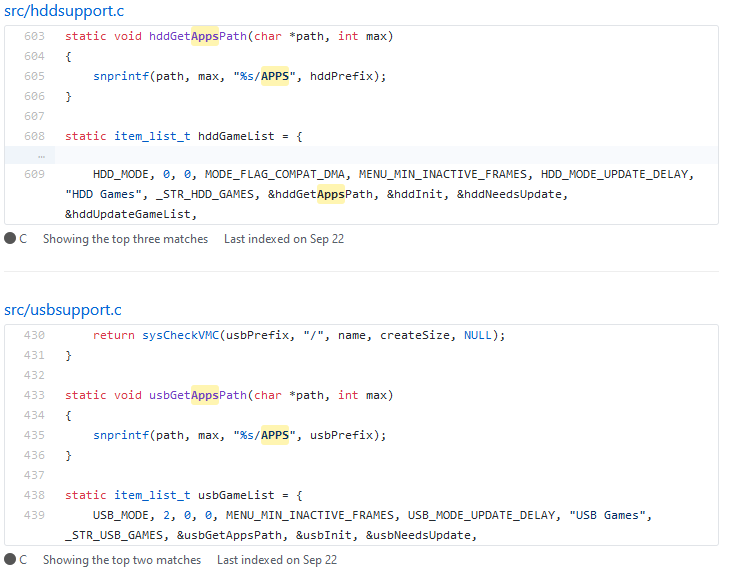
OPL it appears may be hardcoded to use /APPS/

c75dc86e2279da49ad772b0c7b4de6c3.png


47db696e9d5f4ed3e0d0b81203e04db6.png
 
  • Like
Reactions: TnA
@VTSTech
Indeed it does, but that is for displaying apps in your device list (USB, HDD, ETH) which would not be affected by MC Icons anyway.. which I think this thread is about (for the most part)?

Within the device APPS folder for OPL I believe you can have sub folders per app though
https://github.com/ifcaro/Open-PS2-Loader/blob/master/src/opl.c#L389

Does OPL read/scan apps on MC? Can't say I've ever used the apps page.
 
Last edited:
OPL already has a 3D icon, @Tupakaveli made it and it's in the repo currently.. you can see screenshots here
https://www.psx-place.com/threads/open-ps2-loader-v0-9-3.13415/page-40
Great, looks nice!

Edit: yea both SMS & wLE already have memory card icons but unlike OPL which has the files compiled in and just writes them, SMS & wLE create them from source code.
https://github.com/AKuHAK/uLaunchELF/blob/master/makeicon.c
Just tried uLE, it does not have an icon (correct me if I'm wrong), but it can create a very very simple icon. It looks like this:
Schermafdruk van 2019-12-07 08-24-57.png
 
You mean while browsing files in wLe, pressing R1 -> New Icon:
You can enter "Icon Title" and "IconText".

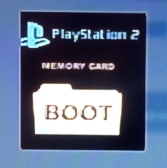
Theoretically BOOT icon is for u\wLe:
boot.png

Although I've never seen dedicated icon for this app (u\wLe).
 
Theoretically BOOT icon is for u\wLe:
Yea that's the one I was talking about, forgot to link the actual icon code though.
https://github.com/AKuHAK/uLaunchELF/blob/master/icon.c

I'm not sure why u/wLE is always BOOT/BOOT.ELF which is why the icon is that way, is it something to do with FMCB recovery mode? @TnA or @jolek probably know.

Im sure ESR has one built in too cause I recall seeing it in the browser. Perhaps a list of apps that don't have icons would be helpful if anyone knows them?
 
Wow! It seems this thread is thriving!

Thank you all for your ideas and contributions!


Regarding per-app-icons:
Well, in some cases the easiest method is to make a Screenshot and slap it on a flat rectangle, for example in wLE's case!
Just a screen-shot from the main-menu and then slapping it on a flat rectangle (like the one shown in Jolek's post).

In ESR's case, I think:
  • extracting the logo from the ELF,
  • adding some Bezier-curves around the flat "writing",
  • adding a z-depth to the bezier curve, to make it a 3D-Icon
would be the fastest and most efficient way.

I really hope for the Mini-MC to be added and that we will have "better" icons once upon in time, than simple rectangles or cubes...
That's probably also the best idea for a better FMCB-MC-Icon, using the FMCB-Logo and then adding depth-info to it!


Having all logos in FMCB pretty similar, was also due to us want to "get it all done" at least, without @JNABK or someone else spending hours on one icon!


I was thinking of the doing the following in my OSDSYS reimplementation:
"LAUNCHSV.INI" would be in a directory and contain the path to an ELF file, so it can be launched by navigating to the icon and pressing the confirm button. This would be similar to how HDD partitions are launched.
Yes, that would be a pretty cool feature!

Regarding this specific config "LAUNCHSV.INI":
Well, the naming-convention-idea is also meant to not being dependent on such a file, BUT of course such an additional file should still be supported, like the new file which is used in OPL's new app-system! :)

You know...
  • (preferably fixed-lenght) Folder-Prefix with a following underscore --> simple code to recognize an app based on folder-name and also easy to see for users, when reading/seeing the name
  • "APPNAME" in folder-name and "APPNAME".ELF have the same name or as a Fall-back-solution "BOOT.ELF" and another fall-back-solution "Filename defined in a config" (like yours, or the one OPL uses in it's new App-System

These config-files can also hold additional information regarding the app (version, etc.)!

OPL already has a 3D icon, @Tupakaveli made it and it's in the repo currently.. you can see screenshots here
https://www.psx-place.com/threads/open-ps2-loader-v0-9-3.13415/page-40
Yeah, correct! I forgot about that!

Merging that with a Mini-MC (APP) Logo would be cool thought!
Folder-name "APP_OPL", ELF-Name "OPL.ELF" and the first "app-folder" already would be made according to the idea(s)!

Not sure about other apps but I would think wLE would already have one also?
I ought to remember, that someone already slapped a Screenshot from uLE's usual/default screen, onto a flat rectangle, but am not sure about it.

Fairly sure SMS already has one compiled in too.. Might have a look.
Definitely, but that was a simple cube, has no Mini-MC and is only for the save/config-folder AFAIR!

As for tools, I think ffgriever coded an app (forgot what it's called) to make very basic 3D cubes/rectangles etc from 2d images.. but yea, they turn out better if made manually though software.. Milkshape etc
I forgot about that tool! THX!
Yes, it's definitely better if manually made (visually, etc.)! But... It's also quite a bit more work... :-|

Edit: yea both SMS & wLE already have memory card icons but unlike OPL which has the files compiled in and just writes them, SMS & wLE create them from source code.
https://github.com/AKuHAK/uLaunchELF/blob/master/makeicon.c
That might actually proof useful for the PC-Side-stuff @Maximus32 mentioned, so we can create some "dummy-icons", until anyone wants to contribute a new/other/better icon.

Edit 2: SMS took me longer to find but I knew I had seen it in there somewhere

https://github.com/doctorxyz/sms/blob/master/src/SMS_ConfigIcon.c

https://github.com/doctorxyz/sms/blob/master/src/SMS_Config.c

Controversy aside PS2 Intro Loader uses icons the same way OPL does cause it was easier to code ;-)
I remember, when that feature was added to uLE, due to a user-request! It's cool, but pretty much unknown!


OPL it appears may be hardcoded to use /APPS/

c75dc86e2279da49ad772b0c7b4de6c3.png


47db696e9d5f4ed3e0d0b81203e04db6.png
Yes... It currently does not have support for "searching per folder"... on MC and using the new apps-system (that file within the folder, which OPL is looking for)!

@VTSTech
Indeed it does, but that is for displaying apps in your device list (USB, HDD, ETH) which would not be affected by MC Icons anyway.. which I think this thread is about (for the most part)?
Yerp, it's about the MC Icons, to have a "save" per app!

Within the device APPS folder for OPL I believe you can have sub folders per app though
https://github.com/ifcaro/Open-PS2-Loader/blob/master/src/opl.c#L389

Does OPL read/scan apps on MC? Can't say I've ever used the apps page.
I believe it does not! If support is included or is gonna be implemented, I think just scanning the folders on the MC instead of within the APPS-Folder would be the best!
+ here comes another reason for the naming-convention... The folder-name with the prefix can be used, to "kick off" any folder from the list which does not follow the naming-convention and thus not scan for the file which has the information!

Great, looks nice!


Just tried uLE, it does not have an icon (correct me if I'm wrong), but it can create a very very simple icon. It looks like this:
View attachment 21372
I think there was an easy uLE-Icon!
A screenshot of the UI, slapped on a flat rectangle!
But yes, uLE/wLE has a small feature to create very simple/basic MC-Icons! :)

You mean while browsing files in wLe, pressing R1 -> New Icon:
You can enter "Icon Title" and "IconText".

Theoretically BOOT icon is for u\wLe:
boot.png

Although I've never seen dedicated icon for this app (u\wLe).
Yes, basically JNABK made them all quite similar, due to it sparing A LOT of time!
It is possible to have way better visuals (3 animated 3D-Icons per save/app), but they are 3D atleast and represent the MemoryCard-Style quite well!

I'm not sure why u/wLE is always BOOT/BOOT.ELF which is why the icon is that way, is it something to do with FMCB recovery mode? @TnA or @jolek probably know.
That's due to multiple reasons:
  • Like @sp193 said/wrote... All Modchips which support DEV.1-Mode, use this path! It's the perfect fallback-solution for them, if the FMCB-Loader got corrupted, or the CNF accidentally got deleted, because the internal defaults still point to BOOT.ELF to BOOT3.ELF for Buttonlaunch! (especially useful, if these consoles lasers are not working)
  • Many apps allow to "Exit to BOOT.ELF" and the most natural choice is wLE for this IMO.
  • etc.

Im sure ESR has one built in too cause I recall seeing it in the browser.
Naaaah... Really? But it's not offi9from ffgriever, nor within the ELF! The ELF has a Logo (shown on startup), but not an MC-Icon.
I think there was an equally easily made Logo for ESR-GUI though! It was simply a Screenshot from ESR GUI slapped on a flat rectangle!

Perhaps a list of apps that don't have icons would be helpful if anyone knows them?
...or vice versa, which icons are "wanted"?! But yes, possibly!

I think we would not need specific icons for wLE and ESR, because both are meant to be part of the BOOT-Folder!
I don't mind, if such a contribution is provided however! It certainly would be neat to have icons for every app out there and it would be even cooler, if we would have some icons for the most prominent apps, to follow a kind of "standard" (like proposed in this thread)! :)

ESR does have one, I used it as the base for the Intro Loader icon :-p
??? MC Icon? I think you mean the Logo, which pops up on startup?
I only ought to remember, that there was a "flat rectangle with Screenshot"-MC-Icon for ESR GUI...

It was made to support a modchip, although I'm not certain which one.
All which support "DEV.1"! It was specifically tested (pre-introduction) on an original MI (I think by Jimmykaelkael or l.oliveira.), DMS3 (by me), DMS4 (by dlanor) and later on on a lot of others as well (clones, etc.)!

CC doesn't work with it, because it either needs the Bootmanager (@Jones23's mod preferably) on MC or possibly a hacked FW.

 
That's looking alright!
I didn't remember this one, but do remember that I have seen it before!
 

Similar threads

Back
Top