PS3 Fault finding YLOD with the SYSCON - First steps and Error reporting

I saw a video where only TX and RX were needed (I think, I might be wrong). Always I read the pdf I don't understand where to connect the GND.

I'm using Windows 10 with python27, ft232r usb uart


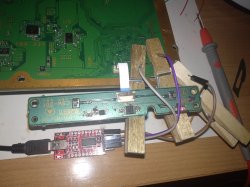
I couldn't solder where it says the GND in the motherboard, should I use a knife to scratch it?


So I though well when I saw something like receiving the command after sending it
Haha, could you show us that video? I'm curious. Probably it was a friend of mine hahaha.

All devices need to share the same GND in order to communicate. If you are not using the GND wire and you are having problems, the first thing you need to try is connect proper GND. A simple alligator clip will be great.

And yes, sometimes it can look like it's working without GND, but it's going to be less reliable or it's because all grounds are already connected together via earth wire.

I couldn't solder where it says the GND in the motherboard, should I use a knife to scratch it?
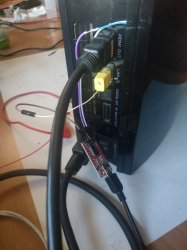
You can get GND from pretty much anywhere on the machine. An alligator clip is perfect for this. Or you can just get creative. The connection doesn't have to be so strong.
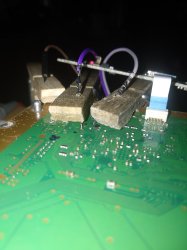
In fact your soldering with rigid pins to the board looks scary. Be careful really not to break the pads. (It wouldn't be the end of the world, but yeah take care)

Edit: (Normally I like to get ground from the ethernet port, when the machine is assembled. I just jam a wire in there with the ethernet cable. Just an example)
 

Attachments
  • IMG_20210423_182311.jpg
    IMG_20210423_182311.jpg
    4 MB · Views: 254
  • IMG_20210223_011131.jpg
    IMG_20210223_011131.jpg
    5.8 MB · Views: 124
  • IMG_20210223_012146.jpg
    IMG_20210223_012146.jpg
    1.1 MB · Views: 118
  • IMG_20210403_170956.jpg
    IMG_20210403_170956.jpg
    1.3 MB · Views: 112
Last edited:
Haha, could you show us that video? I'm curious. Probably it was a friend of mine hahaha.

All devices need to share the same GND in order to communicate. If you are not using the GND wire and you are having problems, the first thing you need to try is connect proper GND. A simple alligator clip will be great.

And yes, sometimes it can look like it's working without GND, but it's going to be less reliable or it's because all grounds are already connected together via earth wire.


You can get GND from pretty much anywhere on the machine. An alligator clip is perfect for this. Or you can just get creative. The connection doesn't have to be so strong.
In fact your soldering with rigid pins to the board looks scary. Be careful really not to break the pads. (It wouldn't be the end of the world, but yeah take care)

Edit: (Normally I like to get ground from the ethernet port, when the machine is assembled. I just jam a wire in there with the ethernet cable. Just an example)


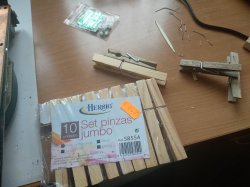
Thanks, so after using the clothespin it worked. I'm seeing a lot A0403034 so I guess it's something with the RSX. Hope I can fix it :)
 
40 3034 is the classic reball candidate. Welcome to the 90% majority :apologetic:. You could attempt a reflow, although a reball is better.
 
If you're expecting to fix it, I'd caution you to temper that expectation. The reballing process it VERY difficult. You will destroy the first few attempts. While I don't want to discourage you from learning, failing is a neccessary evil gaining this skill. I have killed 3 consoles so far and I haven't gotten it right.

Reflowing on the other hand is MUCH easier. You might have sucess with it, but it won't last forever. You might get a year out of it before the YLOD comes back.
 
Reballing/Reflowing Cheap DIY Hardware list ($350):
  • $104 = IR Preheater (Be sure cord is rated for 15A - it says on the plug. If not, buy another one that is. This is a safety hazard. The cord that came with mine was 10A and was getting hot to the touch after just a few minutes! It would surely have burned my house down had I not replaced it. The 15A cords works perfect for hours of continuous operation whithout warming up in the slightest. They may have fixed this since I purchased, but be sure to check before using it. Otherwise, this is a great preheater!)
  • $28 = Dual Channel Temperature Meter with K-Type Thermocouples. This works great. It's not the most accurate thing, but for the price it's perfectly fine. You need to place one probe on each side of the motherboard to monitor the topside and bottomside temperatures. This tells you when you're getting close to flowing temperatures. But you'll still have to watch the chip and nudge it to know for certain. This minimizes the time you stay above the melting point and allsow you to manually simulate a temperature profile. Not perfect, but better than nothing.
  • $79 = Hot Air Rework Station. This is the one I have. I only use it for the hot air gun. It's temperature controlled soldering iron is fine, but I prefer my KSGER T12 station. The DC power supply is a bonus and nice to have, but it's not the best. This is a nice all in one that enables the electronics DIY'er for the off job here and there. I like mine.
  • ~$20 = 45x45mm IC SMD Rework Nozzel. You need this to evenly distribute the hot air from the rework station. I needed to turn the airflow on the rework station to maximum to get good even pressure in the nozzel, which works well. If you use less than that the heat backs up into the wand and it thermal throttles. The same happens with a heat gun. It'll heat, then cool down, heat, cool down...indefinitely and you'll never get up to temp. You need to get the pressure right or it wont work. I should also mention I had to fit the BGA nozzel over a Hot air nozzel to get it to fit on the end of the wand. I cut the tip off one of the nozzels that came with the hot air station and clamped onto that. You may need to do a similar mod to get it on.
  • $20 = Electronis contact cleaner. This is to thoroughly clean the residues and oils off the BGA. This stuff contains some toxic fumes, so do it outside and wear Nitrile Gloves. Use this with the board tilted at an angle and allow it to run underneath the BGA. Place a paper towel under the chip to soak up the dirty solvent as it runs through (you don't want it to run underneath other components and dry, leaving residues). Flip the board 90 degrees and repeat as many times as needed to be sure it's THOROUGHLY clean under the BGA. Any dirt, grime, oils, dust, or residual flux can contaminate the solder when you reflow. That will reduce the amount of time your reflow lasts.
  • $13.25 = AMTECH BGA FLUX. Now I know the stuff you buy on ebay is probably a knock off. But it's worked well for me. It's not the stuff you want to use for reballing, but works well to reflow. Once the board is warm, use this to wick under the BGA. Add until it has wicked as much as it can. Then begin increasing the temps to being simulating a reflow profile. After reflowing the chip and cooling the motherboard. Be sure to thoroughly clean off the flux residue with contact cleaner the same as you did before.
  • $50-80 = Reballing kit. I wont link to one as I don't like what I got and haven't found a good solution yet. There is a blue jig that everyone sells, but it's hard to adjust and doesn't hold the chip securely. You can file down the ridges that hold the chip so it sits more securely, but it's a PITA. There is a silver one that holds the chip diagonally, but it's too small to hold the RSX substrate corner to corner (found that out the hard way!) It might be able to hold the IHS, but it's better to remove that before reballing so you don't have to heat the chip so much. Anoying! These kits often come with stencils, a variety of leaded solder ball sizes, BGA flux, brush, spudger, suction pen, & etc.
  • $5-10 = Aluminum Tape. This is to attach the temperatur probe and mask off the RSX. Regular aluminum foil will work for the rest of the top side, but the area next to the edge of the chip the tape works best. I've tried polyacrylamide tape (Kapton), but the second flux touches it, it looses it's stick. The aluminum adhesive is more resistant and the aluminum itself bends to hold it's shape, even if the adhesive looses some of it's stick. Just be sure to remove while the board is still a little warm. It's hard to remove otherwise. Also the sticky residue it leaves behind needs cleaned off.
  • $25 = Swing Arm Mount. This is to hold your Hot air wand above the motherboard, so you don't have to hold it by hand. It takes some modifying, but works pretty good once that's done.
Here's an example of my setup:
ghetto-reballing-jpg.33019


The biggest problem I have run into is getting the new leaded solder balls to adhere to the RSX pads and be perfectly centered on them. This is the hardest part IMO. Removing the chip is a piece of cake. Soldering it back on isn't that difficult either. I did have trouble with the motherboard warping at first, but solved that using aluminum foil on top of the MB, 2 hours drying at 100C, and higher BTM preheat temps (150-180C) during the reflow. It's balling the RSX that's hard!

On the other hand, a reflow with this setup is super easy. It'll last longer than an IFixIt heat gun special, that's for sure...lol!
 
Is there a way to fix a broken flash on a "not supported" Slim (CECH-30xxx (KTE-001) Lowest fw: 3.65 )?
Or can this mean a different source of problem?

Code:
/*****Syscon dump*****/
# [SSM] Bringup Start.
# [SSM] PS0 ok.
# [SSM] PS1 ok.
# [SSM] PS2 ok.
# [SSM] PS3 ok.
# [SSM] PS4 ok.
# (PowerOn State)
#!
OK 00000000
#!Boot Loader SE Version 3.6.5
#!(Build ID: 4447,47393,
#!Build Date: 2011-04-20_12:18:23)
#!
#!Copyright(C) 2011 Sony Computer Entertainment Inc.All Rights Reserved.
#!
#![INFO]: query_system_power_up_cause returns successfully.
#![INFO]: requested_os_context: 0x00
#![INFO]: current_os_context  : 0x00
#![INFO]: requested_gr_context: 0x00
#![INFO]: current_gr_context  : 0x00
#![INFO]: last_shutdown_cause : 0x02
#![INFO]: wake_source         : 0x00000004
#![INFO]: b_str: bool(0)
#![INFO]: CBE process technology id: 0x0000000c
#![INFO]: CBE design level: 0x00000002
#![INFO]: XDR Link successfully initilized.
#![INFO] get_boot_memory_type type 416
#!PX::EBCADMATCH0 1f000008
#!PX::EBCACCTRL0 00000401
#!PX::EBCADBS0 1f000000
#![INFO]: flash format 2
#![INFO]: Connecting to Debug Device (SB UART)
#!


/********SB DUMP******/
Boot Loader SE Version 4.8.6 (Build ID: 5353,50715, Build Date: 2020-01-30_11:23:58)
SDK Version: 486.000
Copyright(C) 2020 Sony Computer Entertainment Inc.All Rights Reserved.
[INFO]: === eXtreme Data Rate Memory Subsystem ===
[INFO]: (Configured Memory Size per single XIO channel: 128 MBytes.)
[INFO]: XIO channel[0] is available.
[INFO]: XIO channel[1] is available.
[INFO]: ---> Total 256 MBytes are now in use.
[INFO]: SPU enable [0, 1, 2, 5, 6, 7] 11101111
[INFO]: BE:12S DD2.0, SB:ZX1.2
Cell OS SDK4.8.6 000 (release build: r50715 2020_01_30_110000)
Copyright 2020 Sony Computer Entertainment Inc.
revision: 50702
date:     Thu Jan 30 11:25:44 JST 2020
lv2(0): total memory size: 249MB+640KB
lv2(0): kern memory size:   12MB+640KB (heap:3492KB  page pool:4736KB)
lv2(0): user memory size:  237MB
lv2(2):
lv2(2): Cell OS Lv-2 32 bit version 4.8.6
lv2(2): Copyright 2011 Sony Computer Entertainment Inc.
lv2(2): All Rights Reserved.
lv2(2):
lv2(2): revision: 50715
lv2(2): build date: 2020/01/30 11:30:24
lv2(2): processor: Broadband Engine  Ver 0x0000  Rev 0x2100
lv2(2): PPU:0, Thread:0 is enabled.
lv2(2): PPU:0, Thread:1 is enabled.
lv2(2): rsx:      rsx40 a01 500/650 vpe:ff shd:3f  [N3T552-09:0:4:9:13:14:6:0:1][22:0:a:0:1:0:1][1:1:0]

lv2(2): Available physical SPUs: 6/7
lv2(2): mounting the flash file system : ........... Failed (error code:0x8001002b)
lv2(2):
lv2(2): ###
lv2(2): ### Vflash recovery mode
lv2(2): ###
lv2(2):
lv2(2): creating the vflash recover process (emergency program) : OK

Flash checked OK with PS3DumpChecker1.00(build500) - but teensy-norway still connected in 'released' state.
No picture nor safe/recovery mode is available - just switch off if holding the power-button.
 
Good info how did you get this?
lv2(2): rsx: rsx40 a01 500/650 vpe:ff shd:3f
I always seen rsx 40 on rsx when I get them out of board. Rest of codes @M4j0r meanning ?
This unit will need delid rsx if nothing related to hdmi, have you tried both AV /Hdmi? I assume yes. It seems kind of problem that won't be displayed in errlog? Does WiFi module receive 1.8v in standby?
Delid this model is a pain find someone that can reball, it must desolder both out of board is easy to delid rsx with razor blade. Why both, because if only one reballed, second will fail at one point. I always reball both to avoid this kind of problem.
 
Last edited:
This should spawn the emer_init.self so you should see the recovery mode GUI. If you can't see it there might be something else wrong.
Some more log after a longer "test" and shutdown:
Code:
lv2(2):
lv2(2): Prepare to shutdown rsx ctxsw driver timeout! please report
So RSX may be bad?
(board had overheating Cell/now delidded, new paste/ and smoking from a bad laser-head cable install -- but seems the drive still loads and spins up a disc)

Good info how did you get this?
lv2(2): rsx: rsx40 a01 500/650 vpe:ff shd:3f
I always seen rsx 40 on rsx when I get them out of board. Rest of codes @M4j0r meanning ?
These are from the SouthBridge UART (Rx/Tx testpoints are next to a corner of an unpopulated test/PCI(?) connector) and enabled by 0x02 @address 0x48C02 in syscon (use w command).
This unit will need delid rsx if nothing related to hdmi, have you tried both AV /Hdmi? I assume yes. It seems kind of problem that won't be displayed in errlog? Does WiFi module receive 1.8v in standby?
Indeed, no image on AV or HDMI. No syscon lerrlog. WiFi gets 1.8V
 
Btw @vyktormvmpay25 i remember weeks ago you was publishing some images in the forum indicating where are located the testpads (for the pogo-pin machine) of the syscon UART RX and TX for different motherboard models
But i forgot where you posted them, the only one i can find right now is this one with a JSD-001 motherboard
https://www.psx-place.com/threads/s...o-what-does-it-mean.26148/page-17#post-273673

Do you remember where you posted the info for other motherboard models ?
The reason why im asking you about this is because the "80 pins" connector that can be seen in that photo is for PCI
And the pinout of that PCI connector in prevous motherboard models was different (it was not including the syscon UART pins)

Anyway... the question is... are you connecting to syscon UART in all superslim motherboards with the same pins 78 and 79 of the PCI connector ?

@CodeKiller would you mind to add that KTE-001 specimen to our collection of thermal configs ? :)
 
Last edited:
Ok so usually I have prepared rsx, I don't keep cpu desolder in order to not mix those.
Like I said really reball will sort it. You can try delid on board but be careful as you may damage something,and if won't start after delid or same status of glod, at least you have tried. Is not a lost case if you don't damage any part on board, it still can be resoldered.
OK that address of SB is related to our data in cpu remarry process @sandungas?
875da7cca3ab19b0ffe94e88017753b2.jpg

All kte001 without rsx, keeping rsx reballed to accelerate process of fix income boards.
I did not know you don't have kte001 boards I will do thermal config for this @sandungas.
Edit @CodeKiller
Now I've see you already delided.
 
Last edited:
@vyktormvmpay25 no, the pads you marked in this photo are directly connected to syscon SW2-303 (not southbridge)
https://www.psx-place.com/threads/s...o-what-does-it-mean.26148/page-17#post-273673

I would like to know where are you soldering the syscon UART wires TX and RX for the other superslim motherboards
The other day you was doing syscon dumps by UART in several superslim motherboards and im wondering if you are connecting the syscon UART TX and RX wires to the same testpads (pins 78 and 79 of the PCI connector)


Edit:
Sorry i meant... pins 4 and 6 of the PCI connector
 
Last edited:
I made an image just to be clear, you are connecting the syscon UART wires to pin 4 and 6 of the PCI connector, right ?
https://www.psdevwiki.com/ps3/PCI
n0rn86C.jpg

Actually, is mentioned in this section of a wiki page:
https://www.psdevwiki.com/ps3/Syscon_Hardware#Syscon_UART
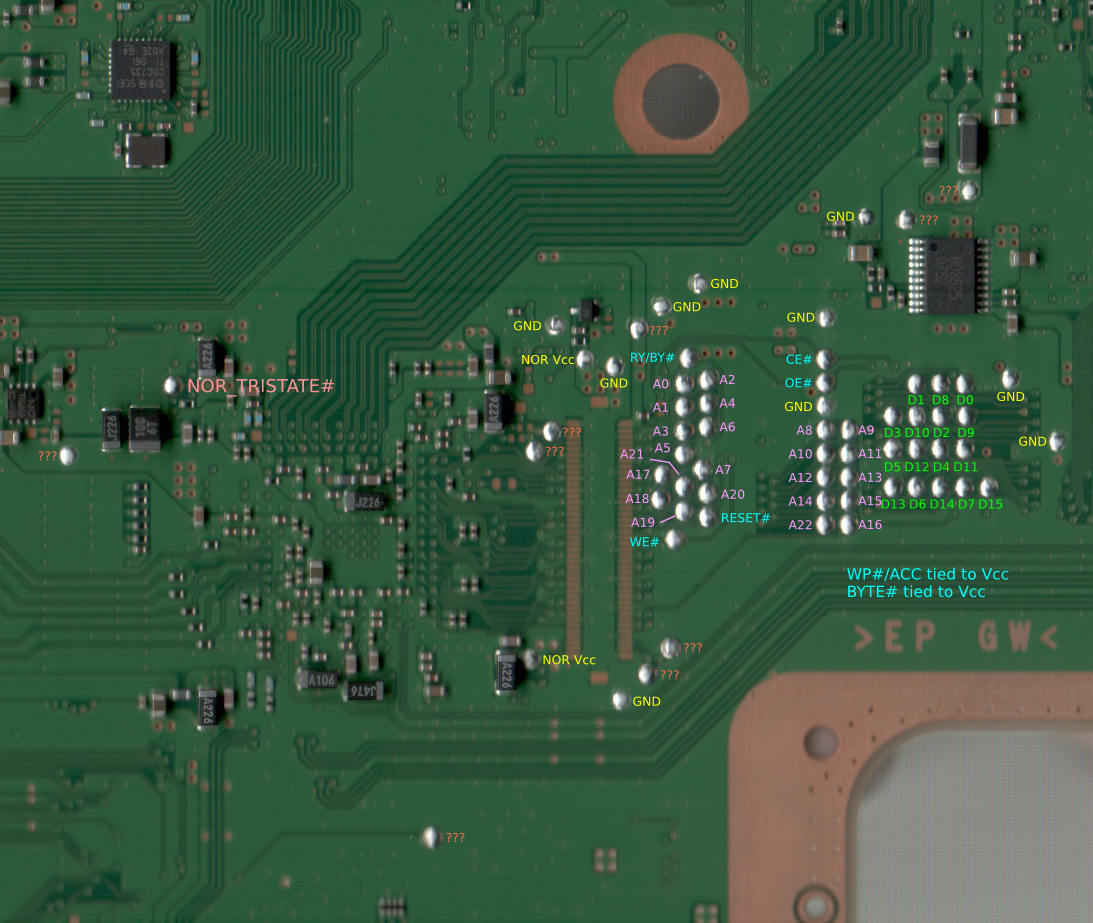
You can attach a 3.3v TTL cable (LV-TTL) to the UART on syscon (UART0_TxD, UART0_RxD). (Convenient solder points are available on JSD-001 / JTP-001 by the NOR test points. They are marked as '?' in marcan' noraliser / judges' NORway install picture, closest to the ground at the bottom - RX is left, TX is right) Baud rate is 57600
That sentence contains a link to this image (are the 2 pads marked with "???" question marks)
JSD-001_NOR_-_nor_testpoints.png


---------------
The reason why im asking about this is because i think they modifyed the pinout of the PCI connector a bit. And i think it happened around PS3 model CECH-25xx (motherboards JSD-001/JTP-001)

I would like to have a confirmation that the syscon UART are also there (PCI connector, pins 4 and 6) in all the next motherboard models
 
Last edited:
I made an image just to be clear, you are connecting the syscon UART wires to pin 4 and 6 of the PCI connector, right ?
https://www.psdevwiki.com/ps3/PCI
n0rn86C.jpg

Actually, is mentioned in this section of a wiki page:
https://www.psdevwiki.com/ps3/Syscon_Hardware#Syscon_UART

That sentence contains a link to this image (are the 2 pads marked with "???" question marks)
JSD-001_NOR_-_nor_testpoints.png


---------------
The reason why im asking about this is because i think they modifyed the pinout of the PCI connector a bit. And i think it happened around PS3 model CECH-25xx (motherboards JSD-001/JTP-001)

I would like to have a confirmation that the syscon UART are also there (PCI connector, pins 4 and 6) in all the next motherboard models
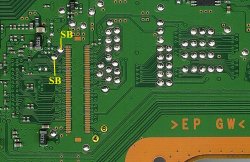
CECH-30xx KTE-001 still there and on the other end is the SB_RX/TX testpoints
 
RIGHT ?So i need an working/glod board ? How do i log on to SB like with same uart script?
Yes @sandungas is 4 and 6 of pci.What do you compare or think to enable any extra info on a pci ? it will even be possible ?ive been looking to compare pins as well.
 

Attachments

  • SB.jpeg
    SB.jpeg
    360 KB · Views: 71
Last edited:
added http://s.go.ro/bsq4n096 in same folder with all ,is a mess but any info required will sort in same folder all data collected .
NEVER knowing which rx and tx is but this is easy sorted when you log
THERE are all in http://s.go.ro/ax49drsu
Ok, by looking at yor photo of the SW3-302 now i figured what you did, thx :)
I was hoping to get an straightforward and easy answer of the kind... "yes, syscon UART are always pins 4 and 6 of the PCI connector, and his testpads are located very close to the PCI connector"... but it seems sony was moving the syscon UART testpads around :(
Anyway... i guess are going to be always connected to PCI connector pins 4 and 6 (since JTP-001/JSD-001 or so)

In syscon SW2-xxx series the UART are pins 78 and 79, and in syscon SW3-xxx series pins 57 and 58, right ?
So... what you was doing is to to follow the traces that goes out of the syscon pins to find where is located the testpad, and his location varies by motherboard model, there are only a few motherboards where it can be seen that are directly connected to PCI pins 4 and 6 (in JSD-001, JTP-001, and KTE-001 as mentioned by @CodeKiller)
 
On zecoxao thread ,post 327 are ;he posted pins so i just made photos is his credit.
zecoxao
Here are the UART pins for AA(SW-30X) and BB(SW2-30X):
78 SC_RxD(RxD3/RxD2/P14) 0
79 SC_TxD(TxD3/TxD2/P13) 3v @ standby (3.3) 3.3
Here are the UART pins for CC(SW3-30X):
57 SC_RX
58 SC_TX Variable V Standby 3.3V Running
Those full dumps are there in forum .​
 
Last edited:

Similar threads

Back
Top