FB Neo RL Plus

PS3 FB Neo RL Plus v2.30

Plan B. It works always.
Disinstall FBNeo RL Plus (remove it completly) and reinstal it from zero. You will lost only preferred game list, if you made it.
I've done it 4 times, still with the same problem, the buttons still have a problem, I think you don't know how to solve this problem [emoji46][emoji47][emoji20]

Enviado de meu SM-A105M usando o Tapatalk
 
I've done it 4 times, still with the same problem, the buttons still have a problem, I think you don't know how to solve this problem [emoji46][emoji47][emoji20]

Enviado de meu SM-A105M usando o Tapatalk

But first time you have installed FBNeo RL plus, did it work?
If yes, cause it doesn't write files outside its folder, when you reinstall it from ZERO, it must works.
So, check if folder /dev_hdd0/game/FBNE00123 is removed when you disinstall it.
 
But first time you have installed FBNeo RL plus, did it work?
If yes, cause it doesn't write files outside its folder, when you reinstall it from ZERO, it must works.
So, check if folder /dev_hdd0/game/FBNE00123 is removed when you disinstall it.
I didn't think I will give up playing in that emulator and look for another better emulator [emoji2379]

Enviado de meu SM-A105M usando o Tapatalk
 
I've done it 4 times, still with the same problem, the buttons still have a problem, I think you don't know how to solve this problem [emoji46][emoji47][emoji20]

Enviado de meu SM-A105M usando o Tapatalk
You are not really doing what he suggested, he said to UNINSTALL the previous version before installing the new one

Your problem was caused when you was remapping buttons, this button mapping is stored in a settings file, and that file is invalid (for some reason we dont know), so the solution is to delete it... and the easyest way to do it is by uninstalling the whole program

Additionally... if you want to help to figure why this problem happened, what you could do is to make a copy of the folder /dev_hdd0/game/FBNE00123 and upload it here, this way crystal could take a look at the settings file and try to figure why it happened
 
When i will add mame2003-plus as additional core.... this could be played...

upload_2020-9-21_10-54-2.png

upload_2020-9-21_10-55-22.png

upload_2020-9-21_10-56-58.png


Or this....
upload_2020-9-21_10-59-10.png

upload_2020-9-21_10-59-29.png


upload_2020-9-21_11-0-23.png


I have to test FPS on real PS3 Hardware.
 
Bom dia amigos, muito obrigado pelo excelente trabalho. Gostaria de saber como posso rodar os jogos NeoGeo em CD. Muito obrigado.

Good day friends, very obrigado hair excellent work. I would like to know how to shoot NeoGeo games on CD. Very obrigado.
 

Attachments

  • upload_2020-9-24_9-4-20.png
    upload_2020-9-24_9-4-20.png
    312 bytes · Views: 32
Last edited by a moderator:
I suppose you want play neogeo CD games, right? Not to put neo geo games on CD....

Bom dia amigos, muito obrigado pelo excelente trabalho. Gostaria de saber como posso rodar os jogos NeoGeo em CD. Muito obrigado.

Good day friends, very obrigado hair excellent work. I would like to know how to shoot NeoGeo games on CD. Very obrigado.
 
Some scanning issues...

- The scanning process (usually, but not always) freezes the PS3 if you have a mis-named ZIP or a ZIP that is unsupported by FB Neo RL +.

- neocdz.zip freezes the scan; you have to move the file into the System folder after a scan, then manually load a CD game from RetroArch (not the front-end).

- I had all FB Neo games in one folder, but then made a folder called neogeo inside it and moved all Neo Geo games there; the scan froze. Apparently it can't deal with folders inside the same folder.

Compiled blueMSX (after fixing a couple of issues) .... Metal Gear works...
View attachment 27587

View attachment 27588

I think keyboard can be mapped correctly....
View attachment 27589

Can you actually play Metal Gear? I mean, can you get to the weapons, equipment, and radio screens, and use them? Can you use the in-game save function? If so, maybe this could be the next system fo FB Neo RL +. Or perhaps you could upload the blueMSX core for us.

Speaking of that, there are some other cores which might be worth compiling; these are from RetroArch Extended Edition 1.7.1 and may have seen some improvements since then...

- fMSX
- P-UAE
- atari800
- Hatari
- DOSBox
- VICE (forget which one, though)

More info can be found in the RetroArch Extended Edition 1.7.1 thread.

Just for curiosity... do you have your PS3 attached to an analog TV?
Still differences NTCS & PAL with modern digital TV? HD/Full HD/4k TVs are NTCS in america
/Asia and PAL in Europe? Isn't the same standards nowadays?

I have a HD TV, hooked up via HDMI. I think the problem is not the signal, but the PAL resolution is not compatable with the TV. Not a problem for me to hold Triangle, other people might not know this.

Quote from Ole's original readme:

"Additional info:

- NTSC support: press and hold CIRCLE button during emulator startup to initialize 480 lines /60 Hz video mode. If it doesn't work for you, you can press and hold TRIANGLE button during starup to use the current video mode set in dashboard.

Make sure to change emulator options to actually emulate ntsc amiga machine by setting ntsc=true in your configuration file or in options."

"Release log:
============
r10
- detection of unsupported 576p (PAL) videomode. If 576p mode is not supported on non-European PS3 models then XMB resolution is used."

When i will add mame2003-plus as additional core.... this could be played...

View attachment 27891
View attachment 27892
View attachment 27893

Or this....
View attachment 27894
View attachment 27895

View attachment 27896

I have to test FPS on real PS3 Hardware.

I already tried KI several months ago, frame rate is unplayable. I doubt anything has changed since then. Sega System 32 games are still broken (unfrozen black.screen) in the latest available nightly compile (August 15).

 
You anticipated me, I am already working on scanning roms to improve it. Made it on separate thread to avoid freezes.
About blueMSX, i havent tried well it, cause i need a keyboard to attack to PS3... i think i need it. Meanwhile: https://www.psx-place.com/threads/bluemsx-core-for-ps3.31280/

I will read RetroArch Extended Edition 1.7.1 thread, for sure P-UAE isn't PS3 compilable (link).


Some scanning issues...

- The scanning process (usually, but not always) freezes the PS3 if you have a mis-named ZIP or a ZIP that is unsupported by FB Neo RL +.

- neocdz.zip freezes the scan; you have to move the file into the System folder after a scan, then manually load a CD game from RetroArch (not the front-end).

- I had all FB Neo games in one folder, but then made a folder called neogeo inside it and moved all Neo Geo games there; the scan froze. Apparently it can't deal with folders inside the same folder.


Can you actually play Metal Gear? I mean, can you get to the weapons, equipment, and radio screens, and use them? Can you use the in-game save function? If so, maybe this could be the next system fo FB Neo RL +. Or perhaps you could upload the blueMSX core for us.

Speaking of that, there are some other cores which might be worth compiling; these are from RetroArch Extended Edition 1.7.1 and may have seen some improvements since then...

- fMSX
- P-UAE
- atari800
- Hatari
- DOSBox
- VICE (forget which one, though)

More info can be found in the RetroArch Extended Edition 1.7.1 thread.


I have a HD TV, hooked up via HDMI. I think the problem is not the signal, but the PAL resolution is not compatable with the TV. Not a problem for me to hold Triangle, other people might not know this.

Quote from Ole's original readme:

"Additional info:

- NTSC support: press and hold CIRCLE button during emulator startup to initialize 480 lines /60 Hz video mode. If it doesn't work for you, you can press and hold TRIANGLE button during starup to use the current video mode set in dashboard.

Make sure to change emulator options to actually emulate ntsc amiga machine by setting ntsc=true in your configuration file or in options."

"Release log:
============
r10
- detection of unsupported 576p (PAL) videomode. If 576p mode is not supported on non-European PS3 models then XMB resolution is used."


I already tried KI several months ago, frame rate is unplayable. I doubt anything has changed since then. Sega System 32 games are still broken (unfrozen black.screen) in the latest available nightly compile (August 15).
 
Can you actually play Metal Gear? I mean, can you get to the weapons, equipment, and radio screens, and use them? Can you use the in-game save function? If so, maybe this could be the next system fo FB Neo RL +. Or perhaps you could upload the blueMSX core for us.

YES! :cool2:
NO (Can you use the in-game save function?) Doesn't work.
 
YES! :cool2:
NO (Can you use the in-game save function?) Doesn't work.
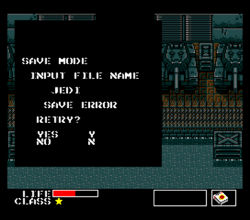
Actually, you can access the save menu by pressing F1, then F5. Then you type in a file name and press Return. But then the save fails...

Metal Gear.png

(pressing Y doesn't do anything)

Apparently this is a known issue...https://github.com/libretro/blueMSX-libretro/issues/115

It's too bad, save states are either not supported for this core or they are broken. However, the good news is that blueMSX now seems to be able to auto-detect the system.

I dont know if Ezio taken official libretro p-uae or not, surely he modded a lot sources and his work is private, not available... so it's useless....

@Zar helped @Ezio, I believe, perhaps he can be of assistance.

@Crystal, you've probably already know about this, but...https://www.psx-place.com/threads/retroarch-1-7-1-extended-version.17068/page-3#post-112121
 
Testing release v2.11, only basepack: link
Colecovision added. Put coleco roms into a folder named coleco and select it in the options as one of rom folders.
Coleco bios needed (coleco.zip), it can be putted into same directory or system directory.
For coleco roms details, search FBNeo RL plus resources on archive.org.
Fbneo core updated.

Edit: repacked pkg for old firmwares, same link.
 
Last edited:
Actually, you can access the save menu by pressing F1, then F5. Then you type in a file name and press Return. But then the save fails...

View attachment 28075

(pressing Y doesn't do anything)

Apparently this is a known issue...https://github.com/libretro/blueMSX-libretro/issues/115

It's too bad, save states are either not supported for this core or they are broken. However, the good news is that blueMSX now seems to be able to auto-detect the system.


@Zar helped @Ezio, I believe, perhaps he can be of assistance.

@Crystal, you've probably already know about this, but...https://www.psx-place.com/threads/retroarch-1-7-1-extended-version.17068/page-3#post-112121

@Zar told me where are github sources... i found them and they work....
as i thought, p-uae has been heavily modded.
 
Back
Top