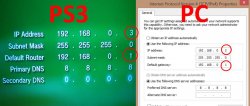
Looking for the best tips and tricks for transferring files to the ps3.
So far i've found that sending directly ftp is the best method as no files over 4gb can be transferred or placed on fat32. My only issue is ftp file transfers seem to be slow as hell.
Anyone have any tips or better/faster methods?
Multiman seems to detect my ntfs iso directories no problem, but it doesn't actually show it in file manager making transferring files impossible. Looking for a solution to install .pkg or copy iso from ntfs but can't seem to figure it out.
There has to be some simpler tips and tricks i can try.
So far i've found that sending directly ftp is the best method as no files over 4gb can be transferred or placed on fat32. My only issue is ftp file transfers seem to be slow as hell.
Anyone have any tips or better/faster methods?
Multiman seems to detect my ntfs iso directories no problem, but it doesn't actually show it in file manager making transferring files impossible. Looking for a solution to install .pkg or copy iso from ntfs but can't seem to figure it out.
There has to be some simpler tips and tricks i can try.