sp193
Developer
What is FMCB?
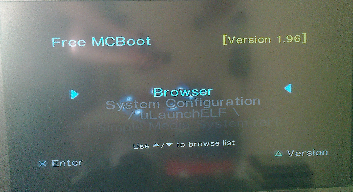
Free Memory Card Boot (FMCB) is a piece of homebrew software, which is designed to setup your PlayStation 2 console and provides you with means of launching homebrew software, without the need for any extra hardware, modifications to your console or dangerous tricks like the legendary swap trick.
FMCB was originally developed by Neme and Jimmikaelkael, but they have been kind enough to provide me with access to its source code, for me to make some improvements to it.
FMCB is installed onto your memory card. While clone/compatible memory cards may work, they are copies of a proprietary memory card, which often means that they aren't perfectly compatible. Please use clones/compatibles at your own risk.
FMCB will not allow you to boot games that you cannot already play. This means no playing of burned and imported discs.
What is FHDB?
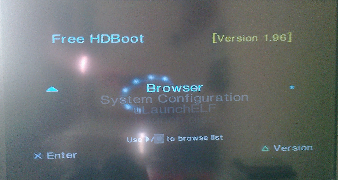
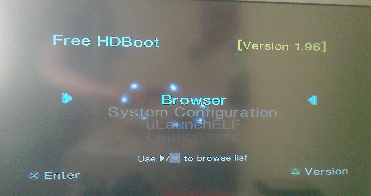
Free Harddisk Drive Boot (FHDB) is basically FMCB that gets installed onto the PlayStation 2 console's HDD unit. It does everything like FMCB does, but is meant to be used with the Sony HDDOSD (Browser update v2.00).
Patched/modified copies of the HDDOSD may not work, although non-Sony disks are supported by FHDB itself.
***Whether the hacked HDD OSD supports non-Sony disks or not depends on whether it was modified to support non-Sony disks.***
Modifying or getting a pre-modified copy of the HDDOSD is not under this project, which is why that topic will not be discussed here.
Like with FMCB, FHDB will not allow you to boot games that you cannot already play. This means no playing of burned and imported discs.
What does FMCB v1.9 offer?
For mere humans:
Unsupported consoles:
Please refer to this thread: http://psx-scene.com/forums/f153/pla...bility-155567/ (PlayStation 2 model compatibility)
Please read the included README file for information regarding limitations/known issues and other important notes!
Before posting/asking questions, please read this question and answer article which I spent a little time writing up: https://sites.google.com/view/ysai187/home/projects/fmcbfhdb/fmcb-1-9-faq
Downloads/links:
FMCB & FMCB installer project homepage: https://sites.google.com/view/ysai187/home/projects/fmcbfhdb
Sister thread on PSX-scene: http://psx-scene.com/forums/f153/fmcb-v1-9-series-release-thread-116247
Additional Resources
Poweroff ELF (menu entry for switching off the PS2): http://www.psx-place.com/threads/fmcb-fhdb-v1-9-series-release-thread.13413/page-2#post-126749
HDDChecker (HDD Maintenance tool): http://www.psx-place.com/threads/hddchecker.3855/
***
Note: If you have problems getting FHDB to boot (No FMCB logo), then you might have a problem with your HDD. Please download and run this tool to determine what's wrong: https://sites.google.com/view/ysai187/home/projects/hddchecker
All checks must pass, including the S.M.A.R.T. status.
Disks that fail the S.M.A.R.T. test are about to fail, and should be replaced.
If the partition bad sector check fails, it means that your disk has been marked as having bad sectors by a filesystem driver. Using WinHIIP's scan and repair function should solve that, assuming that the bad sector(s) was remapped by the drive successfully. Alternatively, a format with WinHIIP or uLaunchELF should solve it too, at the expense of all unbacked-up data.
EDIT 2019/01/07: FMCB v1.966 released - http://www.psx-place.com/threads/fmcb-fhdb-v1-9-series-release-thread.13413/page-8#post-152415
EDIT 2018/11/03: FMCB 1.965 re-released - http://www.psx-place.com/threads/fmcb-fhdb-v1-9-series-release-thread.13413/page-4#post-144373
EDIT 2018/07/21: FMCB v1.964 released - http://www.psx-place.com/threads/fmcb-fhdb-v1-9-series-release-thread.13413/page-4#post-131088
EDIT 2018/07/04: FMCB v1.963 re-released - http://www.psx-place.com/threads/fmcb-fhdb-v1-9-series-release-thread.13413/page-2#post-129231
EDIT 2018/07/03: FMCB v1.963 released - http://www.psx-place.com/threads/fmcb-fhdb-v1-9-series-release-thread.13413/page-2#post-129101
EDIT 2018/06/28: FMCB v1.962 re-released - http://www.psx-place.com/threads/fmcb-fhdb-v1-9-series-release-thread.13413/page-2#post-128686
EDIT 2018/06/20: FMCB v1.962 released - http://www.psx-place.com/threads/fmcb-fhdb-v1-9-series-release-thread.13413/page-2#post-127560
EDIT 2018/06/19: FMCB v1.961 released - http://www.psx-place.com/threads/fmcb-fhdb-v1-9-series-release-thread.13413/page-2#post-127435
EDIT 2018/06/12: FMCB v1.96 re-released - http://www.psx-place.com/threads/fmcb-fhdb-v1-9-series-release-thread.13413/#post-126696
EDIT 2018/06/08: FMCB v1.96 released - http://www.psx-place.com/threads/fmcb-fhdb-v1-9-series-release-thread.13413/#post-126237
Free Memory Card Boot (FMCB) is a piece of homebrew software, which is designed to setup your PlayStation 2 console and provides you with means of launching homebrew software, without the need for any extra hardware, modifications to your console or dangerous tricks like the legendary swap trick.
FMCB was originally developed by Neme and Jimmikaelkael, but they have been kind enough to provide me with access to its source code, for me to make some improvements to it.
FMCB is installed onto your memory card. While clone/compatible memory cards may work, they are copies of a proprietary memory card, which often means that they aren't perfectly compatible. Please use clones/compatibles at your own risk.
FMCB will not allow you to boot games that you cannot already play. This means no playing of burned and imported discs.
What is FHDB?
Free Harddisk Drive Boot (FHDB) is basically FMCB that gets installed onto the PlayStation 2 console's HDD unit. It does everything like FMCB does, but is meant to be used with the Sony HDDOSD (Browser update v2.00).
Patched/modified copies of the HDDOSD may not work, although non-Sony disks are supported by FHDB itself.
***Whether the hacked HDD OSD supports non-Sony disks or not depends on whether it was modified to support non-Sony disks.***
Modifying or getting a pre-modified copy of the HDDOSD is not under this project, which is why that topic will not be discussed here.
Like with FMCB, FHDB will not allow you to boot games that you cannot already play. This means no playing of burned and imported discs.
What does FMCB v1.9 offer?
For mere humans:
- Smaller, faster and more stable.
- The HDD unit is now supported.
- The "Early Japanese"/PCMCIA units (SCPH-10000, SCPH-15000 and SCPH-18000) are fully supported.
- Includes kernel update (ExecPS2 fix) for the SCPH-10000 and SCPH-15000.
- Chinese consoles are now supported (e.g. SCPH-50009).
- Support for the PSX (DVR)
- When you leave the CD/DVD tray ejected, FMCB/FHDB will not stall.
- Your play history will now be updated (The towers in the background of the "Sony computer entertainment" screen should continue to grow taller and greater in numbers).
- Support for selected DEX console models.
Unsupported consoles:
Please refer to this thread: http://psx-scene.com/forums/f153/pla...bility-155567/ (PlayStation 2 model compatibility)
Please read the included README file for information regarding limitations/known issues and other important notes!
Before posting/asking questions, please read this question and answer article which I spent a little time writing up: https://sites.google.com/view/ysai187/home/projects/fmcbfhdb/fmcb-1-9-faq
Downloads/links:
FMCB & FMCB installer project homepage: https://sites.google.com/view/ysai187/home/projects/fmcbfhdb
Sister thread on PSX-scene: http://psx-scene.com/forums/f153/fmcb-v1-9-series-release-thread-116247
Additional Resources
Poweroff ELF (menu entry for switching off the PS2): http://www.psx-place.com/threads/fmcb-fhdb-v1-9-series-release-thread.13413/page-2#post-126749
HDDChecker (HDD Maintenance tool): http://www.psx-place.com/threads/hddchecker.3855/
***
Note: If you have problems getting FHDB to boot (No FMCB logo), then you might have a problem with your HDD. Please download and run this tool to determine what's wrong: https://sites.google.com/view/ysai187/home/projects/hddchecker
All checks must pass, including the S.M.A.R.T. status.
Disks that fail the S.M.A.R.T. test are about to fail, and should be replaced.
If the partition bad sector check fails, it means that your disk has been marked as having bad sectors by a filesystem driver. Using WinHIIP's scan and repair function should solve that, assuming that the bad sector(s) was remapped by the drive successfully. Alternatively, a format with WinHIIP or uLaunchELF should solve it too, at the expense of all unbacked-up data.
-
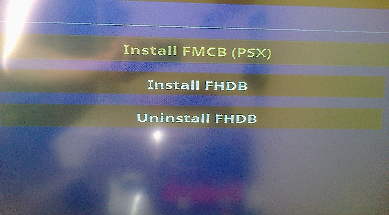
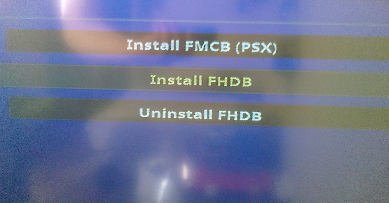
To give the user some flexibility, the following installation options are possible:
Method Description Normal Installs FMCB for only the host PS2 itself. FMCB will work on similar models. Cross-model Installs FMCB for only the host PS2's region. FMCB will work on all models within the same region as the host PS2's. Cross-region Installs FMCB for all possible PS2s, across all regions. This offers the highest possible level of model support. Multi Same as cross-region, but does not actually install copies of the file. Other than the system patches for the early Japanese consoles, the main FMCB KELF is only installed once and then crosslinked across the various B*EXEC-SYSTEM directories. This would result in the smallest installation footprint, along with the highest possible level of support. -
The system executable and data folders differ according to the region:
Region System Executable Directory System Data Directory Japan BIEXEC-SYSTEM BIDATA-SYSTEM US BAEXEC-SYSTEM BADATA-SYSTEM Asia BAEXEC-SYSTEM BADATA-SYSTEM Europe BEEXEC-SYSTEM BEDATA-SYSTEM China BCEXEC-SYSTEM BCDATA-SYSTEM
EDIT 2019/01/07: FMCB v1.966 released - http://www.psx-place.com/threads/fmcb-fhdb-v1-9-series-release-thread.13413/page-8#post-152415
EDIT 2018/11/03: FMCB 1.965 re-released - http://www.psx-place.com/threads/fmcb-fhdb-v1-9-series-release-thread.13413/page-4#post-144373
EDIT 2018/07/21: FMCB v1.964 released - http://www.psx-place.com/threads/fmcb-fhdb-v1-9-series-release-thread.13413/page-4#post-131088
EDIT 2018/07/04: FMCB v1.963 re-released - http://www.psx-place.com/threads/fmcb-fhdb-v1-9-series-release-thread.13413/page-2#post-129231
EDIT 2018/07/03: FMCB v1.963 released - http://www.psx-place.com/threads/fmcb-fhdb-v1-9-series-release-thread.13413/page-2#post-129101
EDIT 2018/06/28: FMCB v1.962 re-released - http://www.psx-place.com/threads/fmcb-fhdb-v1-9-series-release-thread.13413/page-2#post-128686
EDIT 2018/06/20: FMCB v1.962 released - http://www.psx-place.com/threads/fmcb-fhdb-v1-9-series-release-thread.13413/page-2#post-127560
EDIT 2018/06/19: FMCB v1.961 released - http://www.psx-place.com/threads/fmcb-fhdb-v1-9-series-release-thread.13413/page-2#post-127435
EDIT 2018/06/12: FMCB v1.96 re-released - http://www.psx-place.com/threads/fmcb-fhdb-v1-9-series-release-thread.13413/#post-126696
EDIT 2018/06/08: FMCB v1.96 released - http://www.psx-place.com/threads/fmcb-fhdb-v1-9-series-release-thread.13413/#post-126237
Last edited by a moderator: