PS3 Frankenstein PHAT PS3: CECHA with 40nm RSX

Ok. yeah, I ended up desoldering with IHS on top. Then after taking it off the board, I delidded using one of the paintings knives https://www.amazon.com/gp/product/B004669XQ6/ref=oh_aui_detailpage_o00_s00?ie=UTF8&psc=1

But even the thinnest one was too fat...I slightly damaged the corners of ram chips trying to slide the knife under (Ouch!).

Here is how I soldered the balls . I failed to record the whole process, but you can see how easily they move out of place. I am still trying to learn this skill.

 
Last edited:
Hi im getting reading to do this 40NM RSX swap, however aliepxress have sent me the wrong 40NM GPU, its a "CXD5301A1GB" instead of the 5300 series i originally brought.
All of the listings ive seen for the RSX mod chip have only said the 40NM 5300 chips work, so im guessing the one i recivived wont be compatable at all? or has no one been able to confirm this yet?

(btw the console is a CECHA00 if that matters)
 
40NM GPU Are same on 2100/2500/3000.On 4000 are same footprint but may be heat reduced as they dont have ihs so 4000 may not match( a tiny distance on ic die)
I suppose the 4000 could be used too, but simply using the old thick heatspreader from the 90nm

Of course this is all experimental. But I'd just try it. There are lots of things to be worried about anyway.
 
Hi im getting reading to do this 40NM RSX swap, however aliepxress have sent me the wrong 40NM GPU, its a "CXD5301A1GB" instead of the 5300 series i originally brought.
All of the listings ive seen for the RSX mod chip have only said the 40NM 5300 chips work, so im guessing the one i recivived wont be compatable at all? or has no one been able to confirm this yet?

(btw the console is a CECHA00 if that matters)

Btw be careful with GPUs from aliexpress, some of them may be faulty. It's a bit of a gamble.
 
No dice. 3034, 2120. Will investigate a little more tomorrow. And I've got a CECHG01 that wants to donate his known good 90nm to see if that board was good in the first place.
Could you post pictures of your work? I don't want to speculate as to what you might have done wrong, but it looks like there are 2 pads in the picture below that are bridged (next to the VCC wire). I didn't know if you saw that and replicated it, but it looks easy to miss. If you post pics we might spot something.
placement1-jpg.32779


Also maybe we can ask the seller/maker to look at them and confirm if you did it right. Wasn't someone here in touch with the seller? I'd like to rule out installation of the MOD. Then we can more confidently speculate if it was the GPU/MB that was bad, or call into question the MOD itself.

Lastly, You could try sniffing the SPI with your bus pirate to see what the mod is trying to do. Or confirm if it's doing anything at all. I don't have any idea how to do that, so someone else will have to chime in. I just know you can use the bus pirate for that.
 
@RIP-Felix Finally got that customer return in that I need to do, so it's on hold now. Yes, I bridged the two pads on the chip, and I can post a quick pic before I put it back in the oven when its turn comes back up. I've got a known working 90nm I want to slap back on there and see if the board was actually good in the first place.
 
Do you mean this POS?View attachment 32719
That's the one I tried (and failed) with PS3 #'s 1 and 2. The tiny little edges couldn't hold onto the chip with any force since you have to adjust the four sliding aluminum doohickeys independently. It just kinda sits in there. Well, the one on the lest has a little spring thing, but it's a joke. Pops out constantly! It made centering the chip to line up with the stencil A NIGHTMARE! Took me an hour just to set it for the RSX. Useless...

Anyway, I just bought this and am waiting for it to arrive from China...
236085.jpg

The central screw makes adjusting it easy, always centered, and allows you to apply some pressure to hold the chip in place (I'm hoping).

Lmao i bought that same blue one on ebay for like $60 the other day. I aint gonna bother returning it to China for that money back. But if it's as bad as you make it sound then i guess im buying another one rip.
 
Lmao i bought that same blue one on ebay for like $60 the other day. I aint gonna bother returning it to China for that money back. But if it's as bad as you make it sound then i guess im buying another one rip.

@RIP-Felix @Sampsonay Here I made a video on how to modify it. You don't have to discard it just yet. You have to be careful with filing the edges of the tabs though, it still has to sit evenly. So make sure you measure how may mm you need to file in order to make it lock tightly and evenly.

(The video was supposed to be more comprehensive, but I was just trying to get the point across.)

 
Last edited:
The silver one that has the center screw design is better, but the seller on e-bay just canceled my order (after 2 weeks), saying that customs in china and shipping delays would mean it'd take forever to get here. Sounds like BS to me, they always take forever. That blue POS took 2 months. Obviously I was willing to wait, if I bought it from china in the first place. So I don't really have an alternative option than to make do with the POS.

My main problem with it is that it's not easy to center the chip, having to adjust 4 tabs individually. The other problem is that little metal spring to hold the chip doesn't apply enough force to hold the chip in place.
 
The silver one that has the center screw design is better, but the seller on e-bay just canceled my order (after 2 weeks), saying that customs in china and shipping delays would mean it'd take forever to get here. Sounds like BS to me, they always take forever. That blue POS took 2 months. Obviously I was willing to wait, if I bought it from china in the first place. So I don't really have an alternative option than to make do with the POS.

My main problem with it is that it's not easy to center the chip, having to adjust 4 tabs individually. The other problem is that little metal spring to hold the chip doesn't apply enough force to hold the chip in place.

I suggest you use Aliexpress. Not only you get to choose your shipping option (which offers several alternatives, standard shipping is a lot faster than from ebay), but there is also a better feedback system and you can filter out the lowest rated sellers. I have ordered numerous items from there, all have arrived within 2 weeks, sometimes 3 (I never order from zero-feedback sellers though).

Also what little metal spring are you referring to? My version of the blue one doesn't have any spring, there is a screw in the middle, not sure what it was for.
 
One of the tabs (as you call it) has a screw that holds in a black piece of metal, which is bent slightly. That's to push the PCB and hold it in, but since the 90-degree ridges are too small (which you filed down), it doesn't hold it in deep enough. So it easily pops out.
 
One of the tabs (as you call it) has a screw that holds in a black piece of metal, which is bent slightly. That's to push the PCB and hold it in, but since the 90-degree ridges are too small (which you filed down), it doesn't hold it in deep enough. So it easily pops out.

I think I removed that metal piece completely. It didn't do anything for me, so in my case the chip is held in place using only adjustment tabs (Is there a better term for those?) . Since I made the ridges deeper, there are now enough forces to tighten the RSX from each side.
 
Last edited:
Do you mean this POS?View attachment 32719
That's the one I tried (and failed) with PS3 #'s 1 and 2. The tiny little edges couldn't hold onto the chip with any force since you have to adjust the four sliding aluminum doohickeys independently. It just kinda sits in there. Well, the one on the lest has a little spring thing, but it's a joke. Pops out constantly! It made centering the chip to line up with the stencil A NIGHTMARE! Took me an hour just to set it for the RSX. Useless...

Anyway, I just bought this and am waiting for it to arrive from China...
236085.jpg

The central screw makes adjusting it easy, always centered, and allows you to apply some pressure to hold the chip in place (I'm hoping).
The blue one is not so bad, but requires to be adjusted following a procedure like this, not sure if you was aware but worths to be mentioned:
1) unscrew the 4 tabs to the "fully opened" position
2) screw the 4 tabs the same number of turns for an approximation (lets say 17 turns)
3) screw the 4 tabs to the final adjustment (lets say, one quarter of a turn... or half a turn)

The point is, the only position where we know the tabs are at the same distance from the center is when all them are "fully opened" (or fully closed), and from that position you need to count very accuratelly the number of turns you screw each tab
I suggest you to make a mark in the screw heads with a permanent marker or a razor knife radially when the tab is at the fully opened position (like a clock hand aiming at time "12 o'clock"... or the north direction of a compass), this way you can use that mark as reference
In theory (considering the geometry of all parts is perfect), at the end of step 3 you should have the marks of the 4 screws in the same angle
 
Last edited:
Well i just lifted my first GPU ever today. That was exhilarating. I'm pretty sure i ruined it, tho this board was beyond repair (cpu got murdered).

Im using a t-8280 preheater and an aoyue 852a pro hot air station with a 45x45mm square nozzle. The hot air station has a built in vacuum pickup tool which i attached when the gpu was finally hot enough to nudge around. Tho, i spent way too much time between lifting my hot air lamp away and grabbing the gpu with my vacuum pickip, and only the top side wanted to lift up. Increasing the suction of the pickup tool also increases airflow on the heatgun, and i did that while heatgun was away from the board, which took like 7-10 seconds. Way too much time.

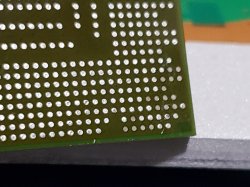
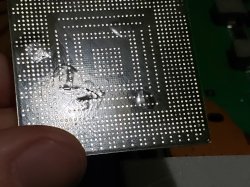
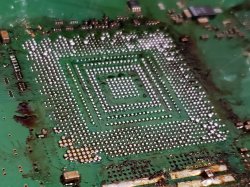
Anyway, I immediately backed off and brought the hot air lamp back down, and tried again when the GPU was able go be nudged again. This time i slowly increased air flow of my hot air station as i moved the lamp upwards, and as soon as i had my suction at 100% i lifted the gpu up with no hassle at all. After cleaning the GPU, i noticed some small bumps beneath it, i assume that's another bad thing that would have killed this GPU even if the pads were all fine. I'll share some photos of the results.

I have a couple more beyond repair boards in my basement, hopefully i can get my technique right with them.

Edit:
With the GPU now removed, i realized my vacuum pickup tool can carry it perfectly at minimum suction. Next time i do this, there probably wont even be 1 second between lifting the hot air lamp and introducing the pickup tool to the GPU.

Also, i forgot to mention i am using a temperature sensor. I placed the probe right next to the GPU's right side. I might need a second temp sensor on the left side, since that side is where the pads got ripped. I also tested my sensor for accuracy by putting it on my tongue, and that checked out fine.

 

Attachments

  • 20210410_175452.jpg
    20210410_175452.jpg
    1.2 MB · Views: 131
  • 20210410_175528.jpg
    20210410_175528.jpg
    1.6 MB · Views: 130
  • 20210410_175555.jpg
    20210410_175555.jpg
    1.7 MB · Views: 142
Last edited:
Well i just lifted my first GPU ever today. That was exhilarating. I'm pretty sure i ruined it, tho this board was beyond repair (cpu got murdered).

Im using a t-8280 preheater and an aoyue 852a pro hot air station with a 45x45mm square nozzle. The hot air station has a built in vacuum pickup tool which i attached when the gpu was finally hot enough to nudge around. Tho, i spent way too much time between lifting my hot air lamp away and grabbing the gpu with my vacuum pickip, and only the top side wanted to lift up. Increasing the suction of the pickup tool also increases airflow on the heatgun, and i did that while heatgun was away from the board, which took like 7-10 seconds. Way too much time.

Anyway, I immediately backed off and brought the hot air lamp back down, and tried again when the GPU was able go be nudged again. This time i slowly increased air flow of my hot air station as i moved the lamp upwards, and as soon as i had my suction at 100% i lifted the gpu up with no hassle at all. After cleaning the GPU, i noticed some small bumps beneath it, i assume that's another bad thing that would have killed this GPU even if the pads were all fine. I'll share some photos of the results.

I have a couple more beyond repair boards in my basement, hopefully i can get my technique right with them.

Edit:
With the GPU now removed, i realized my vacuum pickup tool can carry it perfectly at minimum suction. Next time i do this, there probably wont even be 1 second between lifting the hot air lamp and introducing the pickup tool to the GPU.

Also, i forgot to mention i am using a temperature sensor. I placed the probe right next to the GPU's right side. I might need a second temp sensor on the left side, since that side is where the pads got ripped. I also tested my sensor for accuracy by putting it on my tongue, and that checked out fine.
It seems that temperature on outer edges of the chip were not enough, but in centre it was too much. If heating with a heatgun set to 230 degrees, and set table temperature to 300 degrees, it will be enough to gently desolder this chip. PUHUI T-8280 needs some slight modification. By default, temperature sensor is not contacting table surface, you need to bend it a bit to make contact with table. Then 300 degrees on the table corresponds to approx. 180 on bottom side of PCB and 150 degrees on top. And then using heatgun you will slowly heat up to 210-220 degrees.
Also please use good flux suitable for Lead-free solder. I personally prefer NC-559-ASM.
 
It seems that temperature on outer edges of the chip were not enough, but in centre it was too much. If heating with a heatgun set to 230 degrees, and set table temperature to 300 degrees, it will be enough to gently desolder this chip. PUHUI T-8280 needs some slight modification. By default, temperature sensor is not contacting table surface, you need to bend it a bit to make contact with table. Then 300 degrees on the table corresponds to approx. 180 on bottom side of PCB and 150 degrees on top. And then using heatgun you will slowly heat up to 210-220 degrees.
Also please use good flux suitable for Lead-free solder. I personally prefer NC-559-ASM.

I actually bent the preheater's temperature probe upward to make contact with the board, so when i set it to 180C, the board is hitting exactly 180C. I also read up on the whole "popcorn" effect i experienced, which to my understanding happens when there is moisture trapped in the GPU, and heating it too quickly can cause pressure to build up inside it and cause the surface to pop out. I'll try to avoid this by letting the board sit at 120C for a couple hours, then proceed to the higher temperatures. Also, im using Amtech flux, bought it directly from Louis Rossmann's store.

Tho there was a bunch of old flux i never bothered cleaning from this board prior to doing this, so that's why the flux residue looks like crap lol
 
Back
Top