
FreePSXBoot by brad-lin

PS1 FreePSXBoot by brad-lin 2.1

jolek

Senior Member
uni.png

FreePSXBoot

  • Exploit allowing to load arbitrary code on the PSX (i.e. PlayStation 1) using only a memory card (no game needed).

    In other words, it's a softmod which requires a memory card, and a way to write raw data to it.

    To use it, you will need a way to copy full memory card images (not individual files) to a memory card. Some possibilities are:
    • A PS2 and the software Memory Card Annihilator v2 (use "Restore MC image")
    • Memcarduino. Requires soldering wires to the memory card.
    • Using a Memcard Pro, which lets you create your own virtual memory cards on an sdcard. Simply drop the card image file you want to use as Memory Card 1, Channel 1.
    • Using Unirom and NOTPSXserial with a serial/USB cable, using the command : nops /fast /mcup 0 FILE.mcd COMPORT where FILE is the mcd file corresponding to your model, and COMPORT corresponds to your computer serial port.
  • Usage
    • Copy the full memory card image corresponding to your model/BIOS to a memory card.
    • Insert it in slot 1.
    • Power up your PlayStation with the lid open, and go to the memory card manager.
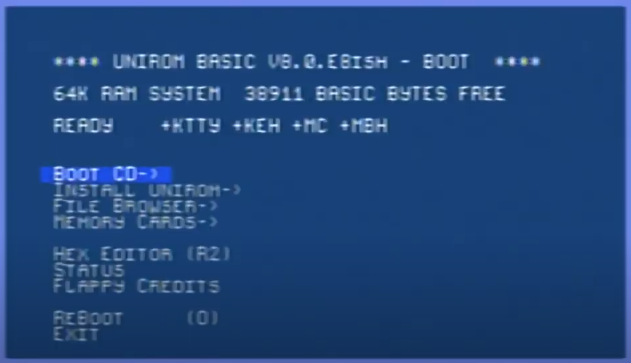
    • After a few seconds, the screen will flash orange. Wait ~30 seconds for the Unirom welcome screen to appear.
    • If the screen doesn't flash orange after 20 seconds, you have either used a wrong memory card image, or your model uses an exploit which is not 100% reliable. In that case, power off your PlayStation, wait for 1 minute, and try again.
    • Once Unirom is loaded, you can insert a CD, close the lid, and press R1 to load the game.
    • Don't forget to remove your memory card, as its exploit will trigger into games as well. This isn't an issue when using the Memcard Pro, as it will automatically change the virtual card to the game you're booting.
  • Supported models
    • All models are supported except SCPH-3000, which will probably be supported in the future.
    • As of version 20210419, the exploit is 100% reliable on all supported models.
    • Certain PSOne consoles appear to not support the exploit in its entirety. We are currently checking on the issue to ensure that it is fully exploitable.
    • See the table below for more details and download links.
  • Changelog:
    • 2021-04-19: Added support for BIOS 1.0 and 4.3 (SCPH-1000 and SCPH-100 respectively)
    • 2021-04-19: Exploit 100% reliable for every supported BIOS; now hooks an ISR (thanks sickle)
    • 2021-04-19: Unirom version updated to 8.0.F
    • 2021-04-14: Exploit uses fastload, which reads the memory card much faster than Sony's code (thanks Nicolas Noble)
    • 2021-04-12: New version of Unirom, able to load games. Huge thanks to the psxdev contributors.
    • 2021-04-11: 100% reliable exploit for the SCPH-7002, SCPH-7502 and SCPH-9002.

  • The earlier version of this exploit relies on uninitialized memory in kernel space to be at 0 in order to work properly. The SDRAM chips have a fairly slow decay rate, and this exploit will only be reliable if the machine has been powered off for long enough.
    Technical details
    Demonstration
  • These images are pre-built with Unirom.

    There are different downloads for different console versions. Please download the correct ROM for your model and BIOS version. If a model or BIOS version is missing, it means it is not supported yet.

    As more reliable versions of the exploit are developed, the images are updated. Older versions can be found in the images directory.
    BIOS version/date Models 100% reliable exploit? Download Link
    1.0 (1994-09-22) SCPH-1000 Yes 20210419
    2.0 (1995-05-10) SCPH-1002 Yes 20210419
    2.1 (1995-07-17) SCPH-1002
    SCPH-3500
    Yes 20210419
    2.2 (1995-12-04) SCPH-1001
    SCPH-1002
    SCPH-5000
    SCPH-5903
    Yes 20210419
    3.0 (1996-11-18) SCPH-5001
    SCPH-5501
    SCPH-5503
    SCPH-7003
    Yes 20210419
    3.0 (1997-01-06) SCPH-5502
    SCPH-5552
    Yes 20210419
    4.1 (1997-12-16) SCPH-7001
    SCPH-7002
    SCPH-7500
    SCPH-7501
    SCPH-7502
    SCPH-7503
    SCPH-9001
    SCPH-9002
    SCPH-9003
    Yes 20210419
    4.3 (2000-03-11) SCPH-100 Yes 20210419
    4.4 (2000-03-24) SCPH-101
    SCPH-102
    Yes 20210419
    4.5 (2000-05-25) SCPH-101
    SCPH-102
    Yes 20210419
    See the folder builder for a tool that can be used to generate your own payloads and memory cards.
    Memory card images are raw data: your memory card must have the exact same content as the files. Use Memcarduino or something similar; don't use a memory card file manager, as it will try to correct the data we're altering.

    If the exploit is successful, you will see the screen flashing orange. Otherwise, power cycle your PSX and try again after a minute or so. It may take a few tries.

    The exploit works in emulators as well, and works all the time due to the memory being always initialized to 0. Tested with no$psx, pcsx-redux, and DuckStation.


  • WARNING

    By flashing FreePSXBoot to your Memory Card, you need to be aware of the following:
    • The .mcd image files replace the whole contents of your card, meaning that your Memory Card will be ENTIRELY WIPED after flashing a .mcd image, so creating a backup of your saves is compulsory.
    • Because the exploit has corrupt Memory Card filesystem on purpose for it to run, your card will become unusable for normal operations. That is, you won't be able to use this card for saving and loading game saves and it will cause crashes on your PS1 or your PS2 console (if you have any).
    • Once installed, it may become difficult to uninstall, as the normal software to re-format a memory card won't work, due to the exploit itself. You could end up with no means to recover the memory card; if for example your installation method was Memory Card Annihilator v2, then it will also crash. Memcarduino, Unirom, or using the Memcard Pro would currently be safe bets.
  • Restoring the memory card:
    • The most reliable way is to use Memcarduino and its FORMAT option.
    • Some games that have a save file manager (shows the contents of the memory card before saving) built into them, like OddWorld: Abe's Oddysee and Cool Boarders 4 (suffers from a caveat that keeps the game from loading the memory card with certain exploit versions) for example, can be used to overwrite FreePSXBoot when saving progress.
    • We plan to bundle a complete version of Unirom in the memory card images in the future, with the ability to format memory cards.


Source & Latest Details (original release and information source):

https://github.com/brad-lin/FreePSXBoot.​
 
Last edited by a moderator:
If they add a way to recover/format the MC after installing the image with MC Annihilator, it will be a must.

The other method aren't really user friendly.
 
Once installed, it may become difficult to uninstall, as the normal software to re-format a memory card won't work, due to the exploit itself. You could end up with no means to recover the memory card; if for example your installation method was Memory Card Annihilator v2, then it will also crash. Memcarduino, Unirom, or using the Memcard Pro would currently be safe bets.
In GUI version of MCA it's freezing but maybe works with CLI (run from RadShell or PS2Link of course). MCA v1.0 comes with two versions: GUI and CLI, while MCA v2.0 only with GUI.

For PSX MC inserted into second slot:
Code:
"Memory Card Annihilator (CLI) v1.0.elf" -port=1 -slot=0 -forcepsx -nformat -no_iopreset
 
In GUI version of MCA it's freezing but maybe works with CLI (run from RadShell or PS2Link of course). MCA v1.0 comes with two versions: GUI and CLI, while MCA v2.0 only with GUI.

For PSX MC inserted into second slot:
Code:
"Memory Card Annihilator (CLI) v1.0.elf" -port=1 -slot=0 -forcepsx -nformat -no_iopreset

It needs to be tested.
I still haven't tried FreePSX Boot though, since I don't have Ps1 MCs to waste (and I already have a modchipped Ps1).

They are planning to bundle a complete version of UniRom with a formatting option. I think I'll wait for it (since it's not clear form me if the Ave's Odyssee/Cool Boarder 4 method is reliable) then I'll test it with the un-modded PSOne.
 
Indeed. I have only one PSX card and no PSX games with memory card manager build-in (which "fix" the card) so I'm not volunteer for that. ;p I just giving the idea to the peoples who already have it installed but want back to normal.
 
Does anyone know a way to find what BIOS version a psOne scph-102 has?
I could not find any resource that interprets the serial number, or other markings on the pcb/case to know the date of production.
I don't know if i should try first the 4.4 or 4.5 bios version.
 
Does anyone know a way to find what BIOS version a psOne scph-102 has?
I could not find any resource that interprets the serial number, or other markings on the pcb/case to know the date of production.
I don't know if i should try first the 4.4 or 4.5 bios version.

You have to disk swap the disk Berion linked to you.
 
FreePSXBoot version 1.1 is out!

Changelog:
  • 2021-04-21: Added support for BIOS 1.1, and fixed BIOS 2.0 exploit (needs icache flush to work)
  • 2021-04-21: Progress bar added in stage2 payload (thanks Nicolas Noble)
 
Does anyone know a way to find what BIOS version a psOne scph-102 has?
I could not find any resource that interprets the serial number, or other markings on the pcb/case to know the date of production.
I don't know if i should try first the 4.4 or 4.5 bios version.

However, I suggest you (for saving a CD burning and maybe the need of swapping) to do so:

- Burn only the PSX Hacker Kit on CD (you need it anyway for MC recovery. Don't burn the Bios dumper disc)
- Install version 4.5 on MC and try it

This way you have 50% chance the MC will just works (if your PSone is a 4.5), no need of bothering blocking the sensor and swapping. In my case it worked (apparently my is a 4.5).
If not, then you'll have to disk swap (for using the Hacker Kit disc to format the MC, then install the 4.4 version).

Dump Your firmware. On Shendo's blog there is application which dumping in parts to Memory Card. only first is enough as this will be in written in first 128KiB.

https://shendosoft.blogspot.com/2013/07/psx-bios-dumper-26-released.html

Data can be retrieved on PS2 via copy from mc to usb.

Or if You have such possibility with PSX, direct copy firmware to PC through caetla.

You don't need to dump the BIOS (unless you want it for use with a emulator or something else). The console BIOS version is showed on the disc's main menu (just boot the disc and you're done).

Also: https://www.psx-place.com/threads/t...es-save-game-exploit.33236/page-4#post-291314
 
Last edited by a moderator:
However, I suggest you (for saving a CD burning and maybe the need of swapping) to do so:

- Burn only the PSX Hacker Kit on CD (you need it anyway for MC recovery. Don't burn the Bios dumper disc)
- Install version 4.5 on MC and try it

This way you have 50% chance the MC will just works (if your PSone is a 4.5), no need of bothering blocking the sensor and swapping. In my case it worked (apparently my is a 4.5).
If not, then you'll have to disk swap (for using the Hacker Kit disc to format the MC, then install the 4.4 version).

Thanks! I had two knock-off psx memCards available to try the exploit, wrote the 4.4 version on one and 4.5 on the other but neither worked. Then i checked the memory cards on the ps2 and it seemed like it did not even write the images to the cards, they appeared as empty. Perhaps the cards do not work.

When i'll have some spare time will connect them to an Arduino to check if there is something wrong with them
 
Thanks! I had two knock-off psx memCards available to try the exploit, wrote the 4.4 version on one and 4.5 on the other but neither worked. Then i checked the memory cards on the ps2 and it seemed like it did not even write the images to the cards, they appeared as empty. Perhaps the cards do not work.

When i'll have some spare time will connect them to an Arduino to check if there is something wrong with them

Have you tried formatting them before installing?

Also, if you have a tonyhax compatible game, boot it for knowing your exact PS1 BIOS (the version is reported on tonyhax main screen).
 
Formatting is pointless, memory card image overwriting every memory block just like full format.

MCA v2.0 would tell You if card is unreadable and doesn't allow write image or just hang in block write where are problems.

You shouldn't see anything besides card in Browser on PS2, and should freeze. This exploit modify save which have in theory few hundreds MiB which crashing most of the parsers.
 
I have no idea then.
The ps2 browser does not freeze, i can enter the cards and they appear as empty.

MCA V2 did not say anything about the memory cards.
 
Last edited:
So, as for MCA the installation went fine (the gauge filled and you get the success message)??

Try saving on that MC from a Ps1 game (or also put some saves with Ule on it) to check if they remain stored.
 
So, as for MCA the installation went fine (the gauge filled and you get the success message)??

Try saving on that MC from a Ps1 game (or also put some saves with Ule on it) to check if they remain stored.

Yes, the mca installation went fine, completed, then the checkmark appeared.
When i try to copy from the ps2 browser something into the MC it says it cannot use that card as a destination...so i dunno,
When copying something from ulaunch it says it wrote it, it appears there, but when i enter the card again it dissapears. So i think both cards are not functional.

Also, can this exploit be installed on a 8MB card?
 
Last edited by a moderator:
Cannot be. Because PSX Memory Card can be only 128KiB. Larger is impossible to create because there is no place for further blocks index in first 8KiB block.

PS2 Memory Cards use filesystem called MCFS which is designed by Sony for PS2 and is similar to FAT. PSX Memory Cards haven't any file system. PSX firmware and games wouldn't know what to do with none standard card, so all manufactures which creating large psx cards, dividing memory to 128KiB banks with some switching systems (like buttons on the cards, or joypad shortcuts) or using compression and dynamic switching between blocks which was proofed to be disaster sooner or later for user data. ;)
 
Cannot be. Because PSX Memory Card can be only 128KiB. Larger is impossible to create because there is no place for further blocks index in first 8KiB block.

PS2 Memory Cards use filesystem called MCFS which is designed by Sony for PS2 and is similar to FAT. PSX Memory Cards haven't any file system. PSX firmware and games wouldn't know what to do with none standard card, so all manufactures which creating large psx cards, dividing memory to 128KiB banks with some switching systems (like buttons on the cards, or joypad shortcuts) or using compression and dynamic switching between blocks which was proofed to be disaster sooner or later for user data. ;)

I have two 2MB Ps1 memory cards a friend gave me (so I have no instructions). There is no buttons on them, I've never been able to use more than 1MB on those cards (also on Ps2 one of them shows the usual 122kb, and the other one can't be see by the Ps2). I just use them as normal 15 blocks MCs.
 
Please, use proper units. They was created for a reason. "B" is not the same as "b", and "MB" is not the same as "MiB" or "Mb". ;)

Every PSX card have 16 blocks. First is for index. Those card probably have switching system on joypad (could not works on PS2, or PSX outside console menu). I have 1MiB card and each of 8 sections can be switched by select+L1/R1 (back/forth). Try something like that.

uLE should shows 120KiB free on empty PSX card (but what it shows I don't know) to be correct.
 
Back
Top