

Louay
Senior Member
*** THIS MOD IS INCLUDED IN NEWER HEN AND CFW RELEASES. THERE IS NO NEED TO INSTALL ANYTHING FROM THIS THREAD! -Coro
---------------------------------------------------------------------------- CFW Consoles -------------------------------------------------------------------------------
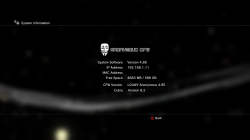
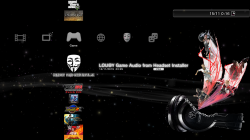
Photos :
----------------------------------------------------------------------------------------------------------------------------------------------------------------------------------
Videos :
i wait for Jack to USB adapter but it comes to my mind another thing is that i have my Blue Yeti Micro Phone that have USB i plug to PS3 then plug my Headset to BlueYeti's Jack port and it work
Game Tested : Splinter Cell Blacklist audio from Headset
Credits : Thanks to Zer0xFF for reverse engineere the libaudio for CFW consoles and PS3Xploit team for including the patch for HEN consoles
FYI @atreyu187 @Naked_Snake1995 @Naxil @ISAK.M
@Niander466,@Naxil,@KFAQ can confirm for you that works
If you use Bluetooth Headset you will have low quality audio compared to using USB Headset
---------------------------------------------------------------------------- CFW Consoles -------------------------------------------------------------------------------
- Download this PKG (it works for CFW 4.82/4.84/4.85/4.86)
- Copy it to root of FAT32 USB or External Hard Drive
- Boot your PS3 then Install the PKG
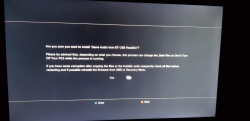
- Click on Game Audio from BT-USB HeadSet
- Click on Installer
- Confirm Reboot by clicking on Yes
- Connect your USB/Bluetooth headset to PS3
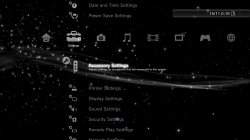
- Go to Accessory Settings in Settings Column
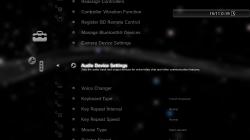
- Scroll Down till you See Audio Device Settings
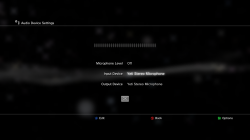
- Choose Your Device
- Start your Game and you will hear sound from your HeadSet and Have fun
- Audio of XMB will still output to TV but when you enter the game you will get sound to headset
- If you unplug your HeadSet from USB or Power it Off(Wireless HeadSet) PS3 will output back from TV
- When you plug your USB HeadSet again you will regain sound from your Headset and not from TV
- Download this PKG (4.86 HEN v3.0.1 headset audio patch+Auto-Updates Disabled) " it works normally no problem as @Niander466 and many others test it and report to me it works "
- Copy it to root of FAT32 USB or External Hard Drive
- Boot your PS3 and click on ★ Enable HEN
- Install the PKG
- Connect your USB/Bluetooth headset to PS3
- Go to Accessory Settings in Settings Column
- Scroll Down till you See Audio Device Settings
- Choose Your Device
- Start your Game and you will hear sound from your HeadSet and Have fun
- Audio of XMB will still output to TV but when you enter the game you will get sound to headset
- Audio will output to Bluetooth/USB HeadSet only when HEN is Enabled
- If you unplug your HeadSet from USB or Power it Off(Wireless HeadSet) PS3 will output back from TV
- When you plug your USB HeadSet again you will regain sound from your Headset and not from TV
Photos :
----------------------------------------------------------------------------------------------------------------------------------------------------------------------------------
Videos :
i wait for Jack to USB adapter but it comes to my mind another thing is that i have my Blue Yeti Micro Phone that have USB i plug to PS3 then plug my Headset to BlueYeti's Jack port and it work
Game Tested : Splinter Cell Blacklist audio from Headset
Credits : Thanks to Zer0xFF for reverse engineere the libaudio for CFW consoles and PS3Xploit team for including the patch for HEN consoles
FYI @atreyu187 @Naked_Snake1995 @Naxil @ISAK.M
@Niander466,@Naxil,@KFAQ can confirm for you that works
If you use Bluetooth Headset you will have low quality audio compared to using USB Headset
Last edited by a moderator:


