


STLcardsWS
Administrator
-
This is a wrapper/port of Grand Theft Auto: San Andreas Android for the PS Vita with lots of custom patches such as: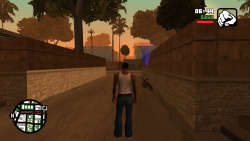
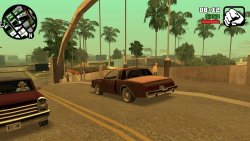

Grand Theft Auto: San Andreas PS Vita Port
- Fixed camera controls for flying vehicles (including the Hydra jet).
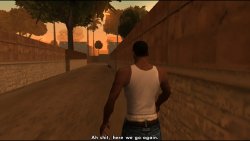
- Fixed broken facial expressions.
- Fixed cheats hash key table.
- Removed specular lighting on pedestrians.
- Added PS2-like rendering.
The port works by loading the official Android ARMv7 executable in memory, resolving its imports with native functions and patching it in order to properly run.
-
Setup Instructions (For End Users)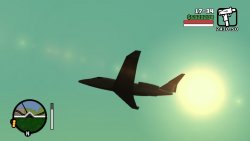
In order to properly install the game, you'll have to follow these steps precisely:
- Install kubridge and FdFix by copying kubridge.skprx and fd_fix.skprx to your taiHEN plugins folder (usually ux0:tai) and adding two entries to your config.txt under *KERNEL:
*KERNEL
ux0:tai/kubridge.skprx
ux0:tai/fd_fix.skprx
- Optional: Install PSVshell to overclock your device to 500Mhz.
- Install libshacccg.suprx, if you don't have it already, by following this guide.
- Obtain your copy of Grand Theft Auto: San Andreas v2.00 legally (com.rockstargames.gtasager is not supported!) for Android in form of an .apk file and one or more .obb files (usually main.8.com.rockstargames.gtasa.obb and patch.8.com.rockstargames.gtasa.obb located in /sdcard/android/obb/com.rockstargames.gtasa). You can get all the required files directly from your phone and they can be extracted with whatever Zip extractor you prefer (eg: WinZip, WinRar, etc...).
- Extract the assets folder from your .apk file to ux0:data and rename it to gtasa.
- Extract the file libGTASA.so from the lib/armeabi-v7a folder inside your .apk file to ux0:data/gtasa.
- Extract the whole main.8.com.rockstargames.gtasa.obb file to ux0:data/gtasa.
- Extract the whole patch.8.com.rockstargames.gtasa.obb file to ux0:data/gtasa.
- Extract gamefiles.zip to ux0:data/gtasa.
- Optional: For a more authentic console experience, copy the file ux0:data/gtasa/data/360Default1280x720.cfg to ux0:data/gtasa/Adjustable.cfg. This file is a leftover from the Xbox 360 version and provides you the console HUD (e.g. radar on bottom left).
- Install GTASA.vpk on your PS Vita.
The ux0:data/gtasa folder should contain all the files and directories as shown below.
-
Configurator App
- After fully installing the port, you'll be able to configure it with the Configurator app.
- The Configurator app will allow users to enable or disable a set of optimizations, patches and renderer alterations to best match users taste.
- You can launch the Configurator app by clicking on the Configuration button located on the LiveArea section of the port as shown in the following screenshot.
-
Tips and Tricks
- In order to reduce occasional stutters in-game, delete both ux0:data/gtasa/scache_small_low.txt and ux0:data/gtasa/scache_small.txt, then create a copy of the ux0:data/gtasa/scache.txt file to have two version of it. (for example scache(1).txt so in the end you end up with both scache.txt and scache(1).txt inside the ux0:data/gtasa/ folder), then rename scache.txt to scache_small.txt and scache(1).txt to scache_small_low.txt . This will however make the loading screen longer since it needs to compile more shaders ahead.
- You can input PC cheats by pressing L+SELECT to open the on-screen keyboard. See https://gtagmodding.com/sanandreas/cheats/ for the full list of cheats (you can input cheat codes in lowercase as well as uppercase). Note that a few cheats have been removed from the Android version.
- The L2/R2 buttons are mapped to the rear touchpad on the top and the L3/R3 buttons are mapped to the front touchpad on the bottom.
- In order to save storage on your Memory Card, you can safely delete all files in sub-folders of ux0:data/gtasa/texdb which end with:
- .dxt.dat, .dxt.tmb, dxt.toc
- .etc.dat, .etc.tmb, etc.toc
-
Build Instructions (For Developers)
In order to build the loader, you'll need a vitasdk build fully compiled with softfp usage.
You can find a precompiled version here: Linux / Windows.
Additionally, you'll need these libraries to bee compiled as well with -mfloat-abi=softfp added to their CFLAGS:
As last requirement, you'll need to compile vitaGL with make HAVE_SBRK=1 HAVE_SHARK=1 SOFTFP_ABI=1 SHARED_RENDERTARGETS=1 NO_DEBUG=1 install.
After all these requirements are met, you can compile the loader with the following commands:
mkdir build && cd build
cmake -G "Unix Makefiles" ..
make -

Credits
- Rinnegatamante for porting the renderer using vitaGL, providing the companion app and making various improvements to the port.
- aap for porting PS2-rendering aka skygfx.
- Freakler for providing LiveArea assets.
- frangarcj, fgsfds and Bythos for graphics-related stuff.
- CBPS/SonicMastr for PIB, which was used on earlier stages of development.
- isage for the native audio backend for OpenAL-Soft.
-
Changelogs can be found @:
-
(Official) https://github.com/TheOfficialFloW/gtasa_vita/releases
- https://www.psx-place.com/resources/gta-sa-vita.1144/updates
-
(Official) https://github.com/TheOfficialFloW/gtasa_vita/releases
Download: github.com/TheOfficialFloW/
Mirror: VitaDB
Last edited:


