
- Forums
- PlayStation 3 (PS3)
- PS3 Jailbreak CFW and PS3HEN
- Ps3Xploit [Official Forum's] PS3HEN & PS3 Toolset
You are using an out of date browser. It may not display this or other websites correctly.
You should upgrade or use an alternative browser.
You should upgrade or use an alternative browser.
Muhammadazizmusa
Member
please help still i cannot do itSince the mirrored ps3xploit site hen installers don't seem to be working, I came up with a guide to help you install hen offline. I'm giving instructions for 4.86, but the procedure is the same for other firmares--you just need the right files. I installed hen on my superslim using this method. You will get some files from the site and host them yourself. You can use KWS for android as a webserver to host the files.
---INSTALL HFW---
First install hfw 4.86 (download here)
You should reinstall if you lost icons using mirrored site.
---GETTING HAN FILES---
1 goto website (link) or mirror (link)
2 click v3 HAN Tools
3 click Download Release Files
the HAN zip file will be saved as ps3_tools-v3.0-HAN486_HFW_release_PS3XPloit.zip
---GETTING HEN FILES---
1 click PS3HEN
2 click 4.86 HFW
3 click Download Release Files
the HEN zip file will be saved as PS3HEN_3.0.1_4.86_FW.zip
---PREPARE FILES---
1 extract ps3_tools-v3.0-HAN486_HFW_release_PS3XPloit.zip to a new folder
2 extract han_supportfiles-485-486.zip to root of usb
3 go under html folder
4 change han_instller.html filename to index.html
5 copy index.html and ps3xploit_v303.js files to root folder of webserver
6 extract PS3HEN_3.0.1_4.86_FW.zip to a different new folder
7 copy Latest_HEN_Installer_3.0.1_signed-486C.pkg to root of usb
8 go under html folder
9 copy han_flash_mount_rewrite.html to root of webserver
---INSTALL HAN---
1 put usb in ps3 (use port closest to disc drive)
2 turn on ps3
3 connect ps3 and webserver to same network and start webserver (if using kws then connect phone to the wifi that ps3 is connected to)
4 open browser
5 enter webserver address (kws will tell you the address)
6 set as homepage
7 clear cookies, cashe, and everything else
8 make sure "confirm browser close" is off
9 exit browser
10 open broswer (it should load han installer)
11 click initialize
12 when its ready click the launch button.
ps3 will restart. if you see package manager then han installed correctly (if not restart ps3 and open browser to retry)
---INSTALL HEN---
1 delete index.html and ps3xploit_v303.js files from webserver root
2 change han_flash_mount_rewrite.html filename to index.html
3 open ps3 browser
4 it should say "Enabling HAN & Mounting Flash as /dev_rewrite" and exit on its on (if it fails, restart ps3 and try again)
5 installl Latest_HEN_Installer_3.0.1_signed-486C.pkg from package manager
6 shutdown ps3
7 start ps3 and enable hen from the icon.if you do not see enable hen icon when you start ps3, turn off "Display [What's New]" in system settings.
i keep trying more then 5 time still cannot download it please anyone can make a short video please help
Last edited by a moderator:

Fin9ersMcGee
Senior Member
i keep trying more then 5 time still cannot download it please anyone can make a short video please help
Your not giving very much info here.... "It doesn't work" isn't going to get you much of a response.
As other users have mentioned previously, it does work. So you are doing something wrong.
[QUOTE="
9 exit browser
10 open broswer (it should load han installer)
11 click initialize
12 when its ready click the launch button.
ps3 will restart. if you see package manager then han installed correctly (if not restart ps3 and open browser to retry)
---INSTALL HEN---
1 delete index.html and ps3xploit_v303.js files from webserver root
2 change han_flash_mount_rewrite.html filename to index.html
3 open ps3 browser
4 it should say "Enabling HAN & Mounting Flash as /dev_rewrite" and exit on its on (if it fails, restart ps3 and try again)
5 installl Latest_HEN_Installer_3.0.1_signed-486C.pkg from package manager
6 shutdown ps3
7 start ps3 and enable hen from the icon.if you do not see enable hen icon when you start ps3, turn off "Display [What's New]" in system settings.[/QUOTE]
from step 10 nothing showed up, only the webserver with the files in it
9 exit browser
10 open broswer (it should load han installer)
11 click initialize
12 when its ready click the launch button.
ps3 will restart. if you see package manager then han installed correctly (if not restart ps3 and open browser to retry)
---INSTALL HEN---
1 delete index.html and ps3xploit_v303.js files from webserver root
2 change han_flash_mount_rewrite.html filename to index.html
3 open ps3 browser
4 it should say "Enabling HAN & Mounting Flash as /dev_rewrite" and exit on its on (if it fails, restart ps3 and try again)
5 installl Latest_HEN_Installer_3.0.1_signed-486C.pkg from package manager
6 shutdown ps3
7 start ps3 and enable hen from the icon.if you do not see enable hen icon when you start ps3, turn off "Display [What's New]" in system settings.[/QUOTE]
from step 10 nothing showed up, only the webserver with the files in it

if it shows file instead of page....click on index.html. if it fails set that page as homepage, back out and start browser againfrom step 10 nothing showed up, only the webserver with the files in it
Last edited:
HOW TO USE -- kWS Android Web Server (LINK)
Connect your phone to PC with usb cable and copy the html and js files to the phone. Put them in the "root" directory of the internal storage. It is the top directory on the phone's internal storage. This is the directory that has folders in it named "Android", "DCIM", and "Download". You can use a different folder by changing "Home Directory" in settings.
--INSTRUCTIONS--
1 Tap three dots in top right hand corner and tap "Settings"
2 Scroll down and tap "Directory Index"
3 Tap empty checkmark box beside "Directory index" to enable directory listing.
4 Tap BACK twice to return to main screen.
5 Connect phone to wifi network that PS3 is on. (PS3 does not have to use wifi--it can use a network wire to connect to router)
6 Tap "Start" on kWS main screen
7 Check phone IP address and Port number. IP is number after "Host" (in the picture below there is no number--it says localhost instead because i was not on wifi yet when i started server) Port number is probably 8080 but check it to be sure. When you enter the numbers into PS3 browser, put a colon between them. So if your IP is 192.168.1.25 and Port is 8080 then you will enter it into PS3 browser like this 192.168.1.25:8080
If you get "Error: Path (something) does not exist" then check "Home Directory" setting. If the page you are trying to load doesnt show, the server should show you a list of files (if you enabled "Directory index") just click on the one you need and set it as homepage.
CLICK HERE TO RETURN TO GUIDE

Connect your phone to PC with usb cable and copy the html and js files to the phone. Put them in the "root" directory of the internal storage. It is the top directory on the phone's internal storage. This is the directory that has folders in it named "Android", "DCIM", and "Download". You can use a different folder by changing "Home Directory" in settings.
--INSTRUCTIONS--
1 Tap three dots in top right hand corner and tap "Settings"
2 Scroll down and tap "Directory Index"
3 Tap empty checkmark box beside "Directory index" to enable directory listing.
4 Tap BACK twice to return to main screen.
5 Connect phone to wifi network that PS3 is on. (PS3 does not have to use wifi--it can use a network wire to connect to router)
6 Tap "Start" on kWS main screen
7 Check phone IP address and Port number. IP is number after "Host" (in the picture below there is no number--it says localhost instead because i was not on wifi yet when i started server) Port number is probably 8080 but check it to be sure. When you enter the numbers into PS3 browser, put a colon between them. So if your IP is 192.168.1.25 and Port is 8080 then you will enter it into PS3 browser like this 192.168.1.25:8080
If you get "Error: Path (something) does not exist" then check "Home Directory" setting. If the page you are trying to load doesnt show, the server should show you a list of files (if you enabled "Directory index") just click on the one you need and set it as homepage.
CLICK HERE TO RETURN TO GUIDE
Last edited:

pinky
Retired
@Coro , how were you able to get the home directory to work without inputting the root storage device alphanumeric? mine is set to the sd card I put in my phone, but I had to look in a file manager to see what the name was. I think storage/emulated/0 is a generic location that some phones can't use by default.
you have to change it use sd card, but if you dont it will detect the name of internal storage root folder and use it. (i cleared the data for the app on my phone so it was like i just installed it to see default behavior).@Coro , how were you able to get the home directory to work without inputting the root storage device alphanumeric? mine is set to the sd card I put in my phone, but I had to look in a file manager to see what the name was. I think storage/emulated/0 is a generic location that some phones can't use by default.
Fin9ersMcGee
Senior Member
@Coro , how were you able to get the home directory to work without inputting the root storage device alphanumeric? mine is set to the sd card I put in my phone, but I had to look in a file manager to see what the name was. I think storage/emulated/0 is a generic location that some phones can't use by default.
My Samsung's internal storage shows as "/sdcard/" and my sd card shows as "/storage/FE96-14F2/", this is on an unrooted device.
pinky
Retired
I was never able to get it to read that location when I first tried it on the ps4 a few years ago, so I had to physically enter the root name.
it might have something to do with putting it in the ps4 folder (my ps4 stuff). it's not on the root but in a folder named htdocs which is what most of those web servers use like miniweb and xampp. I just did it for clarity sake.
it might have something to do with putting it in the ps4 folder (my ps4 stuff). it's not on the root but in a folder named htdocs which is what most of those web servers use like miniweb and xampp. I just did it for clarity sake.
Last edited by a moderator:
My Samsung's internal storage shows as "/sdcard/" and my sd card shows as "/storage/FE96-14F2/", this is on an unrooted device.
i just cleared data again and checked. in settings it says /sdcard right now. when i start server it says like it does in the picture. setting does not change after i start server. im not sure if this folder mapping or what.I was never able to get it to read that location when I first tried it on the ps4 a few years ago, so I had to physically enter the root name.
thats why i say use the root of internal storage. copying files on windows and setting up the server are easiest with the default folder.
i tried to avoid using android file manager so i wouldnt generate questions about that too. so when i see kws uses that folder as default and its the first folder under 'internal storage' on windows if you use usb wire, i used it to try to make easier.
Just tested on another phone and it is does the same. it was setup for sdcard folder (named like Fin9ers' was) but after clearing data it is set to root of internal storage.
Just tested on another phone and it is does the same. it was setup for sdcard folder (named like Fin9ers' was) but after clearing data it is set to root of internal storage.
Last edited:
pinky
Retired
I just use my sandisk connect now. however, there's a bug either with the ps4 or the device to where it writes this really long address when caching. it's not correct. deleting that portion, then saving fixes it. oh, and I noticed that the alphanumeric for my sd card has changed for some reason. when you mentioned kws a few days ago, I started the server to see if it still worked, and it said the location didn't exist. that's when I put the folder on the micro sd card, then looked up the root name in the first file manager that popped up. the file manager I normally use -- I can't remember how to look it up there.
yeah, this is what mine looks like with the sd card: https://www.psx-place.com/threads/t...en-all-in-one-guide.24369/page-25#post-250510
yeah, this is what mine looks like with the sd card: https://www.psx-place.com/threads/t...en-all-in-one-guide.24369/page-25#post-250510
Last edited by a moderator:
if you changed sd cards im sure that alphanumeric name would change. it may change simply by unmounting and mounting the same card again but i am not sure.I just use my sandisk connect now. however, there's a bug either with the ps4 or the device to where it writes this really long address when caching. it's not correct. deleting that portion, then saving fixes it. oh, and I noticed that the alphanumeric for my sd card has changed for some reason. when you mentioned kws a few days ago, I started the server to see if it still worked, and it said the location didn't exist. that's when I put the folder on the micro sd card, then looked up the root name in the first file manager that popped up. the file manager I normally use -- I can't remember how to look it up there.
Pelumi_michael
Member
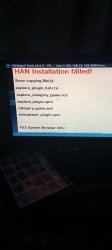
you put usb in wrong slot on ps3 or skipped step 2 under 'prepare files'.Can someone please share a picture of how the files should be in the folder of USB and webserver. I got stucked here.
files go in root of usb drive. that is the top folder.
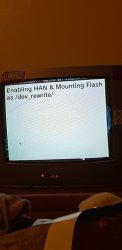
Similar threads
-
 (2026) Easiest HEN Install Method
- Started by Coro
- Replies: 11
-
PS3 CECH-3004B (slim) on 4.93 and HEN installation/enablement issues
- Started by temenori
- Replies: 1
-
PS3HEN How to download and install PS3HEN on 4.92.1.
- Started by Bubbolovespizza
- Replies: 3
-