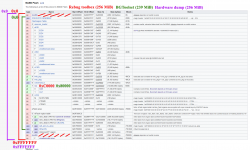
• Official PS3 Toolset is now supporting 4.92 Firmware

    View Official Release Post for additional information HERE

PS3 (Guide) Jailbreaking With Bgtoolset

Another thing is that all flashers/patchers (BGToolset (browser), HFW Flash Writer (browser), HEN Flash Patcher (GameOS app)) should never touch any other regions except for the two ROS banks. Ideally, as long as there are not any bugs in the code, a "brick" in this case should mean only corrupted ROS/CoreOS. Meaning it can be fixed by replacing only that part (2x 7 MiB).

If anyone is interested in writing instructions for a brick recovery in the form of a PDF, it would be great to include them together with a flash backup output from BGToolset / HEN FP. :encouragement:

Here's what I just tried and the results from it. The scenario is pretend By the way. Ididn't actually brick my console. It's a simulation. Perhaps someone can give me insights as to what I did wrong. Check my reasoning...
  1. I follow the guides to get a BGToolSet backup from my NAND console. Checked it pyPS3checker and the dump is good. Then I jailbreak and oops, I get a Russian RSOD. I've bricked my console cuz I wasn't patient and didn't listen to @STLcardsWS warning! Now what?
  2. So I disassemble to the MB. Mark top (side A) NAND0, Bottom (Side B) NAND1 and remove them. Hot air...yay!
  3. Use a HW flasher like teensy or Flashcat USB to read their contents and make good dumps of NAND0.bin and NAND1.bin. 2 dumps of each NAND module so I can compare them and be sure they are identical, indicating a good dump. So 4 reads total. This is important because they are already corrupt I don't want more corruption!
  4. Use FlowRebuilder's Unscramble option to interleave NAND0.bin and NAND1.bin into a single unified 256MB Full NAND Dump.
  5. Open the Unified 256MB Full NAND Dump in HxD.
    • Select block (CTRL + E).
    • Start-offset = 0000000
    • End-Offset = 003FFFF
    • Copy it (CTRL + C)
    • This is bootldr Top
  6. Open 239MB Software Dump (BGtoolSet backup) in HxD and place your cursor at the begining. Then insert Bootldr TOP (CTRL + V). Can confirm it's correct if FF's end at offset 00040000.
Now it has the correct header and all the offsets will line up until it gets to Offset 0D702000 (/dev_flash2 (FAT16) XRegistry). That's where I ran into trouble attempting to paste in the bottom Bootloader...
Go back to Unified 256MB Full NAND Dump
  • Select block (CTRL + E).
  • Start-offset = F000000
  • End-Offset = F03FFFF
  • Copy it (CTRL + C)
  • This is bootldr Bottom
Go back to 239MB Software Dump (BGtoolSet backup) in HxD and place you cursor at the very end of the last FF. Insert Bootldr BTM at the end (CTRL + V).

Now I need to add the Unrefrenced area. I need to fill the rest of the file with FF's (Empty data) so it ends at offset FFFFFFF. I did that by going to...
  • EDIT --> Insert Bytes.
  • Bytecount = 100000
  • Fill pattern = F
  • That added enough offsets filled with FF to go past offset FFFFFFF.
  • I Double clicked "Offset(h)" in the lower left hand corner to manually go to offset FFFFFFF. I selected everything after that and deleted it.
Then I saved that file as testNANDfixed.BIN

The resulting file is 256MB and was recognized by PS3DumpChecker. It said the dump failed on 7 of 114 checks and is BAD.
  • bootldr0 (bottom) FAILED! Offset: 0xF000000
  • bootldr1 (bottom) FAILED! Offset: 0xF000010
  • bootldr Rev key (Bottom) FAILED! Offset: 0xF000004
  • bootldr Statistics (Bottom) Statistics check Failed! 0xFF doesn't match expected percentage: lower then 5% Actual value: 100.00% FAILED! Offset checked: 0xF000000 Length checked: 0x100030 Everything should be less then 5.00%
  • ROS0 Hash Result: FAILED!
  • ROS1 Hash Result: FAILED!
  • Datamatch for: bootldr size Result: Failed!
  • Datamatch for: per console nonce Result: Failed!
  • Datamatch for: bootldr Result: Failed!
BTW, I ran BGToolSet to generate Flash Backup on this console after it had been jailbroken, so that it would be the same as the RebugToolbox Dump below (for this comparison). Spoiler, they do not match.

The RebugToolBox Full Dump from the same working console (after jailbreak) failed 2 of 117 checks.
  • ROS0 MD5 Hash
  • ROS1 MD5 Hash
This console is working fine, so IDK why it's complaining about the dump. Perhaps because my console is already jailbroken? Or perhaps Build 490 of PS3DumpChecker is old?

When comparing the 2 flash dumps they begin to diverge at Offset 0D702000 (/dev_flash2 (FAT16) XRegistry). ANd the last place they diverge is at Offset 0F02A3A0. So we missed a step I think.
Go back to 239MB Software Dump (BGToolSet Backup)
  • Select block (CTRL + E).
  • Start-offset = 00C0000
  • End-Offset = 0EBFFFF
  • Copy it (CTRL + C)
  • This copies ROS0 and ROS1
Go back to Unified 256MB Full NAND Dump
  • Select block (CTRL + E).
  • Start-offset = 00C0000
  • End-Offset = 0EBFFFF
  • Delete it (DEL)
  • The cursor should leave off where it was deleted (Offset 00C000)
  • Paste ROS0 and ROS1 in (CTRL + V)
I scrolled to the bottom of the file which ends at offset FFFFFFF. I have replaced the [pretend] corrupt ROS with the [pretend] backup BGToolSet made. I checked this with PS3DumpChecker and it said 2 errors out of 114 checks.

That's the same as my original 256MB NAND dump RebugToolBox made. And when compared they are identical. So this method worked.

This assumes that there is nowhere else that the jailbreak process can corrupt!
 
Last edited:
Ok, I think I figured it out. Took me awhile to wrap my head around how to use HxD and what I'm doing here. Many thanks to @vyktormvmpay25 and @nikitis for helping me with this. And of course everyone here on the thread.

Step 1
I dumped both the 239mb (incomplete) dump.hex and 256 (full) NAND.BIN, using bgtoolset and rebugtoolbox respectively. Same console, same FW and everything. This should be dumping the same contents, except that the 239mb is missing stuff I need to add back from the 256mb full dump. That's important for my testing methodology.

Step 2
I copy the bootldr(top) in the header of NAND.BIN. Has to be done since HiperVisor hides this from access until after the jailbreak. And all the offsets are relative to each other now, so I can I save this new file as dump+bootldr(top).hex and compare it to the NAND.BIN. This will tell me where they diverge.

Step 3
They were identical all the way down to offset 0D702000. That means that I need to add back...
  • /dev_flash2 (FAT16) XRegistry
  • /dev_flash3 (FAT12) CRL/DRL
  • cell_ext_os_area
  • OtherOS
  • Unknown/FF-region
  • bootldr
  • unreferenced area.
These all need to be added to the bottom of dump+bootldr(top).hex. So I copied everything from D700000 to FFFFFFF in NAND.BIN. Then go to D700000 in dump+bootldr(top).hex and delete everything after it. Then Paste the copied content from NAND.BIN. That replaces everything the incomplete bgtoolset dump didn't get. Then I save it as fixedNAND.BIN.

Step 4
I compare NAND.BIN with fixedNAND.BIN and they are identical! That means I have reconstructed a 256MB nand dump using only the data missing from the bgtoolset dump. All the stuff in between is identical because I made those 2 dumps from the same console. This is how I know the process worked.

Disscussion:
So I gather that the missing files in step 3 contain saves or settings? By moving the contents from the console into the backup dump, then after the NAND write and soldering back, this would preserve them? I'm guessing that's why @bguerville did it this way. Out of necessity (hypervisor) and so you hopefully don't loose progress in games?

I'm still new to this sort of thing, so please forgive my noobery.

PS: inserting ROS of the 239mb dump into the 256mb dump resulted in an identical file too. But that copies much less of the backup and IDK if there is anything important in the parts not copied over. Or if the corruption could extend outside the ROS.
 
Last edited:
Great work @RIP-Felix!. As you are using a NAND, I think that most of the missing info from the Bgtoolset dump is from console and user config stuff (xRegistry.sys, OtherOS, main files of GameOS, bootloader, XMB files, Blu-ray keys, non-game licences).

But I don't think that game config files, or saved games, go into the NAND as those would take all the NAND space pretty quickly.
 
@vyktormvmpay25 tells me he always installs HEN 1st so he can use use rebugtoolbox to dump 256mb flash. Then installs CFW...to avoid this problem.
Looking at the source code of Rebug toolbox, it intentionally leaves the first 0x40000 (256 KiB) empty. That is where the top bootldr (hidden by the hypervisor) would be. It then continues the process exactly as BGToolset would, except that it ends at 256 MiB and not at 0xEF40000 (0xEF00000 + 0x40000), almost at the end of OtherOS region, like the BGToolset would.
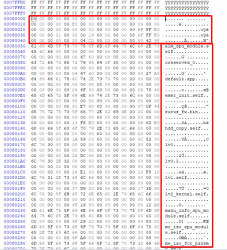
NAND_dump_comparison.png
It's ok to use the Rebug toolbox dump, but still keep in mind that the regions protected by the hypervisor will still be blank. Even with this one, it's still necessary to do a hardware flasher dump and to fix the top and bottom bootldr.
Now it has the correct header and all the offsets will line up until it gets to Offset 0D702000 (/dev_flash2 (FAT16) XRegistry).
Anything in /dev_flashX can change by doing firmware updates (GameOS /dev_flash), adding or removing users, changing settings in XMB (XRegistry, /dev_flash2). I would not care about any differences there to be honest.

NOR based models store /dev_flashX partitions on the hard drive, that's why you only get this on NAND (and eMMC) based models.
The RebugToolBox Full Dump from the same working console (after jailbreak) failed 2 of 117 checks.
  • ROS0 MD5 Hash
  • ROS1 MD5 Hash
This console is working fine, so IDK why it's complaining about the dump. Perhaps because my console is already jailbroken? Or perhaps Build 490 of PS3DumpChecker is old?
Yes, all "known good" ROS hashes have to be added to the list manually. Here is an example from PyPS3checker: hashlist.xml.
BTW, I ran BGToolSet to generate Flash Backup on this console after it had been jailbroken, so that it would be the same as the RebugToolbox Dump below (for this comparison). Spoiler, they do not match.
Likely related to the constant changes in /dev_flashX partitions/regions?
Go back to 239MB Software Dump (BGToolSet Backup)
  • Select block (CTRL + E).
  • Start-offset = 00C0000
  • End-Offset = 0EBFFFF
  • Copy it (CTRL + C)
  • This copies ROS0 and ROS1
Go back to Unified 256MB Full NAND Dump
  • Select block (CTRL + E).
  • Start-offset = 00C0000
  • End-Offset = 0EBFFFF
  • Delete it (DEL)
  • The cursor should leave off where it was deleted (Offset 00C000)
  • Paste ROS0 and ROS1 in (CTRL + V)
This is how you can do it in the case that the flashing process didn't corrupt anything else - power failure, unexpected YLOD, wrong ROS patch. Don't forget about the hypervisor offset (0x40000) in the case of the 239 MiB dump, though. The start offset is 0x80000 (0xC0000 - 0x40000) and the end offset is 0xE7FFFF (0xEBFFFF - 0x40000). You can make sure that you have the right offset by looking for the ROS header and the table of files:
NAND_ROS0.png
0xE7FFFF (+1) is where you can find the "SCEIVTRM" header of the next region.
 
It's ok to use the Rebug toolbox dump, but still keep in mind that the regions protected by the hypervisor will still be blank. Even with this one, it's still necessary to do a hardware flasher dump and to fix the top and bottom bootldr.
Thanks that's a very important bit I didn't consider. I figured that because the console must be jailbroked to run rebugtoolbox that it could access the bootloader (like some kind of workaround that automatically bypasses the hypervisor). But that was a false assumption. So thank you again for pointing that out!

Given this information, BGtoolset's dump is more indicative of what's missing, because...well, it's literally missing! Whereas with the 256MB dump you have to know to replace it!

Yes, all "known good" ROS hashes have to be added to the list manually. Here is an example from PyPS3checker: hashlist.xml.
Is there an updated hashlist.default I can drop into my folder that would recognize FW later than 4.82? I downloaded the newest build listed here, 491 as of this post, but IDK if there is a more up to date version somewhere else, like a github page instead of that release thread. This version only has the hashlist up to FW4.82. I would like to update my hashlist to include FW up to 4.89 (CEX and evilnat). If anyone has done so.

I guess I can just let that slide, knowing that those 2 errors are going to happen if I attempt to check a FW later than 482. It's just a bit behind the times. Not a big deal.

Don't forget about the hypervisor offset (0x40000) in the case of the 239 MiB dump, though. The start offset is 0x80000 (0xC0000 - 0x40000) and the end offset is 0xE7FFFF (0xEBFFFF - 0x40000). You can make sure that you have the right offset by looking for the ROS header and the table of files:
View attachment 39606
0xE7FFFF (+1) is where you can find the "SCEIVTRM" header of the next region.
Well, since the 239MB file ends somewhere in the middle of the OtherOS data then I could just transfer everything from the beginning of it over. That's generic anyway. The differences in my dumps began at...
  • /dev_flash (FAT16) GameOS devflash which is per console. So it contains unique data that can't be generated. But didn't you say earlier that you didn't think this region contains anything particularly important to keep?
  • /dev_flash2 (FAT16) XRegistry is per console, but generic. Nothing important that can't be regenerated, but it contains settings that could have changed since the backup was made. This includes.
    • PSN account details and user settings
    • Registered parpherals connected to the console like a PSP or Vita
    • HDD model and serial number. This one I wonder about. For example, if you replaced it since you made the backup, then the serial number wont match. And if you flash that backup I'm assuming the PS3 would say "appropriate storage was not found," and tell you to format it. That OFC would be bad if you loaded it up with games! So while it is generic and can be regenerated, perhaps this section should be copied over from the console's NAND, just to avoid this sort of issue? Check my reasoning.
  • /dev_flash3 (FAT12) CRL/DRL is console specific
    • I am told by @nikitis that the CRL/DRL can be recognized by AACS DRM when you insert a BluRay disc with an mkb.ini version updated since your console was blacklisted. MKB is loaded into the Bluray drive and processed. The BD has device keys provided by the AACS that decrypt the file and create a Media key. This media key "combines" with the Volume ID on the disc to issue a Volume Unique Key, but only if your device isn't blacklisted in the Media Key Block on the disc! If your console is on that naughty list (perhaps you accessed PSN on a jailbroken console, SONY obtained your Console_ID and added it to the blacklist in the mkb.ini update to be shipped with all new bluray movies), not only does it refuse to issue the Volume Unique Key, which is needed to decrypt the Title key that allows you to decrypt the content on the disc, but it goes one step further and bricks the BD drive! He said they did that to His. He was able to undo it, but he cannot put a Bluray with a newer version of MKB.ini into his console or it'll brick his drive again. So Drive Revocation List means, "your console is blacklisted and we revoke your drive, B!#&H." Petty if you ask me. The CRL/DRL on the NAND has to match the CRL/DRL stored on the Bluray drive or it won't playback. And from what I gather remarrying copies the NAND CRL/DRL to the BD, so you can't get out it that way! Once your on that list, your console_id is there forever.
So I think copying everything from the GameOS devflash onward over to the backup makes sense. After the bootloader in the headder OFC, so the offsets matchup.
 
Last edited:
Question about using the Rescramble option in flowrebuilder. Do the resulting patched flash0 and flash1 contain the explot needed to install custom firmware? And also is it as easy as writing the nands with them, soldering them back, and turning the console on? Or do I have to do some fancy FSM jig nonsense or installing of firmware in safe mode, or FSM? Downgrading and all that jazz. This part always confuses me.
 
Question about using the Rescramble option in flowrebuilder. Do the resulting patched flash0 and flash1 contain the explot needed to install custom firmware?
I'm not the best person to answer this, since my experience ends with flash layouts on software level and NOR contents on physical level. But as far as I understand, this process of scrambling/descrambling and interleaving/deinterleaving solves two things:

1) Scrambling/Descrambling - All NAND flashes need some way of mapping logical offsets to physical ones. This is done to solve complex problems like bad block management and wearleveling. Usually there is some dedicated chip (for FTL, Flash Translation Layer) on the board that stores information on how to read the flash contents properly. PS3 uses a chip called Starship2.
Given this information, we can't just dump the flash contents, edit them and write them back. It's always necessary to descramble it first (figure out the FTL mapping table), then it can be edited and rescrambled back (blocks are reordered back to their original positions). Only then we can be sure that Starship2 is able to find everything at the right places.

2) Interleaving/deinterleaving - There are multiple ways how you can join 2 or more memory chips into one. The simplest option is to take the highest bits of the address and use that to determine which chip is used to retrieve the data. Chips are basically concatenated one after another. Unfortunately for us, wearleveling would have to be divided into multiple regions, and they would never "age" at the same rate. Another drawback is that we don't take advantage of reading/writing in parallel.

The best option is to interleave/interlace individual blocks (block size varies, but always relates to minimum read/write size of the flash chip), so they can be read/written sequentially from/to multiple chips in parallel. Wearleveling now works correctly, since each file is divided up and written to all chips. Transfer rates are also much higher in this case. For us, it means we always have to combine or divide flash dumps, so Starship2 reads it properly.

tl;dr: Dividing up 256 MiB dump into flash0 and flash1 doesn't affect whether it's possible to install CFW. The ability to install CFW depends on CoreOS patches that disable firmware signature checks during install and CoreOS hash checks during bootup.
And also is it as easy as writing the nands with them, soldering them back, and turning the console on? Or do I have to do some fancy FSM jig nonsense or installing of firmware in safe mode, or FSM? Downgrading and all that jazz. This part always confuses me.
Yes, as long as the CoreOS is patched properly and both flash chips contain data in the right format (scrambled and interleaved), you can just turn on the console and go from OFW to CFW.

Whether it boots into XMB or safe mode is another thing. If the CoreOS region contains firmware files for the same version as was previously installed, it will boot into XMB just fine (i.e. OFW 4.85 patched with noFSM for 4.85). If there is a version mismatch however, it jumps into safe mode and asks for a firmware install (i.e. OFW 4.85 patched with noFSM 4.89). This mismatch isn't the end of the world since as long as it boots into safe mode and installs a firmware, it will be overwritten anyway.

Factory service mode is nowadays never required, afaik. Firmware downgrades can be done by enabling QA flags and installing older firmware from safe mode. QA flags change the "install firmware 4.85 or higher" into "install firmware <minver> or higher".
 
Hi, I'm new to hacking the PS3. I have a lot of experience hacking the PS2, hacking games in general (patching original roms type of hacking), and a little programming experience. I've been reading about this online a lot lately, trying to do it the best way possible to avoid bricks. Is the bgtoolset main function to downgrade the OFW (original firmware) of ps3 to 3.55 or before? It looks like there's some guides stickied and one I read didn't mention downgrading at all and said to install CFW to your version or higher, which could be 3.8x, 3.9x, 4.0, etc. but I thought you needed your firmware to be 3.55 or older to softmod the ps3 and install homebrew applications?
 
Hi, I'm new to hacking the PS3. I have a lot of experience hacking the PS2, hacking games in general (patching original roms type of hacking), and a little programming experience. I've been reading about this online a lot lately, trying to do it the best way possible to avoid bricks. Is the bgtoolset main function to downgrade the OFW (original firmware) of ps3 to 3.55 or before? It looks like there's some guides stickied and one I read didn't mention downgrading at all and said to install CFW to your version or higher, which could be 3.8x, 3.9x, 4.0, etc. but I thought you needed your firmware to be 3.55 or older to softmod the ps3 and install homebrew applications?
Minver 3.55 or lower with downgrading included, 3.60 or lower for CFW via the toolset.
 
Hi, I'm new to hacking the PS3. I have a lot of experience hacking the PS2, hacking games in general (patching original roms type of hacking), and a little programming experience. I've been reading about this online a lot lately, trying to do it the best way possible to avoid bricks. Is the bgtoolset main function to downgrade the OFW (original firmware) of ps3 to 3.55 or before? It looks like there's some guides stickied and one I read didn't mention downgrading at all and said to install CFW to your version or higher, which could be 3.8x, 3.9x, 4.0, etc. but I thought you needed your firmware to be 3.55 or older to softmod the ps3 and install homebrew applications?
Nope. bgtoolset is used to install CFW on units that currently have OFW higher than 3.55. No need to go through 3.55 or anything. If you currently have OFW 4.90 then you use bgtoolset and immediately switch to CFW 4.90.
 
thought you needed your firmware to be 3.55 or older
this is the old way. you used a hardware flasher to downgrade to 3.55 and then you installed newer cfw pup file from there. now we use software flasher to add a patch that allows cfw install immediately.

Minver 3.55 or lower with downgrading included, 3.60 or lower for CFW via the toolset.
minver of 3.56 can be jailbroken but you must NOT install a cfw version below 3.56 or it will brick. note that "9.99 downgrade" pups are really 3.55 and will therefore brick. 3.60 minver and above is not jailbreakable.

bgtoolset is used to install CFW
it is used to prepare the console for cfw install. after using the toolset (or the old html flasher), you reboot and then install a cfw pup equal to or higher than your current firmware version.
 
it is used to prepare the console for cfw install. after using the toolset (or the old html flasher), you reboot and then install a cfw pup equal to or higher than your current firmware version.
How does the system even reboot after patching it? Doesn't the patch invalidate the firmware's signature?
 
How does the system even reboot after patching it? Doesn't the patch invalidate the firmware's signature?
AFAIK it disables some checks that the system makes on boot. these are a few of the same checks that cfw has disabled. the patch is made by copying CoreOS files from a cfw. that is why a new cfw must be made before an update to any flasher software can be finished.
 
AFAIK it disables some checks that the system makes on boot. these are a few of the same checks that cfw has disabled. the patch is made by copying CoreOS files from a cfw. that is why a new cfw must be made before an update to any flasher software can be finished.
Well, taking CoreOS from a CFW is not exactly a requirement, we just do that because it's simpler and because there's no point releasing a patched CoreOS as long as there's no available CFW to install but we could just as well repack a CoreOS specifically patched just for jailbreak.
 
Well, taking CoreOS from a CFW is not exactly a requirement, we just do that because it's simpler and because there's no point releasing a patched CoreOS as long as there's no available CFW to install but we could just as well repack a CoreOS specifically patched just for jailbreak.
So, how exactly does that not invalidate the firmware's digital signature?
 
So, how exactly does that not invalidate the firmware's digital signature?
Ask yourself why you can install a 4.xx CFW (with patched and resigned files) directly on top of OFW 3.55 without having to apply any kind of "jailbreak".
That's simply because s#ny could not invalidate the keys we still use today to resign low level CoreOS executables without making all consoles manufactured before 3.60 unusable, those consoles still use the old boot sequence and the old metldr/lv0ldr.
On consoles manufactured after 3.56 however the boot sequence is slightly different (using metldr.2 and lv0ldr.2 among other things) and those same keys are invalid hence no CFW and no CoreOS patches available.
 
Ask yourself why you can install a 4.xx CFW (with patched and resigned files) directly on top of OFW 3.55 without having to apply any kind of "jailbreak".
That's simply because s#ny could not invalidate the keys we still use today to resign low level CoreOS executables without making all consoles manufactured before 3.60 unusable, those consoles still use the old boot sequence and the old metldr/lv0ldr.
On consoles manufactured after 3.56 however the boot sequence is slightly different (using metldr.2 and lv0ldr.2 among other things) and those same keys are invalid hence no CFW and no CoreOS patches available.
Yes, I'm aware of that, but I thought you can't just patch individual files without resigning it.
 
Back
Top